Bloom takes over the Windows taskbar
Bloom replaces the native Windows taskbar with an animated dock and adds a changing island at the top of the screen. That's a larger commitment than installing a clock widget. The dock becomes part of how you open apps and switch windows, so a missed click or broken Start interaction affects work you were already doing.
The README describes draggable app ordering, window previews and context menus. Its island combines music controls with system settings, battery and weather information, plus a calendar and Pomodoro timer. Choose it because you want those controls gathered into this particular interface. A successful repository build cannot tell you whether the dock behaves properly with your everyday applications.
What happened when we ran it
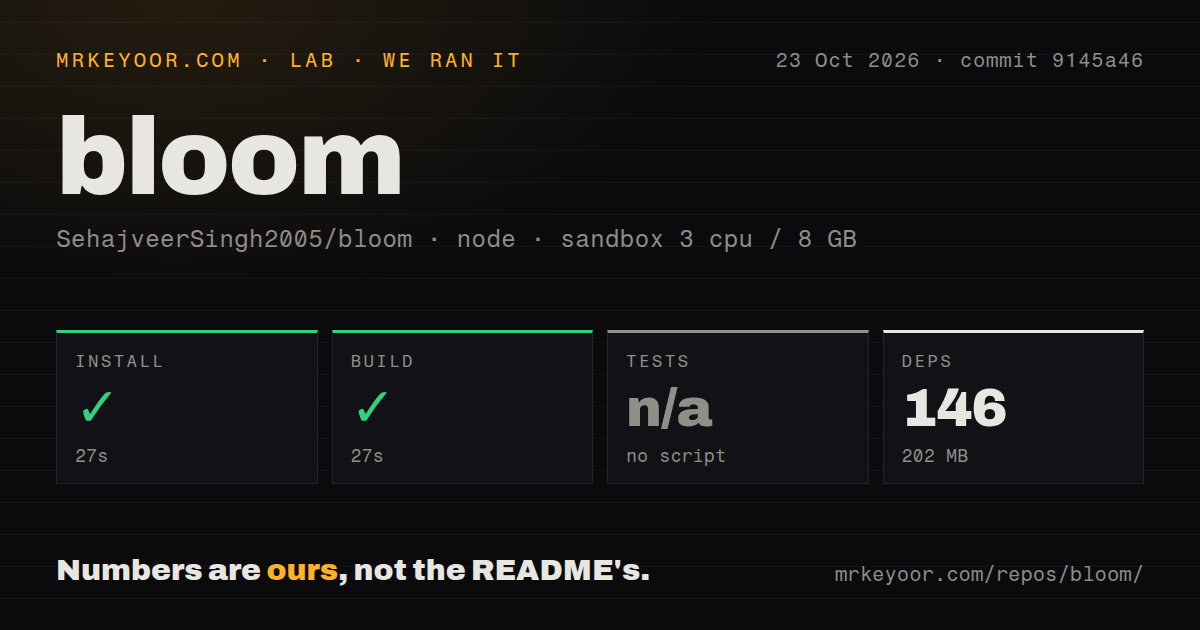
Our sandbox installed Bloom commit 9145a46 in 27 seconds and completed the build in another 27 seconds on 2026-10-23. Installation recorded 146 dependencies and 202 MB on disk. The test step was skipped because the repository had no tests script or target. There is no passing-test result to attach to that successful build.
The recorded configuration was 3 CPUs, 8 GB of RAM and image label lab-node:22. That label doesn't establish the actual Node version or operating system. The checkout contained 248 files, roughly 36,612 source lines and 13.9 MB before installation. Our scan found 6 CI workflow files, no Dockerfile and no tests directory.
These are encouraging source-checkout results, with a firm boundary. The supplied record doesn't establish that a native Windows installer was produced, installed or exercised. It contains no measured desktop response time, idle resource use or audio-capture result. We can credit the install and build without treating animations, keyboard hooks or taskbar recovery as verified behavior.
Rust and Bun lead into native Windows integration
The README offers a downloadable release or a source workflow using Bun and bun run tauri dev. It names Rust and Bun as prerequisites. Behind the interface, it describes a Rust backend using Windows shell integration, global keyboard hooks, WASAPI audio capture and COM media-session control. These are Windows facilities, so the TypeScript frontend doesn't make Bloom a portable desktop utility.
No hosted account is specified in that basic source workflow. That is the extent of the credential guidance we can establish from the README, rather than proof that every weather or network feature works offline. Our supplied run didn't exercise those features. A contributor also needs to distinguish getting the repository to build from running the native application on a suitable Windows desktop.
The music visualizer is described as reacting to frequency bands, and the project says it pauses when nothing is playing. Those are documented behaviors, not our measurements of responsiveness or efficiency. If animation is the reason you're considering Bloom, try the media applications and output devices you actually use before deciding the visualizer earns a permanent place on screen.
Start-menu behavior deserves attention before adoption
Issue 337 reports a dock problem in Bloom 3.10.1: the Windows Start menu fails to open until the user opens Bloom's settings panel. The report was still open when inspected. It is one user's account, not a failure reproduced in our sandbox, and it doesn't establish how broadly the problem occurs.
It does identify an adoption check with more practical value than another screenshot. On your own machine, try opening Start through the dock, switching between foreground apps and using context menus. Also check what happens after the shell restarts or Bloom exits unexpectedly. These are suggested acceptance checks, not results from our run. A taskbar replacement should earn trust on the paths you use without thinking.
The 3.10.1 release notes include fixes for restoring off-screen windows, shell-change recovery and taskbar recovery after a forced process termination. They show the maintainer working on consequential desktop behavior. They don't prove every recovery case is solved, especially with a current Start-menu report against the same release.
Active maintenance doesn't settle desktop reliability
The repository's last push was 2026-10-22, and release 3.10.1 was published that day. The Start-menu report was updated on October 23. Recent code activity and a current issue together support calling Bloom actively maintained. They leave the quality of resolution and behavior on other Windows configurations open.
The README also discusses Microsoft Defender warnings and says a submitted executable was cleared. That is the project's account of a particular submission. Our sandbox record contains no security audit or independent verification of that claim. Don't turn a passing build or a README assurance into a general safety guarantee for an executable you download.
Documentation earns 3/5 for explaining the interface and showing a short source workflow, while leaving contributors to establish the full native environment and recovery behavior. Setup ease and operational maturity remain unassessed because native Windows installation and shell use weren't reproduced. The issue sample also isn't enough to rate support responsiveness.
Pick skins or a wider shell replacement when those fit better
Rainmeter displays customizable desktop skins, including hardware meters and audio visualizers. I'd choose it when those displays are the goal and Bloom's replacement dock isn't the feature you want. That is a difference in scope, not evidence that either program uses fewer resources on your machine.
Seelen UI offers a wider Windows desktop replacement with window management and a theming system. Consider it if your request starts with window tiling and shell customization rather than Bloom's island-and-dock interface. It carries its own operating questions, which this run doesn't compare.
Bloom is worth trying on a Windows machine where you can tolerate evaluating a taskbar replacement. Keep a way back to the stock taskbar, and make opening Start without visiting Bloom's settings a requirement for keeping it.