A Python function becomes something a colleague can try
Gradio's opening example connects a Python greeting function to a textbox and slider, then opens a browser interface. Replace the greeting with your model call and a colleague can supply inputs without editing a notebook. That is the reason I'd choose it: the person evaluating your work gets an interface they can use, while you keep the computation in Python.
The 3,099 files in our checkout cover much more than that example. The README describes Interface for function inputs and outputs, Blocks for layouts and connected interactions, and ChatInterface for conversations. Those choices let you start with a plain form and add interaction when the task demands it. They also make Gradio a reasonable internal review tool for comparing model outputs with people who don't write code.
What happened when we ran it
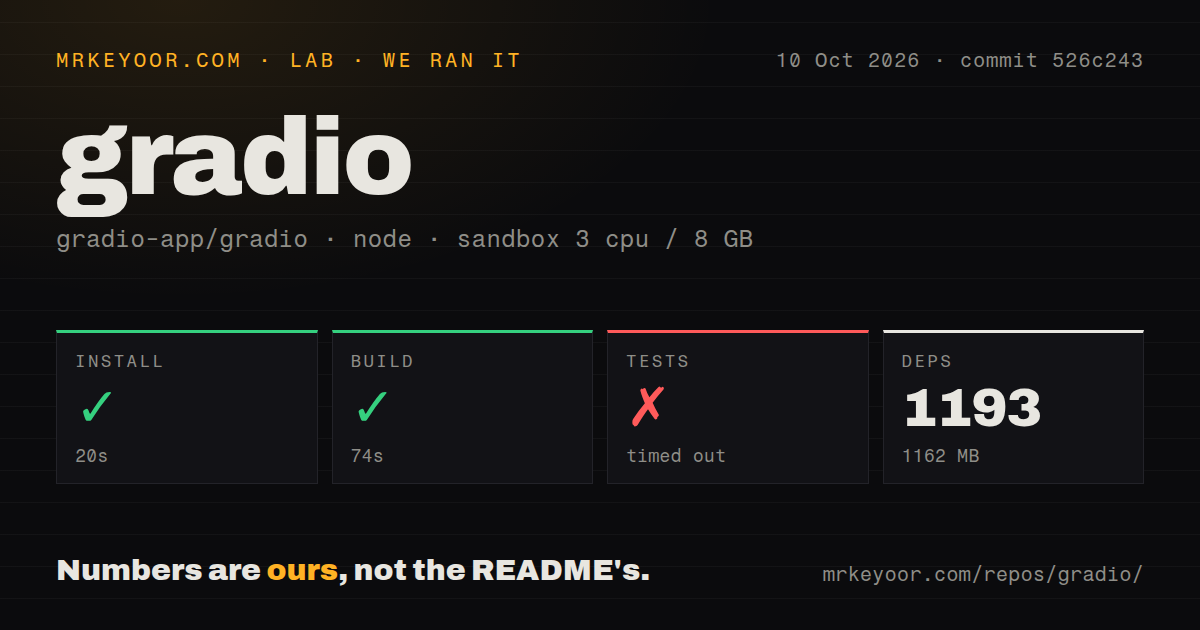
Our run installed Gradio's pnpm workspace in 20 seconds and built it in 74 seconds, then the test command timed out at 900 seconds. We cloned commit 526c243 on October 10, 2026, into an unprivileged container with 3 CPUs, 8 GB of RAM, no secrets, and the lab-node:22 image. Installation added 1,193 packages and occupied 1,162 MB on disk.
Vitest's log tail reported 93 test files, no tests executed, and 1 error. It then printed a failure message and said it was watching for file changes, with a key to quit. Dependency scanning and bundling messages followed. The supplied tail does not contain the underlying exception, so it cannot establish whether a browser requirement, configuration, or application defect caused the error.
The timeout therefore does not show that Gradio needed 900 seconds to execute its tests. The command remained in watch mode after reporting an error. Our harness did not obtain a completed passing suite, and the build success cannot substitute for that result. A contributor needs a terminating check suitable for unattended execution before treating this workspace as ready for automated validation.
The source workspace is larger than the Python quick start
Our clone occupied 76.5 MB before installation and contained about 312,661 source lines. The lab identified a pnpm workspace monorepo with 25 CI workflow files, a tests directory, and no Dockerfile. That is a useful picture of the contributor environment. It does not tell you the footprint of a Python application using the published Gradio package.
The README's Python quick start requires Python 3.10 or newer and recommends a virtual environment. A local greeting function needs no external account. A model-backed app still needs whatever its function calls: model files and suitable hardware, or credentials for a remote API. Our source build says nothing about model response speed, memory requirements, or the quality of those outputs.
A public share link keeps the computation on your machine
The 1,162 MB we measured buys a working source environment, not a hosted service. In the documented sharing path, setting share=True creates a public URL while your computer continues running the function. The sharing guide says these links expire after a week and require the originating machine to stay on. That suits a short evaluation session more than a permanent service address.
Access also needs care. The guide says the built-in password authentication lacks multifactor authentication and automatic lockout policies. It warns that adding a Hugging Face LoginButton alone does not prevent anonymous users from running events. External OAuth can use a FastAPI mount with an authentication dependency. For a sensitive internal tool, I'd settle who may invoke each function before making the app reachable.
Media input needs checks beyond a successful build
A passing 74-second build did not exercise Gradio's media handling in our sandbox. Open issue #13976, filed October 15, reports that an OGG upload fails in gr.Audio on Gradio 6.30.0 even though the interface lists that type as supported. The report supplies a small reproduction but no exception log. It is a specific reason to try your own audio formats before choosing the component.
Video handling has a separate recent example. Issue #13954 reports format conversion overwriting a neighboring file with the destination filename. The linked fix, pull request #13958, was merged and the issue closed, but the latest release's notes do not include it. Treat that as active repair work and verify the version you deploy contains the change. Don't infer a released fix from a closed issue alone.
October maintenance is active, with release boundaries to watch
GitHub showed 43,774 stars, 104 open issues and PRs, and a last push on October 16, 2026. The latest release was gradio@6.30.0, published October 8, with fixes for hidden Accordions and Chatbot tags among its changes. Recent issue reports and merged repairs support an active-maintenance judgment. Our 25-workflow count shows substantial CI infrastructure, though our own test command still failed to finish.
The ecosystem also exposes app functions as MCP tools and supplies coding skills for assistants including Claude Code. Those are useful if the same function needs human and agent callers. For a dashboard centered on chart exploration, I'd compare Panel or Dash first; for a report built around a Python script, Streamlit deserves a look. Choose Gradio when the interaction is chiefly supplying inputs to a function, and try the actual OGG file before inviting the audio team.