Dash connects Python callbacks to about 50 chart types
Dash binds browser controls to Python and renders charts through Plotly.js. The README describes about 50 chart types, plus layouts with dropdowns, sliders, and graphs. That is a good match for an analyst who can express the application as inputs and outputs. The callback graph also makes dependencies more explicit than a script that simply reruns from top to bottom after each change.
The checked-out repository was much larger than the small examples suggest: 1,251 files, roughly 142,020 source lines, and 29.7 MB before installation. Dash includes the Python package, its renderer, component generation, JupyterLab work, and supporting packages in a monorepo. A team modifying the framework is working on a web platform with several toolchains, even if an app author writes only Python.
Dash 4.4.1 keeps company-wide delivery outside the OSS quick start
Dash 4.4.1 can serve an application from a laptop or workstation, but the README says organization-wide access is not easy in the open-source edition. Plotly lists managed deployment, SSO providers, Kubernetes scaling, job queues, design tools, embedding, and report snapshots under Dash Enterprise. Open-source users can build those pieces around Dash, but they should budget that work instead of treating the five-minute tutorial as a deployment guide.
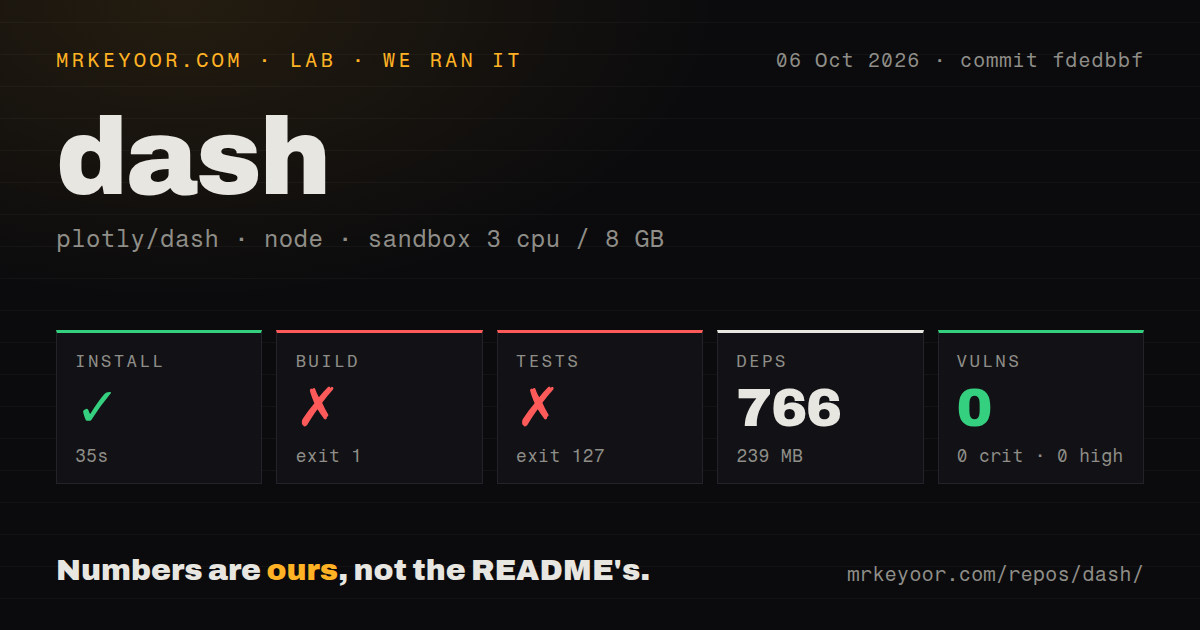
Our npm install occupied 288 MB after adding 775 packages. That is manageable for a developer machine, yet it measures only repository dependencies. It does not include a Python environment, an application data stack, Redis or Celery for background work, nor whatever identity layer the organization selects. The setup cost changes sharply between a local chart with a dropdown and an authenticated service used by a whole department.
What happened when we ran it
Our sandbox installed Dash in 25 seconds, adding 775 npm packages in a fresh Debian container with 3 CPUs and 8 GB of RAM. Npm audit reported 0 known vulnerabilities: 0 critical, 0 high, 0 moderate, and 0 low. The checkout had 4 CI workflow files, a tests directory, and npm workspaces, but no Dockerfile. Those are results for commit 5bad579, not a claim about every release or deployment.
The build ran for 7 seconds and exited with code 1. Its parallel tasks entered the JupyterLab package, renderer, and component generator, then the shell reported python, jlpm, and renderer as unavailable. The component task exited with code 127. Our test command also ran for 7 seconds and exited with code 127 because pytest was not found. No test cases ran far enough to produce a pass count in the supplied log.
The 7-second failures expose an undocumented contributor boundary
The failed build does not show that Dash itself cannot be built. It shows that npm install was insufficient in the stated Node 22 image. The root build expected Python, JupyterLab's package tool, and a renderer command to exist, while the root test expected pytest. Anyone cloning the monorepo for a fix needs a contributor setup that accounts for each of those tools before the standard npm scripts can complete.
The repository scan found 4 CI workflows and a tests directory, so the project has visible automation and test structure. Our 7-second test failure still gives no evidence about test correctness because pytest never started. We would require a clean run in the documented full development environment before treating a local patch as verified. The narrow conclusion is useful: app installation and framework contribution are different setup jobs.
Version 4.4.1 fixed forged background-callback handles
The latest release, v4.4.1, fixed a serious problem in background callbacks. Its notes say client-supplied job and cache handles had been trusted verbatim, which could let an unauthenticated client terminate a process under the Diskcache manager or access cached results. Dash now signs those handles and binds them to a page-load token. Existing applications did not need callback changes for that fix, according to the release notes.
That fix matters more than the repository's 29.7 MB checkout size, and it argues for staying current rather than pinning an older Dash without review. The same release corrected duplicate callback registration with FastAPI reload, restored a Flask-WTF exemption path, and kept graph interactions from being reverted by later patch updates. These are concrete maintenance signals across security, server integration, and interactive state.
FastAPI 4.4.1 and Celery still have specific open edges
Open issue 3962 reports that Dash 4.4.1 accepts FastAPI reload directory and exclusion options but does not forward them to the Uvicorn subprocess. In the reported monorepo setup, Uvicorn watched the wider working directory and reloaded after unrelated file changes. Issue 3729 describes a separate limit: the Celery manager assumes result backends expose key/value get and set methods, which excludes documented Celery database, MongoDB, Cassandra, and RPC backends.
Neither issue appeared in our 25-second install because we did not run an application server or background worker. They are adoption checks, not lab outcomes. Confirm the exact FastAPI development loop and Celery result backend before standardizing on Dash. Static assets deserve a smaller check too: issue 3900 asks the docs to explain manual MIME registration for .mjs files in an affected Python setup.
An August 2026 push and 490 open issues show an active, busy project
GitHub recorded Dash's last push on August 31, 2026, and 24,389 stars when fetched. Search returned 490 open issues, while the repository metadata reported 528 open issues and pull requests combined. Releases v4.2.0, v4.3.0, v4.4.0, and v4.4.1 all arrived between June 1 and July 21, 2026. That is recent maintenance alongside a large queue, rather than a quiet project with an old tag.
Maturity does not make the 1,251-file contributor environment simple. Dash earns a trial when the team already works in Python, values Plotly.js, and understands callbacks. Before committing, build the measured commit in the full documented toolchain, exercise authentication around the deployed service, and test the chosen background manager. If those tasks sound larger than the dashboard itself, Streamlit or Gradio may be the more economical fit.