A NAS trial starts with the access model
Go Music DL's administrator login does not restrict ordinary Web listening and downloads. Both supplied README versions say search, playback, downloads, and playlist browsing are available without login; settings and Cookie changes require an administrator account. For a NAS owner, deciding who can reach the service comes before adding account cookies or a music collection.
The project combines online music search with local files, playlists, lyrics, and metadata tools. The tested README lists 12 online platforms, not 11: NetEase Cloud Music, QQ Music, Kugou, Kuwo, Migu, Qianqian, Soda, 5sing, Jamendo, JOOX, Bilibili, and Apple Music. This is documented adapter coverage. Our run did not verify that each platform could search, play, or download music.
The supplied documentation is Chinese. It covers Web, TUI, desktop, Android, and iOS workflows, but an English setup guide is not included in the supplied evidence. iOS distribution also needs attention: the README says the unsigned IPA requires the user's own signing before installation.
What our recorded run establishes
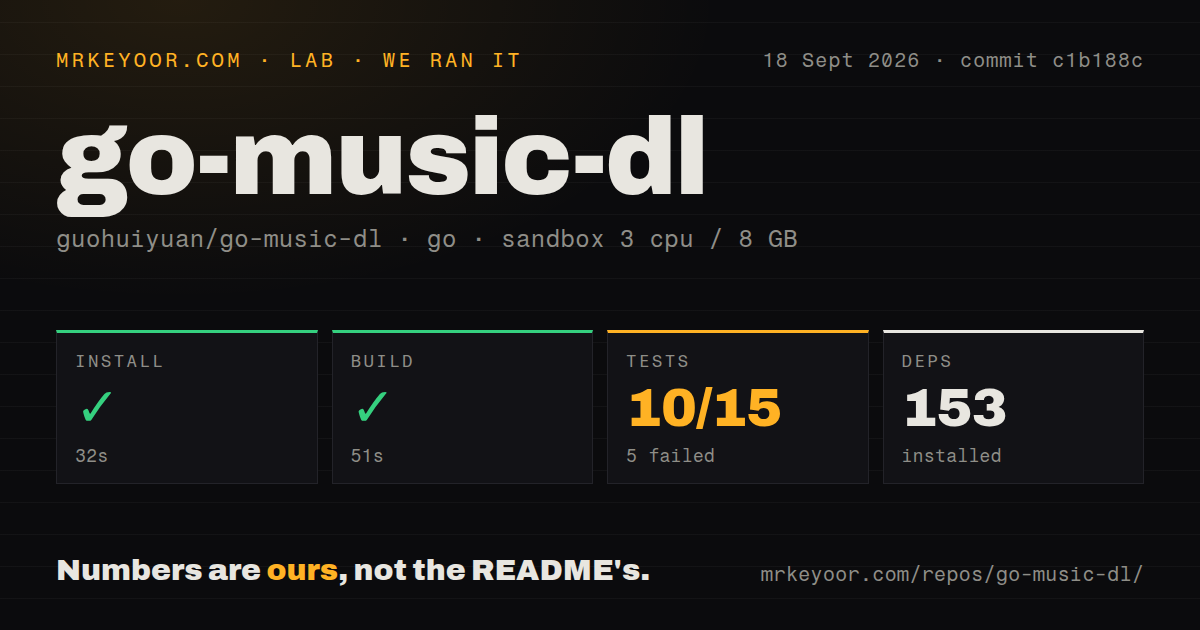
Our stored run is dated September 18, 2026 at 12:27:59.758 UTC and used commit c1b188c366ece39cb19a61d108e4fbf7c29271e5, associated with v1.1.1. The recorded environment had 3 CPUs, 8 GB of memory, and the image label golang:1.24-bookworm. The install tail shows Go 1.25.1 being downloaded, so the image label alone does not identify the toolchain used throughout the run.
The install step exited 0 in 31.548 seconds, rounded to 32 seconds in the stored summary. The dependency metric was 153. Neither observation establishes that the CLI was installed or launched.
The build step took 50.714 seconds, rounded to 51 seconds, and its wrapper recorded exit 0. Its captured tail nevertheless contains missing xkbcommon, wayland-client, GTK, and WebKitGTK diagnostics, Gio webviewer compilation errors, and vet-exit:1. Without the complete command and reconciled output, this is a conflicting build record rather than proof of a successful project build.
The test step exited 1 in 24.432 seconds, rounded to 24 seconds. The visible output contains successful package results for cmd/music-dl, core, internal/appshell, internal/cli, and internal/web. It marks desktop_app and desktop_go as build failures. The README identifies desktop_app as the mobile application directory, so these are not both desktop targets. The output also identifies three packages with no test files.
The stored parser summary reports 10 passed, 5 failed, and 15 total. Its tail repeats package results under a summary heading, and the supplied count-scope warning says exhaustive unique coverage was not verified. We retain those figures as parser output, not as a verified count of passing tests or distinct failed packages. Packages without test files are not failed tests.
The checkout metrics were 154 files, approximately 35,785 lines of source, and 4.4 MB. The record also identifies five CI workflows, a Dockerfile, and a Compose file. These describe the checkout, not runtime reliability. There was no installed-binary check, music-service workload, playback trial, or local-library performance measurement. The failed command does not establish that the released application is broken.
Use the deployment instructions for the version you choose
The tested README describes persisting the container's /home/appuser/data directory and running as UID 1000. It tells users to create the host directory first and includes a mode-777 example. The current supplied README instead says Compose creates ./data and configures write permissions automatically. Do not carry the older manual permission step into a current deployment without checking the selected version's instructions.
Both versions document a Web service whose ordinary functions remain available without login. The tested README describes a one-time initialization token, an administrator password of at least 6 characters, and a default 7-day session. It separately says embedded desktop and mobile services listen on 127.0.0.1 and disable the Web administrator login flow. Those embedded-client settings should not be assumed to describe a standalone Web deployment.
For a NAS trial, restrict network access and protect the persisted data directory. The README says platform cookies are stored locally and should not be shared publicly. Administrator login alone is not access control for the ordinary Web functions described above. This recommendation follows the documented access model; it is not a security audit finding.
Check the features you intend to use
The current README documents scanning, uploading, searching, and organizing local audio, with SQLite indexing, pagination, snapshot caching, and background refresh. The tested README specifies a 10-second snapshot cache. Neither its claims about large libraries nor its caching design are our performance measurements.
FFmpeg and ffprobe are documented as included in Docker images and Android APKs. CLI, desktop, and iOS packages require users to install them when needed for probing or metadata writing. The documentation says missing FFmpeg causes metadata embedding to be skipped rather than preventing raw audio downloads. The existing diagnostic command is ffmpeg -version; running it successfully would still be a separate check from exercising metadata writing in the application.
Source support has explicit limits. The supplied READMEs mark Soda QR login as unavailable, Apple Music downloads as previews with full downloads requiring gamdl, and Qianqian and Jamendo playlist search as potentially returning empty results. The current README adds Soda full-track signing options that are absent from the tested version. Those newer claims were not exercised by our September run.
Start with a copied folder. Check the selected service's login, one permitted download, filename handling, lyrics, metadata, and behavior after deleting a file outside the application. These are proposed evaluation steps, not tests we performed.
How to read the scores
The scores are editorial judgments of the supplied evidence: 1 means little basis for adoption, 2 means material gaps, 3 means a documented evaluation path with unresolved limits, 4 means strong evidence across the relevant workflows, and 5 requires broad independent verification. They are not benchmarks or adoption measurements.
Setup receives 3 because release and Compose routes are documented, but our build record is contradictory and no runnable installation was checked. Documentation receives 3 because deployment, cookies, local files, and FFmpeg are explained, while the supplied material is Chinese and differs between versions. Community receives 2 because the supplied issue extracts show maintainer replies, but do not measure support responsiveness or adoption. Maturity receives 2 because documented source limitations and unverified client workflows leave substantial questions for an operator.
When a narrower downloader fits
spotDL fits a Spotify-playlist input workflow: its README says it finds the songs on YouTube and downloads them with album art, lyrics, and metadata. It does not download the audio from Spotify.
yt-dlp fits command-line downloads from supported audio/video URLs. Its README describes support for thousands of sites. Neither alternative's supplied description establishes that it replaces Go Music DL's combined local-library and multi-service interface.
Choose Go Music DL for a controlled evaluation of that combined workflow. The next useful evidence is a successful trial of the exact client, source, and library operations you need.