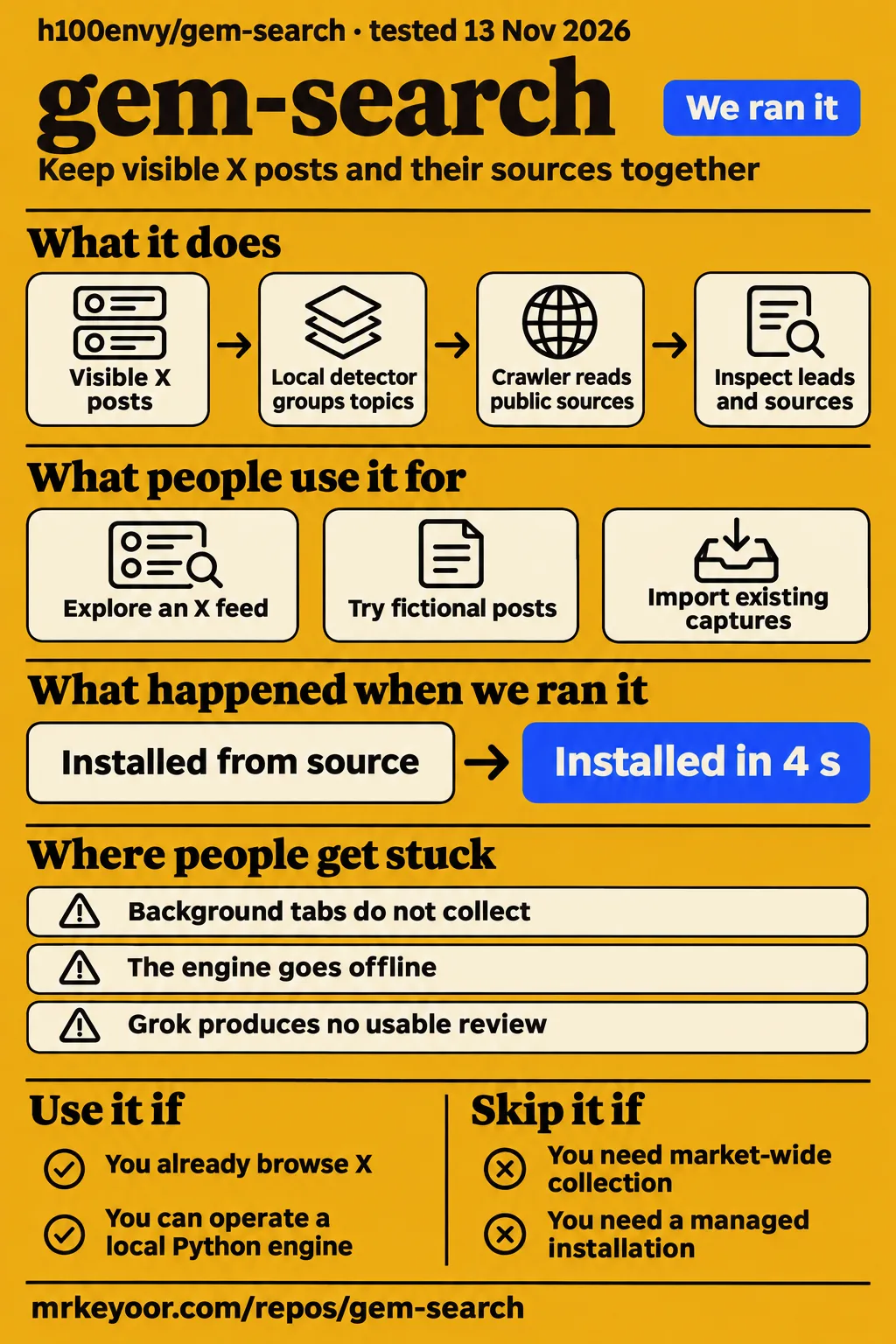

Our sandbox installed gem-search's npm dependencies in 4 seconds and completed its test step in 2 seconds. Use h100envy/gem-search if you want to inspect recurring ideas in the X posts you browse and keep their sources together. Skip it if you need market-wide monitoring, a managed browser extension or a shared hosted research service. The separate browser-deployment attempt stopped at our runner's Compose-file requirement.
The useful idea is straightforward: collect a visible post, follow its public links, and keep the reasons for investigating it. The h100envy/gem-search README calls the browser companion an open-source developer preview. Its documented workflow suits researchers who want to revisit the evidence behind a lead rather than lose the originating post in a crowded feed.
What you can do with gem-search
The project describes a Chrome companion that sends visible X posts to a research engine on your computer. Its local detector groups repeated topics, tickers and project links; a crawler reads public sources behind those leads. Optional Grok reviewers assess the supplied evidence from different perspectives. The project site's pipeline description explains how the stages connect.
That workflow turns a browsing session into a research queue. Instead of remembering a project name, you can inspect the posts and links attached to a finding. Upstream describes a dashboard that keeps sources, gaps and decisions together. The practical reason to consider it is that preserved trail: you can return to an original claim and read the linked material before deciding what deserves further attention.
The supplied README also describes hosted on-chain tools and a launchpad, with server code on a separate launchpad branch. Those are distinct operating paths under the same project name. The local browser workflow starts with an unpacked extension and a Python process. Our measured checkout is commit a04fae4; the supplied README is a separate source for the project's documented capabilities and setup.
What people use gem-search for
Upstream documents four starting workflows: explore an X feed, try fictional posts, add optional Grok reviews or import existing captures. These are instructions for using the project, rather than customer outcome reports. The README's first-adventure instructions connect each input to the local research workflow, while the site walkthrough describes pairing and the fictional demo.
| Workflow described by upstream | Input | What you inspect afterward |
|---|---|---|
| Explore an X feed | Posts rendered in the visible tab | Grouped leads and their attached sources |
| Try the spider demo | Fictional posts at /spider-demo | The companion's behavior before pairing a real feed |
| Add Grok perspectives | Collected evidence and your own xAI key | Separate reasons from four reviewers |
| Bring existing research | JSON captures in the documented data format | Findings in the local research pipeline |
For a first session, follow upstream's sequence: open the fictional demo, pair the extension, then browse a feed whose subject you already understand. A useful decision question is whether you can open a finding, locate its originating posts and explain why they belong together. That makes the evaluation about recovering and inspecting evidence, with the generated verdict serving as another item to read.
This workflow fits a researcher following a manageable set of subjects. A saved lead can be useful even when it leads nowhere, because the attached material explains what prompted the investigation. Start with a specific purpose, such as keeping project announcements from one browsing session together, and judge the resulting queue against that purpose before adding optional model reviews.
What happened when we ran it
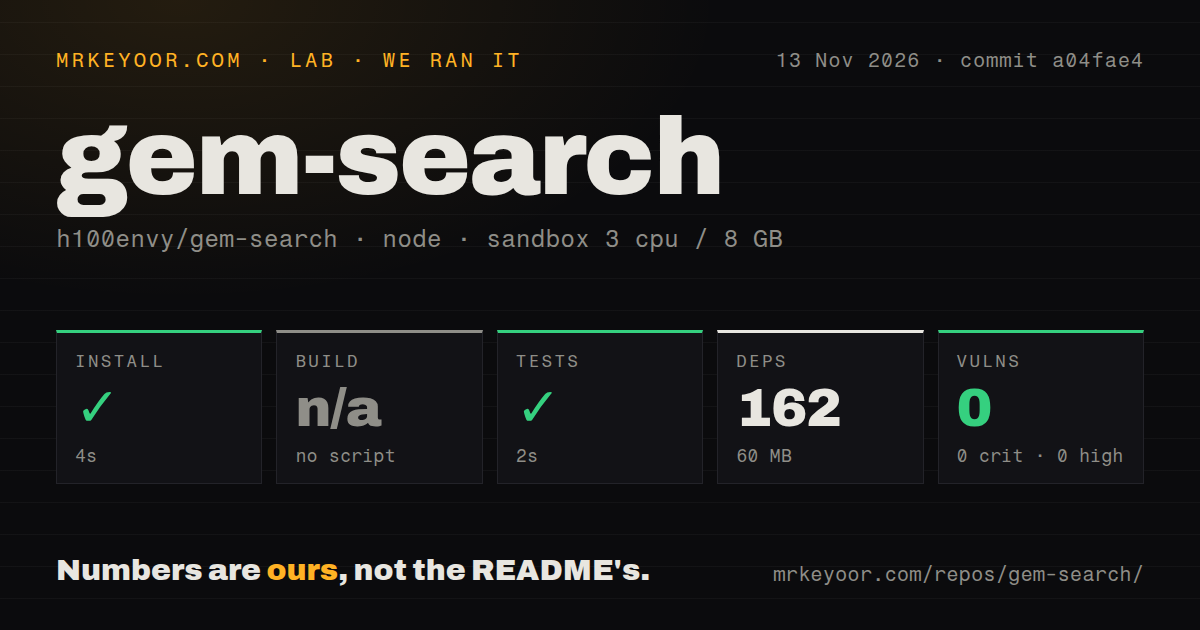
Our npm sandbox run at commit a04fae4 on 2026-11-13 installed dependencies in 4 seconds and completed the test step successfully in 2 seconds. The browser-deployment runner separately failed its safety step because the checkout lacked a Compose file. The table preserves the repository checks, their recorded outcomes and the distinction between a skipped build and a successful test command.
| Repository check | Our recorded result |
|---|---|
| npm install | Succeeded in 4 seconds |
| Dependencies | 162 recorded, 60 MB on disk |
| Build | Skipped because there was no build script or target |
| Tests | Succeeded in 2 seconds |
| npm audit | 0 known vulnerabilities across critical, high, moderate and low severity |
| Checkout | 67 files, about 3,182 source lines, 0.4 MB |
| Repository signals | One CI workflow file, a tests directory, no Dockerfile |
We measured these results in a sandbox configured with 3 CPUs, 8 GB RAM and image label lab-node:22. The npm installation completed successfully, so dependency installation was not the stopping point in this run. The build entry records a skip because no build script or target existed. The test entry records the command's successful outcome and elapsed time, without assigning a passing-test count.
The hands-on safety step failed because none of compose.yaml, compose.yml, docker-compose.yaml or docker-compose.yml existed. Its error labels the repository unsafe under a rule requiring a Compose file. That is the runner's acceptance rule. The documented native setup instead starts a Python engine and pairs an unpacked extension; the failed step contains no Python startup traceback.
The generic run summary says the project was deployed with its own Docker Compose and every port bound to 127.0.0.1. The detailed safety record says the required file was absent. We give the detailed failure precedence and report deployment as blocked. The separate teardown record reports successful cleanup with the result "teardown: ok".
Where people get stuck
The documented setup requires Python 3.11+ and Chrome/Chromium, with the Windows backend running through WSL2. It also requires loading an unpacked extension and pairing it with the local engine. The README quick start supplies that sequence. These requirements explain why downloading the repository alone does not put the spider into a browser tab.
| Situation | Documented check or next action | Basis |
|---|---|---|
| You downloaded the source but see no spider | Start the engine, load extension/ unpacked, and pair through Connections | Upstream's setup sequence |
| The engine goes offline | Keep it running and reconnect the extension | README describes a bounded queue forwarding captures after reconnection |
| A background tab produces nothing | Use the visible tab | README says background tabs do not collect or auto-scroll |
| Grok produces no usable review | Inspect allowance and status before treating it as a result | README excludes failed calls and invalid responses from passing findings |
| Our Compose-based runner refuses the checkout | Follow the separately documented native setup for a local installation | The recorded failure was a runner prerequisite |
The pairing sequence starts at 127.0.0.1:8787. Copy the code from Connections, open Chrome's extensions page, enable Developer mode and load the repository's extension/ directory unpacked. Paste the code into the extension popup and connect. Then open an X feed, search or profile page and release the spider on that tab. The backend stays running while you browse.
Upstream says up to 200 captured posts remain in the extension queue when the engine is offline, and the next successful connection forwards them. It also says background tabs do not collect or auto-scroll. Those details make the active tab and engine connection useful first checks when the dashboard is quiet. English setup instructions are present in the supplied README, which also links Russian documentation.
Visible posts determine the research sample
The README says the spider inspects rendered posts in the visible viewport, and its growth display compares activity within that collected sample. This gives readers a concrete way to interpret a lead: it reflects material captured during browsing. The README's detector description explains the inputs and the time windows behind the displayed counts.
Upstream describes emerging narratives as repeated two-word phrases from three or more different authors in the last 6 hours. Growth compares mentions in the last 6 hours with the pace of the preceding 18 hours. The display also includes authors and when the spider first saw a lead. These fields help explain why something appeared in the queue and give you details to compare with its attached posts.
For your own evaluation, keep a manual list of interesting and irrelevant posts from the same browsing session. Compare that list with the dashboard before enabling paid analysis. Ask whether the grouping helps recover evidence you saw and whether the attached sources explain the result. That is a more specific adoption decision than judging the tool by the size of its shortlist or the animation on the page.
Local storage and optional Grok use different data paths
The README says the engine and database run locally, while collected excerpts go to api.x.ai when Grok is enabled. Local rules work without an API key. The project site's local-first description also makes sending posts conditional on enabling Grok, so the optional model mode changes the processing path described by upstream.
The README says keys stay in the backend, model outputs cannot execute code or control wallets, and the browser token can submit captures and read scanner status. It describes the engine as local and single-user and tells operators not to expose its port to the internet. Follow that intended architecture when deciding whether the application fits a personal research workflow or your organization's operating requirements.
The optional launch module has a separate activation path. Upstream describes it as opt-in and dry-run by default, with an additional setting required before browser captures can enter it. It is not required to use the spider. For an initial research evaluation, keep the task focused on reading posts, inspecting public sources and exporting findings; transaction authorization is a separate decision.
Four Grok reviewers share a request allowance
The README says one full Grok review makes four requests, with the default allowance permitting at most three full reviews per rolling 24 hours, including failed calls. Reviews begin after at least four distinct observed authors. This is upstream's documented request accounting, and the Grok setup section explains the roles and configuration.
Lookout considers the observed signal, Maker examines product or technical evidence, Skeptic looks for contradictions and risk, and Runner considers whether further investigation is warranted. The roles give the reader separate reasons to inspect against the supplied sources. In this local workflow, the README says no xAI search tools are enabled, and the reviewers work from bounded excerpts rather than independently browsing for evidence.
Identical evidence and model inputs can reuse reviews cached for 24 hours, according to the README. It also specifies a 700-token output limit for each request and says the allowance is not a guaranteed dollar cap because charges depend on the xAI plan. Begin with local checks so you can decide what additional explanation the model responses contribute to the same research task.
gem-search vs GPT Researcher and Local Deep Researcher
Gem-search starts with visible X posts, while GPT Researcher and Local Deep Researcher document research workflows driven by a task or topic. Choose the input and deliverable you need before comparing their interfaces. The practical distinction is whether you want to preserve discoveries encountered while browsing or begin with a question and produce a research report or summary.
| Project | Documented starting point | Pick it when |
|---|---|---|
| h100envy/gem-search | Visible X posts sent to a local research engine | You want to investigate leads encountered while browsing X |
| assafelovic/gpt-researcher | Web and local research for a given task, producing reports with citations | You want a report organized around a research assignment |
| langchain-ai/local-deep-researcher | A topic, iterative web searches and a locally hosted model | You want a sourced Markdown summary using Ollama or LMStudio |
GPT Researcher's README describes research reports with citations. It also describes customization for domain-specific research agents and a workflow in which a planner generates questions and execution agents gather material. The GPT Researcher README therefore supports choosing it for an assignment you can state before opening X, with a report as the intended deliverable.
Local Deep Researcher documents Ollama and LMStudio for model hosting. Its workflow generates a search query, summarizes results, identifies knowledge gaps and repeats the search loop for a configurable number of cycles. The Local Deep Researcher README describes a final Markdown summary with its sources. Choose that workflow when a topic and a locally hosted model are your starting requirements.
Two similarly named repositories serve a different purpose: rochefort/gem-search is a command-line Ruby gem search utility, and shime/gemsearch also describes a CLI for searching Ruby gems. Their names explain some search-result overlap. Use the owner and repository together when following installation instructions or deciding which software a result describes.
What the other reviews get wrong
The kaito2828/gem-search download instructions describe a different repository owner from h100envy/gem-search. The supplied evidence establishes conflicting setup instructions: the kaito2828 page says no additional software is required beyond a normal Windows computer and browser, while the h100envy-linked setup page specifies Python 3.11+, Chrome and Windows through WSL2.
For this review, the identity anchor is the project's clone command naming h100envy/gem-search. Follow that repository's documented Python startup and unpacked-extension instructions. The Ruby search utilities are also separate software with separate installation paths. The useful correction is specific: match instructions to the repository owner and intended workflow rather than transferring a download guide from a result with the same name.
FAQ
The gem-search GitHub repository reviewed here is h100envy/gem-search, named in the project site's clone command. That answers the supplied "gem-search github" search intent and identifies the software covered by our measurements. The questions below cover repository identity and the first setup decisions supported by the supplied project instructions, without borrowing requirements from similarly named applications.
Where is gem-search on GitHub?
Use github.com/h100envy/gem-search for this local X research tool. The project site's clone command names that exact owner and repository. Its workflow pairs a local engine with a browser extension. Check the owner before downloading: the supplied research also contains Ruby package-search tools called gem-search and gemsearch, which serve a different purpose.
What does it require to run locally?
The README specifies Python 3.11+ and Chrome/Chromium, with the backend on macOS, Linux or Windows through WSL2. Start the local engine and load the extension unpacked, then pair through Connections. The README quick start says Node 22+ is needed only for the full test suite and optional Solana module; the research backend and extension need no npm build.
Does gem-search require a Grok API key?
No: the project site says local rules work without an API key. Add your own xAI key only for the optional four-reviewer mode. The site's local-rules description and README Grok instructions describe those choices. Start with the local dashboard and source trail, then decide whether the separate model explanations are useful for your research task.
What we have not tested yet
Our evidence contains repository checks and a blocked browser-deployment attempt, with no observed working-deployment demonstration. Browser pairing, current X extraction, queue recovery and detector accuracy against a labeled collection remain untested. The pack supplies no known-answer research tasks, answer timings, runtime memory measurements or working-deployment screenshots. The sandbox image label also does not establish actual runtime or operating-system versions; those require raw toolchain logs.
The generic Compose deployment summary conflicts with the detailed failed safety step. Raw deployment logs are needed to reconcile those records beyond the conservative account above. The 0-known-vulnerability npm audit result is not a security assessment of the Python engine, extension permissions, crawler or transaction modules. Upstream's private-network blocking, token restrictions and local-storage descriptions are documentation claims rather than results from our network or security inspection.
Visible-post collection is not an X firehose or a substitute for a licensed data service. Upstream also warns that repeated wording can miss meaning, three coordinated accounts can fake a phrase, and a cashtag or address is a lead rather than a validated token. A shortlist therefore supplies no proof of safety, originality or future returns. The supplied evidence supports no measured accuracy, cost or speed winner against either alternative.
The supplied synthesis contains no attributed user workflows, problem reports or comparisons for h100envy's tool, and the supplied X extract supports no specific clothing-app recommendation. Independent user outcomes, support responsiveness and production reliability are unassessed. We also have no inspected Grok payloads, paid-call results, observed API bill, comparison of local checks with four-reviewer mode or evaluation of the hosted launchpad. A useful next step is a saved browser session whose captured posts, grouped leads and source links can be checked against the same input by a person.