Thirteen Firebase products share one Apple SDK repository
Firebase Apple SDK is the official client layer for 13 named Firebase products, including Authentication, Firestore, Cloud Messaging, Crashlytics, Remote Config, Storage, and AI Logic. You add only the products your app uses, usually through Swift Package Manager. That makes the repository useful to a team that wants one vendor-supported route into several backend services rather than separate Apple clients for identity, data, files, and operational reporting.
The boundary matters. This checkout contains the source for the Apple libraries except Firebase Analytics. Analytics is still bundled as a compiled dependency when you install through Swift Package Manager or CocoaPods. Apache-2.0 covers the repository, while use of the connected services also falls under Firebase's service terms. If your review requires source access to every binary in the application, that exception ends the evaluation early.
What happened when we ran it
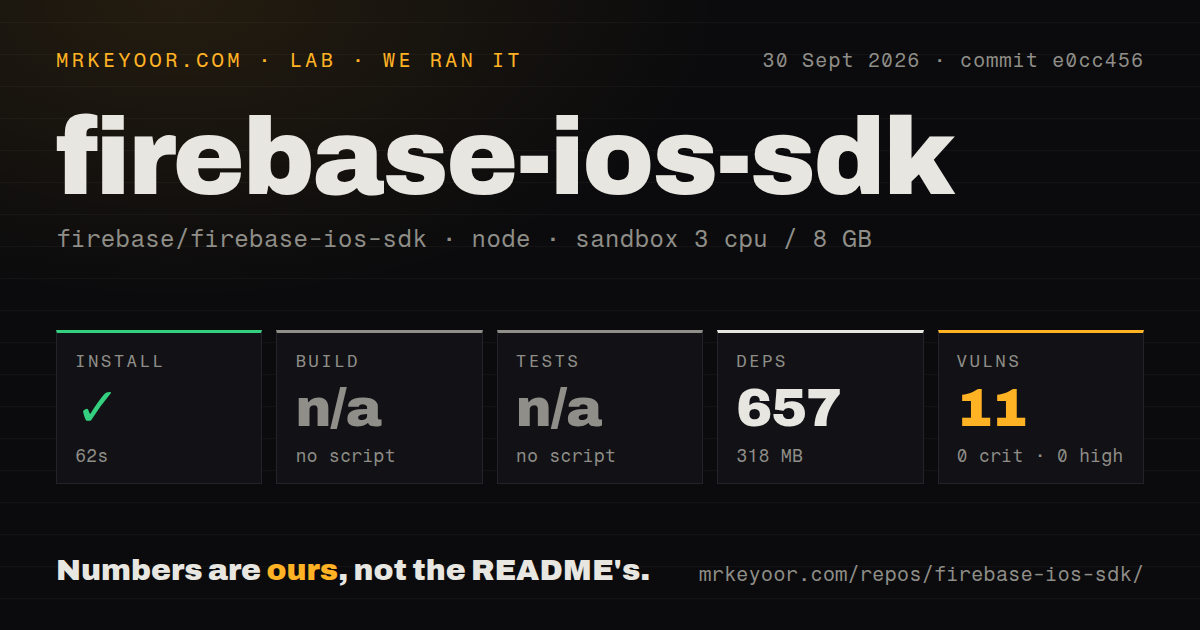
Our sandbox cloned commit e0cc456 and found 4,798 files, about 535,288 lines of source, and a 69.2 MB checkout. The measured Node project lives under FirebaseFunctions/Backend/, not at the Apple SDK root. Its npm install completed in 62 seconds, added 657 packages, and occupied 318 MB. npm audit reported 11 known vulnerabilities, all moderate, with no critical or high findings.
There was no build script or target in that measured npm project, so the build step was skipped. The same directory had no test script or target, so the test step was skipped too. Those are limits on what our Debian container established. We did not compile Swift, open an Xcode scheme, run an iOS simulator, or claim that the Apple SDK passes its own test matrix.
The repository contains 53 CI workflow files, but our scan found no Dockerfile and no tests directory at the scanned level. That shape fits an Apple platform project whose contributing guide sends developers into Xcode schemes and product-specific test instructions. It also means a clean npm install inside the Functions backend is not evidence that an iOS app will compile. Treat the 62-second result as a check of that nested backend only.
Xcode 26.2 is the real contributor starting line
The development guide requires Xcode 26.2 or later. Swift Package Manager contributors open Package.swift, choose a library scheme, and run the relevant tests in Xcode after executing the scheme setup script. CocoaPods development needs version 1.12.0 or later plus cocoapods-generate. Formatting adds clang-format, Mint, and SwiftFormat. This is a serious Apple codebase, and a Linux-only contributor cannot reproduce the documented workflow.
Application setup is smaller than repository development, though it still crosses several systems. You create a Firebase project, register the Apple bundle identifier, download GoogleService-Info.plist, add selected packages, and initialize Firebase in the app. Push notifications need APNs configuration. Realtime Database integration tests may use an emulator or a configured service instance, while sample apps need valid Firebase app files. The quick start does not collapse all products into one credential-free test.
Swift Package Manager is now the safe default
Release 12.19.2 shipped on September 15, 2026 as a Swift Package Manager-only release. The repository warning says new CocoaPods versions stop after October 2026, although already published pods will remain available. Existing CocoaPods applications are not suddenly broken, but a team expecting current Firebase fixes needs a migration plan now. Starting a fresh project on CocoaPods would create avoidable work within weeks.
Carthage remains experimental and limited to iOS. Platform support is uneven too: macOS, Catalyst, and tvOS have official beta support, while watchOS and visionOS rely partly on community coverage. Firestore on visionOS needs its source distribution when used through Swift Package Manager. On watchOS, Crashlytics cannot capture mach exception or signal crashes, which includes SwiftUI crashes described in the README.
Product names also hide different readiness levels. The README recommends choosing libraries with a Swift suffix where they exist, but it labels FirebaseCombineSwift as under development and unsuitable for production. A team adopting 4 Firebase products should check 4 support and test paths rather than treating the umbrella package as one uniform layer. That extra reading is still cheaper than discovering late that a target platform, package manager, or wrapper sits outside official production support.
Active maintenance does not make every product equally simple
GitHub showed 6,714 stars, 303 open issues, and 136 open pull requests on September 30, 2026. The repository was pushed on September 29, and recent work covered Analytics crashes, Firestore cache behavior, Remote Config response handling, and AI features. The latest release fixed an Analytics selector problem under Swift Package Manager. Those dates and changes show active maintenance rather than a quiet compatibility archive.
Scale is the trade. Firebase gives an Apple team mature clients for services that would otherwise need separate selection and wiring, but each chosen product brings its own console settings, platform limits, and testing path. Our run also left the Apple build untested and found 11 moderate npm advisories in the nested backend. Choose it for the service set, not because the repository looks like one dependency you can validate with one command.