Short answer: treat the restricted account as a security finding
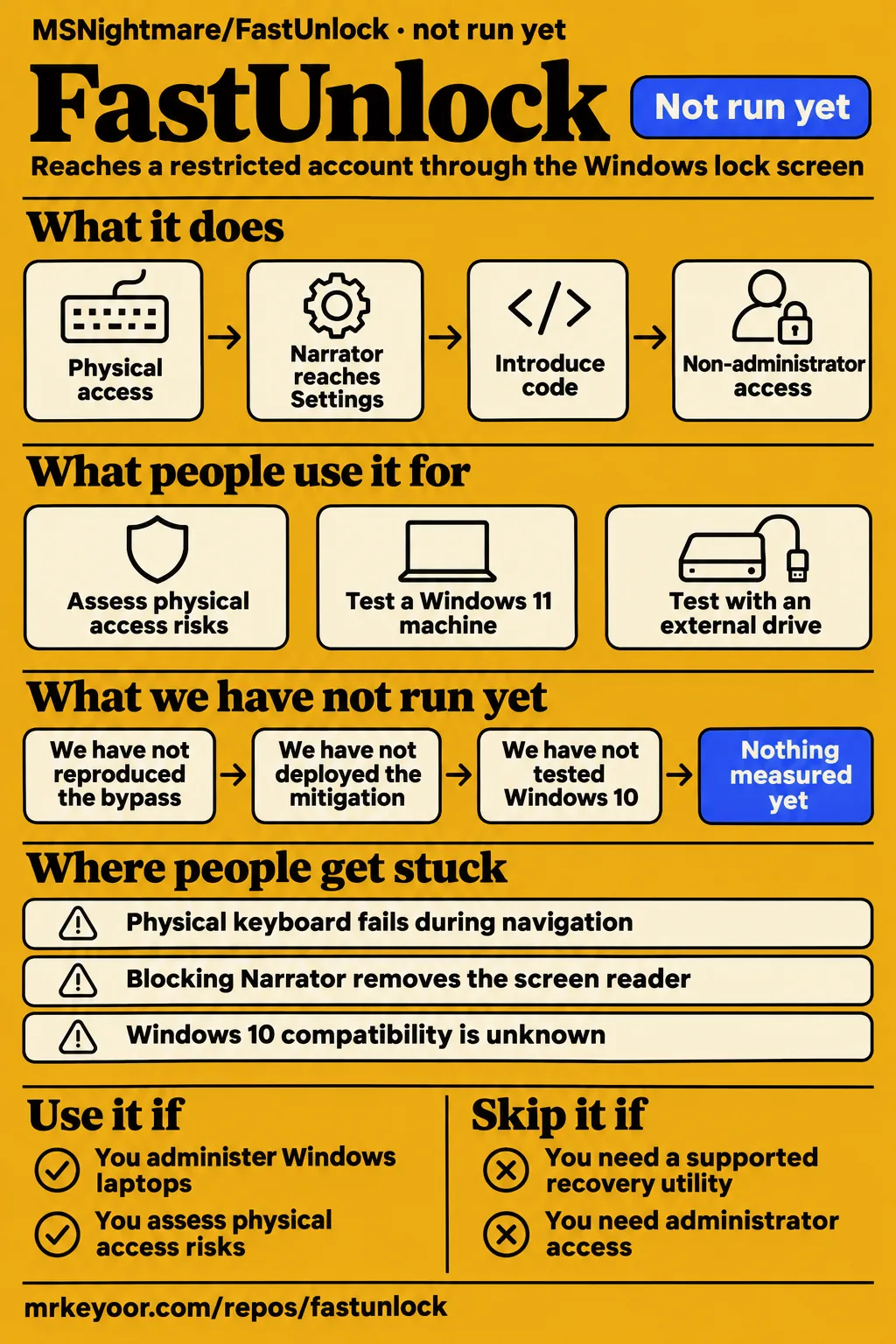
ThreatLocker independently reproduced FastUnlock and reached a non-administrator WSIAccount context through the Windows lock screen. Use the project as an investigation reference if you administer Windows laptops or assess physical access risks. Skip it if you want a supported recovery tool that restores access to your normal desktop: ThreatLocker's result was a restricted account, and our sandbox stopped before execution.
The decision is whether your laptop can reach the affected recovery interface while outside your control. Encryption, the lock screen and the account running a process protect different boundaries. FastUnlock concerns the latter two after Windows can use the drive. A claim about launching an application therefore needs a different response from a claim about decrypting a powered-off disk.
What you can do with FastUnlock
MSNightmare describes a Narrator lock-screen bypass that reaches Windows Settings and code execution as WsiAccount. Narrator is Windows' built-in screen reader, and the author's entry conditions include physical access and an online-linked account. For you as an administrator, the repository is useful for understanding an exposed interface and defining an authorized assessment, rather than adding another service to your infrastructure.
The account name matters. A program running before normal sign-in is already an access-control failure, but the identity and permissions of that program determine what follows. ThreatLocker explicitly calls its resulting account non-administrative. Don't turn that finding into a claim that the attacker becomes the laptop owner, acquires administrator rights or reads every protected file.
In the author's linked demonstration, Narrator's spoken navigation reaches Settings and AutoPlay options. The transcript records those interface transitions. It is useful corroboration of the navigation, with a narrower scope than a complete demonstration of arbitrary program execution. The README's later USB update and ThreatLocker's reproduction provide separate support for the subsequent claim.
What people use FastUnlock for
The concrete uses documented here are security demonstrations by the project author and ThreatLocker, each with an identifiable outcome.
| Who used it | What they assessed | What they reported |
|---|---|---|
| MSNightmare, the project author | A BitLocker-encrypted machine described as Windows 11 26H2 with the November patch | The author reports five minutes from discovery to breaching that machine and later adds that the USB step worked. This is the author's account, not our timing. |
| ThreatLocker Threat Intelligence | An independent reproduction using an external drive | The team reports access as non-administrator WSIAccount. Physical keyboard typing failed during Narrator navigation; the on-screen keyboard offered a workaround. |
ThreatLocker's report is the stronger reason to take the disclosure seriously: another team describes what it reached, the device-access conditions and a practical obstacle. It also states that the external drive was its chosen route, rather than the only conceivable way to introduce code. That distinction affects how narrowly you should read a USB-focused mitigation.
The community discussion serves a different purpose. In r/sysadmin, danrhodes1987 shares the disclosure for awareness and adds a mitigation link. Other commenters describe older lock-screen oddities. Those anecdotes aren't FastUnlock reproductions. You can use the thread to find administrative concerns without counting every report of a visible desktop as another affected machine.
What happened when we ran it
Our November 24, 2026 sandbox assessment of commit 6df128c ended NOT RUN: no supported ecosystem was detected, the language field was null, and there was no Dockerfile. The recorded configuration was 3 CPUs and 8 GB RAM, with image listed as n/a. These are assessment conditions, not Windows requirements or an actual operating-system version.
| Assessment stage | Recorded result | What you can conclude |
|---|---|---|
| Repository harness | NOT RUN: no supported ecosystem, language null; no Dockerfile | There is no install, build or test result to report. |
| Hands-on safety step | FAILED because no recognized Compose file existed | The automated deployment path stopped before a Windows demonstration. |
| Cleanup | Teardown: ok | Cleanup completed; this is not an execution result. |
The separate hands-on attempt stopped at its safety check with “unsafe repo: none of compose.yaml, compose.yml, docker-compose.yaml, docker-compose.yml exists”. The rule required a Compose file. That identifies why this automation refused to proceed; it doesn't diagnose a broken Windows technique.
One generated run summary describes deployment with the project's own Docker Compose, but that description conflicts with the failed prerequisite check. It cannot serve as proof of deployment. The next recorded outcome is successful teardown. Our assessment contributes a clear execution boundary, while the reported Windows outcome belongs to MSNightmare and ThreatLocker.
Where people get stuck: typing and mitigation scope
ThreatLocker couldn't type with the physical keyboard while navigating through Narrator, although its team could use the on-screen keyboard when text entry was needed. That is a specific obstacle in an independent reproduction, rather than evidence that every keyboard or Windows build behaves identically.
| Problem or decision | Documented response | Status you should attach to it |
|---|---|---|
| Physical keyboard typing fails during navigation | ThreatLocker describes using the on-screen keyboard | A workaround reported by the reproducing team |
| An administrator needs a temporary control | Issue #1 points to danrhodes/MSNightmare-FastUnlock-Mitigation | A community mitigation link, not a closed vendor fix |
| Blocking Narrator affects a person who uses a screen reader | PrivacyAffairs warns that blocking it takes Narrator away | An accessibility cost that must enter the deployment decision |
| A USB-only control sounds sufficient | ThreatLocker says it used an external drive but other routes exist | A reason to distinguish the demonstrated route from the entry point |
The author of issue #1 links a mitigation repository; the captured issue is open with no comments. There is no resolution discussion there to treat as a support history. The linked project's README says its WDAC policy, a Windows application-control rule, denies Narrator.exe and includes a reversal script. Its instructions are upstream guidance, not a successful deployment by MrKeyoor.
The most consequential operational question is who depends on Narrator. PrivacyAffairs explicitly warns that blocking it removes the screen reader. An organization that needs accessible sign-in cannot judge the control solely by whether it blocks a demonstration. Put the affected users and the rollback decision into the change review before distributing a rule.
BitLocker protects a different stage from the lock screen
The reported FastUnlock technique operates after the drive has unlocked; it does not demonstrate cracking BitLocker encryption. ThreatLocker explains that a preboot PIN must be supplied before the drive unlocks and Windows starts. That is the relevant distinction when you decide how a traveling laptop should be left.
| Device state and protection | How the reporting describes the boundary | Practical decision |
|---|---|---|
| Powered off or hibernated, with a startup PIN | ThreatLocker says the PIN can help because it precedes Windows startup | Pair preboot authentication with the appropriate power state |
| Already running at the lock screen | PrivacyAffairs says the drive is already unlocked | Don't treat the startup PIN as fresh authentication for this state |
| Sleeping | PrivacyAffairs says a startup PIN doesn't help in this state | Distinguish sleep from shutdown or hibernation in your device policy |
A TPM, the hardware security component commonly used by BitLocker, can unlock a drive automatically under a TPM-only configuration. PrivacyAffairs contrasts that behavior with TPM plus a startup PIN. For this review, the useful comparison is the point at which authentication happens, rather than which configuration produces the most reassuring encryption status icon.
The Cyber News makes the same distinction in its November 20 X post: it describes an already-running PC and says the report doesn't show decryption of a powered-off drive. You don't need to accept a social post as a reproduction to see why its wording is more careful than a blanket “BitLocker breach” headline.
FastUnlock vs startup PINs, Narrator blocking and hardening tools
The useful alternatives are defensive controls and assessment tools, because FastUnlock is a disclosure about a Windows path rather than an application you deploy for everyday work. These choices answer different administrative questions.
| Comparison | Why choose the first option | Why choose the second option |
|---|---|---|
| TPM-only vs TPM plus startup PIN | Automatic startup avoids a separate preboot prompt | ThreatLocker says a PIN can help on powered-off or hibernated devices before Windows starts |
| Local-only vs Microsoft-linked accounts | PrivacyAffairs says local-only accounts fall outside the author's stated online-account condition | Microsoft-linked accounts provide the recovery flow named in the reported technique |
| Disable AutoPlay vs block Narrator | HW Busters discusses AutoPlay as a control for the USB leg | Blocking Narrator targets the accessibility entry point and removes a screen reader people may need |
The startup comparison follows ThreatLocker's description of preboot protection. The account comparison is PrivacyAffairs' reading of the author's prerequisites. The AutoPlay comparison comes from HW Busters' mitigation discussion. Read these as choices about scope, not a ranked performance test.
For a focused community control, danrhodes/MSNightmare-FastUnlock-Mitigation documents blocking Narrator with a WDAC deny policy. Its README also warns that Narrator stops working for all users. That tradeoff makes it a candidate for an administrative change review, rather than an automatic recommendation for every laptop.
For broader configuration work, HardeningKitty assesses Windows settings against a finding list. Choose that kind of tool when you need to examine a system baseline beyond this disclosure. Its general hardening role should not be read as a claim that it detects or fixes FastUnlock. A baseline assessment and a targeted Narrator rule can answer separate questions within the same investigation.
What the other reviews get wrong
Several published descriptions confuse the original video's stopping point, the author's later update and the limits of disk encryption.
HW Busters: the final USB step. Its article says the researcher never ran the final step because he lacked a flash drive. The README now adds that he bought a USB stick and it worked, superseding that account of what he had personally tried. It doesn't change the contents of the earlier video. Keep the demonstration and the later written report separate.
HW Busters: startup PIN coverage. Its statement that none of the reports discusses a preboot PIN is contradicted by ThreatLocker's explicit explanation of powered-off and hibernated devices. The same HW Busters article later recommends a preboot PIN. Its broad dismissal of existing coverage is the part to correct.
PrivacyAffairs: getting past encryption. Its opening describes getting past BitLocker drive encryption, while its explanation says the drive has already unlocked on a running laptop. Read literally as an encryption-breaking claim, the opening overstates the finding. The educational video also explicitly says BitLocker encryption has not been cracked.
SecNews: five minutes. SecNews describes roughly five minutes to code execution in a demonstration. The author's figure instead covers finding the issue and breaching one machine. It isn't a typical attack duration, and it isn't an installation or execution benchmark from our lab. Repeating it without its scope gives the reader a false sense of measurement.
Questions people ask
Yes, ThreatLocker independently reproduced FastUnlock and reported access under a non-administrator WSIAccount context. That reproduction is the direct support for the reported bypass.
Does FastUnlock actually work, and has anyone independently reproduced it?
ThreatLocker reports that its threat intelligence team tested the technique using an external drive and obtained restricted-account access. Its report names the account and the physical-keyboard obstacle, giving you more to assess than a reposted demonstration alone.
Does someone need physical access to use FastUnlock?
Yes. MSNightmare explicitly says physical access is required, and ThreatLocker lists the same condition. This is the wrong disclosure to cite as evidence of an internet-only attack against a distant locked laptop.
Which accounts and Windows devices are exposed to FastUnlock?
The author reports Windows 11 26H2 with the November patch and says at least one account must be linked online. ThreatLocker specifies a Microsoft account available through the account recovery flow. Those are reported conditions, rather than a universal affected-device list.
Does FastUnlock work on Windows 10?
Windows 10 compatibility is unknown. The README says the author hasn't checked other Windows versions. In r/sysadmin, tuxedo_jack proposes trying a Windows 10 VM, but the captured conversation contains the proposal rather than a result.
Does FastUnlock defeat BitLocker encryption or exploit access after the drive unlocks?
It concerns access after the drive unlocks. The educational demonstration's narration explicitly distinguishes the bypass from cracking BitLocker. Program execution through an exposed Windows interface is still a security finding, with a different boundary from decrypting a powered-off disk.
Is there a Microsoft patch for FastUnlock?
The November reporting reviewed here describes FastUnlock as unpatched. HW Busters reports no patch or advisory in its November 20 article. A scheduled update date is not evidence that Microsoft has fixed this particular issue, so don't treat December's calendar as a remediation commitment.
Where can administrators find a temporary FastUnlock mitigation?
Issue #1 points administrators to danrhodes/MSNightmare-FastUnlock-Mitigation. The linked README describes a Narrator-blocking policy and a rollback script. Treat it as community code to assess against your application-control policy and accessibility needs.
Does a BitLocker startup PIN protect a sleeping or already locked laptop?
No, the reporting does not describe a startup PIN as protection for an already-running or sleeping laptop. PrivacyAffairs says the PIN is requested after restart or hibernation, while ThreatLocker describes its value before the drive unlocks and Windows starts.
Does the FastUnlock demonstration show actual program execution?
The original demonstration stops before the final program-execution step, as the author's README explains. The later USB success statement and ThreatLocker's reproduction support subsequent execution reports. They don't add footage to the original clip.
What we have not tested yet
MrKeyoor has not reproduced the Windows bypass, deployed the mitigation, or assessed a Windows compatibility matrix. Our sandbox's lack of a supported execution path leaves setup quality unassessed. The recorded CPU and RAM allocation supplies no Windows minimum, runtime version, attack success rate or timing result.
Windows 10 coverage needs a completed test rather than the Reddit VM proposal. The author's Windows 11 version claim also needs build-by-build reproduction before it can support a fleet-wide compatibility statement. For a useful assessment, record the exact build, account configuration, device power state, startup protection, resulting process identity and permitted actions together.
We have not measured which protected files WsiAccount can read or independently demonstrated a FastUnlock-to-SignDrop escalation chain. PrivacyAffairs attributes that further escalation to the author and makes it conditional on a separate vulnerability. Restricted-account execution alone doesn't answer either question.
Neither the linked mitigation nor AutoPlay blocking has comparative validation in our lab. Accessibility-preserving protection and routes beyond removable media need separate assessment. The November articles are also not a live Microsoft patch-status feed: a vendor advisory naming a fix would be stronger evidence than a predicted update date.
Finally, the reviewed discussions don't substantiate adoption, customer counts or real-world exploitation. Search results also include phone-unlocking businesses and tools: Fast Unlocking Shop has an order-tracking login, and Fast-Unlocker Pro advertises phone services. Their purchases, accounts and update histories say nothing about MSNightmare/FastUnlock. Keep the repository owner in your search and the resulting process identity in your assessment notes.