Decide whether you want to train a model
Faceswap makes sense when you want to prepare two face datasets and train a model for conversion. That preparation is a substantial part of the workflow. The usage guide recommends around 500 to 5,000 faces per subject, with varied angles, expressions and lighting, and tells users to check extracted faces before training.
The detector can select unwanted people or produce incorrect detections. Reviewing the extracted material and cleaning alignments are therefore practical steps before judging the model's results. The GUI exposes extraction, training and conversion, while faceswap.py provides the command-line entry point. Video utilities are available through Effmpeg or a separate FFmpeg workflow.
This suits operators who want to inspect and adjust the process. If your deadline leaves no room for dataset cleanup and training, the documented workflow is a poor fit.
What our recorded run establishes
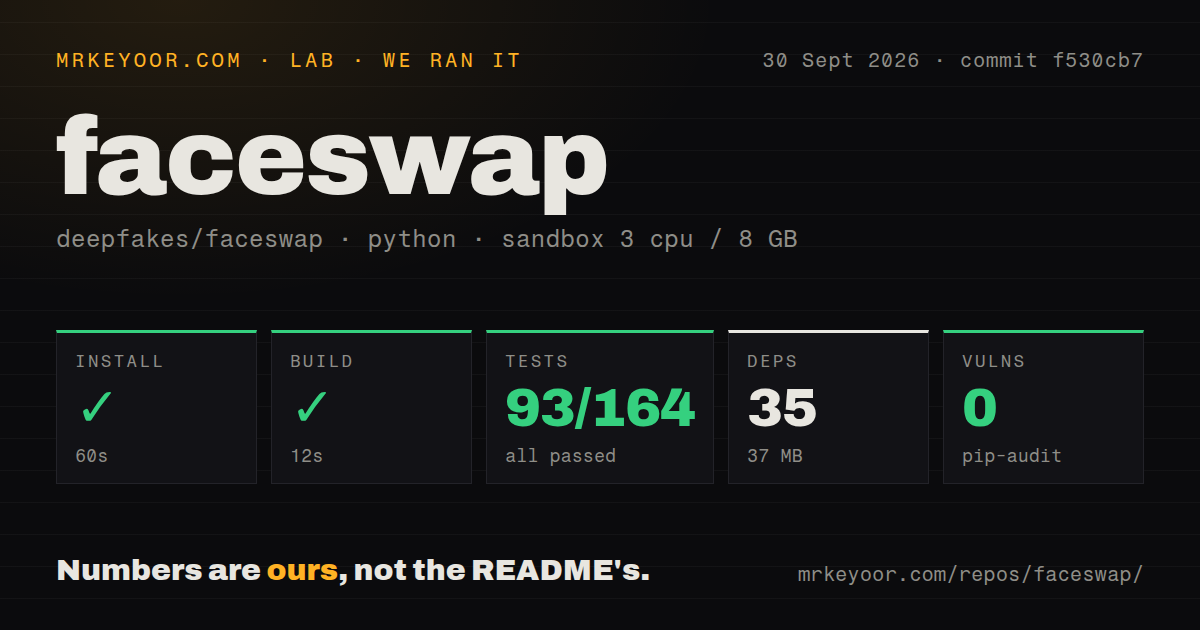
Our run was recorded on September 30, 2026, at commit f530cb7508ae670f6474f8a7d9c4df94705cf96b, dated August 5, 2026. The sandbox configuration lists 3 CPUs, 8 GB of RAM and image ghcr.io/astral-sh/uv:python3.12-bookworm. The captured install output identifies Python 3.12.12. This was a stored run; no new execution was performed for this correction.
The harness marked the install step successful after 60 seconds, but its captured output contains a conflicting result. Setup asks whether to enable ROCm support, then raises EOFError: EOF when reading a line. The backend also reports an error. An outer success flag cannot establish successful application installation when the captured setup output shows this interruption.
The dependency metrics record 35 packages and 37 MB. Those figures do not establish that all Faceswap dependencies were installed. The build step returned exit 0 after 12 seconds, but its captured tail is empty and the supplied record does not identify the command or resulting artifact. We cannot claim a verified application build or an installed CLI from that entry.
The pytest step returned exit 1 after 14 seconds. Its recorded parser summary lists 93 passed, 0 failed, 0 skipped and 71 errors, with total 164. The output contains the line "93 passed, 71 errors in 1.35s". The 14 seconds describe the harness step; 1.35 seconds is pytest's reported duration.
These counts are recorded summaries, not independently reconciled exhaustive unique test coverage. They should not be converted into a passing percentage or a claim that 71 assertions failed. The tail lists errors across configuration, utilities, startup, training and other modules, but omits the underlying test exceptions. It does not establish their cause or show whether they would occur in a completed, supported installation.
The checkout metrics were 578 files, approximately 96,644 source lines and 7 MB, with one detected CI workflow, a tests directory and no detected Dockerfile. Pip-audit recorded an advisory total of 0. Audit coverage is unknown, so this is not evidence that the full dependency environment or application is safe.
No installed-binary check, GUI launch, extraction workload, GPU training or converted video is recorded. Image quality, training speed and hardware compatibility remain unmeasured.
Plan hardware before setup
The installation guide says CPU training can take weeks compared with several hours on a GPU. The usage guide gives a ballpark of 12-48 hours on a GPU and weeks on a CPU, while explaining that model choice, image count and hardware affect the duration. These are documentation estimates, not our benchmarks.
The guide documents NVIDIA support, AMD acceleration through ROCm on Linux, and experimental native Apple Silicon GPU processing. The v3.0.0 installer release states that native Windows supports NVIDIA and CPU, with AMD users directed to WSL2 and ROCm. Check the requirements for your exact hardware rather than treating a supported operating system as proof of GPU compatibility.
The release describes installers that obtain prerequisites, set up an environment and create a GUI shortcut. Manual instructions recommend an isolated environment and hardware-specific requirements. The installation guide contains differing Python guidance across its sections, so select the instructions for your backend rather than assuming the Python 3.12.12 sandbox represents the recommended setup.
For an evaluation, first follow the appropriate installation route and confirm that the application starts. Then try extraction on a small set of media you have permission to use. Inspect those faces before starting a longer training job. These are proposed next steps, not work completed in our run.
Choose alternatives by workflow
FaceFusion documents headless, batch and queued-job commands. Consider it if those operating modes are central to your workflow. Its README explicitly warns that installation requires technical skills; the supplied extract does not establish easier setup, better results or a training-free workflow.
ComfyUI ReActor provides face-swap nodes with image inputs and outputs. Consider it if ComfyUI is already your workspace and you want to connect swapping to other nodes. This is a workflow distinction, not a measured quality comparison.
How to read the scores
The scores describe the evidence available for this review. The rubric is 1 for insufficient evidence to recommend a route, 2 for a documented route with substantial unresolved limits, 3 for a usable documented baseline, 4 for detailed evidence across the relevant tasks, and 5 for that evidence plus successful verification within a stated scope. Unknown adoption, compatibility or output quality does not earn a high score.
Setup receives 2/5 because installation routes are documented but our captured setup did not establish completion. Documentation receives 3/5 because it explains the workflow and backend choices, while acknowledging incomplete coverage and presenting differing Python guidance. Community receives 2/5 because the README identifies a forum and Discord support route, but we did not measure response quality or adoption. Maturity receives 3/5 because the project documents a complete pipeline, GUI and v3.0.0 installers, while our run leaves startup and end-to-end operation unverified.
The README rejects changing faces without consent or with the intent of hiding the edit. Obtain permission for the material and review outputs before sharing them. For a reader willing to prepare data and train a model, Faceswap offers a documented path to evaluate. Our record supports that next step, but does not establish a successful installation or finished result.