
Espanso 2.4.1 expands one YAML rule across desktop apps
Espanso watches normal keyboard input and replaces a trigger with configured content. It runs on 3 desktop operating systems: Windows, macOS, and Linux. A basic YAML match pairs a short string with a replacement, then reloads when the file changes. Because detection is system-wide, the same address, reply, code fragment, or correction can work in an editor, browser, chat client, and ticketing tool without separate snippet stores in each application.
The feature set goes well beyond fixed text. Matches can use regex triggers, dates, clipboard contents, images, forms, choices, shell output, and scripts. Rules can be included or excluded for a particular application, title, or class. A search bar inserts items that are awkward to memorize. Espanso Hub packages add shared match collections through the built-in package manager, while ordinary configuration remains a set of files a user can inspect, version, or sync.
Three desktop platforms get local expansion without a hosted account
Espanso describes itself as fully local and says it does not track users. There is no service account, API key, or central snippet server in the basic path. File-based configuration makes backup and code review straightforward. The sync guide uses a cloud folder, GitHub, or symbolic links rather than an Espanso cloud. Its environment-variable path override is marked experimental, so teams should choose one documented sync method and test service restarts before rolling it across machines.
Local operation does not make every match harmless. The shell extension can run PowerShell on Windows, Bash on Linux, or the configured shell on macOS. Script matches can invoke any installed language, and external packages are configuration files that may carry executable actions. Hub packages are described as manually verified, but external sources are also supported. Review package contents, keep secrets out of replacements, and restrict who can change a shared match directory.
What happened when we ran it
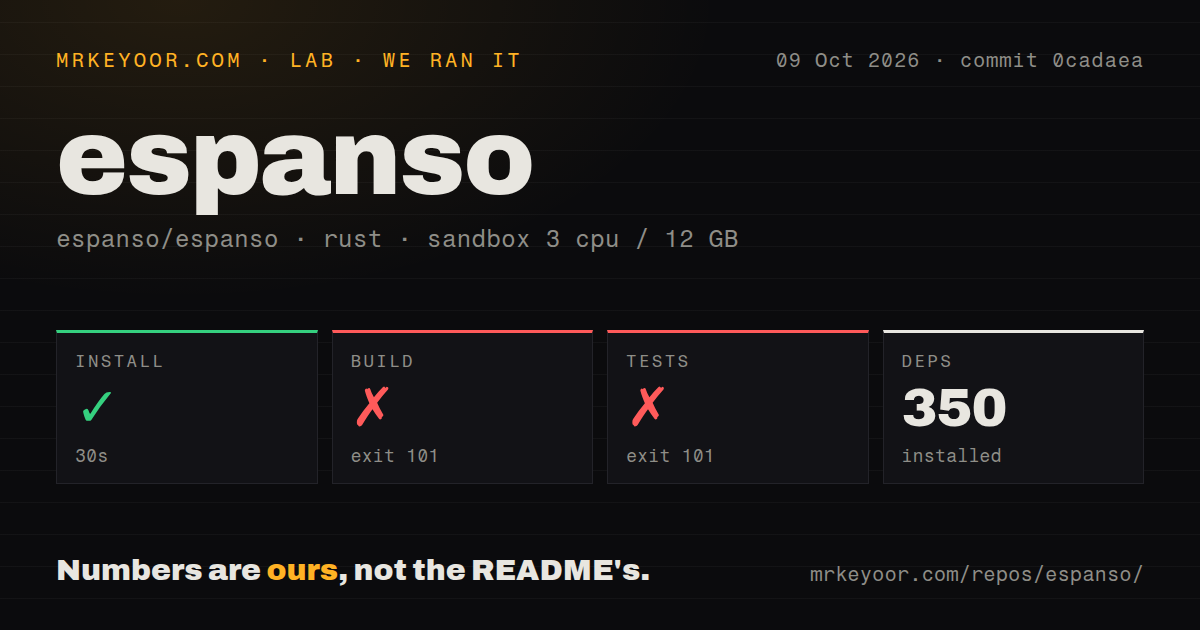
Our sandbox installed 350 Rust packages in 41 seconds. We used commit e6c3736 in an unprivileged container with 3 CPUs, 12 GB of RAM, no secrets, and the lab's Rust image. The checkout contained 572 files, about 81,431 source lines, and occupied 15.9 MB before installation. Dependency installation completed, so the failure happened later during compilation rather than while obtaining the Rust packages.
The build exited with code 101 after 103 seconds. espanso-modulo stopped because wxWidgets was not installed and the build script could not run wx-config, wx-config-gtk3, or wx-config-qt. Tests hit the same custom build command and exited with code 101 after 23 seconds. Our scan found 6 CI workflow files, no Dockerfile, and no tests directory. The log provides no completed test count, so this run cannot support a test-quality claim.
Debian source builds require wxGTK and an X11 or Wayland choice
The contributor guide explains the missing piece directly. A Linux build needs a recent Rust compiler and a C or C++ toolchain. Debian and Ubuntu instructions also list X11, XTest, XKB, D-Bus, and wxGTK development packages. Our fresh image did not satisfy that set, and the error named wxWidgets. Disabling the modulo feature can remove GUI functions such as Forms and the Search bar, but the guide says Espanso was designed around that component and warns that the reduced experience may be poor.
Linux has 2 separate build flavors. The selected binary must match the active X11 or Wayland session, otherwise the guide says installation may succeed while the app silently fails. The public README still labels Wayland experimental. Issue 2786 reports missing app-specific detection under the Niri compositor, while issue 2214 tracks a visual flash near the cursor. Anyone standardizing a team setup should test the actual compositor, target applications, keyboard layouts, suspend cycle, and login restart.
Five hundred eleven open issues make platform testing part of adoption
GitHub listed 14,407 stars, 511 open issues, 22 open pull requests, and a last push on September 2, 2026. That queue is large, but it sits beside current triage and fixes. Issue 2748, a parsing regression in v2.4.0, was closed on September 1 and is named as the main fix in v2.4.1. Older reports about suspend, boot startup, and application compatibility still receive updates, which shows use and maintenance while also documenting the breadth of desktop edge cases.
The project's platform tiers help set expectations. Current Windows 11, Apple Silicon macOS Sonoma, x86-64 Ubuntu 24.04, and Debian 12 are Tier 1. Intel macOS, Windows 10, Fedora, Arch, NixOS, and several Debian variants are best-effort Tier 2. BSD, ChromeOS, Windows ARM, and 32-bit Windows are Tier 3 or unsupported. The maintainer guide also requires manual checks for installation, service startup, GUI behavior, and an actual expansion because CI cannot reproduce every desktop interaction.
Version 2.4.1 is active, while Wayland remains the main caution
Release v2.4.1 was published on September 2, 2026, the same date as the last push. Its notes fix unquoted trigger parsing across platforms, improve Linux desktop-file installation, and address a stale daemon lock after macOS logout and login. The repository began in 2019 and uses GPL-3.0. A 6-year history, fresh release, and active maintainer list make the project look durable even though the combined issue queue is substantial.
For ordinary users, installing the signed or packaged release is more representative than compiling the 15-crate Rust workspace in a bare container. The value is easy to test: add several harmless matches, then try them in the applications where typing time is actually lost. Espanso earns a place when those expansions behave consistently and its YAML is preferable to proprietary sync. Source contributors and Wayland users have more homework, as our wxWidgets failure and the current compositor reports make clear.