egui makes immediate-mode Rust interfaces unusually approachable
egui is a pure-Rust GUI library built around immediate mode: code describes the interface to show now instead of constructing a long-lived control tree. The README example covers a heading, layout, text input, slider, button, output, and image in about 10 statements. That economy is the main attraction for a debug panel, editor, inspector, visualization, or tool where the interface serves the application.
Its reach is broader than a small widget library suggests. egui can run anywhere an integration draws textured triangles, while the official eframe framework covers the web, Linux, macOS, Windows, and Android. The web demo uses Wasm and WebGL. That does not remove platform work, but it gives Rust teams one UI vocabulary across 5 named environments.
The useful distinction is egui the library versus eframe the framework
The README is direct about scope: egui is a library you call, not an environment that owns your program. That matters inside an existing renderer or engine because the core does not insist on becoming the application shell. It includes epaint for custom 2D painting, useful for graphs, shapes, overlays, and domain-specific canvases. For standalone apps, eframe supplies the fuller route and heavier platform dependencies.
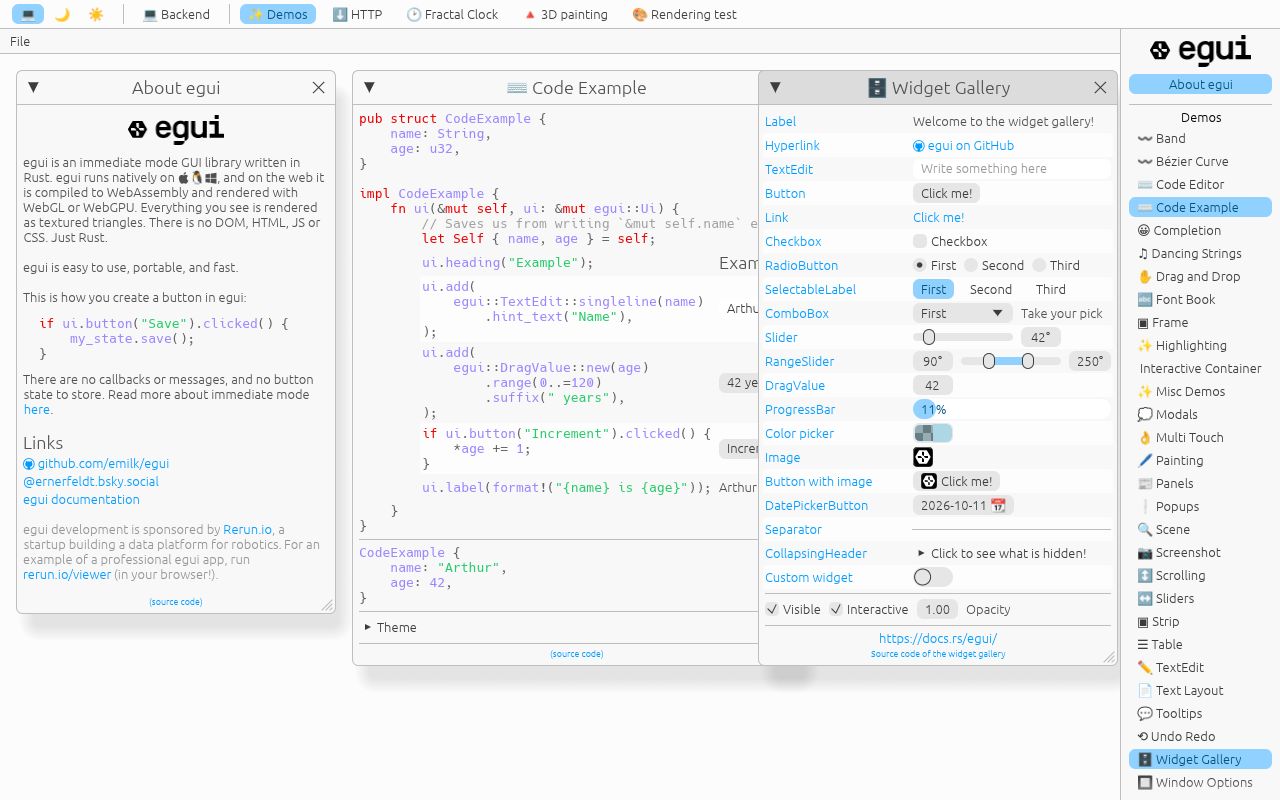
The standard surface is practical in version 0.36.1. It includes labels, buttons, links, selection controls, sliders, text editing, color picking, images, columns, wrapping, scrolling, panels, collapsing sections, and movable windows. Text editing supports multiline input, copy and paste, undo, and emoji. Rendering covers anti-aliased lines, circles, text, and convex polygons, while AccessKit provides the stated accessibility integration.
What happened when we ran it
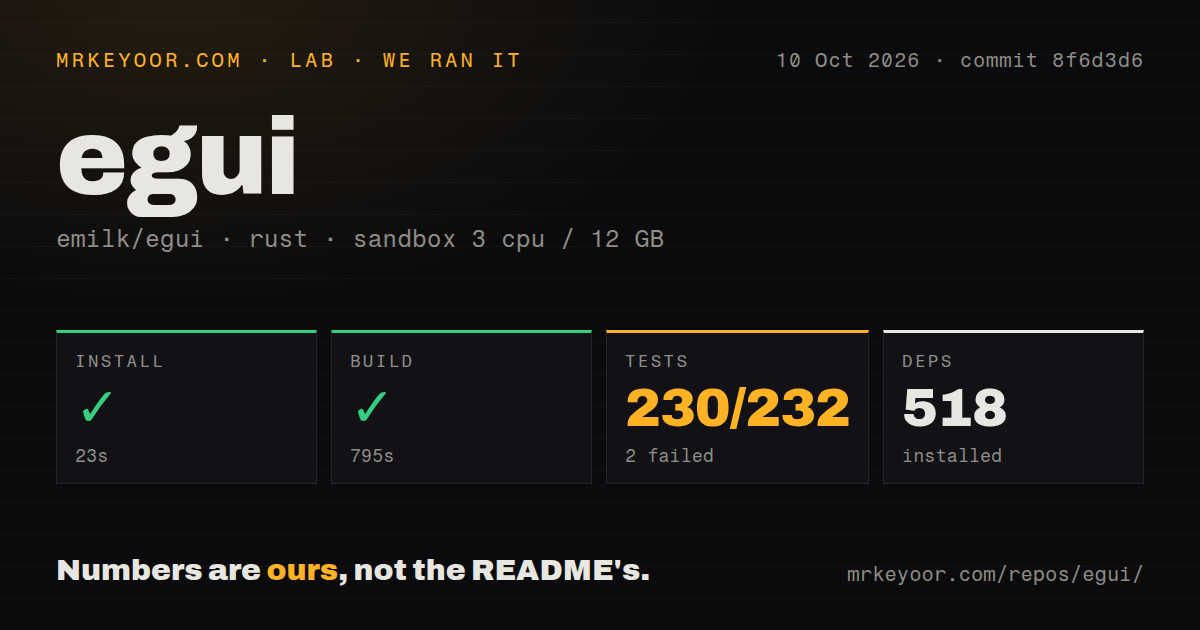
Our run used commit e63fa0b in an unprivileged Debian sandbox with 3 CPUs and 12 GB of RAM. Installation succeeded in 125 seconds and installed 487 packages. The build succeeded in 640 seconds. Those results prove the checkout completed dependency resolution and compilation in a clean environment, but also reveal the weight behind the compact example: 810 files and about 126,620 lines of source.
Tests were the exception. After 181 seconds, cargo test exited with code 101: 150 tests passed and 2 failed out of 152. The log identifies egui_demo_app --test test_demo_app as a target to rerun and reports 1 failed test in that target, but its tail does not expose the underlying assertion or error. We cannot responsibly assign a cause. Our build passed; our full test command did not.
There are 14 CI workflow files and a tests directory, both useful maintenance signals. There is no Dockerfile, so the repository does not provide a canonical container matching our setup. The README separately lists Linux packages for the native demo, including GTK 3, libclang, XCB components, OpenSSL, and libxkbcommon. It says those are demo requirements, not requirements of platform-agnostic egui itself.
Its strengths are portability, directness, and candid boundaries
The core 2D design suits applications whose state already exists and only needs to be exposed or manipulated. There are no callbacks in the pure immediate-mode model, custom widgets are presented as straightforward extensions, and small parts can be combined without adopting all of eframe. The project says egui contains no unsafe code and keeps default dependencies minimal; heavier image, windowing, graphics, and clipboard pieces live in adjacent crates.
Portability has a concrete visual tradeoff: native-looking interfaces are an explicit non-goal. The README also says egui is a work in progress, lacks features, and expects breaking interfaces in new releases. Version 0.36.1 can support professional-looking applications, with Rerun Viewer offered as an example, but maintainers do not promise painless upgrades or the deepest widget toolkit. Test accessibility, text input, platform behavior, and critical controls on every target.
The project is active, but 1,144 open issues imply triage work
Activity is not the concern. The supplied snapshot records 30,418 stars, release 0.36.1 on August 7, 2026, and a last push on September 4, 2026, the day of our review. Code is moving, the release is 28 days old, and adoption is substantial. Discussions, Discord, official docs, examples, and a runnable web demo provide several support and learning routes.
The caution is scale. There are 1,144 open issues, which may reflect broad use as well as a significant queue; the evidence does not show response times or how many are bugs. Combined with the warning about API churn, upgrades deserve planned engineering time. A same-day push argues strongly against abandonment, but does not prove any particular report will be fixed quickly. Review issues for your backend and target platform before locking a release.
It belongs inside a Rust application, not as a universal UI answer
In a real stack, egui fits beside an engine, renderer, simulation, or data-processing core. Use egui when you control drawing and event integration; use eframe when you want the official shell across the 5 named native and web environments. Keep business logic outside widget calls so API migrations stay contained, and treat third-party widget crates as dependencies with their own maintenance risk.
Choose Iced for a structured message-driven architecture, Slint when declarative UI or embedded use is central, and Xilem when exploring reactive Rust is worth younger-project risk. Choose egui when the decisive need is a direct, embeddable interface spanning browser, desktop, and engine contexts. Our 640-second successful build says the path is real; our 2 failed tests say production adoption should start with a target-specific proof.