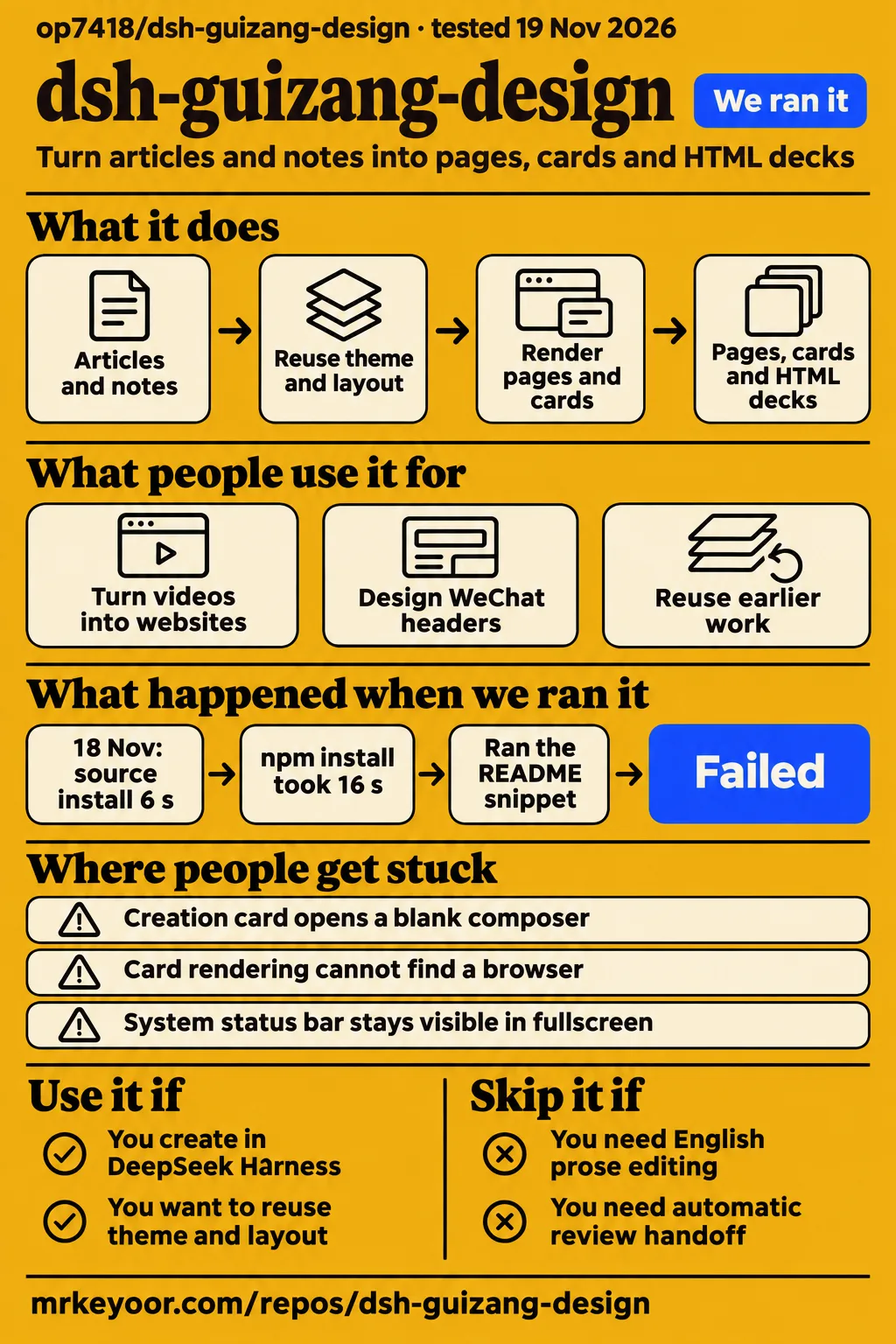
Our sandbox installed dsh-guizang-design in 6 seconds and reported 9 high-severity npm advisories. Use it if you already create in DeepSeek Harness and want related pages, cards and decks to share a design system. Skip it if you need English prose editing, automatic review handoff or a presentation workflow with documented fixes for the reported display problems.
The appeal is practical: keep a publishing style, find an earlier piece, and start the next one from its layout. Creator accounts support that use. Our repository checks support a narrower conclusion about setup and tests. The open issues deserve as much attention as the sample designs.
What people use dsh-guizang-design for
Author op7418 reports turning long videos into readable single-page websites, then reading and reviewing the material in that form. That is a useful reason to try the page skill: the output becomes something you can revisit at your own pace. The author describes faithful and explanatory modes, so decide whether you want the original material preserved or additional explanation before asking for a page. Author's account
- Op7418 also says most of his published text and image content uses these skills and this workflow. His recurring use explains the emphasis on reusing earlier work and combining formats. It is the author's own production account. Recurring publishing workflow
- X user xiaomovps describes a separate workflow: ModSearch gathers material, dsh-media-desk handles writing and management, and dsh-guizang-design handles the final design and illustrations. The user reports a more convenient, complete creation process, including cards, WeChat headers, long images and simple pages. X workflow report
- The independent dsh.so registry reports web startup and plugin activation for version 0.1.4 with DSH 0.2.2-rc.3 on November 17, 2026. Its evidence checks loading and serving the host page, rather than judging a finished publication. Registry runtime record
Those accounts put the plugin near the end of a creator's workflow. Research and writing can happen elsewhere, then the design skills turn the material into a page, PNG cards or an HTML deck. The maintainer documents shared themes and fonts across these outputs. That packaging is the reason to choose the plugin over collecting unrelated layout prompts. Maintainer documentation
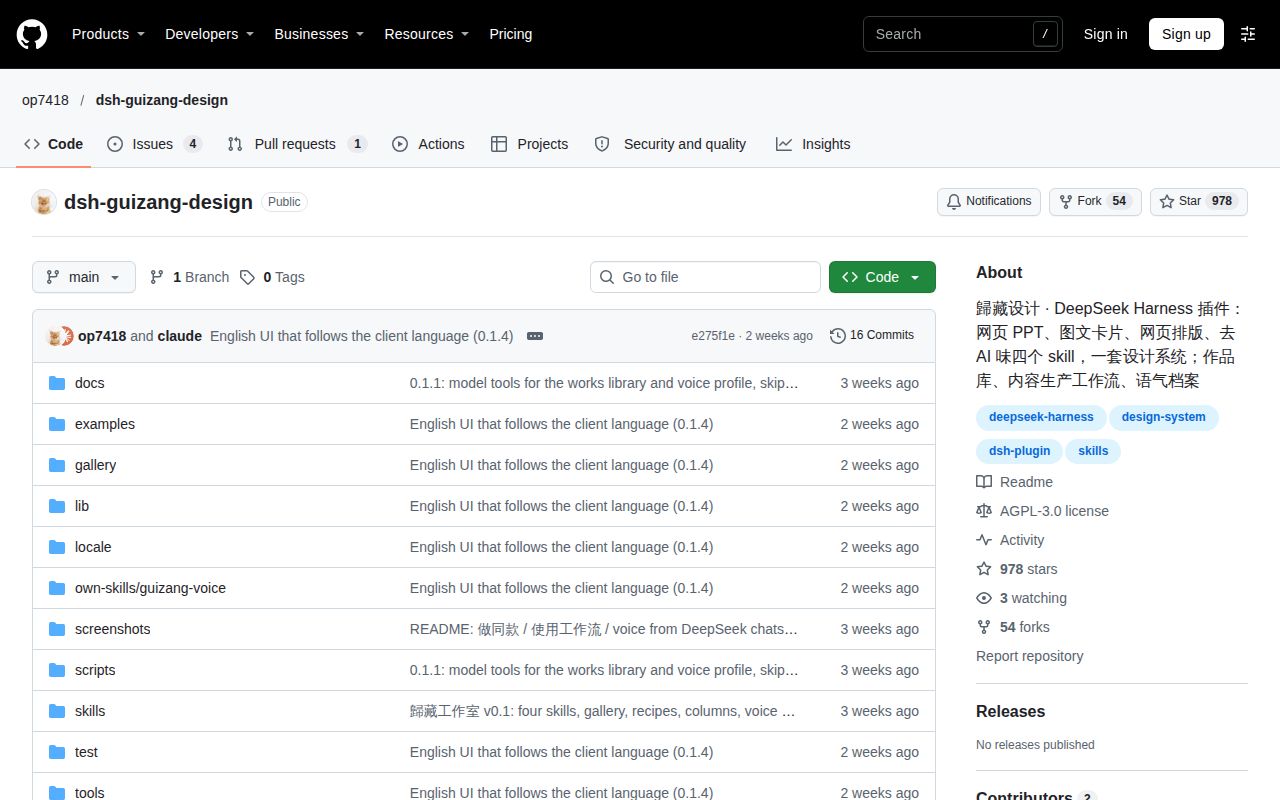
The directory lists the last repository push as November 5, 2026, while the sampled issue records contain open reports about integration and host behavior. That is a young project with concrete user feedback to read. Directory badges and promotional praise are less useful for an adoption decision than those reports and the named creator workflow above. Repository date
What happened when we ran it
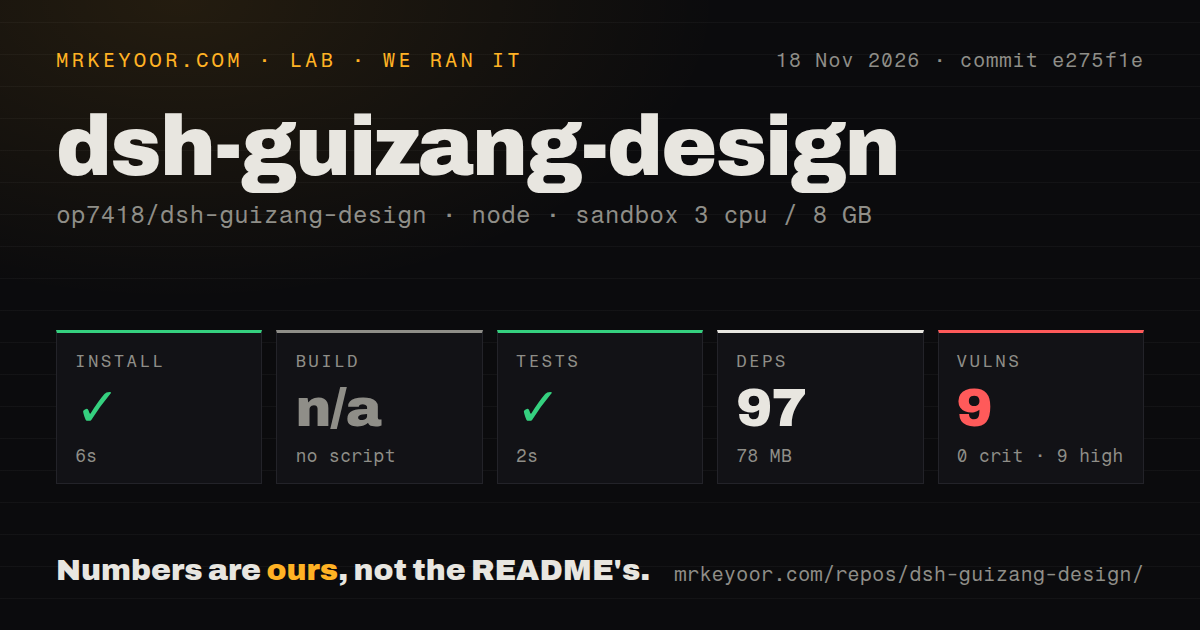
Our November 18, 2026 sandbox run at commit e275f1e installed dependencies in 6 seconds and passed the test step in 2 seconds. There was no build script or target, so the build step was skipped. Those are repository checks, with the results below taken from our recorded lab measurements.
| Check | Our recorded result | What to take from it |
|---|---|---|
| npm installation | Succeeded in 6 seconds | The recorded dependency installation completed |
| Dependency footprint | 97 dependencies, 78 MB on disk | This is the recorded dependency footprint |
| Build | No build script or target, skipped | There is no passing build result to cite |
| Tests | Succeeded in 2 seconds | The test command passed; the supplied block gives no test count |
| npm audit | 9 known vulnerabilities, all high severity | Dependency review belongs before adoption |
| Repository scan | 199 files, about 7,509 source lines, 15.2 MB checked out | A source inventory, separate from installed dependencies |
| Automation signals | No CI workflow files, no Dockerfile, tests directory present | Tests exist, without a detected CI workflow in this checkout |
The sandbox configuration recorded 3 CPUs, 8 GB RAM and the image label lab-node:22. The label is configuration metadata. Actual Node and operating-system versions require the raw toolchain logs. Our quick installation therefore gives you one concrete setup observation, rather than a promise about your laptop or the desktop host.
The audit finding changes our recommendation more than the short install time does. Nine high-severity advisories are a reason to inspect the dependency paths before using sensitive material. The supplied summary gives severity totals without package names, advisory identifiers or affected paths. It supports reporting the finding, not naming a vulnerable component or prescribing an upgrade. The authentication report discussed below is separate evidence from an issue author.
Where people get stuck: desktop entry and browser exports
Desktop users should install through Plugins, and card rendering requires Playwright Chromium; PDF and long-image exports use local Chrome. These are different setup paths. A plugin that appears in the sidebar can still need a browser before it produces the file you wanted. Follow the path for your output instead of treating every export error as a failed plugin installation. README setup instructions
| Symptom | Documented action or issue status |
|---|---|
| Installed, but no active plugin | Click Enable now, or turn it on in the plugin list |
| Desktop CLI command errors | Use Plugins → Add plugin in the desktop app |
| Card rendering cannot find a browser | Run npx playwright install chromium, then retry |
| PDF or long-image export needs Chrome | Install local Chrome or set CHROME_PATH |
GitHub install stops at ERR_PNPM_GIT_DEP_PREPARE_NOT_ALLOWED or ERR_PNPM_IGNORED_BUILDS |
The directory documents approving the exact allowBuilds key DSH prints for a trusted source, then retrying; pin a commit |
| Creation card opens a blank composer | Issue #5 reports entering the slash command manually as the workaround |
The browser and desktop instructions come from the maintainer README. The build-approval errors and pinned-source advice come from the Awesome DSH Plugin directory. Approving an install-time script means trusting that source to run code. The npm distribution is also documented there as a prebuilt route.
The desktop problem has a specific shape. In issue #5, a macOS DSH NEXT user running embedded DSH 0.2.2-rc.1 and plugin 0.1.4 clicks a creation card. A new conversation opens, but the skill command never appears. Typing the slash command manually lets the user continue. The reporter suggests messaging timing or a host API difference as possible causes; the supplied thread is open and records no permanent fix. Desktop report
Local files still reach the selected model during voice learning
The README says voice-learning material is handed to the currently selected model when you start learning from your chats. The profile lives on disk, but local storage alone does not make the analysis local. Choose what material you supply according to the model you have selected, especially if earlier conversations contain work you would not ordinarily send to that provider. Voice data handling
The documented storage location is $DSH_HOME/guizang-design/, defaulting to ~/.dsh/guizang-design/. The library stores paths and titles rather than copies of your work. voice.md holds the profile, while voice-corpus.md holds collected messages. Removing a library entry leaves the original artifact in place. Deleting those local profile files is the documented way to remove them locally. Storage documentation
A separate concern comes from issue #1. Its author reports that registered local routes lack admission checks, including routes for removing works-library entries and collecting voice material. The proposal is to call connection.requestRejection(req) before dispatch and reject requests when authentication is missing or throws. The supplied record is an open code-review report with no implemented fix. Treat it as a reported security concern, with the reproduction boundary collected at the end of this review. Authentication report
English documentation exists; the editing skill targets Chinese
The project is Chinese-first and has an English README; the maintainer says switching DSH to English changes the plugin page, workflow drafts and official examples without reloading. An English reader has a documented entry point, although the /humanizer-zh skill specifically edits Chinese prose. An English interface should not be read as evidence of an English cleanup tool. English README
The social formats also reveal its original audience: Xiaohongshu card sets and WeChat headers sit alongside square sharing cards. That matters when you decide whether its ready-made workflows fit your publication. The bilingual workflow is documented as producing Chinese and English pages, with the English rewritten for its readers. It is a different operation from preserving an existing English article exactly. Choose the page mode and workflow deliberately. Documented outputs and workflows
Where recurring production hurts: review queues and presentation screens
Issue #2 reports that works-library registration skips the official present path used by human-review plugins. For an individual, finding yesterday's card in a gallery may be enough. For a team, a gallery entry and an approval queue serve different jobs. The issue author, who maintains Review Outbox, asks for an official present call after library registration so the deliverable also enters that review path. Review integration report
The proposal in issue #2 is open in the supplied record. If your publishing process depends on a human accepting each artifact, account for the handoff explicitly. Automatic library registration is a way to organize and reuse work; it should not be presented as proof that a reviewer has received or accepted it.
Presentation control has its own report. The author of issue #4 says a system status bar stays visible after fullscreen, and requests automatic external-display detection, display selection and fullscreen playback on the current screen. The supplied issue is open without a recorded workaround. Anyone choosing this mainly for live talks should treat those requested controls as unresolved requirements. Audience-screen report
Existing installations can also change what runs. The README says a same-named skill in ~/.dsh/skills or a project's .dsh/skills overrides the bundled snapshot. Before comparing two machines' output, check which skill each machine is actually loading. That is a concrete reason two people can install the same plugin package yet be working from different skill instructions. Skill precedence
dsh-guizang-design vs standalone Guizang skills and Humanizer-zh
Standalone Guizang skills are the documented alternative when you use Claude Code, Codex or another agent instead of DSH. The plugin adds a sidebar, works library, voice profile and combined workflows around bundled skill snapshots. Choose the packaging that matches where you already work. Moving into a new host solely to typeset one article would need a stronger reason than a gallery. Maintainer's packaging explanation
| Choice | What the documentation supports | Pick it when |
|---|---|---|
| dsh-guizang-design | DSH integration, shared design system, works library and voice profile | You create repeatedly inside DSH and want to reuse work there |
| Standalone guizang-pages-skill | Article and note typesetting for Claude Code, Codex and other agents | Your existing agent needs page layout without the DSH studio |
| Standalone Humanizer-zh | Guidance for editing Chinese filler and repetition while preserving facts and voice | Your job is prose editing rather than managing visual deliverables |
The standalone page README documents HTML pages and PDF or long-image export. The Humanizer-zh README describes instructions an agent follows, rather than an independent detection program. It explicitly disclaims proving authorship or guaranteeing an AI-detector result. Those are useful alternatives by task, without a claim that either produces better output than the plugin.
The author also compares the voice profile with his earlier cleanup workflow: removing stock phrases did not tell the model how the writer normally sounded. The plugin's profile is intended to supply that context. That explains the feature's purpose; it is an author-reported advantage, separate from a measured improvement in writing quality. Author's comparison
What the other reviews get wrong
DeepSeekV4Pro's guide says nothing is uploaded, but the maintainer explicitly describes sending collected voice-learning material to the selected model. The guide's local-storage description leaves out the consequential part of that flow. The author's NetEase promotional article uses similarly broad language about data staying local. Read the storage and analysis steps separately. Guide's claim and maintainer's qualification
DSH Plugin Hub at dsh-plugin.org gives contradictory desktop advice. Its installation section suggests desktop or desktop-NNN as CLI profiles, while its troubleshooting section correctly sends desktop users to the plugin UI. The maintainer says the desktop profile is app-managed and the desktop CLI command errors. Follow the UI instructions. The same directory's blanket claim that creation cards prefill drafts also needs the host-specific exception recorded in issue #5. Directory instructions and desktop exception
The author's promotional article says generated content displays normally offline because fonts are bundled. The README gives a condition: cards embed fonts by default, while web pages need --embed. Use that option for pages you intend to read offline. This corrects the font claim; it does not promise that every external resource in an arbitrary page will be available without a connection. Promotional claim and font requirements
Questions people ask
Install dsh-guizang-design in DeepSeek Harness desktop through Plugins → Add plugin, enter the package name, then click Enable now. The desktop profile is managed by the app. Installation instructions
How do I install dsh-guizang-design in DeepSeek Harness desktop?
Use the Plugins page, enter dsh-guizang-design, install it and enable it. Closing the completed installation dialog leaves the plugin off, so turn it on in the plugin list if necessary. The maintainer documents uninstalling and installing again as the UI upgrade route. Desktop setup
Which DSH versions does dsh-guizang-design support?
The README requires DSH >=0.2.1-rc.2 <0.3.0. For the self-run web CLI, it additionally lists Node.js 22.19 or newer and pnpm. Keep that documented requirement separate from the image label attached to our sandbox. Compatibility requirements
Why does card rendering need a browser, and how do I fix a missing-browser error?
Card rendering uses Playwright Chromium to produce its images. The documented missing-browser remedy is npx playwright install chromium, followed by another render attempt. PDF and long-image page exports use local Chrome or CHROME_PATH, so preparing one browser path does not describe both export paths. Browser requirements
Why is my works library empty after installation?
Earlier artifacts need to be registered by file path; automatic registration applies to work made after the plugin is installed. Ask the model to register the earlier file in the works library. The library records metadata and paths rather than copying the artifact itself. Library FAQ
What should I do when voice-profile learning cannot find long messages?
Supply articles you wrote through the article-supplement option. The documented collector uses personally typed messages longer than 30 characters, excluding system messages and skill injections. A history of brief chat replies can therefore leave it without the material it expects. Voice collector FAQ
How can I avoid slow font loading and view generated pages offline?
Cards embed fonts by default; render web pages with --embed to embed their fonts too. The README presents this as the remedy for slow font loading on domestic Chinese networks. It is font-handling advice, not a measured speed comparison for readers elsewhere. Font FAQ
Is dsh-guizang-design free, and who pays for model usage?
The plugin is AGPL-3.0, with bundled skills retaining their own licenses. DeepSeekV4Pro's guide says installation is free and model usage is billed by the model provider. Do not budget for unlimited generation simply because the plugin is open source. Maintainer license and guide's billing explanation
Does Make same style copy the previous work's content?
Make same style references the previous work's theme and layout in a new conversation; you supply new content. The README describes this as a reuse shortcut for the design. It is a useful fit for recurring publications whose subject changes while their visual treatment stays familiar. Style reuse
Can the audience screen automatically detect an external display and present fullscreen on it?
Automatic external-display detection and selection are requests in open issue #4. The report asks for wired and wireless display handling and describes a visible system status bar in fullscreen. The supplied thread records no resolution. External-display request
Can I play the presentation fullscreen on my current screen without an external display?
Current-screen fullscreen playback is also requested in issue #4. The record supports describing that request and its open status, rather than promising the requested behavior. If this is essential for your talks, include it in your acceptance check on the host you intend to use. Current-screen request
Why do creation cards open a desktop conversation without prefilling the skill command?
The cause is unconfirmed in issue #5; its reporter suspects message timing or host API differences on macOS DSH NEXT. The recorded workaround is to type the slash command manually. The report concerns plugin 0.1.4 with embedded DSH 0.2.2-rc.1, rather than every DSH host. Prefill report
Can the plugin's local routes require host authentication?
Issue #1 proposes using the host's connection.requestRejection(req) check before routing requests, with rejection when the connection is unavailable or throws. The supplied thread remains an open proposal, without evidence that the change shipped. Its author's report is the basis for this concern. Proposed authentication check
What we have not tested yet
Our evidence stops before generating and judging a finished page, card set or deck. We have not tested design quality, faithful preservation of source material, voice matching, English workflow output, accessibility of finished artifacts or browser export on a user's desktop. No independent output-quality comparison accompanies the supplied creator accounts. The registry's startup and activation checks do not establish those outcomes.
A later lab run on November 19 used commit e275f1e4d4a8 and the generic quickstart-lib recipe. Its snippet step failed because the README has no JavaScript/TypeScript code block to run. That is the recorded no-snippet finding, not a rendering failure: the documented usage is through DSH skills. Teardown was recorded as successful. This later record supplies no completed publishing task or output screenshot. The installation, footprint and test figures in this review come only from the designated November 18 measurement block.
We did not reproduce the authentication report as an exploit, inspect network traffic during voice learning or establish whether deleting local files affects data already processed by a model provider. The nine audit advisories lack package-level detail in the supplied measurement summary. They cannot be connected to issue #1 from these records. Presentation behavior and the proposed review-event integration also need their own host-level checks.
Nor do we have a volume benchmark for a busy publication. The XGrowing performance summary traces the no-lag and no-overheating assertion to an author post; it is not our benchmark. The supplied YouTube ecosystem commentary discusses reusing writing style and design, rather than supplying an output-quality assessment. Its record does not identify a channel, and the other supplied YouTube records contain no transcript. Performance account and ecosystem commentary
Start an evaluation with one article you can compare against its source. Keep its HTML page, rendered cards and exported file together, then check the skill version, text, fonts and review handoff before making it your recurring publishing workflow.