
React and MDX turn documentation into a maintained website
Docusaurus v3.10.2 treats a docs site as a React application whose usual content happens to be Markdown or MDX. The classic starter supplies documentation, a blog, custom pages, navigation, and dark mode. Writers can stay in Markdown for ordinary pages, while developers can place JSX, TypeScript, CSS, and npm packages beside the content when a product needs more than prose.
That breadth has a visible cost in the project itself. Our checkout contained 4,246 files and about 130,095 lines of source before dependencies. Docusaurus is a workspace of packages, themes, plugins, examples, and its own website rather than one small renderer. A team adopting the released packages does not inherit that whole repository, but a contributor or deep debugger has to understand parts of it.
Static output keeps hosting separate from authoring
A production build writes static files to the build directory. Docusaurus does not require its own application server after that step, and the deployment guide lists GitHub Pages, Netlify, Vercel, self-hosting, and other static hosts. The site can generally work without browser JavaScript, although interactive React components naturally depend on it. This separation makes the deployment model easy to reason about.
Configuration still has sharp corners. The url, baseUrl, and trailingSlash values must match the host, and the official guide warns that identical output can behave differently across hosting providers. Our full repository build took 314 seconds, which is not a forecast for your site. Content volume, plugins, locales, and preserved versions will determine the build you pay for on every deployment.
Versioning copies the docs tree and should stay selective
Running the version command copies the current docs folder and sidebar into versioned directories. That gives users stable pages for older releases and lets the current docs continue changing. It also duplicates content. The Docusaurus guide says most sites do not need versioning, recommends it for frequently changing, high-traffic documentation, and suggests limiting preview builds to 2 or 3 versions when startup gets slow.
Internationalization follows the same file-first approach. Each locale receives translated Markdown, JSON labels, and plugin-specific data under an i18n directory. Locales can be built and deployed independently, and Crowdin is an integration rather than a requirement. That is a sensible fit for a large project. For one language and one supported release, much of this machinery will sit unused.
What happened when we ran it
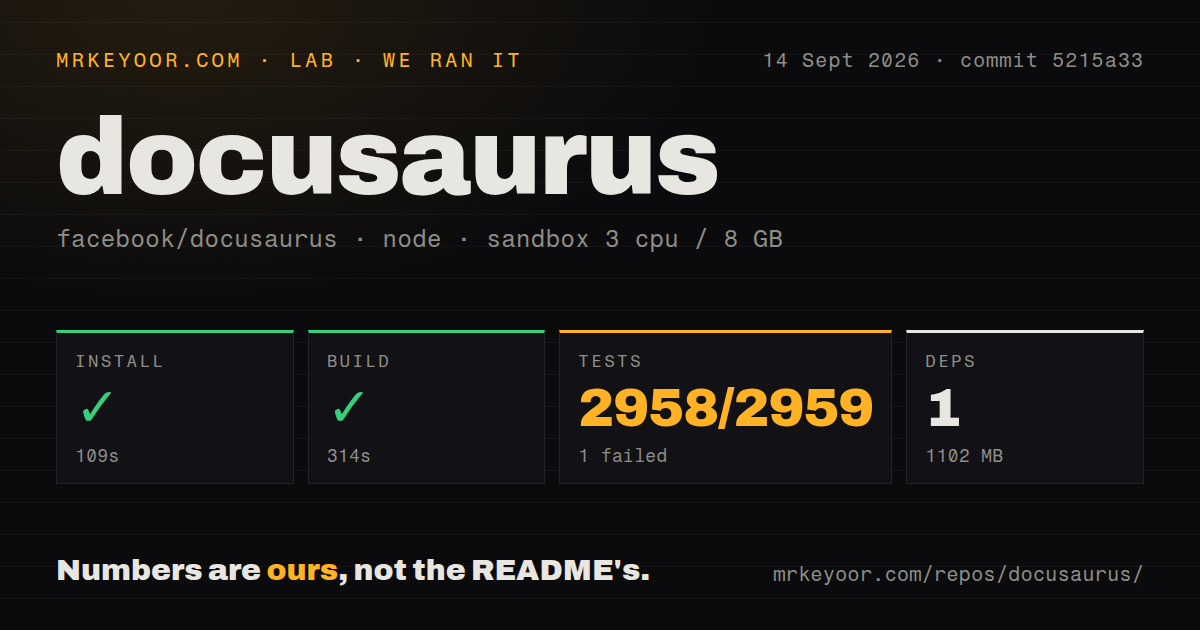
Our sandbox installed the Docusaurus monorepo in 109 seconds. The lab recorded 1 package installed, yet the resulting dependency footprint was 1,102 MB, so the package counter should not be read as a small environment. The build completed successfully in 314 seconds inside an unprivileged container with 3 CPUs, 8 GB of RAM, Node 22, and no secrets.
The test command failed with exit code 1 after 48 seconds. Vitest reported 2,958 passing tests and 1 failure out of 2,959 across 183 test files. The failed file was packages/docusaurus-utils/src/vcs/__tests__/gitUtils.test.ts: 40 of its 41 tests passed, and the summary recorded 1 failed snapshot. The supplied log tail ended with ELIFECYCLE and did not show enough detail to name the mismatch, so we will not guess.
The same 62.9 MB checkout had 17 CI workflow files and a tests directory, but no Dockerfile. That is much more project infrastructure than nano-sized tools usually expose. It also makes the single failure worth reporting precisely: the suite exercised thousands of cases, while commit 5215a33 did not finish green in our stated Debian environment.
Stable v3 starts on Node 20, while core contribution is heavier
The v3.10.2 installation guide requires Node.js 20 or newer and scaffolds a site with npx create-docusaurus@latest my-website classic. A generated site has familiar docs, blog, src, and static folders plus its configuration and sidebar. You can preview it locally, then copy the built directory to a static host. No database or Docusaurus account is involved.
Swizzled theme internals can break on minor upgrades
Docusaurus calls component replacement swizzling. Wrapping a theme component keeps the original implementation and adds code around it; ejecting copies the component into your project. The swizzling guide warns that unsafe components can change incompatibly during a minor theme release. A custom header can therefore become code your team must compare and repair during upgrades.
MDX also carries HTML and React parsing edge cases. Open issue 12449, filed against v3.10.2 on September 15, 2026, reproduces a newline inside an anchor becoming a paragraph element and breaking a table after formatting. That report is still awaiting triage. It is a narrow bug, but a useful reminder to build rendered docs in CI instead of treating Markdown edits as text-only changes.
Search is an integration, not a built-in local index
The official search path is Algolia DocSearch. It needs an application ID, a public search API key, and an index, and the hosted crawler normally reads the public site. Private sites can run a crawler themselves. Typesense and local search plugins are listed as community options, so teams behind a firewall should choose and test that dependency before promising search.
Development remains active around the 398 combined open issues and pull requests. GitHub recorded 66,247 stars and a last push on September 14, 2026; v3.10.2 was released on July 10. The open v4 umbrella issue lists Node 24, React 19.2, TypeScript 6, and other migration work, but v4 is not the latest stable release. New adopters should use the stable guide and watch that issue rather than configuring against main.
Docusaurus is worth its weight for docs with product requirements
Choose Docusaurus when versions, locales, a blog, custom React pages, and static deployment are requirements you would otherwise assemble yourself. Its 2,958 passing tests, active release work, and detailed manuals support that choice, while the single failed snapshot keeps our result short of clean. For a compact manual with one language and little custom UI, a smaller generator leaves less code, fewer dependencies, and fewer upgrade decisions to own.