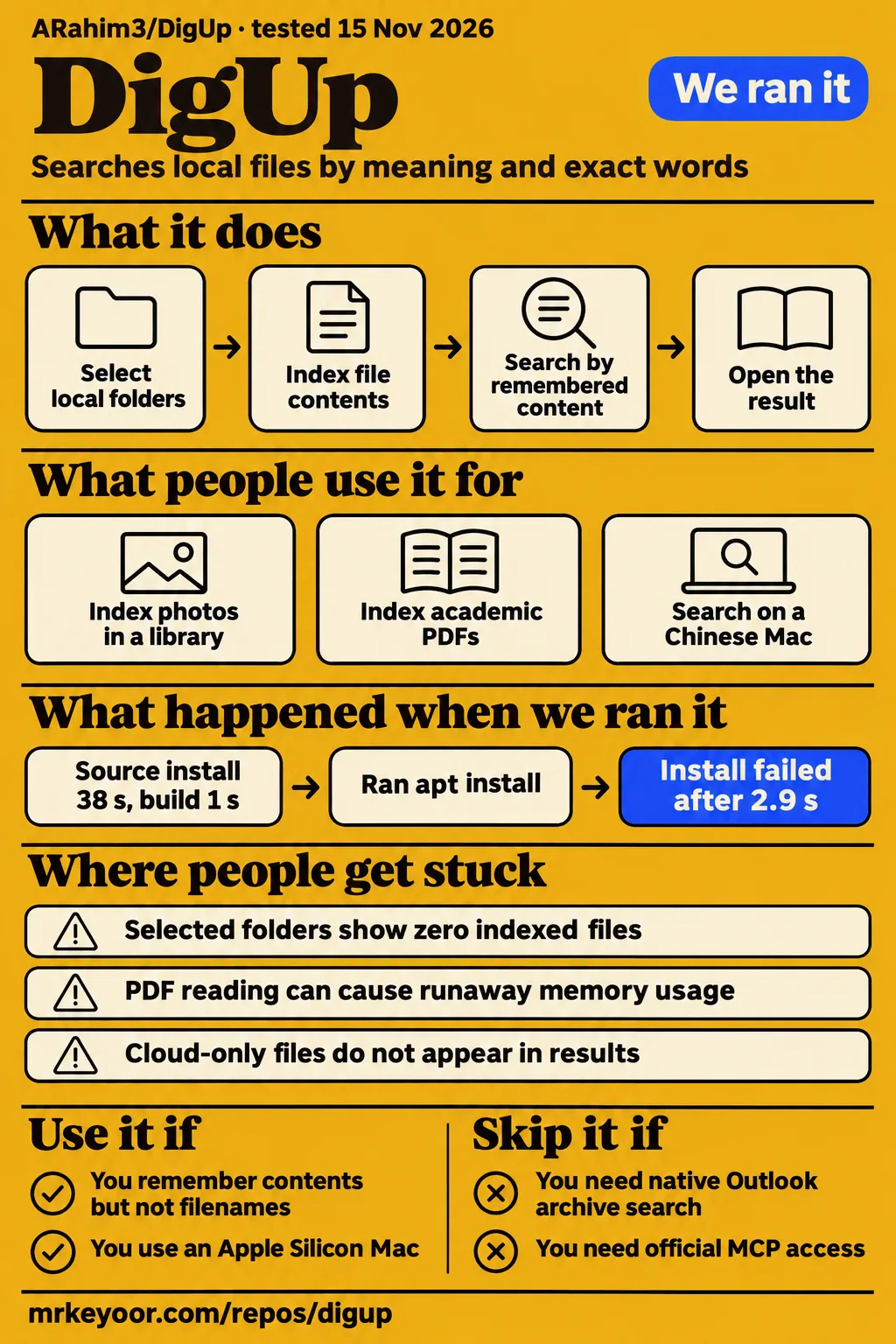
DigUp is worth trying on a few selected folders when you remember a file's contents but have forgotten its name. Keep your existing desktop search. Skip DigUp if your decision depends on native Outlook archives, an official MCP connection or automatic Apple Photos-library indexing. Our recorded harness completed its dependency and build steps, while the separate desktop attempt stopped before the application could run a search.
Selected folders define what DigUp can find
DigUp searches selected local files by meaning and exact words, using EmbeddingGemma 2 for the semantic part. The project README describes searching pictures, PDF pages, documents, recordings and video, with a separate opt-in index for code. This is useful when the remembered clue is a scene or subject rather than a filename. Exact matching still matters for an invoice number or error message, which is why the project combines both retrieval methods.
Think about the folder before the query. An ordinary directory of exported photos fits the documented workflow. A Photos library, cloud placeholder or mailbox container can require a different route. A remembered image cannot appear by meaning until its contents have actually been read. That makes the folder counts and exclusion explanations part of everyday use, rather than settings you visit only when something crashes.
The public demo is narrower evidence than a comparative review. Google's @googlegemma X post promotes scene search, timestamps and code lookup. In the supplied transcript of Find Anything with DigUp Local AI, the presenter prepares a mixed folder, identifies a home-inspection PDF and proposes finding a squid in an animal video. The extract stops while the test material is being introduced. Its channel identity is absent from the record, and that excerpt supplies no final search outcome to score.
What people use DigUp for
GitHub reports show people trying DigUp with personal photo libraries, academic papers and everyday multilingual Mac use. These accounts are more helpful for choosing a first folder than the generic promise to find anything. They also show that a use case can be real even when the outcome is a workaround or a bug report.
| Person and task | What happened | What that means for you |
|---|---|---|
| MrCreonLevit, opening an Apple Photos package | Described dragging its originals folders into DigUp's folder picker. Issue #43 | Accessing the underlying folders is a manual workaround. |
| imcl75, trying the same library route | Reported needing all sixteen originals subfolders individually, with an existing Pictures selection causing an overlap conflict. Issue #43 | Adding the parent originals folder was insufficient in this account. |
| jiaxu0715, indexing files including academic PDFs | Reported severe memory growth, then said it stopped after the entire sync finished; the maintainer described a partial fix in 0.6.1. Issue #3 | A PDF-heavy collection deserves attention during its first pass. |
| Simonxiaoxueboshi, using a Traditional Chinese Mac | Reported daily use of 0.6.2 and requested translated menus and settings. Issue #77 | Daily use is documented, without a search-accuracy result. |
| szpak, trying the Linux beta on Fedora | Got the application running after adapting the Debian package, then interrupted estimation after unexpected folder inspection. Issue #128 | Read the estimation explanation before choosing personal folders. |
Malcomle also tried a contributor modification for Apple Mail: an .emlx reader plus crawling Mail packages. Their issue #69 report describes an initial 19-hour estimate for roughly 30,800 messages. This was an experiment with modified readers, not a shipped mailbox feature. Apple Mail experiment.
The Photos case is particularly revealing. MrCreonLevit found a path through the package, but imcl75 then encountered dataset detection and overlapping folder selections. Those are two different barriers around the same collection. If the photographs you care about already exist in ordinary exported folders, begin there. Exporting a small collection gives you a clearer first evaluation than reorganizing the folder list around the package workaround.
What happened when we ran it
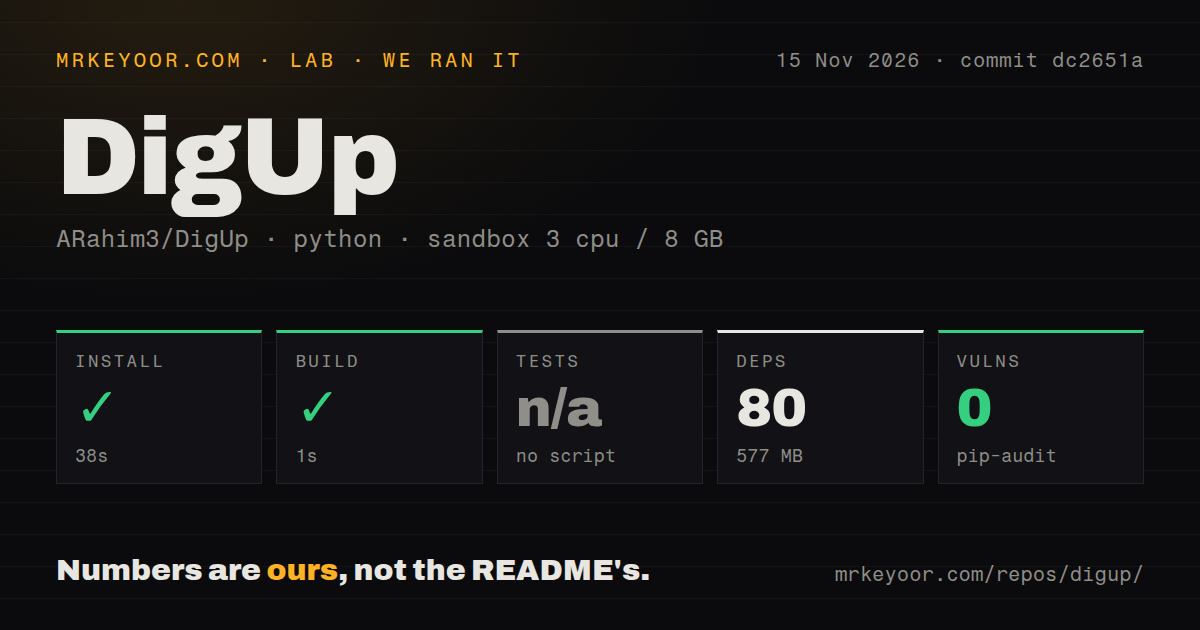
Our sandbox recorded a successful dependency step in 38 seconds and a successful build step in 1 second at commit dc2651a on November 15, 2026. The harness identified Python work under ./worker/. Its recorded configuration was 3 CPUs, 8 GB RAM and image label ghcr.io/astral-sh/uv:python3.12-bookworm.
| Recorded harness item | Result |
|---|---|
| Dependency step | Succeeded in 38 seconds; 80 dependencies recorded |
| Installed footprint | 577 MB on disk |
| Build step | Succeeded in 1 second |
| Tests | Skipped: no tests script or target |
| pip-audit | 0 known vulnerabilities reported |
| Checkout | 311 files, approximately 35,621 source lines, 13.5 MB |
| Repository signals | 4 CI workflow files; no Dockerfile or tests directory detected |
Those are the supplied harness observations, not a stopwatch result for the downloadable desktop application. The upstream README describes a Swift search engine, a SwiftUI Mac application and a Tauri shell for Windows and Linux. Calling the harness's Python classification the desktop application's architecture would misdescribe the project. We retain the recorded result and its scope rather than silently turning it into a native application build.
A separate desktop attempt used commit dc2651ad8299 in a fresh Debian container on the same date. It stopped at the package step with E: Unsupported file ./DigUp_x.y.z_amd64.deb given on commandline, exit 100. The step record and finding record preserve that error. The command used the README's placeholder filename. It does not show a real release asset being installed, so the failure supports a failed recipe execution, not a finding that DigUp itself cannot run.
Where people get stuck: indexing before searching
Selected folders can still show zero indexed files, and issue #67 contains reports from both Mac and Windows users. The maintainer asks for the folder status and logs rather than claiming a single cure. The official troubleshooting page supplies a more useful diagnostic order: model completion, exclusion reasons, scheduling and platform-specific defects.
| Symptom | Check or action supported by the records | Resolution in the evidence |
|---|---|---|
| Zero indexed files | Finish both model downloads; inspect “N not read”; check pause, charger and schedule settings. | Issue #67 remains open in the supplied record. |
| Cloud documents missing | Make the folder available offline in the provider's application. | Documented workaround: DigUp reads local copies. Troubleshooting |
| A selected code-like folder yields only screenshots | Explicitly add that folder; add nested code projects separately if their whole contents are wanted. | Current docs say explicitly selected folders are read whole. Troubleshooting |
| A Windows folder stops before indexing | The docs identify a former problem with files between 2 and 4 GB. | Docs name 0.7.0-beta.2 as the fix for that cause. Troubleshooting |
| Index complete, semantic results empty or wrong | Try Settings → General → Run the model on the processor. | Documented fallback for affected graphics cards, described as slower. Troubleshooting |
The distinction between a selected folder and a nested project matters if you keep your home directory in Git. The troubleshooting page says that code-project markers once caused even an explicitly selected folder to be treated as screenshot-only. Its current rule changes that selected-folder behavior while retaining special treatment for nested projects. Check the exclusion explanation against the folder you actually added before assuming the model misunderstood your search.
PDF handling and rescans have different failure histories
The maintainer reports a runaway-file safeguard in 0.6.1 and rescan fixes in 0.6.2, in different issue threads. Those details matter more than a blanket statement that “memory problems were fixed.” A file reader consuming memory and a watcher repeatedly scanning unchanged folders need different evidence and different remedies.
In issue #3, jiaxu0715 reported memory reaching 55 GB. Removing one academic paper did not immediately end the complaint: the user then saw CGPDFService growth and eventually reported that it stopped after sync finished. The maintainer says 0.6.1 stops a runaway reader, skips its file and makes pause or quit stop processing. They explicitly leave the ownership of those CGPDFService processes unresolved. This is a partial diagnosis with a released safeguard, not proof that every PDF-memory report has one cause.
Issue #68 tells a different story. astelmach20 traced recurring no-change scans to an active MongoDB data directory on the Desktop. The maintainer's closing reply says 0.6.2 fixes both broad rescans triggered by constantly rewritten files and slow scans through iCloud or Google Drive folders. The practical response is to update for those fixes, then keep unnecessary database or build directories out of the selected collection. The official docs also offer scheduled indexing and battery controls for the computationally heavy first pass.
Local processing still reads local files and leaves logs
DigUp's README says indexed content stays on the computer, with no account or telemetry, but it also documents daily update checks that can be disabled. Local search therefore has a specific network policy, rather than a promise that the application never connects again after downloading its model. The project's own download locations are GitHub Releases and digup.arahim.dev.
Folder inspection is a separate privacy question. In issue #128, szpak reported estimates inspecting folders before the interface made that activity clear. The maintainer describes estimation as listing files and reading durations and page counts, with nothing indexed or uploaded. Their closing reply says inspection was delayed until after the first page and code folders were named. The folder step still examines its listed folders when shown, including folders the user has not ticked.
Logs also deserve a look before you attach them to a public issue. In issue #67, the maintainer warns that app.log and indexer.log contain filenames and searches. Local processing does not make a diagnostic attachment harmless. Review those files and redact personal details before sharing them; the maintainer's request itself tells users to look through them first.
Model languages, exact words and translated menus differ
The project advertises multilingual semantic search, while its documentation separates that from screenshot OCR, word segmentation and interface localization. For an English-speaking reader, the English README and troubleshooting guide provide a usable starting point. For someone evaluating Chinese or another language without spaces between words, a single “multilingual” label hides an important retrieval difference.
| Language layer | What the records actually say |
|---|---|
| Semantic model | README claims more than 100 languages, with its own eval files covering English, Bengali and Arabic. |
| Exact words | Troubleshooting says Chinese, Japanese and Thai are not yet split into words for keyword matching. |
| Screenshot text | Apple's recognition handles screenshot text on Mac; Windows and Linux do not yet read that text. |
| Application menus | Issue #77 requests localization; the maintainer wants to add translation infrastructure once interface text settles. |
Sources: README, official troubleshooting, localization discussion. Simonxiaoxueboshi's daily-use report is evidence that someone uses DigUp on a Traditional Chinese system. It is not a scored evaluation of Traditional Chinese retrieval. A contributor's Simplified Chinese translation draft likewise shows work offered to the project, rather than a released language switch.
DigUp vs Spotlight, Everything and Windows Search
Use DigUp alongside built-in search when the clue is what a file contains; keep filename and system-search tools for their existing jobs. The supplied comparisons distinguish those purposes without demonstrating an accuracy or speed winner. In particular, the Everything guide explicitly says it contains no head-to-head test.
| Tool | Reason to choose it | How that differs from choosing DigUp |
|---|---|---|
| Spotlight | App launching, system tasks and remembered names, as described by digup.run's comparison. | DigUp adds meaning search over selected media; the guide recommends keeping both. Comparison |
| Everything | Windows filename searching, the capability described in the supplied guide. | Choose DigUp for content descriptions across selected media, accepting the indexing work. Comparison |
| Windows Search | Built-in name, text and metadata searching, as described by DigUp's comparison material. | DigUp's pitch is additional retrieval by what media show or say. Comparison |
| ShowMe for Omarchy | Developer simenmobel reports a Rust adaptation with Vulkan inference and desktop shortcuts. | An independently reported implementation for Omarchy, rather than proof of official DigUp compatibility. Developer post |
For a Mac user, the simplest decision is whether you repeatedly remember a scene, paragraph or conversation but cannot locate its file. That is the problem DigUp is designed to address. If your habitual task is typing the filename you already know, the comparison evidence supplies no reason to replace a working search tool. On Windows, choose between Everything and DigUp by that same task distinction before making a performance claim about either.
What the other reviews get wrong
PDF page jumps and media timestamps depend on the viewer, and the official troubleshooting page spells out exceptions that shorter coverage omits. These exceptions affect the action after you find a result. They are worth checking before reorganizing your workflow around a demo.
| Claim in the supplied coverage | Correction supported by the records |
|---|---|
| digup.run's Spotlight table says PDFs open to the matching page. | Official docs say macOS Preview receives search terms but does not jump automatically; DigUp's Space preview opens Quick Look at the page. |
| Broad timestamp promises appear in the supplied use-case coverage. | Official docs name supported players and permissions; Linux Flatpak players cannot receive the moment. |
| Mac-only descriptions are treated as a project-wide hardware rule. | Apple Silicon is the Mac requirement; the maintainer confirms official Windows and Linux betas in issue #63. |
| The October battery-drain snapshot is read as current status. | The guide dates its open report to October 16; issue #68 later records closure with released 0.6.2 fixes. |
| “All offline” is read as no further network activity. | README documents daily update checks, with an option to turn them off. |
Sources: digup.run comparison, official viewer behavior, platform discussion, dated troubleshooting snapshot, rescan fix, README privacy policy. Likewise, the Spotlight-replacement framing in the supplied video coverage is too broad: the comparison material recommends retaining Spotlight for system tasks. A setup prompt telling an assistant to configure DigUp also does not supply an MCP interface. Issue #160 records that interface as a request, with the maintainer expressing plans for expanded CLI functionality or MCP support.
Questions people ask
DigUp is the local file-search application in ARahim3/DigUp on GitHub, with semantic and exact-word retrieval over selected folders. Its README is the starting point for downloads and requirements. Searches for “digup ai” can also surface unrelated products, so keep the repository owner in the query.
Where is the GitHub repository for ARahim3/DigUp?
The repository is github.com/ARahim3/DigUp, and its README identifies the official download locations. It is separate from bingmann/digup, a digest-file updating utility. The supplied records also contain DIGIUP's AI services and the Digup AI creation site; neither identifies this repository as its product. DIGIUP services, Digup AI site.
Can DigUp find files when I remember their contents but not their filenames?
Yes, that is the documented purpose of its semantic search: describe content in the local folders you select. The README gives photo, PDF, recording and video examples, while exact words remain useful for literal identifiers. Project explanation.
Can local natural-language search really retrieve any file?
No: DigUp reads supported formats in selected folders and applies exclusions. Cloud-only files need local copies, and Photos packages have the workaround described above. “Any file” overstates what the documented readers cover. Supported files, Photos discussion.
Can DigUp make Spotlight understand the meaning inside my files?
DigUp provides its own search panel and index alongside Spotlight. The “Spotlight understands” wording in Google's X post describes the idea, rather than a documented upgrade to Spotlight's index. Use DigUp's shortcut to query DigUp. Google post, side-by-side use.
Is DigUp better than Spotlight, and can I use them together?
You can use both together, according to the README and the supplied Spotlight guide. Choose by the search task: names, text and metadata are the built-in tool's documented comparison points; DigUp adds meaning across media. Spotlight comparison.
How do I choose between DigUp and Everything?
Choose Everything for the Windows filename-search task described in the comparison, and consider DigUp when the clue is content inside selected files. The guide's Everything column repeats filename-search documentation rather than a shared test workload. Everything comparison.
Does DigUp support Windows and Linux, and are those builds still in beta?
Yes, the current README links Windows and Linux beta packages, and the maintainer confirms their release in issue #63. The README distinguishes missing screenshot-text recognition and Mac-only readers for old Word documents, RAW photos and SVG pictures. README, maintainer confirmation.
Which Macs can run DigUp?
DigUp requires an Apple Silicon Mac with macOS 14 or later. Intel Macs are excluded by the official troubleshooting page. This Mac requirement should not be applied to the separate Windows and Linux beta packages. Hardware requirements.
Is DigUp safe to run?
The README describes local processing, no telemetry and official download locations, while the Windows installer is unsigned. Treat those as documented properties rather than a blanket safety certification. Check the official asset and its checksum, choose folders deliberately and inspect logs before sharing them. Download guidance, log warning.
What should I check first if DigUp is not working?
Check model completion and indexing state, then the chosen folder's “N not read” explanation and scheduling settings. The official guide distinguishes unfinished downloads, excluded files and waiting indexers instead of treating every empty result as a model failure. Troubleshooting.
Why does DigUp show zero indexed files even though I selected folders?
An unfinished model, excluded or cloud-only files, scheduling and specific platform bugs are documented possibilities. Issue #67 includes unresolved individual reports, so the fixed Windows large-file cause is not an answer for every affected machine. User reports, diagnostic checklist.
Why does DigUp use so much memory while indexing PDFs?
In issue #3, the maintainer traced one runaway case to macOS's PDF text reader and shipped a stop-and-skip safeguard in 0.6.1. The thread leaves the reported CGPDFService ownership unresolved. That account supports checking the specific file and logs, rather than diagnosing every PDF collection from the symptom alone. PDF memory thread.
How we scored the documentation and support evidence
Documentation receives 4/5 for an English README and symptom-specific official troubleshooting; community evidence receives 3/5 for user diagnostics, contributor fixes and maintainer follow-through. These are editorial judgments about the material we read, rather than product benchmarks. For both dimensions, 1 means little actionable support, 2 means isolated useful guidance, 3 means an actionable path with concrete examples, 4 means detailed coverage of common problems, and 5 requires that breadth plus independent corroboration across the assessed scope.
The documentation earns its score by explaining exclusions and viewer behavior that broad feature descriptions omit. The community score rests on the PDF investigation, rescan fix and Linux port discussion, rather than stars or assumed adoption. Setup and maturity remain unassessed because the desktop attempt ended before search and the harness covered a different recorded scope. Those missing observations should not become invented middle scores.
What we have not tested yet
Our evidence does not include a completed desktop retrieval workload or a measured comparison against Spotlight, Everything or Windows Search. We did not measure answer accuracy, indexing throughput, search latency, idle battery use or full-library resource consumption. The image label alone cannot establish the actual Python runtime or operating-system version, and the supplied raw toolchain logs are needed to settle those versions.
The harness's Python worker classification needs reconciliation with the native project's documented structure before its build result can support a source-build recommendation. Skipped tests do not mean the upstream project has no tests: the current README explicitly documents Swift testing and evaluation queries. The audit's zero-result report covers its recorded scope, without a demonstrated security review of the desktop readers, model files, updater or application permissions.
The record for issue #128 calls the tested version 0.7.2-beta.2 but names its resolution as 0.7.0-beta.3. We cannot reconstruct a dependable release sequence from that inconsistency. Photos-package behavior, GPU fallback, viewer integration and multilingual quality also need a completed target-machine run. Contributor mail-reader experiments in issue #69 and the MCP request in issue #160 do not demonstrate shipped support. The maintainer declines mailbox-container support for now and describes one-file-per-message readers as a later item without a delivery promise.
Start with an ordinary local folder containing files you can identify yourself. Check the indexed count and exclusion reasons, search for a remembered scene and an exact identifier, then open the result in the viewer you actually use. That is the missing evidence worth collecting before giving DigUp your whole archive.