Dashi keeps issues next to the coding session
Open an issue in Dashi Taskboard and you can connect it to the Codex conversation that processes it, plus a Git branch or worktree. That is the useful reason to install this project: your work item can retain a route back to the code and discussion. The repository describes itself in Chinese, and much of its issue discussion is Chinese, but an English README exists and explains the supported workflows.
Our checkout occupied 5.7 MB before installation and 670 MB afterward. For that footprint you get a browser board, an HTTP service, and the taskctl command line used by a bundled Codex Skill. The board can live beside your editor or appear inside Codex. Choose it because those links solve your personal workflow problem, rather than because moving cards between columns is hard to find elsewhere.
What happened when we ran it
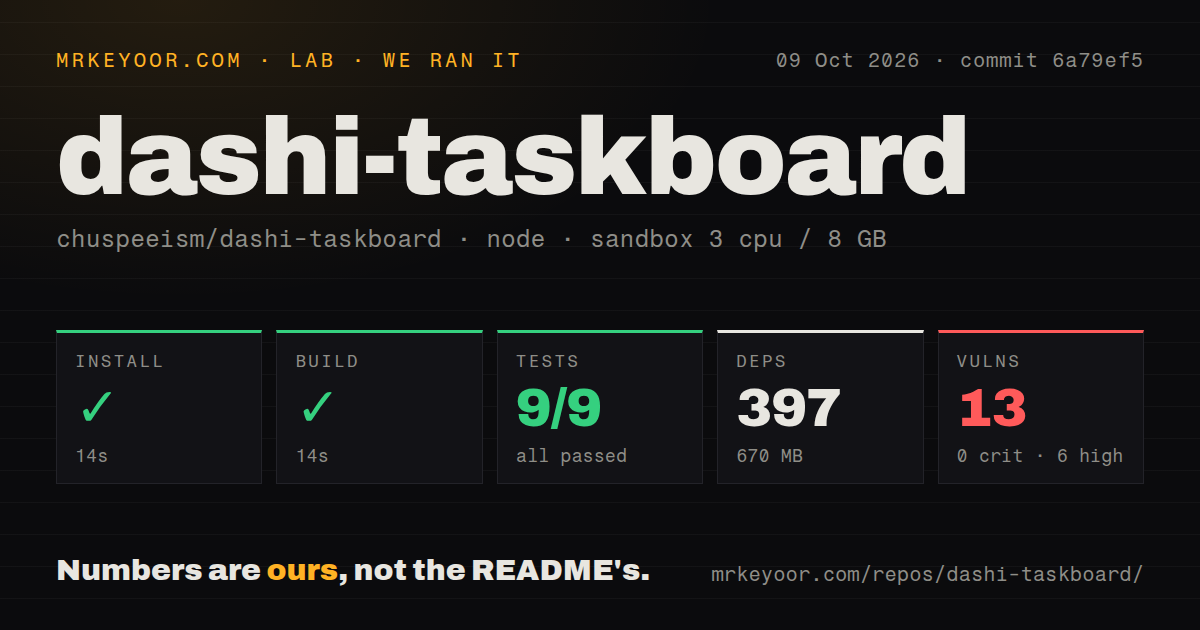
Our run installed 397 npm packages in 14 seconds and built successfully in another 14 seconds at commit 6a79ef5. Vitest passed all 9 tests, with 0 failures, in 80 seconds. The October 9, 2026 sandbox was a fresh unprivileged Debian container with 3 CPUs, 8 GB of RAM, the lab-node:22 image, and no secrets. The measured install, build, and test steps all succeeded.
The audit reported 13 known vulnerabilities: 6 high, 4 moderate, and 3 low, with 0 critical. The repository contained 238 files and roughly 65,043 source lines. Our scan found 3 CI workflow files and a tests directory, but no Dockerfile. These results establish a working preparation path and a passing measured suite. They do not establish desktop integration, cloud deployment, or the runtime reachability of each advisory.
The Skill leaves acceptance with the user
The English README says the bundled Skill inspects an issue, moves it into progress, verifies the work, and leaves it in review. It marks the issue done only after explicit user acceptance or an instruction to complete it. That boundary fits a developer who wants the board to record what an agent did without allowing the agent's confidence to substitute for review.
All 9 measured tests passed, but a green suite does not tell you whether an issue's implementation deserves acceptance. The integration records a Codex thread identifier when a task actually processes the issue, making the stored connection more useful than a manually pasted conversation title. Branch and worktree choices come from the selected project repository. You still need to keep the chosen workspace and the issue's description consistent.
Desktop embedding depends on the host app's interface
Issue 446 reports that the board entry disappears and the panel cannot open when Codex uses its classic expanded sidebar. The report identifies selectors that expect a navigation rail, and an open pull request proposes a fallback. This concerns the current injection layer. We did not reproduce it in the sandbox, so it remains a reported desktop failure rather than a result of our run.
The 14-second build cannot settle that compatibility question. The launcher watches replacement renderers and must remain running for embedded use. The Windows documentation also describes bypassing the renderer's content security policy to load the panel, and warns that other local processes can access the unauthenticated debugging interface. If your organization prohibits that arrangement, use the standalone browser board or choose a different workflow instead of deploying the injector.
LAN sharing grants every reachable user write access
The configuration table defaults the service to 0.0.0.0. The README explicitly says LAN mode has no account authentication: anyone on the trusted network who can reach it can read and write the board. For a personal machine, set CODEX_TASKBOARD_HOST to 127.0.0.1 unless sharing is intentional. An authenticated deployment boundary is required for public access. Origin checks are not individual user accounts.
The 6 high advisories from our audit make reviewing deployment exposure more pressing, although the supplied results do not name affected packages or prove an exploitable request path. Do not treat a passing suite as an audit exemption. Before using the board for sensitive issue descriptions or attachments, inspect the advisory details and decide which machine or network gets access. Our measurements support that review requirement, not a claim that the board has been compromised.
Cloud sharing keeps device paths local, with one shared password
The cloud guide puts business data in Cloudflare D1 and attachments in a private R2 bucket. Each machine still runs a local companion for project paths and Codex or Git capabilities. Cloud mode uses the cloud as its sole business-data source and fails visibly when a request fails. It does not silently switch to a separate local board, which helps avoid conflicting records.
The 670 MB local installation remains relevant even when business data moves to Cloudflare, because device capabilities still need the companion. Cloud access uses a shared Basic Authentication password. The username is a display name, and anyone with the password can choose another name and edit everything. There is no individual-user revocation. That is a reasonable arrangement for two trusted collaborators, and a poor fit for a team requiring verified attribution or separate permissions.
September maintenance is followed by current integration reports
The last push was September 29, 2026, and v1.1.26 shipped that day with window-dragging and profile-identity fixes. GitHub showed 3,322 stars and 35 open issues and PRs. October discussion includes the classic-sidebar failure and a request for an Agent mention in a comment to start execution. The latter remains a request, so do not buy into the workflow assuming that dispatch behavior already exists.
For a conventional shared board, compare Kanboard or PLANKA. For Dashi, start in the browser, confirm that an issue reaches the intended conversation, and check its return path after an app update. The 397-package installation is worth carrying when it keeps your accepted work, active session, and repository connected. If authenticated team ownership is the requirement, the documented shared-password model is a reason to choose something else.