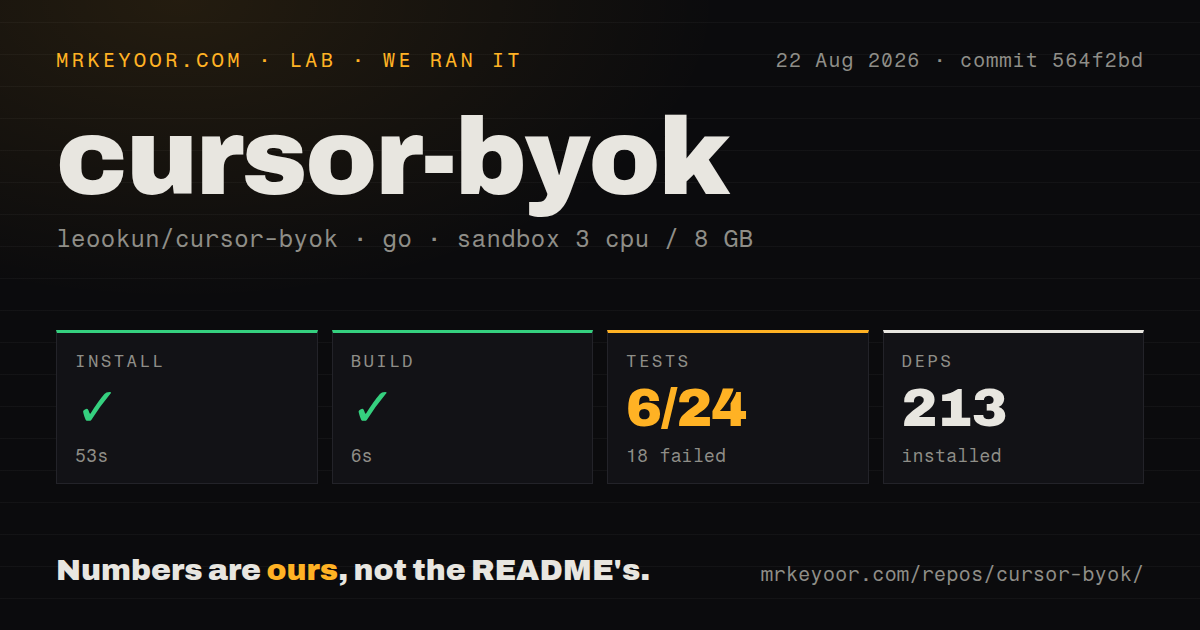

Cursor keeps its interface while another provider answers
cursor-byok runs a local service between Cursor and a model API. You configure an endpoint, key, model ID, protocol, context window, output limit, headers, and extra request fields. Cursor still supplies the editor context and Agent workflow, while the gateway translates and forwards the model request. This is useful when a preferred model is absent from Cursor's built-in list or when a team already pays for direct API access.
The app also tracks token use, cache hits, conversation turns, and estimated value. Its model screen can duplicate, reorder, and batch-test configurations, and the connection tester exposes provider responses. Those conveniences matter because compatibility is not binary. A text prompt may work while tool calls, images, reasoning fields, child agents, or streaming fail. The current issue queue contains examples in each of those areas across 97 combined issues and pull requests.
Local keys do not make remote prompts private
The README says API keys and application settings are stored locally. Model requests still go to whichever service you configure. That distinction should guide any security review. A self-hosted vLLM endpoint may keep traffic inside your network, while a commercial OpenAI-compatible gateway receives prompts, code context, tool output, and possibly images under its own terms. cursor-byok does not change the provider's retention policy merely by keeping the credential on your laptop.
The project is independent and not endorsed by Cursor. It reproduces enough of Cursor's backend behavior to keep Agent capabilities such as tools, Skills, MCP, and multi-turn conversations available. That makes it sensitive to undocumented client changes. Release v0.1.3 shipped on August 26, 2026, and GitHub recorded another push the same day. Fast maintenance is necessary here, but every Cursor update and gateway release deserves a small compatibility test before daily use.
What happened when we ran it
Our sandbox installed 213 Go packages in 53 seconds and built commit 564f2bd in 6 seconds. The checkout held 383 files, about 71,540 source lines, and occupied 22.2 MB. Our scan found no CI workflow files, Dockerfile, or top-level tests directory. Those repository signals describe the measured commit, not necessarily the current Rust/Tauri layout shown by GitHub and the latest upgrade reports.
The test command ran for 56 seconds and exited with code 1. It counted 6 passing and 18 failing packages out of 24. The final log said pkg-config could not find gtk+-3.0 or webkit2gtk-4.1, then marked cursor/internal/updater as a build failure. The prompt and protobuf-related packages shown at the end passed. The log supports a missing Linux desktop dependency finding; it does not show that the 18 failures were logic defects.
v0.1.3 upgrades can leave Cursor Tab unauthenticated
Issue 357 documents an upgrade from the older Go build to Rust/Tauri v0.1.3 on macOS. The reporter found that a legacy synthetic BYOK identity remained in Cursor state. Direct Tab requests then reached Cursor's official backend with that identity and returned ERROR_NOT_LOGGED_IN. The local proxy and service ports were healthy, which made the problem look like a network or certificate failure.
That issue proposes a careful repair flow that backs up state.vscdb and removes only known synthetic identity values. Issue 283 describes a Windows user losing normal Cursor access after switching in the wrong order and recovering only by deleting that same database, which also reset settings. These are user reports, not outcomes from our Linux sandbox. They are strong reasons to copy Cursor's state before first launch or upgrade.
Certificates and desktop libraries can block managed machines
The current issue 352 asks whether the new version can work without installing a certificate because company policy forbids it. That is a common enterprise boundary, not an edge case a user can always work around. A local interception gateway may need trust changes that an administrator controls. Confirm the exact certificate behavior with your platform team before installing the app on a managed workstation.
Linux brings a separate GUI requirement. Our test log named GTK 3 and WebKitGTK 4.1, and issue 316 reports a blank Tauri window on one GNOME setup with a WebKitGTK renderer workaround. Prebuilt downloads may spare users the source toolchain, but they do not remove the desktop runtime or rendering layer. A headless server is therefore not the obvious home for the full application.
Strict provider schemas expose translation mistakes
Issue 318 reports that the OpenAI Responses adapter omitted the required detail field from an input_image part. In the reported vLLM chain, one image produced a 400 response, and the saved image in conversation history caused later turns to repeat the failure. The reporter says adding detail: auto fixed the tested path. Because that report covered an earlier build and beta source, users should reproduce it against v0.1.3 before assuming it remains.
The larger lesson is specific: test the content types and tools you use, not only the model configuration button. Send text, invoke one tool, read an image, continue for another turn, and reopen the session. cursor-byok earns a trial for people who strongly prefer Cursor's interface. Our 18 failed packages and the upgrade reports make backups and a disposable first workspace part of that trial, not optional housekeeping.