Cua is four products sharing one computer-use mission
The repository groups several related jobs. Cua Drivers controls native applications in the background. The sandbox SDK creates Linux, macOS, Windows, Android, or container environments through one API. Cua-Bench runs evaluation and reinforcement-learning tasks. Lume manages macOS and Linux virtual machines on Apple Silicon. Treating these as one install hides more than it explains.
The common thread is computer use outside a browser tab. An agent can request screenshots, click coordinates, type text, send mobile gestures, and run shell commands. Drivers expose a CLI and MCP server for Claude Code, Cursor, Codex, OpenClaw, or custom clients. Sandboxes make the target disposable, while the benchmark tooling records trajectories for evaluation or training.
Background desktop control reaches beyond browser automation
Cua Drivers aims to click, type, and verify in macOS, Windows, and Linux applications without stealing the user's cursor or focus. The same interface can address desktop tools that Playwright cannot see. This makes it relevant for coding agents working in terminals and editors, office workflows, legacy applications, and tests that cross browser and native windows.
Operating systems impose different boundaries. macOS requires Accessibility and Screen Recording permissions. Windows capture and input follow different APIs. Linux supports X11 and compositor-specific Wayland routes, and the README explicitly warns that raw background input has limits on Wayland. A cross-OS API can normalize commands; it cannot make every desktop security model behave alike.
Open issue #3389 shows the kind of ambiguity operators must handle. On a reported macOS Electron target, type_text said delivery was failed or unverifiable even though text appeared, while TextEdit produced confirmed readback. An agent that retries blindly could duplicate input. Verification should inspect the resulting UI state and treat "unverifiable" as uncertainty, not proof that nothing happened.
What happened when we ran it
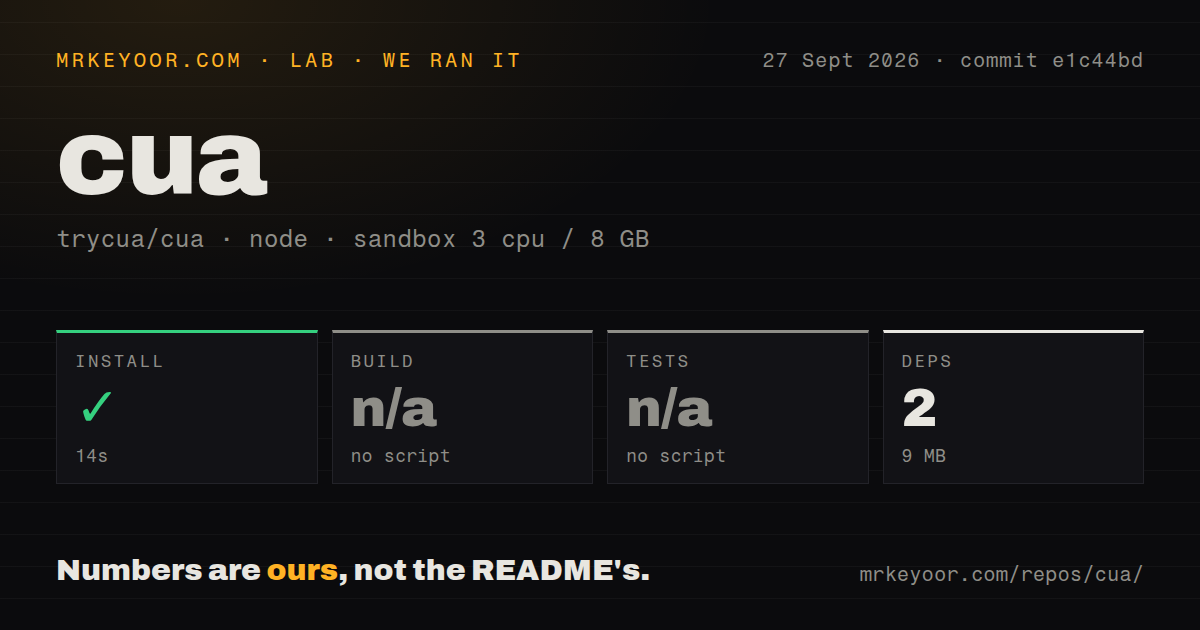
We cloned commit b296ec9 into an unprivileged Debian container with 3 CPUs and 8 GB of RAM. The root pnpm install succeeded in 11 seconds, adding 2 packages and using 9 MB on disk. The harness found no root build script or target and no root test script or target, so both steps were skipped.
Those small numbers describe only the root package surface. The checkout contained 4,255 files, about 694,015 source lines, and 264.6 MB of checked-out data. It had 102 CI workflow files and a tests directory, but no Dockerfile. A two-package install plainly did not compile or exercise the platform-specific Rust, Python, Swift, Nix, VM, benchmark, and GUI paths.
We therefore cannot claim Cua built or passed tests from this run. The result instead reveals a monorepo-discovery problem for generic tooling: the root does not provide one command that represents project health. Evaluators should choose a component and follow its own checks on the target operating system, including real permission prompts, background focus behavior, screenshots, and cleanup after failure.
Sandboxes trade host setup for disposable operating systems
The Python SDK presents one Sandbox interface for Linux containers, Linux VMs, macOS, Windows, and Android. An ephemeral image can run shell commands and receive mouse, keyboard, screenshot, and mobile calls. The README's support table covers local QEMU and the hosted Cua service; cloud use of a custom qcow2 or ISO remains marked as coming later.
Local use still needs a virtualization backend and suitable host hardware. macOS guests carry Apple's platform restrictions, while Android, Windows, and Linux images have different licensing and initialization work. Hosted use moves that burden to Cua but adds an account, credentials, remote data handling, capacity, and service dependency. Sensitive teams should decide whether screenshots and trajectories may leave their network before selecting cloud convenience.
Lume has a particularly direct Apple-silicon path using Virtualization.Framework. Its unattended Sequoia and Tahoe presets create a lume user, enable SSH and autologin, and disable sleep and screen locking. The default password is also lume. That is useful for a disposable local lab, but the credential must change before the guest reaches an untrusted network.
Benchmarks provide structure, not a universal score
Cua-Bench supports OSWorld, ScreenSpot, Windows Arena, and custom tasks, with trajectory export for training. The quick start creates a Linux Docker base image and can run up to 4 tasks in parallel in its example. Those are configuration details, not performance results from our sandbox. We did not run a benchmark or validate any agent score.
Evaluation quality depends on image reproducibility, task reset, screen resolution, timing, model configuration, and the definition of success. A framework can organize those pieces while still producing incomparable results if two teams choose different environments. Pin the Cua commit, component release, base image, agent model, and task dataset when publishing a result.
Licensing also varies inside the optional stack. The repository is MIT, Kasm components are MIT, OmniParser is listed as CC-BY-4.0, and the optional Omni extra includes Ultralytics under AGPL-3.0. Organizations distributing a product should review the exact extras and assets they ship instead of relying on the top-level badge.
August 26 activity is high and release versions are component-specific
The repository was pushed on August 26, 2026, and GitHub listed 730 combined issues and pull requests. The latest GitHub release is sandbox-v0.4.3, published August 22, with a Cua Sandbox release and CLI update. Lume, Drivers, the agent SDK, and benchmark package follow their own versions, so that tag cannot describe compatibility across the entire monorepo.
The 102 workflow files and same-day work show unusually active platform testing across operating systems. The issue queue also contains platform-specific edge cases around capture, accessibility trees, background input, and VM behavior. That combination is appropriate for hard systems software: active does not mean uniform.
Cua deserves evaluation when native desktop control or cross-OS agent research is the actual requirement. Begin with one component and reproduce its operating-system checks, because our root run skipped the meaningful builds and tests. Browser-only agents should choose a browser-focused tool; Cua's extra machinery pays off only when the computer outside the browser matters.