The documentation build is an entry point for contributors
CPython's documentation path installed 57 packages in our sandbox, a manageable first step for someone fixing Python's reference material. The repository also contains the interpreter and standard library, so choosing your working directory matters. A documentation correction and a change to object allocation live under the same roof, but they demand different tools and different evidence before you can trust the result.
The main README points ordinary Python users to installable distributions on python.org. That's sensible advice. Clone CPython when you need to inspect implementation behavior, prepare a contribution, or maintain a customized interpreter. If your job is writing a web service or running scripts, owning a compiler configuration usually adds work without helping your application. The source checkout is useful when the source itself is your task.
What happened when we ran it
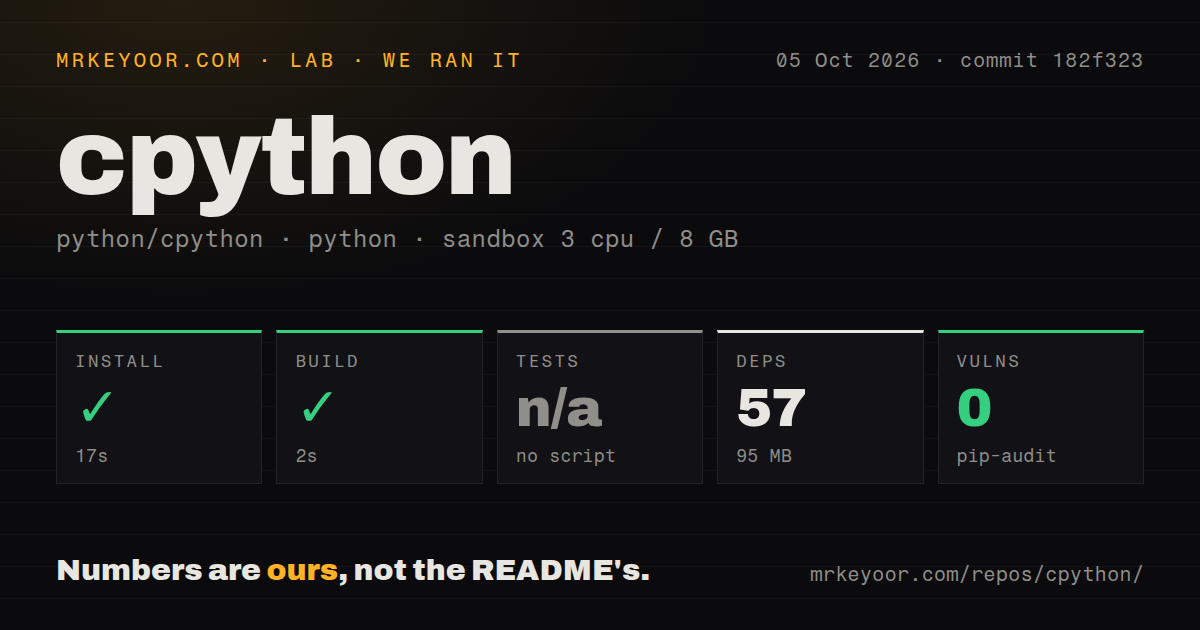
Our run installed commit 182f323's documentation dependencies in 17 seconds and completed the build in 2 seconds. Installation added 57 packages and occupied 95 MB on disk. We cloned the repository on October 5, 2026, and the harness selected Doc/. Those successful steps establish that the selected documentation path worked in that environment. They do not establish that we compiled a fresh Python interpreter.
The measurement setup was an unprivileged Debian container with 3 CPUs, 8 GB of RAM, the ghcr.io/astral-sh/uv:python3.12-bookworm image, and no secrets. The harness found no test script or target for its selected path, so it skipped tests. Pip-audit reported 0 known vulnerabilities in the environment it checked. Neither result answers whether interpreter changes pass CPython's own suite or whether every part of this source tree is free of security defects.
The checkout contained 6,478 files, roughly 2,233,304 source lines, and occupied 136.7 MB. Our scan found 23 CI workflow files, no Dockerfile, and no directory named tests. CPython's README explicitly documents make test, however. The scanner's directory signal cannot support a claim that Python has no tests. This is a case where understanding the selected subproject changes the meaning of an otherwise reassuring lab card.
Sphinx gives documentation authors a separate workflow
The documentation build guide names Sphinx, blurb, and python-docs-theme as tools maintained outside the tree. Its Unix route creates a virtual environment with make venv, then generates HTML with make html. You can choose another environment directory or point the Makefile at tools already on your PATH. Documentation authors get explicit controls rather than having to infer the environment from a badge.
Our 95 MB installed footprint belongs to that documentation environment. It doesn't include an independently measured compiler toolchain or prove a full interpreter installation fits the same budget. The guide also offers prebuilt documentation, so you can avoid local generation entirely when you only need to read the reference. Local generation earns its keep when you need to check a changed page, its links, and its rendered layout before submitting a patch.
Native interpreter work requires platform dependencies
The root README directs Unix users through configure and make, and warns that a complete installation requires additional libraries. Some standard-library modules cannot be built or used on every platform. That warning deserves attention: a successful compiler invocation is not enough to decide whether your application has the modules it expects. Read the linked platform dependency guidance before choosing build options.
Windows has its own PCbuild instructions, while macOS has additional framework and universal-build choices. Our 2-second documentation build says nothing about those routes. The README also describes profile-guided optimization, including an instrumented interpreter and a training workload before the final binary. Choose that route because your intended deployment warrants it. We have no interpreter compilation timing or workload comparison to justify a speed claim here.
Main is an alpha, and shared installation prefixes need care
The live README identifies main as Python 3.16.0 alpha 0. That makes the development branch a poor default for someone seeking a settled production runtime. A contributor investigating current development has a reason to use it. An application maintainer should choose an appropriate released distribution and confirm compatibility with the packages the application depends on. Our sandbox's Python 3.12 image identifies the environment, not the version of an interpreter built from this checkout.
The README gives another concrete reason to avoid casual system installation: make install creates the primary python3 executable under the chosen prefix. It recommends make altinstall for other versions sharing that prefix. If you maintain several interpreters, decide which executable owns that name before installing. A small documentation contribution should never require replacing the Python executable that your other tools already use.
October activity shows ongoing interpreter maintenance
GitHub recorded a push on October 10, 2026, and listed 77,608 stars with 9,732 open issues and PRs when checked. Current issue activity includes garbage-collector work updated October 11, with linked pull requests. The latest-release API returned no release entry. Read that alongside the recent push and issue work rather than treating a missing GitHub release card as evidence of abandonment.
For Java embedding, consider GraalPy. For constrained devices, consider MicroPython. PyPy is another Python implementation to evaluate against your own application's compatibility requirements. CPython remains the direct choice for contributing to Python's interpreter or official documentation. Start a documentation patch in Doc/, where our 57-package run succeeded. For an interpreter patch, bring platform build dependencies and require the interpreter's own checks before trusting the change.