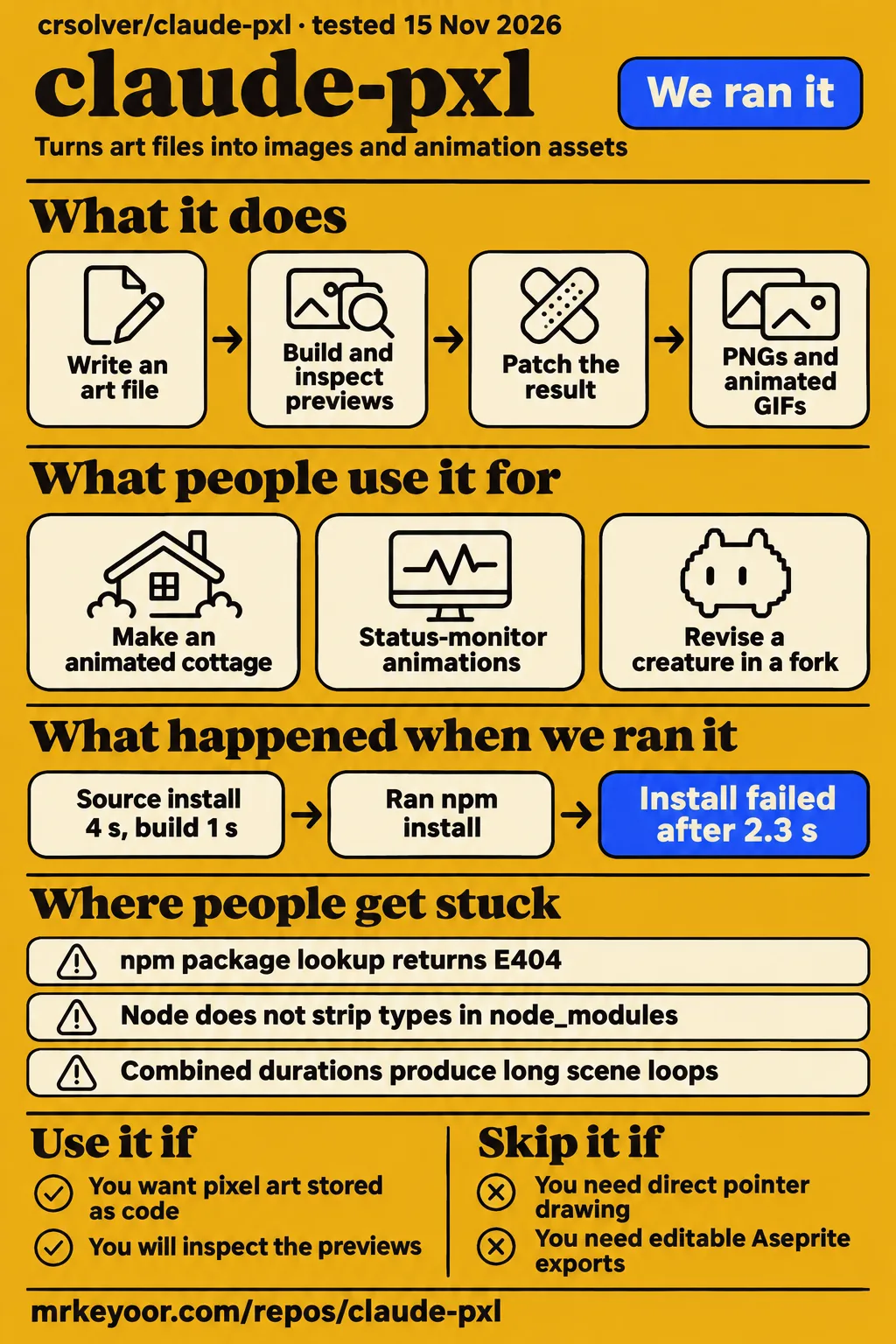
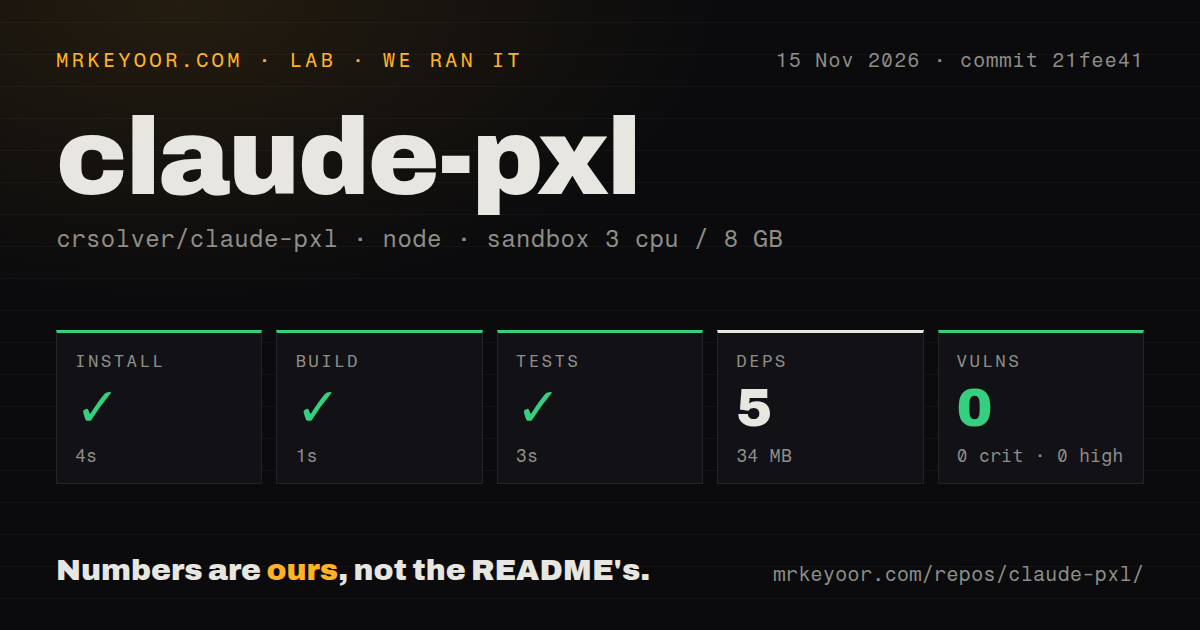
Our sandbox completed claude-pxl's repository install in 4 seconds, build in 1 second and tests in 3 seconds. Use it if you want sprites you can revise as JavaScript or TypeScript. Skip it if drawing directly on a canvas or exchanging editable paint documents is central to your work. A separate attempt to fetch its package name from npm failed before any art task could start.
The distinction matters because “Claude PXL” now describes several related repositories in coverage. Start with crsolver/claude-pxl on GitHub, then choose a fork for a specific feature. Our recommendation is to try upstream for its text-based workflow, rather than adopt it because a social post showed a more elaborate scene made somewhere in the project family.
What people use claude-pxl for
The reports describe an animated cottage, status-monitor animations and a user who eventually moved to PixelLab. They offer more useful buying context than a gallery alone, provided you keep track of who actually made each observation.
| Who | What they used | Reported outcome |
|---|---|---|
| u/delusion54 on r/aigamedev | A custom skill, followed by crsolver/claude-pxl | They subscribed to PixelLab afterward and described the improvement as modest. Their account |
| Builder Realistic_Comfort_78, according to ainews radar | A reusable pixel-art library demonstrated with an animated cottage | The secondary report says the builder wanted Claude to reuse drawing tools rather than recreate them for each task. Cottage report |
| An unnamed commenter, summarized by ainews radar | Animations for a status monitor | The report records that use, without a direct account of the monitor or its assets. Status-monitor report |
| The uilianks/pxl showcase author | The fork's annotation mode for a 130×160 creature illustration | The author says every revision after the first round came from painted marks and notes. This is a fork example. Annotation account |
The status monitor is the most approachable starting point here. A small indicator has a narrow job: communicate a state and loop without distracting you. As an editorial suggestion, start with an asset that constrained, keep its palette fixed and request one visible revision. You will learn whether editing code suits your art process before committing a whole game's visual style to it.
What you can do with claude-pxl
claude-pxl renders small art scripts into PNGs, sprite sheets with JSON, animated GIFs and a browser replay of the drawing operations. Its README describes JavaScript and TypeScript inputs, and requires Node 22.18 or newer. The useful part is that your palette, repeated parts and animation instructions remain editable source. Upstream README
Consider the README's slime example. You write one side of the creature, turn on mirroring and an outline, then define a red variant with a palette swap against the original. That is a sensible representation when your next request is “keep the shape, change the colors.” A second bitmap would preserve the appearance, but the source records the relationship between the two assets. It gives a developer something meaningful to review in a diff.
The same approach extends to scenes. The documented tools include layers, cast shadows, optional lighting, brushes and tilemaps. Animation frames can patch a base sprite instead of repeating its whole grid. The skill instructs the agent to build, look at the preview and patch the result. That inspection step is part of authoring: a successful command says the script rendered, while the preview is where you decide whether the silhouette and shading work. Upstream skill
What happened when we ran it
Our separate npm-package attempt stopped at E404, while our repository harness completed install, build and tests successfully. Both records are dated November 15, 2026 and reference commit 21fee41, with the hands-on record giving the longer identifier 21fee41f7ecc. They exercised different routes, so the failed registry lookup and successful repository checks can coexist.
The hands-on recipe cloned the repository, then tried npm install pxl-pixelart@latest, taking the name from package.json. npm returned 404 Not Found for https://registry.npmjs.org/pxl-pixelart and said the package was not in that registry. The attempt stopped at installation. The finding points to an npm debug-log location, and teardown reported success. That is evidence of a failed package lookup, with no rendered asset to assess.
| Repository harness check | Our recorded result |
|---|---|
| npm install step | Succeeded in 4 seconds |
| Build step | Succeeded in 1 second |
| Test step | Succeeded in 3 seconds |
| Dependencies | 5 recorded, 34 MB on disk |
| npm audit | 0 known vulnerabilities: 0 critical, high, moderate or low |
| Checkout | 70 files, approximately 8,460 source lines, 3.3 MB |
| Repository signals | 1 CI workflow file, a tests directory, no Dockerfile detected |
The harness used a configured sandbox with 3 CPUs, 8 GB RAM and image label lab-node:22. The separate package recipe used 2 CPUs and 4 GB RAM in an unprivileged container, with no published ports or secrets. An image label is not a toolchain log, so neither configuration supplies an exact observed Node or operating-system version.
For a developer deciding whether to inspect the project, the repository results are encouraging: the recorded checks were quick and the dependency footprint was small. For someone following a package-name shortcut, the E404 is the immediate obstacle. The README's actual quick start uses a clone or a GitHub-qualified npx command, which is a different request from asking the npm registry for pxl-pixelart@latest.
Where people get stuck: package names, timing and fork commands
The concrete failure in our records is the npm registry lookup, and the upstream README gives a clone-based entry point instead. Use the documented command for the repository you chose. Copying the same project name from a social post does not select the same owner, command set or package distribution.
| Situation | What the evidence says | Useful next action |
|---|---|---|
npm install pxl-pixelart@latest returns E404 |
Our recipe stopped at the registry lookup | Start from upstream's documented clone path, rather than repeat the same registry request. |
| A packaged copy cannot run TypeScript directly | The README says Node does not strip types inside node_modules, and package copies use dist output | Preserve the documented generated dist output when packaging. README |
| A scene takes too long to repeat | A documentation-based article explains that combined durations determine the loop | Keep component durations on a shared timing grid. Timing explanation |
| A guarded edit refuses a computed value | The augusto-scarvalho fork's skill says computed values need hand editing | Edit the expression directly in that fork. Fork skill |
| A check says “not run: lit side” | The same fork says that means the light was not checked | Read which checks applied and inspect the image. Fork skill |
The last two rows belong to augusto-scarvalho's fork. They are useful warnings if you choose that repository, not upstream bug reports. A command that checks geometry or edits a literal still has a narrower job than an artist inspecting an image. Keep the preview in your loop, especially when a command explicitly reports that a relevant rule never ran.
claude-pxl vs PixelLab, Spritefusion and the forks
One user preferred PixelLab after claude-pxl, but called the improvement limited. That account supports trying PixelLab when you dislike your results. It does not support a universal ranking of the tools. The practical comparison is between ways of making and revising assets, with the owner name included for every fork.
| Choice | Reason to consider it | Basis for the comparison |
|---|---|---|
| crsolver/claude-pxl | You want palettes, shapes and repeated parts stored as source | Upstream documents PNG, sheet, GIF and live-preview output. README |
| PixelLab | Your current agent-generated results are unsatisfactory | u/delusion54 switched and reported an improvement, without calling it a leap. Reddit account |
| Spritefusion | You want another dedicated pixel-art option to compare | AsparagusOk8818 reports trying it and PixelLab extensively, praising accuracy but criticizing flat colors and poses. Reddit discussion |
| Aseprite or another canvas editor | You prefer direct drawing and an editable paint-document workflow | HotRepo identifies upstream's lack of pointer drawing and documented layer-file interchange as reasons to choose a canvas workflow. HotRepo assessment |
| augusto-scarvalho/claude-pxl | You want its documented inspection, guarded editing, parallax or Aseprite export | The fork's differences document lists these additions separately from upstream. Fork differences |
| uilianks/pxl | You want painted feedback, pixel linting or its Godot export | Its README documents annotation mode, lint overlays and SpriteFrames output. Fork README |
AsparagusOk8818's complaints are useful because they describe what “good” meant to that person: expressive poses and colors that sit well in a shaded environment. Prompt accuracy alone did not satisfy them. Another commenter, KeldornWithCarsomyr, describes a mixed process ending with Aseprite touch-ups and manual frame review, and says unique animation takes more work than their world-map style. Those are individual accounts, but they suggest a better comparison task than choosing the prettiest promotional image: make each candidate revise the same asset in your intended style. Community discussion
Security starts with the local art workflow
Our npm audit recorded zero known vulnerabilities, and the documented quick start opens a local viewer at 127.0.0.1:4321. The README presents a local CLI rather than an account-based image service. Its basic example supplies no API key. If you bring a coding agent, that agent's access and billing are separate from running the renderer. Upstream instructions
Treat downloaded art scripts with the care you give other code you ask a local tool to load. A sensible first trial uses a disposable project directory and only the files needed for the asset. Keep the viewer local while evaluating it. These are operating recommendations for a code-driven art workflow, not findings of an exploit in claude-pxl or claims about its sandbox protections.
October's last push says more than a changing star count
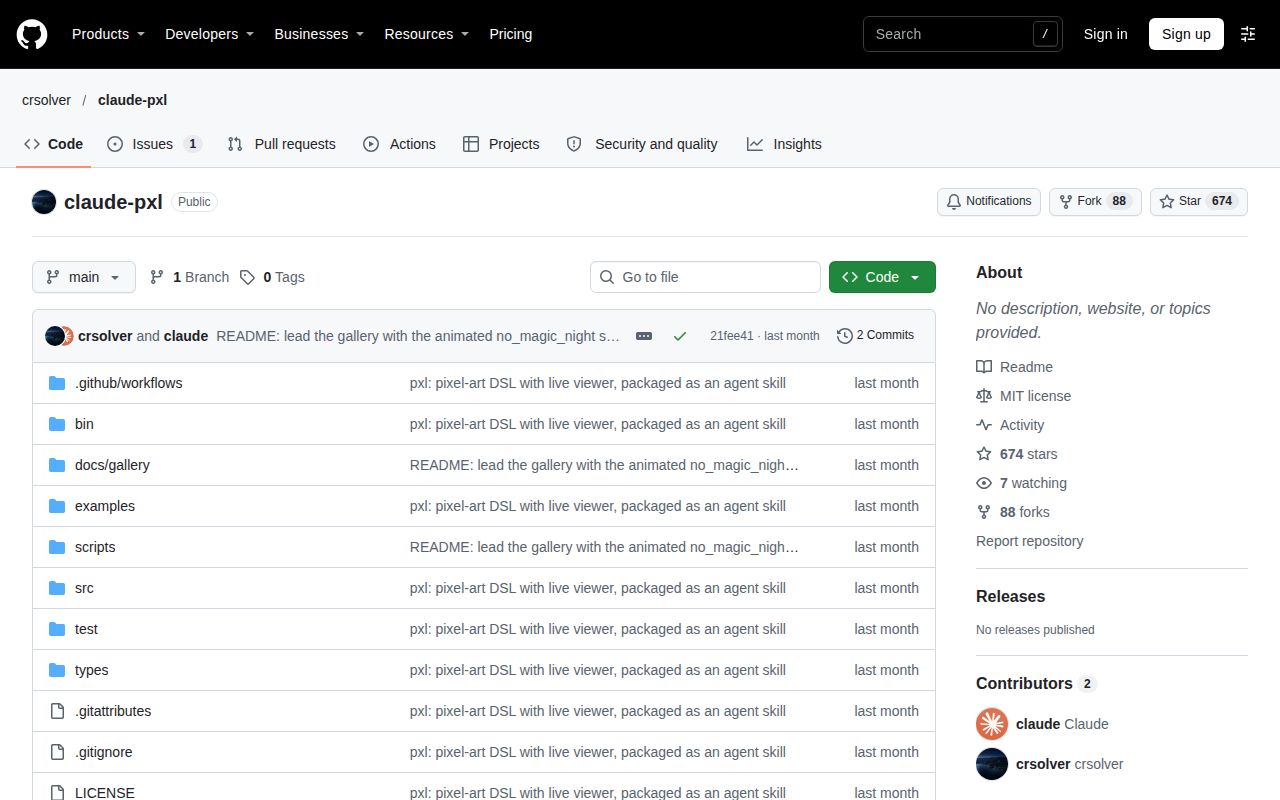
The upstream API records its last push as October 15, 2026, while the supplied metadata snapshot was updated on November 15. Those dates describe different events. A newer metadata timestamp should not be presented as a new code contribution, and an older push date alone is a poor reason to call a project abandoned. Dated GitHub snapshot
The sampled upstream issue #1 asks the author to add a Claude Skills Hub badge. The supplied record marks it open with no comments. It is a directory-listing request, so counting it as an unresolved software defect would mislead a prospective user. Our scan also found a CI workflow and a tests directory. Together these facts describe the evidence available for maintenance, without turning repository attention into a support promise. Issue record
What the other reviews get wrong
AIGamedevLabs' specimen article reports about 402 stars from a historical fetch; the supplied November 15 API snapshot records 673. Repeating 402 as a current count would be stale. The article dates its observation, so this is a correction to reuse of that number, not evidence that its original report was false. Specimen article, API snapshot
Feature attribution deserves more attention than popularity. On X, hakimieiqbal described “Claude PXL” with parallax, perspective and asset-editing tools. The upstream README and augusto-scarvalho's differences document provide the repository boundary readers need: the latter explicitly lists parallax planes and additional editing commands. Read the social post as a pointer to the project family, then choose the exact repository whose documentation covers your task. X record, Fork documentation
Search results also contain unrelated material. The supplied YouTube transcript identifies its tool as Pixel Fix, and one Facebook extract describes Azimut, an OSINT workbench. Neither is a claude-pxl demonstration. Counting those pages as successful upstream users would manufacture corroboration. Video transcript, Unrelated Facebook record
Questions people ask
claude-pxl is crsolver's MIT-licensed pixel-art tool and agent skill, available at github.com/crsolver/claude-pxl. Its renderer takes JavaScript or TypeScript art files and produces images and animation assets. README
What is claude-pxl, and where is its GitHub repository?
claude-pxl is a code-based pixel-art authoring tool, and the upstream GitHub repository is crsolver/claude-pxl. The skill teaches an agent to write an art file, inspect the rendered preview and make a small revision. The source file remains available for later palette or shape changes. Upstream README
How does claude-pxl compare with PixelLab and Spritefusion in actual use?
u/delusion54 reports a modest improvement after switching from claude-pxl to PixelLab, and explicitly says they have no Spritefusion experience. A different commenter, AsparagusOk8818, discusses both dedicated tools and objects to their flat colors and rigid poses despite praising prompt accuracy. These are attributed preferences, not our comparison results. Reddit discussion
Are there working open-weight pipelines for AI pixel art?
The sampled Reddit thread asks this question but supplies no demonstrated open-weight pipeline. claude-pxl supplies a renderer and agent instructions, not model weights. Its README explains how other agents can invoke the CLI, leaving the agent and model choice to the user. Question in the discussion, Renderer instructions
What programming language does claude-pxl use?
Art files can use JavaScript or TypeScript. The README describes TypeScript source directories and editor-completion declarations for art files, while the public CLI is invoked through Node. You can start with its compact JavaScript examples rather than translating the art into C++. README language and layout
How do I install claude-pxl in Claude Code?
Clone crsolver/claude-pxl into ~/.claude/skills/pxl-pixel-art for all projects, or .claude/skills/pxl-pixel-art for one project. The README requires Node 22.18 or newer. Its clone quick start runs node bin/pxl.js serve examples/shop.px.js from the repository directory. These are upstream instructions, distinct from our failed registry-package recipe. Setup instructions
Does claude-pxl work with Codex or Cursor?
The upstream README documents using Codex or Cursor by pointing the agent at SKILL.md and giving it node <path to pxl>/bin/pxl.js as the CLI. That is a documented integration through files and commands. The renderer is not restricted to the agent named in the repository title. Other-agent instructions
Can claude-pxl make parallax backgrounds?
Upstream documents layered scenes and per-layer PNG export. For parallax, those layers can be scrolled in your engine, while the augusto-scarvalho fork explicitly documents a scroll helper for parallax planes. Choose the owner based on where you want the scrolling behavior implemented. Upstream scene features, Fork additions
Can I watch Claude paint pixel art live?
Yes: pxl serve starts a browser viewer that rebuilds on save and replays the drawing operations. Upstream's quick start uses port 4321 on the loopback address. It lets you watch the file's rendering progress while the agent works, rather than wait only for exported images. Live-viewer documentation
What we have not tested yet
Our successful repository checks measure setup and command completion, not artistic quality. The separate package recipe stopped at installation, so it produced no usable preview or exported asset. We have not tested an upstream art request, the live viewer, a revision round, a real game-engine import or a production asset pipeline. There are no screenshots or known-answer art tasks in these hands-on records.
The test result supplies no count of passing cases. The image label supplies no exact observed runtime version. Zero known npm advisories is the recorded audit result, not a security assessment of the script loader, viewer or agent. We have not tested malicious input, exposure beyond localhost, Windows or macOS behavior, or the commands with different coding agents.
Quality and cost need their own evidence. The community examples are anecdotes, the cottage and status-monitor accounts are secondary reports, and the annotation example comes from a fork. Upstream token savings, revision cost and consistent results across models remain unmeasured here. The augusto-scarvalho fork reports its own small edit comparison with a speed tradeoff, but that does not become an upstream saving or our benchmark. Fork evaluation summary
We also lack a controlled PixelLab or Spritefusion comparison, an independently demonstrated open-weight pipeline, and evidence of maintainer response to technical defects. For your next trial, ask for one sprite, one palette change and one animation, then import the result into your actual engine. Keep the source and record every manual repair: that is the work you need to compare with your existing editor.