A small Python example leaves deployment decisions open
Chroma's README creates an in-memory collection, adds documents with metadata and IDs, then queries for similar text. It also documents supplying embeddings directly. That makes Chroma a candidate for a Python retrieval experiment, whether the application delegates embedding to Chroma or generates vectors elsewhere.
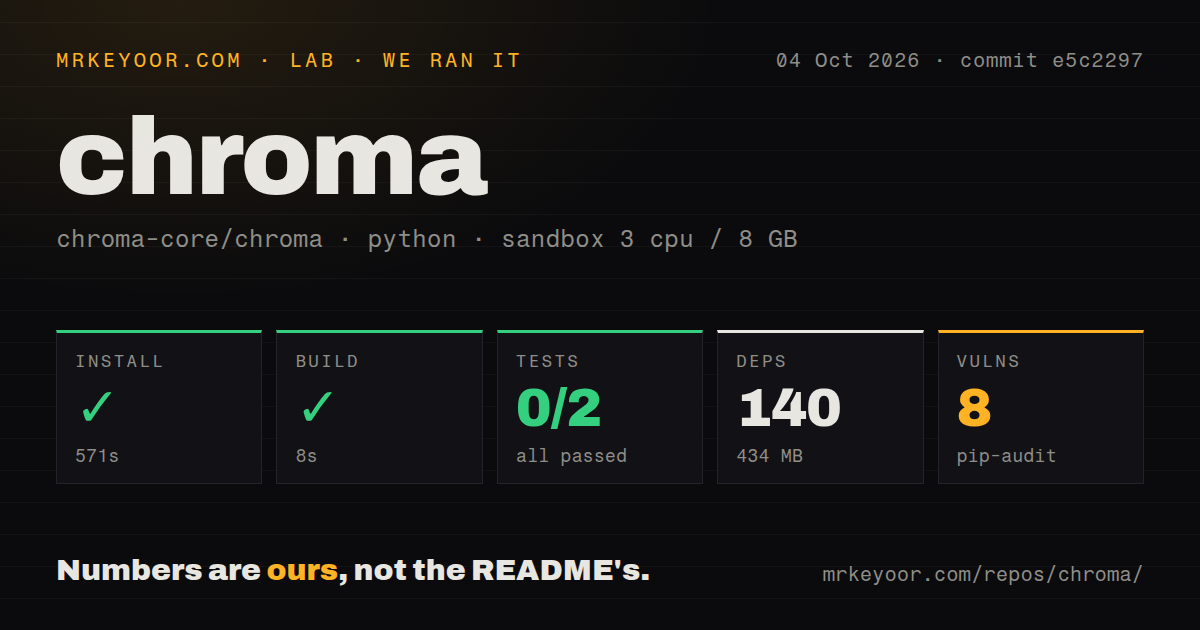
The source environment needs a separate assessment. Our checkout built successfully, but test collection stopped before any assertions ran. A short client example does not establish retrieval quality or confidence in that source environment.
What happened when we ran it
Our Chroma run installed 140 dependencies in 571 seconds and used 434 MB on disk at commit e5c2297 on October 4, 2026. The build succeeded in 8 seconds. The test command exited 1 after 21 seconds, reporting 0 passed, 0 failed and 2 collection/setup errors.
The log reports mismatched Protobuf major versions while loading google/rpc/error_details.proto: generated code 6.33.5 and runtime 5.28.0. Collection stopped in bin/rust_python_compat_test.py and chromadb/test. The pytest tail reports 2 errors in 8.12 seconds; the outer test step took 21 seconds. Those durations describe different scopes. The excerpt does not explain how the incompatible packages were selected, so it does not support a package-pinning fix.
pip-audit reported 8 known vulnerabilities. The supplied record does not identify their severity or applicability to a deployed service. Inspect the advisory details before adoption; this count alone does not establish that a particular Chroma endpoint is exploitable.
The sandbox configuration specified 3 CPUs, 8 GB RAM and image ghcr.io/astral-sh/uv:python3.12-bookworm. The image name does not prove the actual runtime or operating-system version. No retrieval workload or restart exercise was recorded.
Choose persistence and connection settings deliberately
The Chroma client guide distinguishes the in-memory Python Client from PersistentClient, which automatically saves local data and loads it on start if it exists. Choose a disk path before loading documents you intend to keep. A useful acceptance check is to add identifiable records, stop the application, restart against the same path and retrieve the same IDs. That exercise was not performed in the supplied run.
JS/TS clients require a running Chroma server. CloudClient can use an API key alone if the key is scoped to a single database; Chroma then resolves the tenant and database. The guide also documents explicit tenant and database settings, environment variables and regional hosts. For a database outside the default region, use the corresponding regional connection settings. These details should be part of the deployment trial.
Verify operations on the destination deployment
Chroma's open-source roadmap says local and distributed Chroma currently use different storage subsystems. Most engineering effort goes toward distributed Chroma and the cloud offering, and local mode may temporarily lack features or behaviors available in the distributed system. Full feature and API parity remains an active goal; the page gives no delivery deadline.
Before moving a local experiment to another deployment, repeat the application's actual operations there. Use documents with known IDs and expected metadata matches, then check queries, updates and deletes. This is a proposed acceptance exercise, not a reported filtering defect or a completed test.
Compare alternatives by where the data belongs
pgvector provides vector similarity search inside Postgres, including exact and approximate nearest neighbor search. Evaluate it when vectors should live alongside relational records and SQL joins matter to retrieval. This is a recommendation about data placement. The supplied evidence contains no comparative throughput or retrieval-quality measurements establishing a winner over Chroma.
Qdrant documents a container-based client-server route for vector search. Consider that route when a separately operated vector service suits the application. Its README warns that the example container starts without authentication and is open to all network interfaces. Include access control and persistence in any deployment evaluation.
Documentation is assessed; operational reliability is not
The documentation score uses this editorial rubric: 1 means instructions are absent, 2 means partial instructions, 3 means a clear basic route, 4 means multiple routes with stated limits, and 5 means those routes were independently verified. Chroma earns 4 because the client guide explains multiple deployment routes and the roadmap discloses the storage difference. The supplied run did not verify each route.
The repository metadata observed on October 28, 2026 records the last push as October 26, 2026 at 03:26:30 UTC, with 29,595 stars and 984 open issues and pull requests combined. These are dated activity and attention signals; they do not establish response quality or production reliability. Community remains unassessed. The supplied latest-release record lists 1.5.9 dated May 5, 2026, but that record does not establish client/server compatibility at the measured commit.
The next useful result is a retrieval-and-restart check on the chosen deployment, followed by a source environment whose tests get past Protobuf collection.