Three proxy protocols share one Cloudflare panel
CFBox puts VLESS, Trojan, and xhttp subscription generation behind one browser panel running on Cloudflare Workers or Pages. Its main documentation is Chinese, with complete English and Persian files alongside it. The panel writes configuration to Cloudflare KV, selects a client-specific subscription format, and can combine addresses from CFnew and edgetunnel. That is useful if those two projects already make sense to you and you want fewer separate settings pages.
The README names 10 clients, including Clash, Surge, sing-box, Shadowrocket, and v2rayNG. It also describes 32 built-in preferred sources in the v1.1 changelog, although later feature tables still say 26. That inconsistency is small but revealing: CFBox gathers many choices into one interface, while the operator still has to confirm which source set and output each deployment uses. A generated subscription is only useful after the intended client accepts it.
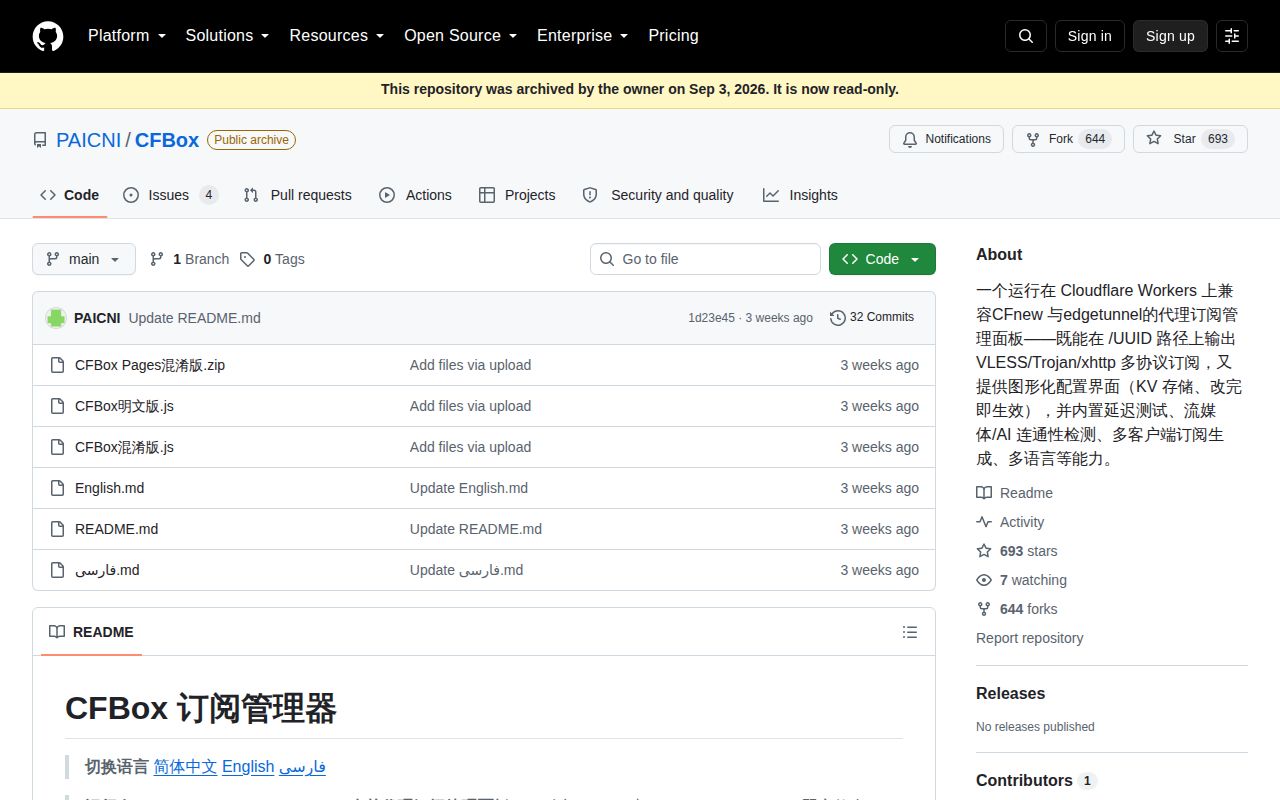
The measured commit ships six files without npm
Commit 1d23e45 contains 6 files: three translated guides, two JavaScript bundles, and one Pages ZIP. The readable script is about 463 KB, while the obfuscated version is about 577 KB. There is no package manifest, lockfile, test directory, CI workflow, or license file in that tree. CFBox is shipped as an artifact to paste or upload, rather than as a conventional JavaScript application you install and build.
That packaging makes the first deployment look short. For a Worker, the guide says to create a project, paste CFBox混淆版.js, set U, bind K, and deploy. Pages users rename the same script to _worker.js and upload it. The tradeoff appears when you want to review a change or reproduce a release. Version v1.1 has no GitHub Release entry or build recipe connecting the readable 463 KB source to the 577 KB obfuscated artifact.
What happened when we ran it
Our 3-CPU, 8 GB Debian sandbox checked commit 1d23e45 on September 16, 2026 and stopped before runtime. The harness found JavaScript source, but it found no supported JavaScript ecosystem and no Dockerfile. There was therefore no documented install target, build target, test command, or container entry point for it to execute. The log did not show an application crash because no application process was started.
That non-run is the setup finding. It does not prove that the Worker fails on Cloudflare, and it gives us no basis for a speed, dependency, vulnerability, or test claim. It means CFBox cannot be checked through the same fresh-container path used for a typical repository. Anyone adopting the 6-file checkout must validate the pasted Worker, generated subscriptions, KV writes, and client behavior in their own Cloudflare account.
Two bindings unlock the panel, while outside services remain
The minimum documented configuration has 2 named pieces. U supplies the UUID used in the access path, and K binds a Cloudflare KV namespace for saved settings. The script accepts several alternate names for both values, which helps migrations but makes configuration harder to standardize. Without KV, messages embedded in the source describe the panel as read-only and disable saving. The UUID path is also the stated access check for the panel and subscription.
Runtime behavior reaches beyond those 2 bindings. The README names a default subscription converter, IP location services, preferred-source lists, Google Fiber's speed test, and optional ProxyIP or SOCKS5 routes. It documents a 30-second in-memory KV cache and a preferred-IP refresh every 15 minutes. Those defaults deserve an inventory before deployment because availability and data flow depend on services outside your Worker, even when the panel itself sits in your Cloudflare account.
Four open issues include real client failures
GitHub listed 4 open issues and no pull requests when we checked. Issue 3 reports that VLESS nodes connected after deployment while every Trojan node failed in the Windows version of Clash Verge. The owner first attributed that behavior to Cloudflare-node projects generally, and another user replied that Trojan worked for them in CFnew and edgetunnel. The thread never reached a confirmed CFBox fix, so Trojan with Clash Verge requires explicit testing.
Issue 2 is messier. The owner said a subscription-group problem was fixed in a v1.2 build available through a fan group, yet that version never reached this archived repository. A later comment in the same issue describes selecting 7 regions with 12 nodes each, an expected ceiling of 84, then receiving hundreds. Issue 4 separately reports choppy scrolling on an older GPU. These are narrow reports, but each touches a feature the panel advertises directly.
Archiving on v1.1 leaves no maintenance path
The last repository push was September 1, 2026, and GitHub now marks CFBox archived. The README calls the current code v1.1, while an issue comment refers users to an off-repository v1.2. GitHub has no release record for either version. Archived status matters more than the young date because users cannot expect fixes to land here for client changes, dead preferred sources, or Cloudflare platform changes.
CFBox had 693 stars and 644 forks when fetched, which shows the idea traveled quickly. Those counts do not restore a license, a build path, or an open maintenance channel. For a personal experiment, the single-file shape keeps the initial Cloudflare work understandable. For anything shared, start with the active edgetunnel or CFnew repositories and keep CFBox's panel ideas only as a comparison.