Automatic HTTPS still needs an operator
Caddy can handle certificate issuance and renewal, but it cannot fix DNS or make clients trust a private certificate authority. That distinction matters when deciding whether it will simplify your web server or reverse proxy deployment.
The automatic HTTPS documentation says Caddy provisions certificates for qualifying sites, keeps them renewed and redirects HTTP to HTTPS. For the ordinary public-domain setup, it lists correct A/AAAA records, externally open ports 80 and 443, permission to bind or appropriate forwarding, a writable persistent data directory and the domain in the configuration. These are documented capabilities and prerequisites, not outcomes demonstrated by our run.
A DNS challenge offers a different validation path: it does not require open inbound ports, but Caddy needs DNS-provider credentials and suitable provider support. For internal HTTPS using Caddy's local CA, the administrator must arrange trust in the necessary client stores. Creating a certificate inside a container does not make a remote browser trust it.
What our recorded run establishes
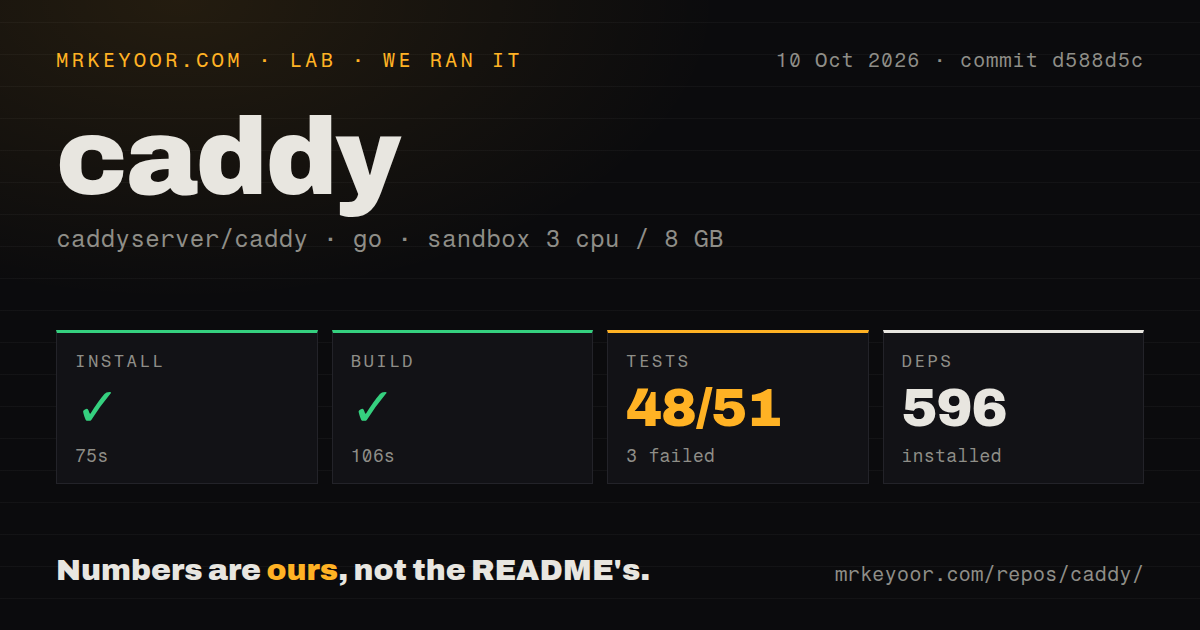
Our stored run is dated October 10, 2026, at commit d588d5c8f0a48a44851a218bbfc3d6edc0e4be17. Its recorded environment specifies 3 CPUs, 8 GB of memory and the golang:1.24-bookworm image. No new execution was performed for this correction.
| Recorded step | Result | Supported interpretation |
|---|---|---|
| Setup | Exit 0 after 75 seconds | The retained tail records downloading Go 1.26.0; it does not verify installation of the Caddy CLI. |
| Harness-labelled build | Exit 0 after 106 seconds | The retained tail is vet-exit:0; a compiled executable and its operation were not verified. |
| Tests | Exit 1 after 66 seconds | The command failed; the retained tail identifies an integration-test failure but does not establish its cause. |
The dependency counter recorded 596 entries. It does not establish how many operating-system packages were installed. The source scan recorded 712 files, approximately 120,573 lines and 4.8 MB, plus 8 CI workflows. It detected neither a Dockerfile nor a dedicated tests directory. Tests plainly exist elsewhere in the repository, so that directory finding is not evidence that Caddy lacks tests.
The parser summary records 48 successful package results, 3 failed package results and 18 packages without tests. Its total of 51 refers to successful and failed package results, not 51 individual tests or all packages encountered. The record explicitly says exhaustive unique coverage was not verified, and no complete-log reconciliation was performed.
The retained output names TestReverseProxyReloadStressUpgradedStreamsHeapProfiles as failing and shows the integration package failing. It also contains HTTP/2 and HTTP/3 warnings about listeners without TLS. Those warnings do not establish why the named test failed. The excerpt cannot explain all three failed package results or turn them into a diagnosis of Caddy, container permissions or network restrictions.
There is no recorded installed-binary check, certificate issuance, renewal exercise, throughput benchmark or application workload. The successful harness-labelled build step therefore should not be read as proof that source compilation produced a working server.
Choose the installation path deliberately
The supplied README recommends downloading a release executable and placing it in PATH as the simplest cross-platform starting point. For source builds, it requires Go 1.26.0 or newer. Our setup tail records that toolchain being downloaded despite the older version in the container image label; it does not report the toolchain used by every later command.
The README distinguishes development builds from builds with proper version information or plugins. Its xcaddy workflow automates a custom build that includes selected module imports. If you need an extra DNS-provider module or another extension, keep a pinned build recipe and treat the resulting executable as an artifact your team maintains.
Binding low ports may require permission or forwarding. Certificate storage must survive restarts and replacement of the container or host. Confirm those conditions before treating a short setup command as a completed deployment.
Configuration automation needs clear ownership
Caddy's native configuration is JSON. Its administration API can load and modify configuration, while adapters accept formats such as the Caddyfile. The documented default administration address is localhost:2019, although installation methods and configuration can change it.
Restrict access to that endpoint because it controls the server configuration. If multiple processes modify configuration, account for concurrency: the API documentation says individual requests have ACID guarantees, but transactions do not span multiple requests. It documents Etag and If-Match headers for detecting conflicting changes. These are documented operating considerations, not security findings from our sandbox.
Check the release against your workload
The v2.11.7 release notes describe fixes for regressions in v2.11.6, including a crash when proxying over HTTP/2 and streams cut off after a minute. They recommend upgrading from v2.11.6. These upstream findings are separate from our recorded integration-test failure; the supplied evidence does not connect them.
For streaming applications, verify the behavior of the exact release and configuration you intend to deploy. Our recorded commit and command outcomes do not validate every release or production workload.
When the alternatives fit
NGINX documents text configuration files with directives and supports web serving and reverse proxying. Keeping an existing NGINX deployment is a reasonable choice when its configuration and certificate process already satisfy the job. This is a migration decision, not a measured performance comparison.
Traefik documents watching service registries and orchestrator APIs to generate routes. It is a relevant alternative when Docker or Kubernetes service changes should drive routing. The supplied evidence does not establish a performance or reliability winner between these products.
Caddy's strongest reason for evaluation here is certificate management alongside serving and proxying. Begin with a release executable, verify that it runs, then check certificate validation, persistent storage and your actual routes. Add custom modules only when the deployment requires them.
How the ratings work
These are editorial evidence ratings, not benchmark results or adoption rankings. A 1 means the supplied evidence shows substantial obstacles; 2 means major uncertainty limits the assessment; 3 means the documented route is usable with material qualifications; 4 means detailed support with limited unresolved questions; 5 requires broad corroboration within the assessed scope. Unknown compatibility, adoption and production behavior earn no extra credit.
Setup receives 3/5 because release and custom-build paths are documented, while our run does not verify an installed executable or HTTPS deployment. Documentation receives 4/5 for concrete installation, HTTPS and API guidance, without a comprehensive documentation audit. Community receives 2/5 because help channels and release contributions are visible but response quality and participation were not measured. Maturity receives 3/5 because the release notes document maintenance and specific regression fixes, while our command evidence is too limited to establish operational reliability.