The app package is smaller than the 779.4 MB repository
Babylon.js gives browser developers a scene engine. The README's starter creates an engine, scene, camera, light, sphere, and ground, then runs a render loop against a canvas. Applications can install the older babylonjs package or use scoped ES modules such as @babylonjs/core. Individual imports support tree shaking; separate packages cover loaders and extensions. That lets an application pay for less than the full contributor checkout.
The online tools shorten the first hour. A browser playground runs API examples, the Sandbox accepts Babylon and glTF scenes, and a shader tool provides a place to work on GLSL. Release 9.26.0 also added an OpenUSD WebAssembly scene loader, object-ID geometry textures, Inspector v2 contribution APIs, and initial Babylon Lite support in Inspector v2. This is an engine with debugging and content tools around it.
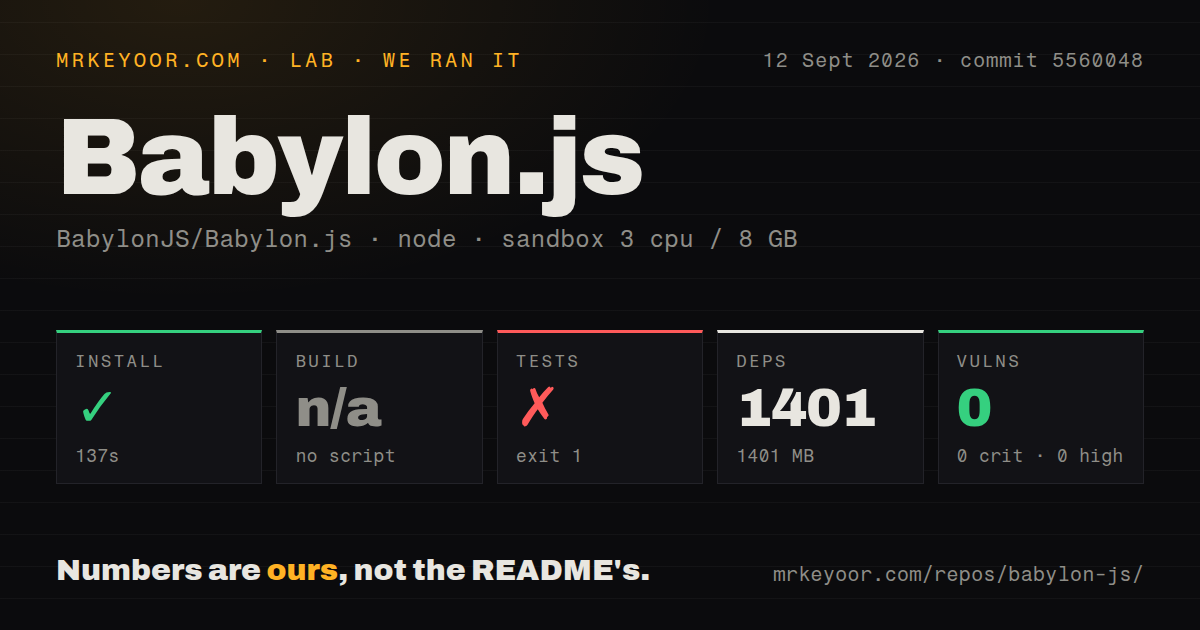
Contributors inherit a 1,401 MB workspace
commit 5560048 contained 9,136 files and roughly 1,050,202 lines of source before installation. The checkout itself measured 779.4 MB. After npm finished, dependencies occupied another 1,401 MB. Those figures describe repository development on our box, not the size of @babylonjs/core inside a finished bundle. Forks and engine contributions need storage and CI capacity beyond the one-line consumer install.
The root package requires Node ^20.19.0, a supported Node 22 release, or a supported Node 24 release, plus npm 11.18 or newer. Its workspaces span packages/**/*, and there is no single root build command. Instead, maintainers choose jobs such as build:dev, build:umd, build:es6, or narrower source and asset builds. The contribution guide asks pull requests to run build:dev, unit tests, and relevant visualization tests. Picking the correct lane is part of working in this repository.
What happened when we ran it
Our sandbox installed 1,401 npm packages in 137 seconds, leaving 1,401 MB on disk. The lab's standard build check found no default script or target, so the build step was skipped. That result does not say the repository cannot be built; it says this monorepo expects one of its named build variants rather than a plain build command. We did not run a substitute build command, and there is no build timing to report.
Tests ended with exit code 1 after 175 seconds. Vitest reported 356 passing files, 1 failed file, and 1 skipped file out of 358. At test level, 5,013 passed, 1 was marked as an expected failure, and 60 were skipped out of 5,074. The failing file stopped during an import from packages/dev/smartFilterBlocks/src/blocks/index.ts; the log tail points at the line that re-exports compositionBlock.js. It does not show enough to assign a cause.
Npm audit reported 0 known vulnerabilities across the installed dependency set: 0 critical, high, moderate, or low findings. Our repository scan found 1 GitHub Actions workflow, no Dockerfile, no root tests directory, and npm workspaces. The README also displays an Azure Pipelines build badge, so the GitHub workflow count is not a complete picture of upstream automation. These measurements cover commit 5560048 in an unprivileged 3-CPU, 8 GB Node 22 container.
WebGPU XR still lacks one end-to-end CI harness
Open issue 18765 documents a WebGPU XR pixel harness that is available on a branch but not wired into CI. The report says it runs through SwiftShader on a machine without a GPU and that the relevant regression has a unit test. On the Azure Linux agent, however, the browser renderer crashes after the first frame. Teams shipping WebGPU XR should keep their own device and browser acceptance tests instead of treating the existing unit coverage as an end-to-end rendering check.
Another open report, issue 16840, concerns mixed metallic values in glTF PBR materials. Its author says the current calculation is not energy conserving and supplies furnace and iridescence comparisons. This is a narrow rendering case, but exactly the kind that screenshots and reference scenes catch better than API tests. A product whose approval depends on physically based material fidelity should run its own asset corpus across intended browsers and GPUs before locking an engine version.
Releases 9.23, 9.25, and 9.26 arrived in three weeks
Version 9.23.0 shipped on August 27, 9.25.0 on September 3, and 9.26.0 on September 10, 2026. Those releases include work on WebXR, Gaussian splatting, WebGPU fixes, OpenPBR, loaders, Inspector v2, and OpenUSD. Frequent releases are useful for browser graphics because GPU and browser behavior moves quickly. They also make version pinning and visual regression tests important; a team can choose when to absorb engine changes instead of receiving them with every install.
GitHub recorded the last push on September 12, 2026, with 26,052 stars, 8 open issues, and 16 open pull requests. The low issue count is partly shaped by project policy: the contribution guide sends questions to the official forum and reserves GitHub issues for bugs and feature requests. Combined with the weekly releases and same-day push, the activity points to active maintenance rather than a quiet issue tracker being mistaken for health.
Use the full engine only when the scene needs it
Babylon.js is a sensible choice for a browser project that needs a scene graph, typed modules, asset loaders, inspection, and an established playground in one ecosystem. Start with scoped ES module imports, host production files on your own CDN, pin the engine version, and save reference screenshots for the materials and devices that matter. The 1 failed file in our 5,074-test run is a reason to check the exact commit, not a reason to dismiss 5,013 passing tests.
Three.js is the better comparison when you want a renderer-first library and will assemble more structure yourself. PlayCanvas Engine is worth testing when its runtime and editor workflow match the team. PixiJS removes the unused 3D surface for a 2D product. Babylon.js earns the heavier commitment when its engine-level tools replace code you would otherwise have to select, connect, and maintain.