mrkeyoor.com_
Fri 23 Oct 21:13 UTC
Webevaluationupdated 22 Oct 2026

Leaflet review

Leaflet is a JavaScript library for adding interactive maps to web pages. It lets you display map tiles and attach markers, shapes and popups, while leaving the choice of tile provider to you.

trackingstars / 7d
Verdict

Leaflet built in 5 seconds in our sandbox, but its test command exited 1 with no tests executed, so browser behavior remains unverified. Shortlist it for maps built around tile layers, markers and popups when you can choose and operate the tile source separately. Match your documentation and plugins to a selected release before adopting the development checkout.

We ran it

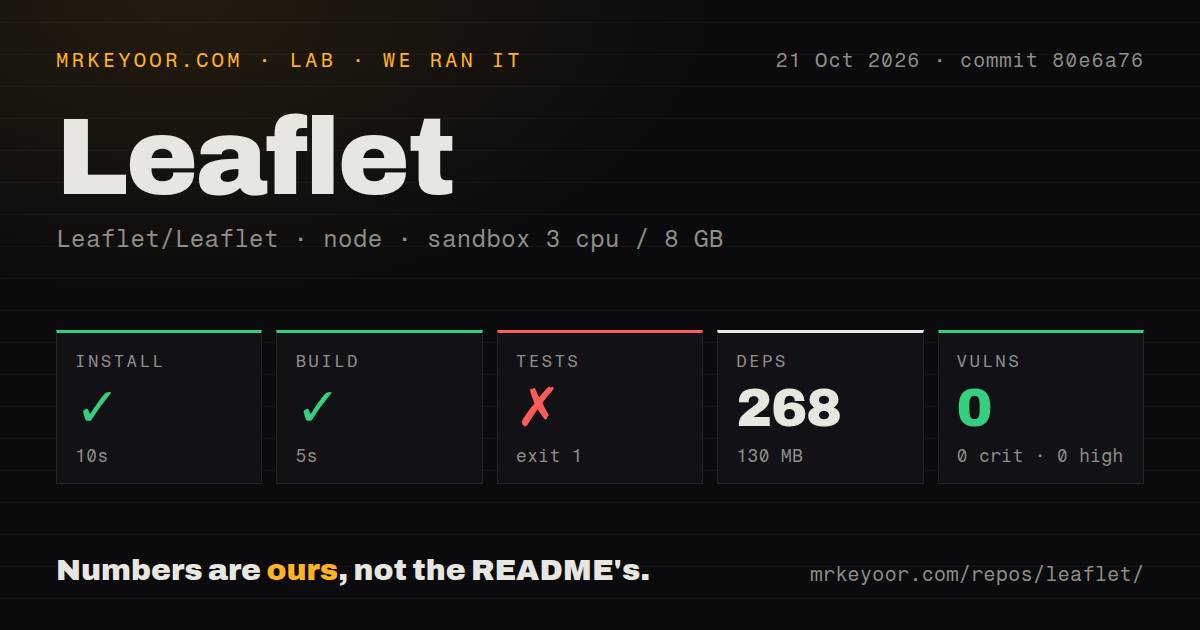
Lab card: what happened when we ran LeafletScreenshot of Leaflet (leafletjs.com)
Install✓ · 10s268 packages · 130 MB
Build✓ · 5s
Tests✗ · 9sran, no count parsed
Known vulns00 critical · 0 high · 0 moderate · 0 low (npm audit)
Repo1034 files~35,318 lines of source · 12.3 MB · 1 CI workflows · tests dir

Answers from our run

Does Leaflet build from source?

Dependencies installed in 10 seconds (268 packages), and the build succeeded in 5 seconds. We cloned commit 80e6a76 into a clean Debian container with 3 CPUs and no project-specific setup.

Do Leaflet's tests pass?

No. The project's own test command exited unsuccessfully after 9 seconds, and its output did not expose an individual test count.

Does Leaflet have known vulnerabilities in its dependencies?

npm audit found none in the dependency tree at the time of our run.

Who should not use Leaflet?

Teams expecting the library to supply a production basemap service: the quick start requires a tile URL and explicitly sends production users to the provider usage policy.

What are the alternatives to Leaflet?

MapLibre GL JS, OpenLayers. Leaflet built in 5 seconds in our sandbox, but its test command exited 1 with no tests executed, so browser behavior remains unverified.

SetupN/ANot assessed: installation was not reproduced in a supported environment.
DocsN/AThe published quick start explains page setup and tile attribution, but its examples were not reproduced or checked against the measured development commit.
CommunityN/AA current repository push and maintainer roadmap were inspected; sustained responsiveness and plugin support quality were not assessed.
MaturityN/AThe build passed, but the browser-runner step executed no tests. Application behavior and compatibility across releases remain unassessed.

Discussed on

  1. hnLeaflet 1.0 – A JavaScript library for mobile-friendly interactive maps628 points
  2. hnLeaflet was created 11yrs ago by Vladimir Agafonkin, a Ukrainian citizen in Kyiv436 points
  3. hnLeaflet: An open-source JavaScript library for mobile-friendly interactive maps321 points
  4. hnLeaflet – A JavaScript library for mobile-friendly interactive maps216 points
  5. hnShow HN: Leaflet.pub – a web app for creating and sharing rich documents170 points

Who it’s for

Web developers building a location map with markers, popups and a small amount of application behavior.
Teams that want to choose their own tile provider and can manage its attribution and production-use requirements.
Maintainers who will keep their application, plugins and documentation aligned to a selected Leaflet release.

Who it’s NOT for

Teams expecting the library to supply a production basemap service: the quick start requires a tile URL and explicitly sends production users to the provider usage policy.
Developers expecting the development branch to match the published quick start: the guide uses 1.9.4, while issue 10435 tracks unfinished work toward version 2.
Applications that pass user content straight into popup HTML: the guide explicitly warns against untrusted input.
Teams choosing primarily for GPU-rendered vector tiles: MapLibre GL JS directly targets that requirement and deserves the first evaluation.

Setup reality

Our sandbox installed commit 80e6a76 in 10 seconds, recording 268 dependencies and 130 MB on disk. The build passed in 5 seconds. Tests exited 1 after 9 seconds; the summary listed 50 test files, "no tests" and 1 error. The tail points into @vitest/browser-playwright without showing the underlying exception. Npm audit reported 0 known vulnerabilities.

The quick start loads Leaflet CSS and JavaScript, assigns a height to the map container and adds a tile layer with attribution. That example needs no API credential, but another tile provider may impose its own access requirements. Choosing a production tile source is separate from adding the library.

The sandbox recorded 3 CPUs, 8 GB RAM and image label lab-node:22; actual runtime and operating-system versions require raw toolchain logs. Browser behavior remains unassessed. The published quick start uses Leaflet 1.9.4, while current development tracks version 2. Do not assume its examples describe every API in the measured checkout.

A location map can start with a tile layer, a marker and a popup. Leaflet's quick start shows that path directly, which is why I'd shortlist it for a shop locator or a page explaining where something happened. The library gives your page map interactions, while you choose where its background tiles come from.

That separation is the adoption decision. A working example with OpenStreetMap tiles does not settle production access to those tiles, and a successful source build does not establish browser behavior. Our sandbox reached the build at commit 80e6a76, then its test command failed without executing tests.

Tiles and attribution remain your responsibility

The quick start adds a tile layer using a URL template, attribution text and a maximum zoom level. It says Leaflet does not enforce a particular tile provider. You can change that source without changing your reason for choosing the map library, but you still need a provider whose terms and access arrangements suit the page.

The guide specifically tells production users of OpenStreetMap tiles to read the Tile Usage Policy. Treat that as a separate adoption task. The sample's lack of an API credential doesn't establish that every provider works without one, or that a public demonstration endpoint will meet your application's needs. Our run did not evaluate a tile service or measure map-loading latency.

CSS and a container height are part of the integration

Leaflet's guide includes its stylesheet before the JavaScript, then creates a map container with a defined height. These details belong in your application review alongside the call that creates the map. If a teammate copies only the JavaScript, the example's page preparation has been lost. Following the entire example is a more useful starting point than treating the library as a single script to paste.

Markers, polylines and polygons cover ordinary location annotations. Popups attach information to those objects, and map events let application code react to interactions. The guide also warns that popup content is rendered as HTML and that untrusted user input must not be passed directly. A map displaying customer-supplied descriptions needs an explicit content-handling decision before those descriptions reach a popup.

What happened when we ran it

Our sandbox installed Leaflet commit 80e6a76 in 10 seconds and built it in 5 seconds on October 21, 2026. Installation recorded 268 dependencies and 130 MB on disk. The checkout contained 1,034 files and occupied 12.3 MB before installation. These results describe the source workflow we ran, rather than the browser payload delivered by an application.

The test command exited 1 after 9 seconds. Its summary listed 50 test files, reported "no tests" and recorded 1 error. The tail points into @vitest/browser-playwright/dist/index.js, but the supplied excerpt doesn't include the underlying exception. It cannot establish a missing browser, a package mismatch or an assertion failure. We have no passing browser-test result from this run.

Npm audit reported 0 known vulnerabilities. That is the recorded audit outcome for this checkout, rather than a guarantee about application security or popup content. The scan found a tests directory and a CI workflow file, but those signals don't resolve the failed browser-runner step.

The recorded configuration was 3 CPUs, 8 GB RAM and image label lab-node:22. The image label does not establish actual runtime or operating-system versions. This run did not assess rendering across devices, keyboard operation or the amount of geographic data a map can handle. Those remain questions for a trial using your own page and data.

The published guide and development branch describe different stages

The quick start loads Leaflet 1.9.4. GitHub's latest-release endpoint identifies v1.9.4, published May 18, 2023, while the repository records a push on October 22, 2026. The old release date therefore needs to be read alongside current development activity.

Issue 10435, updated October 22, discusses the path toward version 2. Its checklist still includes writing an upgrade guide and updating tutorials. That is direct evidence of transition work, without a promised final-release date. It also gives a practical reason to select a release before choosing plugins and copying examples. Our measured commit should not be treated as an interchangeable substitute for the version used by the public tutorial.

A team maintaining an existing Leaflet application should inspect that upgrade work against the APIs and extensions it uses. Someone starting a new location page can first evaluate the documented release path. Neither decision requires calling the project abandoned, and current commits alone don't establish compatibility with a particular plugin.

MapLibre GL JS targets vector tiles, and OpenLayers supplies another layer model

MapLibre GL JS describes GPU-accelerated vector tile rendering. Evaluate it first when that rendering model is central to your map. This is a difference in starting requirements, rather than a performance comparison: our sandbox did not benchmark either library with geographic data.

OpenLayers supports map tiles, vector data and markers, and its package includes TypeScript declarations. Its example makes layers, sources and the view explicit. Consider that model before committing to a library if those abstractions match your application. For a Leaflet trial, choose the release and tile provider first, then put a real marker and its actual popup content into the page you'll ship.

Alternatives

ProjectWhat it isPick it when
MapLibre GL JSA browser mapping library with GPU-accelerated vector tile rendering.Pick this instead when vector tiles and GPU rendering define the map you need to build.
OpenLayersA web mapping library for map tiles, vector data and markers, with TypeScript declarations included.Pick this instead when you want to evaluate its explicit layer, source and view model and need TypeScript declarations shipped with the package.

What people are saying

  1. [velocity-scout] Leaflet/Leaflet

Sources

  1. Leaflet quick start
  2. Leaflet version 2 roadmap discussion
  3. MapLibre GL JS README
  4. OpenLayers README
  5. Leaflet repository metadata
  6. Leaflet latest published release

More web reviews

jiangshan-map · ziwei-doushu · react-virtualized · emdash · dioramas · elpis · the whole board →