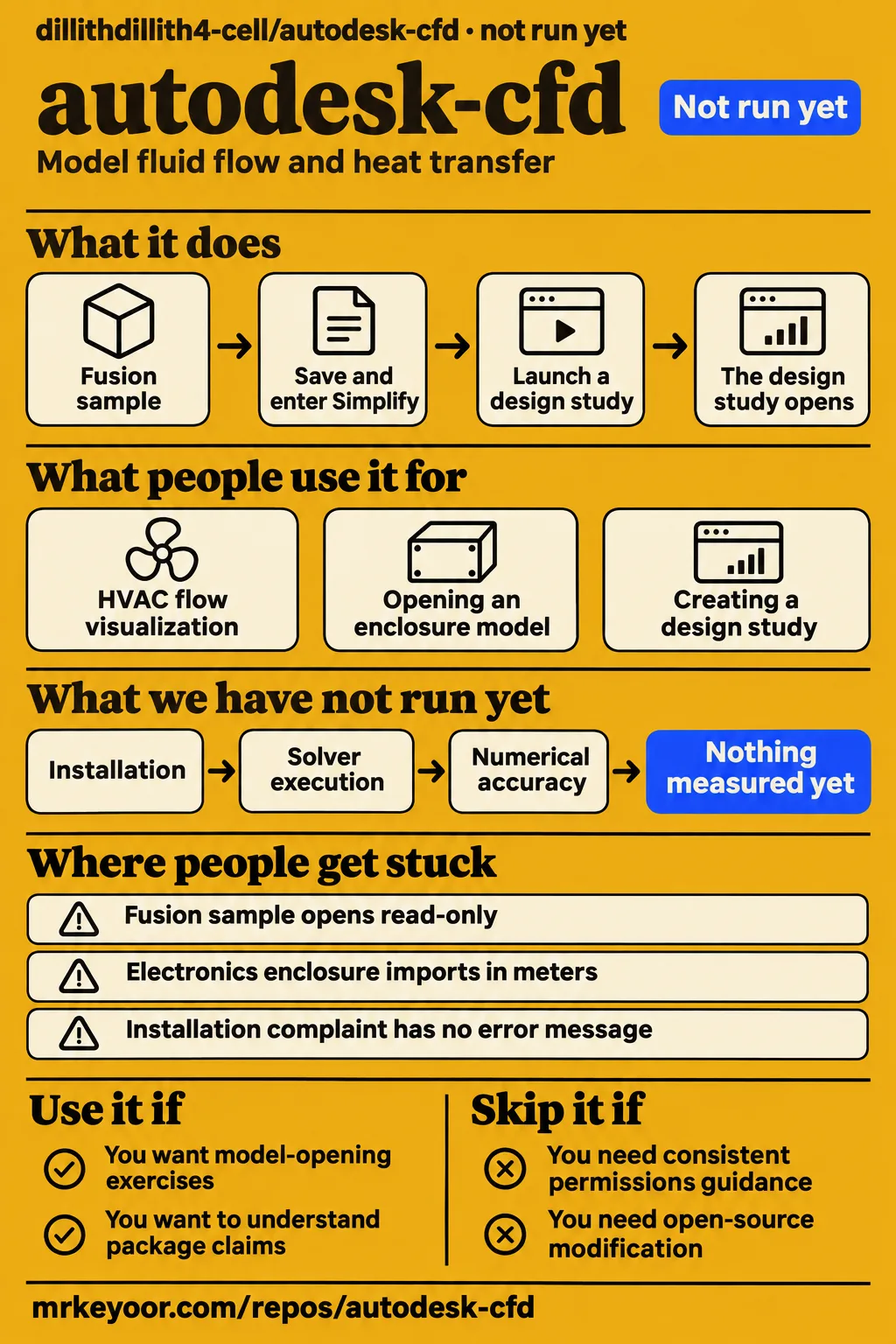
Short answer: choose a documented product route before this package
Our sandbox did not run autodesk-cfd: the checkout was classified as HTML, with no supported ecosystem and no Dockerfile. Use Autodesk's own tutorials if you want to understand its model-opening workflows; skip this repository as your engineering installation route if you need clear licensing and consistent deployment requirements. The repository README says administrator access is unnecessary in Requirements and required in Compatibility.
The name needs care. This review concerns dillithdillith4-cell/autodesk-cfd, whose README advertises a preconfigured desktop package. Autodesk's help pages concern Autodesk CFD, the application. Instructions for the application don't demonstrate that this particular package delivers it as advertised. If you arrived looking for an open-source fluid solver you can inspect and modify, the README's own proprietary commercial licence description should stop that assumption immediately.
CFD means computational fluid dynamics: using numerical calculations to model fluid behaviour. Here, the useful decision is which distribution and documentation you can rely on before entrusting a model to it. A familiar product name alone doesn't answer that.
What people use autodesk-cfd for
Autodesk's tutorials describe opening a Fusion sample and an electronics enclosure; SUTPC's Bilibili listing describes a Revit HVAC visualization. These examples concern Autodesk CFD rather than a demonstrated installation of this GitHub package.
| Who documented or demonstrated it | What they did | What the example establishes |
|---|---|---|
| Autodesk's Fusion tutorial authors | Saved the mesh-study sample, entered Simplify, and launched a design study | A documented route from a Fusion sample to a CFD study, ending when the study opens. Fusion launch instructions |
| Autodesk's electronics cooling tutorial authors | Opened Electronic-Cooling-model.sat and changed the length units | A model-import exercise with a specific units correction. Electronics enclosure instructions |
| SUTPC on Bilibili | Listed a demonstration of HVAC flow from a Revit model in Autodesk CFD | A video listing for that visualization, without a transcript or engineering validation. SUTPC's Revit demonstration listing |
For your first exercise, the Fusion tutorial has a clear stopping point: Autodesk CFD starts and creates the design study. That is useful when learning how geometry enters the application. It doesn't answer whether a simulation has the right physical assumptions. Keep the exercise's actual outcome in view rather than treating the presence of a model on screen as a completed analysis.
The electronics example is similarly concrete. Autodesk names the enclosure file and explains an adjustment you must make after opening it. You can follow that sequence as a navigation lesson without attributing a cooling result to the tutorial page.
What happened when we ran it
Our November 24, 2026 sandbox check at commit df590ab recorded NOT RUN because the repository's HTML classification had no supported ecosystem and the checkout had no Dockerfile. The recorded configuration was 3 CPUs and 8 GB RAM, with image listed as n/a. Those are sandbox settings, not measured application requirements.
| Check | Recorded outcome | Meaning for your decision |
|---|---|---|
| Execution | NOT RUN | No application workload ran in this sandbox. |
| Ecosystem selection | No supported ecosystem; language HTML | The harness had no supported execution path for this checkout. |
| Container entry point | No Dockerfile | No Dockerfile-based run was available to the harness. |
| Runtime identification | Actual versions require raw toolchain logs | No operating-system or runtime version is inferred from the image field. |
The separate hands-on preparation log stopped at its safety check: none of compose.yaml, compose.yml, docker-compose.yaml or docker-compose.yml existed. That runner required a Compose file, a configuration describing container services, before proceeding. Its word “unsafe” labels that runner's rule failure. It isn't a malware finding about the repository.
The sequence ends with teardown reported as ok. There is no successful solver session to narrate. In particular, an unsupported harness route is not proof that a Windows application is broken. It gives you a precise boundary on this review: our lab produced a non-execution result, rather than an installation or simulation benchmark.
Where people get stuck: units, read-only samples and an undiagnosed install
Autodesk documents a units correction and a read-only sample workaround; the installation complaint on X contains no error message. These are different problems with different levels of detail, so they deserve separate answers.
| Problem | What the named source says to do | Resolution shown |
|---|---|---|
| Fusion sample opens read-only | Autodesk says to use File > Save As and save to a personal project | The tutorial then continues into the Simplify workspace. Save the sample first |
| Electronics enclosure imports in meters | Autodesk says to right-click Geometry, choose Change length units, then mm | The exercise continues with the model displayed in the intended units. Change the enclosure units |
| Autodesk CFD installation difficulty | X user lying_down_aca asks for the installation to work | No diagnostic error or successful fix accompanies the post. The installation complaint |
The enclosure instructions also anticipate a Geometry Tools dialog about small edges. Autodesk tells you to close it because those edges are intentional in this model. That's an exercise-specific instruction, not a recommendation to discard geometry warnings in your own designs. The same page then tells you to change the imported units from meters to millimeters. Both details belong to opening this particular enclosure.
For Fusion, saving the sample is the step before workspace selection. If you're following the lesson and can't proceed with the read-only model, changing solver settings would address the wrong stage. Save the copy as the tutorial directs, then continue.
The Japanese-language installation post offers no comparable troubleshooting path. Turning it into advice about permissions, drivers or missing packages would require an error the post never gives.
The README gives conflicting answers about permissions and licensing
The repository's Requirements section says administrator access is not required, while Compatibility says administrative privileges are required during initial deployment. Both statements appear in the same README. If you manage a workstation with restricted privileges, that contradiction directly affects whether you can follow its advertised route.
The licence presentation also changes within the page. A badge says GPL-2.0, while the License section describes Autodesk CFD as distributed under a proprietary commercial licence. Its disclaimer says the project supplies a configuration layer only. A badge on a packaging repository cannot settle your rights to an underlying commercial application; the README itself describes restrictions on redistribution and sublicensing.
There is another tension in the delivery story: Requirements says an internet connection is needed to fetch the script, while a feature describes offline-capable installation from local package contents. Those statements could refer to different stages, but the README doesn't spell out that boundary. For an isolated workstation, you need an actual account of what must be retrieved before disconnecting it.
Our recommendation follows those specific inconsistencies. Get the package's provenance and the applicable application terms resolved before choosing it for a work machine. This review makes no legal determination about the distribution and no security finding about its payload.
What the docs get wrong: the ribbon count contradicts its own list
Autodesk's “Chapter 6: The User Interface” says there are four separate ribbon tabs, then describes Setup, Results, View, Vault, Autodesk 360, Start & Learn and Community. The chapter's count is internally inconsistent. That is the correction the text supports; it doesn't justify predicting exactly which tabs your installed edition displays.
The chapter's command paths are more useful than its count. It explains references as Tab > Panel > Command and gives Setup > Simulation > Solver Manager as an example. When you're finding a command, follow that named path rather than trying to reconcile the chapter's total first.
English learning material exists: Autodesk's launch, enclosure and interface pages are in English. Bilibili also lists Chinese-language beginner instruction from 技术邻官方 and SpaceX中国站, plus SpaceX中国站's mechanical-engineering course. Those course listings establish topics and authors, rather than translated instruction or outcomes from lessons we watched.
autodesk-cfd vs OpenFOAM and Ansys
The OpenFOAM and Ansys posts show a choice people are asking about, without a reproducible comparison that picks a winner. On X, Munyah_Wacho asks engineers “OpenFOAM or Autodesk CFD?” and xXOutDarkXx expresses a preference for Ansys. Neither post explains a matched workload or a selection method.
| Alternative people mention | What the discussion actually contributes | A useful reason to evaluate it |
|---|---|---|
| OpenFOAM | Munyah_Wacho asks which to choose, without giving selection criteria. The question on X | The OpenFOAM Foundation describes its distribution as free and open source under GPL v3. Consider it when access to solver source is a requirement. Foundation's licence description |
| Ansys | xXOutDarkXx prefers Ansys without a technical explanation. The preference on X | Ansys describes Fluent as software that simulates fluid flow. Include Fluent as a named product in an evaluation rather than comparing against the entire Ansys brand. Fluent's product description |
Should you choose OpenFOAM or Autodesk CFD? If your requirement is a solver distributed as open source, the Foundation's explicit licence statement gives OpenFOAM a concrete reason to enter your shortlist. The GitHub package reviewed here describes a proprietary underlying application. That distinction answers a source-access requirement without declaring a winner on accuracy or ease of use.
For Ansys, ask which product and which task. The post names the brand; Fluent is a specific fluid-simulation product you can evaluate. A strongly worded preference tells you what one person liked, but gives you no basis for estimating your own result.
What the other reviews get wrong
Slashdot's “Autodesk CFD vs Autodesk Fusion” page describes high accuracy while its Autodesk CFD column says “No User Reviews.” Its description and empty review column should be read separately. The description is product copy, not an accuracy result reported by customers on that page.
That doesn't make the accuracy claim false. It means the page doesn't earn a recommendation on that basis: it presents no matching simulation case, measured error or convergence study in the text reviewed here. Nor should you assign Fusion's rating to CFD simply because both products appear beside each other. The comparison labels belong to different columns.
For this repository, the more immediate issue is identity. A description of Autodesk's application doesn't corroborate a separate maintainer's claims about a preconfigured package. The official tutorials explain the application's workflows; they don't endorse the GitHub distribution.
Questions people ask
OpenFOAM has an explicit open-source distribution from the Foundation; the X question asking whether to choose it or Autodesk CFD contains no workload-based answer. The Foundation's licensing statement answers the source-access part of that choice, while the discussion supplies no performance result.
Should I choose OpenFOAM or Autodesk CFD?
Choose OpenFOAM for evaluation if access to an explicitly open-source solver distribution is your deciding requirement. The Foundation distributes OpenFOAM under GPL v3. Munyah_Wacho's question about the two products adds no comparison of operating effort or numerical results. Autodesk tutorial instructions can help you assess its workflow, but they don't turn this packaging repository into a tested substitute for either product.
Which do engineers prefer, Autodesk CFD or Ansys?
The X material contains one attributed preference for Ansys from xXOutDarkXx, rather than a survey of engineers. The post supplies no technical reason for that preference. You can treat it as a prompt to investigate a named Ansys product, but not as evidence of a profession-wide preference or better results on your model.
How can a beginner learn to use Autodesk CFD?
Start with Autodesk's documented sample-opening exercises: the Fusion mesh-study lesson covers saving the sample and creating a design study, while the electronics enclosure lesson covers import and length units. They give you specific actions to follow. Bilibili's beginner course listings offer additional topics, with Chinese titles and no transcript available in this review.
How can I visualize HVAC flow from a Revit model in Autodesk CFD?
SUTPC's Bilibili listing identifies a demonstration of Revit-model HVAC flow visualization in Autodesk CFD. The listing names that task, but doesn't supply the geometry-transfer procedure or simulation settings. It is a lead to a relevant demonstration, not enough text to reproduce the workflow. HVAC refers to heating, ventilation and air conditioning.
How do mechanical engineers use Autodesk CFD?
Autodesk's electronics enclosure tutorial gives one concrete entry point for thermal-analysis learning: opening the enclosure and correcting its units. SpaceX中国站 also lists a course aimed at mechanical engineers. Neither source reports an engineering outcome for this GitHub package, so don't read those examples as proof of its suitability for a particular design decision.
What we have not tested yet
Installation, solver execution and numerical accuracy remain untested for dillithdillith4-cell/autodesk-cfd. Our sandbox stopped before application execution. We have no measured solve time, mesh-convergence result, memory consumption during a solve or completed cooling analysis. The configuration's CPU and RAM allocation cannot answer how much workstation hardware your model needs.
The hands-on header says the repository was “deployed with its own docker compose,” but the step record says the required Compose files were absent. We treat the header as inconsistent with that step and the lab's NOT RUN result, rather than claiming a deployment occurred. The header's localhost binding description is consequently no evidence of an exposed or functioning service.
We have not inspected an installed Windows payload, authenticated its origin or assessed its activation behaviour. Autodesk affiliation and distribution authorization require evidence beyond the package's name. The tutorial pages also retain a CFD 2023 toolbar reference and a CFD 2020 model path despite their 2026 help URLs. Those references alone don't prove a broken workflow on another release.
The YouTube records have empty extracts, so there is no watched setup or successful analysis to attribute to their creators. The Bilibili examples are listings. We have not reproduced their demonstrations, compared Fluent or OpenFOAM on a shared case, or assessed support responsiveness for this repository. Before making a solver choice, obtain an identifiable distribution and run a representative case whose expected result you can check.