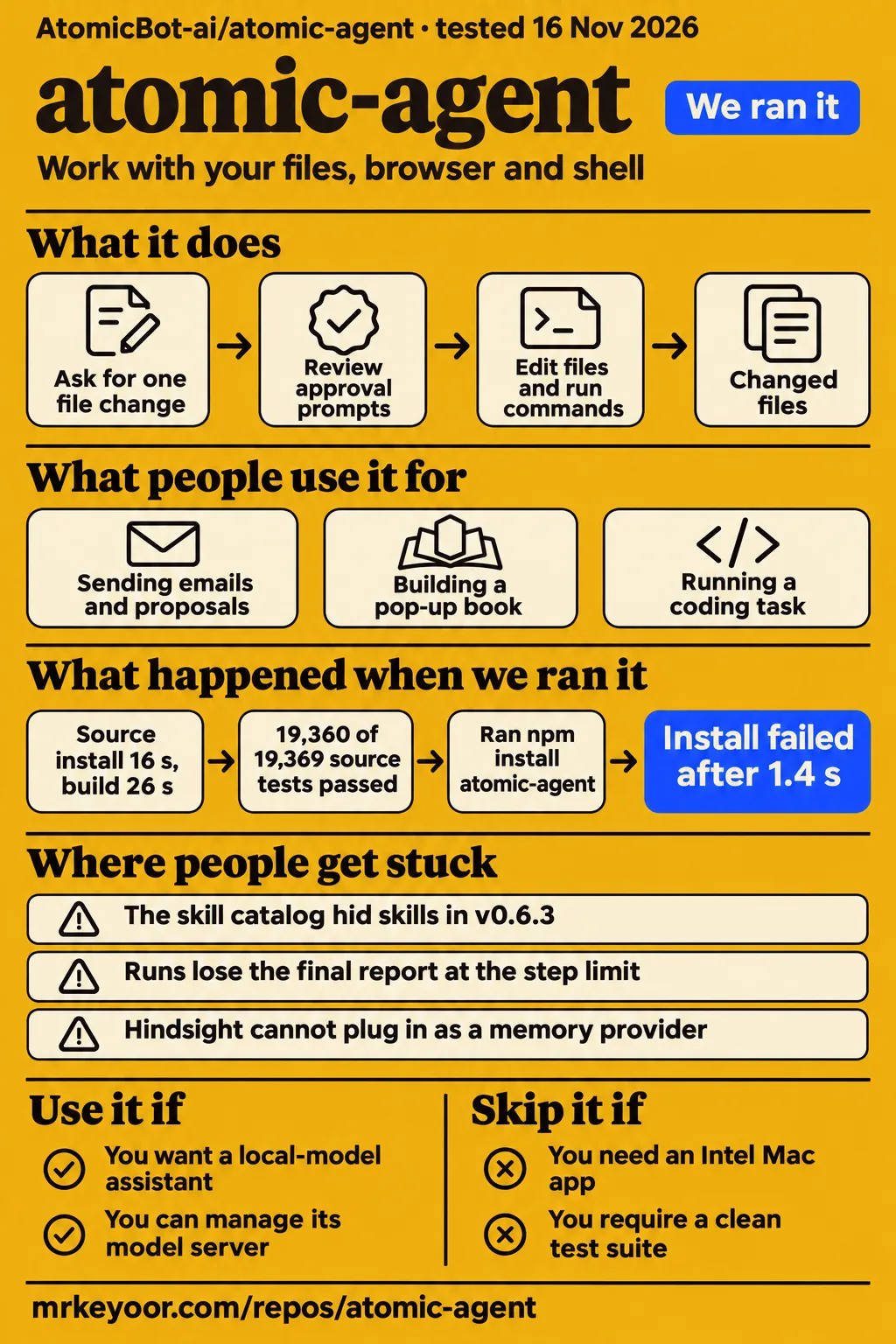
Atomic Agent built in 26 seconds in our sandbox, then its test command failed with three failing tests. Use it if you want a local-model assistant and can manage its model server and permissions. Skip it if you need an Intel Mac app, a drop-in Hindsight memory backend, or a clean test run as an adoption requirement.
The useful change since older coverage is that a desktop app now exists. The difficult decision is how much authority to give an agent that can edit files, run commands and connect to outside services. A desktop download makes entry easier. It doesn't settle that decision.
What people use atomic-agent for
Composio reports email and proposal workflows, while Atomic Agent's own team demonstrates cloud planning with local workers.
| Who used it | What they did | Reported outcome |
|---|---|---|
| Atomic Agent users in Composio's customer story | Drafted and sent personalized emails and proposals | Composio calls email the most common workflow through its integrations. |
| An unnamed winery customer in the same Composio story | Used the agent for rural Internet of Things workflows | The story reports use at a winery, without implementation details. |
| The Atomic Agent team, posting as atomicagent_io on X | Made a fairy tale pop-up book using a cloud planner and local Qwen workers | The team reports a completed Fusion demonstration, compared with using the cloud model alone. |
| The reporter of issue #107 | Ran a coding task up to its step limit | The reporter says the work reached successful verification, then stalled without its requested final report. |
The email example is the clearest reason to consider the integrations: a local assistant becomes more useful when it can work in the services you already use. Composio is also selling that integration layer. Its customer story supports the existence of these workflows, rather than an independent assessment of the emails' quality or business results.
The X demonstration serves a different purpose. It shows the team's intended division of labor: a cloud model directs the work and local models do parts of it. That is a concrete use of Fusion. Decide whether that arrangement suits your own task before treating a vendor demonstration as a reason to switch assistants.
What happened when we ran it
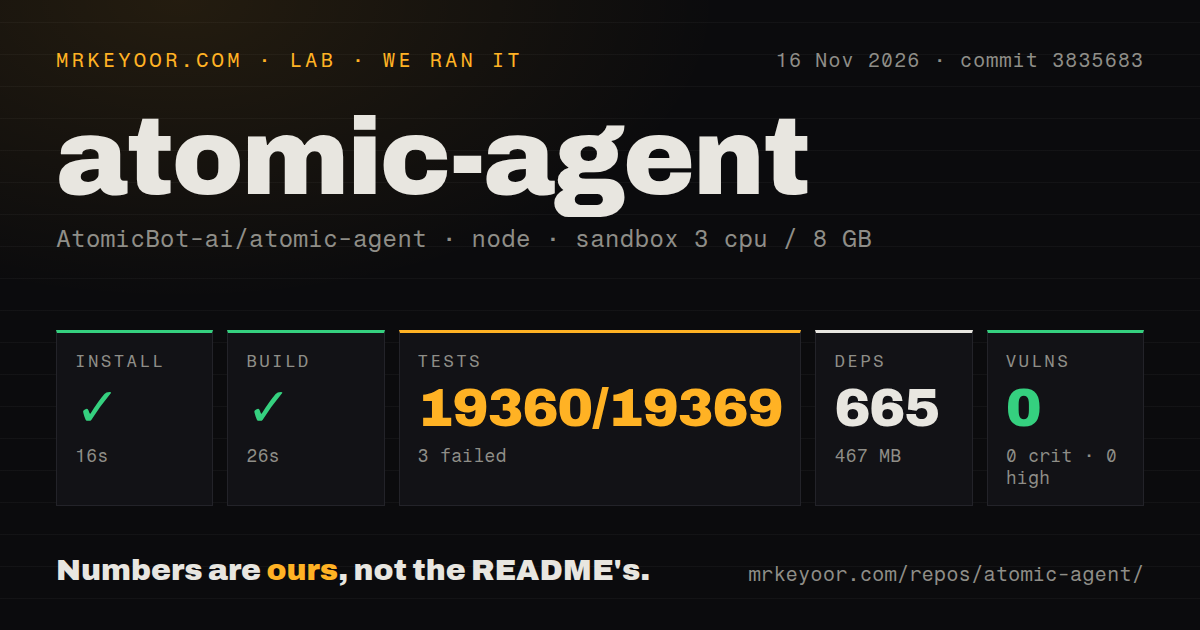
Our November 16, 2026 source run at commit 3835683 installed successfully in 16 seconds and built successfully in 26 seconds, but the test command exited 1 after 729 seconds.
| Check | Our recorded result |
|---|---|
| Sandbox configuration | 3 CPUs, 8 GB RAM, image label lab-node:22 |
| npm dependency installation | Succeeded in 16 seconds; 665 dependencies recorded; 467 MB on disk |
| Build | Succeeded in 26 seconds |
| Vitest tests | 19,360 passed, 3 failed, 6 skipped out of 19,369; command exited 1 after 729 seconds |
| npm audit | 0 known vulnerabilities reported, across all listed severity categories |
| Repository scan | 4,212 files, approximately 739,613 source lines, 40.2 MB checked out |
| Project signals | Four CI workflow files; no Dockerfile or tests directory detected |
The log tail names failures in src/cli/serve-orphan-guard.test.ts and src/tools/os/proc/proc-list.test.ts, one in each file. It reports three failed test files overall, alongside 1,547 passing files. The third failed file and the assertion details are absent from the supplied tail. There is enough evidence to reject a clean-suite claim, and too little to diagnose a package, operating-system or environment cause. The image label supplies configuration, not the actual Node or operating-system version.
The scan's lack of a separate tests directory is particularly easy to misread. The log shows tests living beside source files, including the two paths above. This repository plainly has tests. Likewise, a zero-advisory npm result is a dependency check for this run, rather than a security assessment of an agent's behavior.
A separate hands-on recipe in the research pack stopped at npm install -g atomic-agent with E404, Not Found and 'atomic-agent@*' is not in this registry. The record says the package name came from the manifest. That guessed npm route differs from the release installer documented in the quickstart. The failure belongs in the account, but it cannot overturn the successful source installation or prove the supported installer fails. The pack's finding records the stop at installation and its teardown records successful cleanup.
Where people get stuck: release numbers matter
Issue #466 reports that installed skills could be hidden from the model, and its maintainer identifies v0.6.4 as the shipped fix for disclosure and configuration.
| Report | What the thread says | How to use that information |
|---|---|---|
| #466: skill catalog | On v0.6.3 the reporter saw only 17 of 33 enabled skills. A maintainer says v0.6.4 adds a truncation notice and honors the file setting. | Check the catalog the model receives, not just the installed-skills list. The default budget and alphabetical selection still matter. |
| #121: Windows TUI heap crash | A maintainer reports production React builds in v0.4.1, then other growth-path fixes and a heap warning in v0.4.2. The exact original retainer was never confirmed. | An older crash report needs its release context. Don't repeat the reporter's initial root-cause theory as a settled diagnosis. |
| #65: KoboldCpp endpoint freeze | The reporter says adding /v1 shortened the freeze. The maintainer describes a proposed probing change. |
Treat the URL adjustment as a reported workaround; the extracted thread supplies no shipping release for the proposed change. |
| #104: parallel tool calls | Contributors report fixes in #207 and #212, deriving the request flag from executor limits and provider capabilities. | Executor concurrency and what a provider is asked to generate must agree. Gemini defaults are part of that report. |
| #107: missing final answer | A contributor reports an implementation in PR #269. The extract gives no shipping release. | Keep a contributor implementation separate from a release-confirmed fix. |
The skill report is more consequential than a missing menu entry. The reporter had an enabled skill that a direct lookup could still reach, yet the model could not discover it from the catalog. The maintainer's response fixes the silence: clipping becomes visible and the configuration setting works. Alphabetical order still determines what fits. If the assistant denies having a skill you installed, inspect this boundary before rewriting the skill.
Issue #107 illustrates a separate failure: completing useful work and delivering the requested report are different outcomes. The reporter reached the end of the budget, got max_steps_reached: 50 steps without reply, and lost the final account of the work. For coding tasks, save the changed files and inspect the result yourself even when the assistant's last message is missing. The issue's proposed finalization step is a sensible design response, but its contributor report is not a release receipt.
Desktop and CLI installs can coexist, but updates follow the install route
The README documents a desktop app with its own agent copy, alongside a separately installed CLI.
For a packaged Linux installation, use the package manager for updates. A script-installed CLI uses the updater, while a developer checkout follows Git. The README warns that a copy in ~/.local/bin can take precedence over /usr/bin. That explains why updating a system package can leave the command you type on an older binary. Check which copy runs before investigating a failed update. Installation and PATH documentation.
The supplied README also carries a Debian desktop caveat: the package is documented but absent from the apt repository in that snapshot. Its stated workaround is the architecture-appropriate downloadable .deb. Desktop and terminal share state, so removing a program and deleting your chats, memory and models deserve separate decisions. Package removal leaves data; the documented full uninstall can remove it. Read its deletion preview before confirming. Desktop packages and removal, shared setup.
Getting the executable is only part of setup. The quickstart separately starts a local model, and troubleshooting says browser binaries are not bundled. Linux clipboard, notification and window-control tools can require extra system packages. Begin with one local folder task, then add browser access or service connections as the task requires them. Quickstart, runtime prerequisites.
Local inference and privacy defaults are separate choices
Anonymous usage analytics and crash reports are enabled by default in the official description, even when inference runs locally.
The documented controls include /privacy analytics off in the TUI and analytics.enabled: false in configuration. Turn that choice into part of onboarding if your reason for using a local model is control over network traffic. Sending email, browsing and connecting integrations have their own external destinations. A local model changes where reasoning happens; it doesn't make those operations offline. Official privacy description.
Approval policy needs the same care. The quickstart describes approval before risky writes and shell commands. The newer v0.7.0 release notes add saved allow, ask and deny rules, including an Always allow option across several interfaces. They say project rules can ask or deny but cannot grant themselves permission. That is useful progress beyond session-only grants, and a reason to read the release notes rather than adopting a blanket no-approval setting. Quickstart approvals, v0.7.0 release notes.
The pack's video titled “Atomic Agent GitHub Explained: Local AI Workflows with Reviewable Execution” explains local execution and grammar-constrained calls. It supplies an architectural explanation, rather than a completed task result we can score. Its record supplies no channel identity, so attributing a measured workflow to a named creator would go beyond the evidence. Recorded video explanation.
Atomic Agent vs Hermes, OpenClaw and desktop alternatives
Atomic Agent's vendor comparison positions it around local inference, Hermes around learning from runs, and OpenClaw around messaging reach.
| Choice | Reason to investigate it | Evidence boundary |
|---|---|---|
| Atomic Agent | A standalone assistant organized around local models, with desktop and terminal interfaces | Its own comparison supplies this positioning. |
| Hermes | Self-improvement and a wider provider-oriented approach | Vendor-described positioning, not our comparative reliability result. |
| OpenClaw | Reach across messaging interfaces | The cited GAIA exercise excluded OpenClaw. |
| Jan or GPT4All | A desktop-oriented alternative to evaluate | PromptQuorum recommends them, but its terminal-only premise for Atomic Agent is now dated. |
| OpenHands or Open Interpreter | A candidate for a more specialized coding workflow | PromptQuorum suggests them; the pack supplies no independent coding showdown. |
Sources: Atomic Agent's comparison and PromptQuorum's alternatives.
The comparison worth resisting is the easy accuracy headline. Atomic Agent's later comparison acknowledges a flaw in its Hermes benchmark and narrows the surviving result to step efficiency and latency. That admission belongs beside the promotional score, not behind a link after an unqualified winner label. Choose on workflow and operating model. The article's own caveat prevents us from recommending a switch on accuracy alone. Vendor's benchmark qualification.
What the other reviews get wrong
PromptQuorum's September 12 review describes a terminal-only product with a desktop waitlist; October records document a downloadable desktop app.
That September description can have been accurate when written. It is poor buying advice carried forward unchanged. The same applies to its script-only installation description: the later README documents Linux packages and desktop downloads, while explicitly qualifying desktop availability in apt. September review, October desktop record, package caveat.
Two corrections concern Atomic Agent's own material. Its official summary combines a strong data-stays-local claim with default analytics and crash reporting. Its landing-page example shows port 8080, while troubleshooting distinguishes managed llama-server on 19091 from the external-mode default URL on 8080. Follow the documentation for the mode you selected. Neither “local” nor a copied port number is a complete configuration instruction. Privacy text, landing-page example, port reference.
The approval story has also moved beyond the pack's older issue discussion. Issue #229 describes in-memory grants and a request for persistent guard rules. The fresh v0.7.0 notes document persistent approval rules, a different concrete interface from the proposed config.json plus /guard design. Saying all shell grants disappear on restart would now omit shipped documentation. Older request, new saved-rule documentation.
Questions people ask
AtomicBot-ai's atomic-agent is a local-first agent runtime; the similarly named Atomic Agents Python framework and atomic-agents plugin are separate projects.
What is atomic-agent, and is it the same project as the atomic-agents plugin?
No. AtomicBot-ai's runtime acts on files, browser sessions and commands. The plugin listing describes development workflows for the Atomic Agents framework, and the Python tutorial points to a different repository. Installation instructions and framework comparisons do not transfer between them. Runtime, plugin, Python tutorial.
Does Atomic Agent now have a downloadable desktop app?
Yes. The official October record documents Desktop v0.0.3 and downloads, and the current release notes link a newer desktop release. Use the desktop download page to select your platform rather than following the September waitlist description. October desktop record, current release.
Is Atomic Agent free, and when do cloud-provider charges apply?
The desktop and terminal applications are MIT-licensed and free. Local inference has no provider token bill. When you connect a cloud model, its provider charges for usage. Software licensing and the cost of the selected model service are separate decisions. Official cost FAQ.
Can Atomic Agent work offline without a cloud account or API key?
Yes, the docs describe local-model operation without a cloud account or API key, and local file tasks can work offline. Download the required model first. Web browsing, search and online integrations still need a connection. Quickstart, offline FAQ.
Does local-first mean all telemetry stays on my computer?
No. The official description says anonymous usage analytics and crash reports are on by default, with controls to disable them. That is separate from keeping model inference and local memory on your machine. Set the privacy option deliberately. Official telemetry disclosure.
Which local model should I use for my hardware?
Start with the model the app suggests for your hardware, as the official FAQ recommends. For an existing Ollama setup, select a model that supports tools and configure its context on the Ollama side. The guide distinguishes Ollama's provider-native tool calls from grammar-constrained calls through Atomic Agent's llama.cpp backend. Model FAQ, Ollama guide.
Does Atomic Agent work on Windows, Linux, Intel Macs, and ARM devices?
The supplied desktop page lists Windows x64 and ARM64, Linux x64 and arm64, and macOS on Apple Silicon; Intel Macs are unsupported. The README separately describes Windows ARM running an x64 build under emulation. Check the artifact for your interface and architecture rather than assuming every Windows build is native ARM. Desktop platforms, README platform qualification.
Will Atomic Agent change files or run commands without asking?
By default the docs describe approval prompts for writes, commands and other risky actions. Permission settings and saved rules can change that behavior. Review the effective policy before giving it a working directory with important files. Default approvals, saved rules.
Can I use Atomic Agent from my phone through Telegram or Discord?
Yes. The personal-agent FAQ documents Telegram and Discord bots, with pairing or setup from the terminal. It says the bot answers only you and approvals arrive in that chat. That describes remote access to the agent, rather than a model running on your phone. Phone access FAQ.
Can shell approval rules persist across restarts for Telegram and unattended jobs?
The v0.7.0 notes document saved approval rules and Always allow across Telegram and other interfaces. The older #229 thread describes session grants that vanished on restart and a distinct proposed guard menu. For unattended runs, the release notes say actions needing approval are denied by default, so saved permissions need deliberate scoping. Release behavior, historical request.
Can I import my setup from Hermes or OpenClaw, including memory and skills?
Import is partial: the supplied personal-agent page says chat history and scheduled jobs transfer from Hermes and OpenClaw, while memory and skills do not. The current README lists capabilities source by source, including different transfers for Claude Code and Codex. Inventory what you need before retiring the original installation. Migration FAQ, source-specific import list.
Can Hindsight replace Atomic Agent's built-in memory?
No plug-in path is documented in issue #33. The maintainer says the memory layer has no provider interface and that building one is outside the near-term roadmap. A contributor offering to help is not evidence that the integration exists. Hindsight request and maintainer response.
What we have not tested yet
Our evidence covers source installation, build and the failed test command, plus a separate attempted npm installation that stopped before a task ran.
We have not tested desktop installation, browser task completion, local-model answer quality, long-session memory growth, network egress or approval enforcement. No screenshots or known-answer task results accompany the pack. We did not reproduce the vendor's Fusion demonstration or Hermes benchmark, and the supplied comparison offers no corrected accuracy run. The videos do not supply an independently scored workload or enough creator metadata to turn their narration into a named hands-on endorsement.
For release reliability, the #107 extract lacks a shipping version for the contributor's final-response change, and #65 lacks release confirmation for its proposed probing fix. The #229 proposal and v0.7.0's saved rules need a behavior-level comparison before calling them equivalent. The older timeout discussion in #15 leaves a user's follow-up unanswered, and #485 describes an AnySearch proposal rather than a committed integration. Timeout thread, AnySearch request.
The next useful check is small: pin a release, use a disposable project, inspect which skills the model sees, and ask for one file change with an explicit final report. Restart the agent and check the saved approval rule. That would answer the practical adoption question our source build cannot: does this setup finish your task under the permissions you intended?