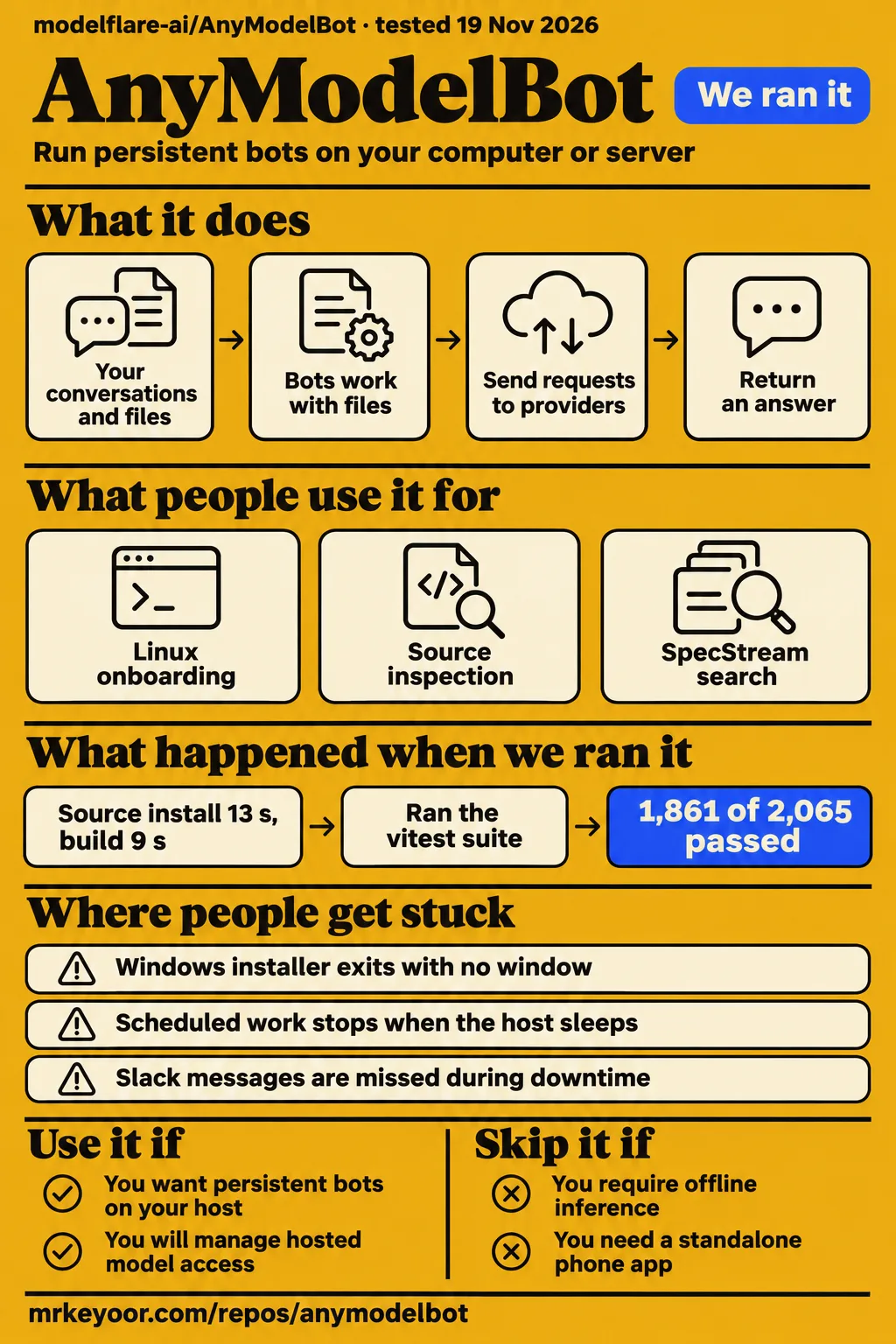
Our AnyModelBot review separates two results: our source run passed 1,861 tests, while our deployment runner failed its Compose prerequisite. Use it if you want persistent bots with files and editable memory on a host you control and will manage provider access and approvals. Skip it if offline inference or a standalone phone app is essential: the official FAQ describes hosted models and messaging-based phone access.
The decision turns on where the agent runs and where model requests go. AnyModelBot places the agent process and its working files on your hardware. Its documented model routes send requests to hosted providers, either directly with your official key or through Modelflare. That distinction connects the installation choice to permissions, request logging and the machine you keep awake for background work.
Each bot has its own workspace, memory and model
Each AnyModelBot bot has its own persona, default model, workspace and memory, according to the English README. The workspace is the folder where that bot works with files. This gives a writing bot and a coding bot separate working contexts, while the application also provides in-app conversations and connections to WeChat, Feishu, Telegram, Slack and Discord. The README documents file access, commands and desktop operation after permission is granted.
Tools perform actions; skills describe reusable procedures. The v0.1.38 release explanation describes built-in app connections including GitHub, Notion, Linear, Atlassian and Canva, alongside custom MCP connections. Connected accounts are available to bots by default, with access controls per bot and tool. Connecting a work account changes which outside services an agent can reach from its local workspace, so those controls belong in the setup decision.
What people use AnyModelBot for
Reported uses include Linux onboarding, source inspection, SpecStream search and Windows installation attempts. These reports answer different practical questions: whether an installer opens, whether source checks finish, or whether an existing search configuration returns results. The table preserves the individual outcomes rather than treating every launch report as evidence of completed autonomous work. Each row links to the account responsible for that observation.
| Who did it | What they did | Reported outcome |
|---|---|---|
| Radar Scout reviewer | Opened a checksum-checked v0.1.35 Linux AppImage in a clean VM | Reached Modelflare sign-in and direct-provider onboarding in the November 14 launch review. |
| Geeyo reviewer | Installed source dependencies and examined several dependency configurations | Reported 1,973 passes, six failures and 66 skips in the source-focused review. |
| SpecStream employee | Used the existing SearXNG configuration | Reported working SpecStream results in issue #70. |
| Eginn-33 | Tried Windows x64 installers on Windows 11 Insider Build 26300 | Reported immediate exits in issue #71. |
| Argusic automated agent | Attempted installation and launch on a clean machine | Classified AnyModelBot as running in the November 18 X account. |
The SpecStream report provides a concrete integration outcome: the existing SearXNG code path returned search results. Its author also identifies the configuration cost, with the key embedded in the address and the provider displayed as SearXNG. The Linux review contributes an onboarding observation, while the Windows issue contributes a reproducible symptom and a maintainer-requested diagnostic procedure. Geeyo's engineering results belong to that reviewer's environment, separate from ours.
What happened when we ran it
Our November 19 deployment attempt failed because its runner required a Compose file. The safety step checked for compose.yaml, compose.yml, docker-compose.yaml and docker-compose.yml, then recorded FAILED because none existed. The run summary nevertheless describes deployment with Docker Compose and ports bound to 127.0.0.1. The failed step is the concrete outcome; the teardown record says cleanup was okay.
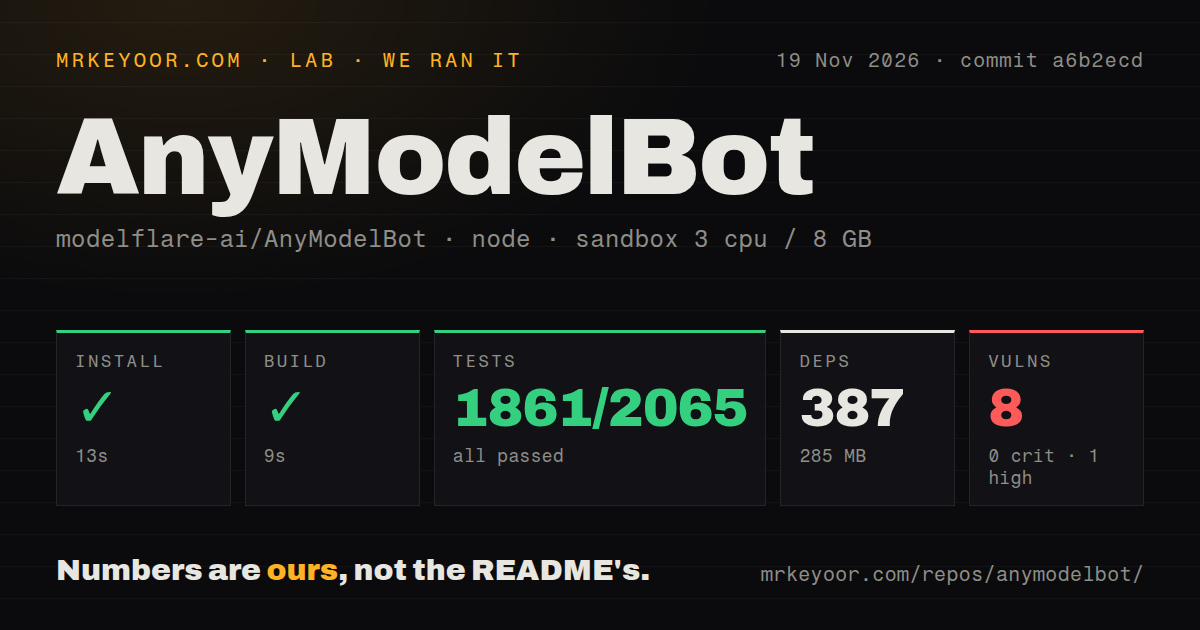
Our separate source harness completed installation, build and tests at commit a6b2ecd on November 19, 2026. Our run passed 1,861 tests, with 204 skipped and no failures. We measured those command outcomes in a sandbox configured with 3 CPUs, 8 GB RAM and image label lab-node:22. The measurement record also separates checkout size, installed dependencies and dependency-audit results, which answer different setup questions.
| Source-harness check | Our recorded result | Meaning |
|---|---|---|
| npm install | Succeeded in 13 seconds; 387 dependencies; 285 MB installed | Dependency installation completed. |
| Build | Succeeded in 9 seconds | The recorded build command completed. |
| Vitest | Succeeded in 267 seconds; 1,861 passed, 0 failed, 204 skipped of 2,065 | The passing count excludes skipped cases. |
| npm audit | 8 vulnerabilities: 0 critical, 1 high, 7 moderate, 0 low | The audit returned dependency findings. |
| Repository scan | 4,010 files; approximately 371,291 source lines; 179.8 MB checked out | These figures describe the checkout. |
| Engineering signals | 5 CI workflow files, a Dockerfile and a tests directory | These files were present. |
The README source instructions include dependency installation, npm run setup to fetch and build the bundled gateway, and npm start to open the local interface. They state Node.js 22.13+ and Go 1.26.8+ as build requirements. The README also documents a Docker run route for a NAS or server; our runner's Compose prerequisite and that upstream deployment route are separate procedures.
Where people get stuck: startup, model names and search settings
Issue #71 reports v0.1.31 and v0.1.32 exiting with code 0 on Windows 11 Insider Build 26300. Eginn-33 describes no window, console output or listener on port 3600, including after reinstalling, changing the installation path and downgrading. The maintainer's reply says v0.1.34 added diagnostics before the lock request and asks the reporter to launch with --diagnose-startup and return the resulting startup logs.
The requested files are startup-*.log under %APPDATA%\anymodel bot\data\logs, including the space in the directory name. The maintainer also asks whether ELECTRON_RUN_AS_NODE is set if logs still fail to appear. This troubleshooting route targets the reported exit path. The thread records an investigation, while the release announcement separately identifies a model-selection error with a stated correction.
| Symptom | Reported response | Dated status |
|---|---|---|
| Windows exits with code 0 and no window | Run startup diagnostics and return logs | Issue #71 remained open. |
Synthetic auto/model-name selection produces an unknown-model error |
Remove synthetic entries and remap saved selections | Co-developer Malachi reports the correction in v0.1.38. |
| No dedicated SpecStream settings entry | Use its SearXNG-compatible endpoint | Issue #70 describes working results with the key in the address. |
Geeyo's source investigation names runtime-dependent integration skips, including agent.integration, rules.integration and tasks.integration; a nested-sandbox bwrap failure with setting up uid map: Read-only file system; Landlock behavior that differed from four tests' database-hiding and loopback-blocking expectations; and two outdated assertions. Those assertions concerned system-prompt section ordering and observation-mode wording. The reviewer reports the minimal bwrap command succeeding outside the nested sandbox and describes CI using the configuration without the agent runtime.
Keeping work local still sends content to providers
Official-key model calls go directly to the provider, while Modelflare-routed calls pass through Modelflare. The project's data-flow explanation distinguishes these routes and says network access is required for model calls. Conversations, memory, files and keys are stored locally, while prompts and content needed for an answer leave for inference. The official site explicitly includes screen content sent during computer use.
The README says Modelflare keeps request logs. Its privacy explanation directs readers to the Trust Center for retention details. Permission settings address which local actions a bot may perform. Read-only, Workspace and Full access are documented presets. Workspace is the default and asks before writes outside the bot folder; Full access removes the sandbox but still asks before deleting a whole folder. Computer use also offers approval before interface-changing actions.
An awake host and usage billing are part of the setup
Scheduled rules stop when the host sleeps, according to the co-developer's explanation. The documented server alternative is Docker on an always-on NAS or home server. The v0.1.38 announcement adds a scheduling distinction: calendar rules can catch up the last missed run within 12 hours, while interval rules do not catch up. An awake host is therefore part of the operating arrangement.
Messaging channels also differ during downtime. The official channel instructions describe Slack and Discord as direct-message channels whose messages are missed while the application is closed. Telegram also uses direct messages but can retrieve messages for up to 24 hours after downtime. Phone access consequently depends on a running desktop or server installation and the behavior of the chosen messaging channel.
The app has no subscription fee, while hosted model usage is billed separately. The co-developer's cost explanation includes background memory housekeeping and context handoffs, with a cheaper model available for those chores. Bot collaboration has spend and request controls, but the documented handoff flow requires Modelflare sign-in and both bots on Modelflare models. Image and video generation also use Modelflare.
Chinese documentation has an English entry point
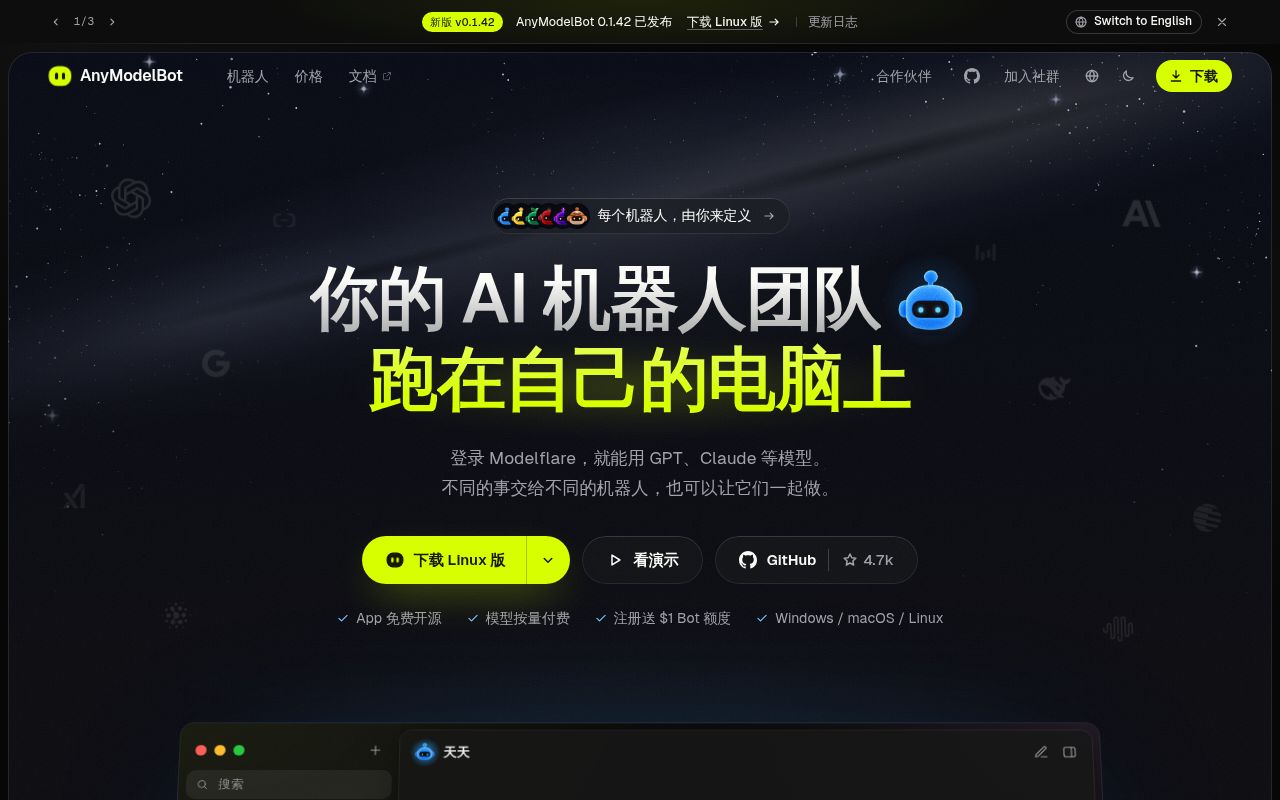
The default README is Simplified Chinese, and README_en.md supplies English instructions. The README's screenshot description says the pictured interface is Simplified Chinese and that English is selectable in Settings. An English reader therefore has both a documentation entry point and a documented interface setting. The English README also describes installers for Windows, macOS and Linux and the source setup route.
The translation exchange in issue #73 shows a completed contribution: lprvy requested a Turkish README, the maintainer said Turkish would be added, and lprvy subsequently reviewed the new file and sent wording fixes in #74. Magnus-minor then reported merging that PR. The thread records a documentation request, proofreading by a native speaker and a merged follow-up change.
AnyModelBot vs Msty, Chatbox AI, LibreChat and Rakazo
The alternatives directory describes Msty around local inference and Chatbox AI around multi-provider chat interfaces. Geeyo describes LibreChat as a self-hosted web conversation interface, while the comparison video discusses Rakazo's sandbox choices. These attributed descriptions distinguish requirements before choosing software: running a model locally, accessing chat on a phone, managing conversations in a browser, or allowing persistent bots to act on a host.
| Choice | Requirement to consider | Source's description |
|---|---|---|
| Msty | Local inference | The alternatives directory names Ollama, Llama.cpp and MLX integrations. |
| Chatbox AI | Desktop, web and phone chat interfaces | The directory's Chatbox AI comparison lists Windows, Mac, Linux, web, iOS and Android. |
| LibreChat | A self-hosted web conversation interface | The Geeyo comparison describes that role. |
| Rakazo | Choosing Docker or cloud bot sandboxes | The comparison video's presenter describes these deployment choices. |
The project's own comparison with Grok Bot, OpenAI dots and Claude Duet emphasizes MIT licensing, a runtime on your hardware, model choice and usage billing. Its author explicitly calls the comparison public positioning. The video similarly frames OpenMausBot around existing assistant credentials and Rakazo around choosing where bot computers run. These accounts organize the choice around deployment and model access.
What the other reviews get wrong
GetToolRank's Modelflare-only description conflicts with the README's direct-provider route. The listing's statement and Geeyo's gateway-dependent conclusion need the same correction: official provider keys can send model calls directly to the provider, as the English README states. Collaboration and image/video generation retain their separately documented Modelflare requirements. Those feature-specific dependencies should not become a claim about every model request.
Enghyu's Python description also needs qualification. Geeyo's source inspection describes a TypeScript application with a Go gateway and TypeScript runtime and computer-use submodules. Retention accounts concern different objects: the alternatives directory describes automatic deletion of task files older than 30 days; Radar Scout describes folders unused for 30 days being marked for deletion, with a Keep option. These are separate retention descriptions, rather than a correction of one by the other.
The older DEV overview's integration caution has been superseded by official Slack, Telegram and Discord instructions. Marco_Ramilli's X promotion makes a different overstatement by saying the bots remember everything. The official memory description says passwords, keys and ID numbers are skipped and describes separate, editable Markdown memory. That is a narrower documented design than total recall.
FAQ
Official provider API keys let you use AnyModelBot without a Modelflare account. The official onboarding answer names a direct-key option. Billing, local storage and bot collaboration have their own documented rules, so the questions below separate account setup from those features. The startup and translation questions focus on the concrete diagnostic procedure and completed README contribution recorded in the issue threads.
Can I use my own provider API key without a Modelflare account?
Yes: choose Use your own API key and enter a supported official provider key. The official FAQ names OpenAI, Anthropic, Google Gemini and DeepSeek among the options and says requests go straight to the provider. The separate collaboration instructions require Modelflare sign-in and both bots on Modelflare models, so onboarding and bot handoffs have different account requirements.
Is AnyModelBot free, and what model usage costs extra?
AnyModelBot is MIT licensed and has no app subscription fee; hosted model use is billed separately. The README states the app-fee distinction, while the co-developer's explanation includes background chores such as memory tidying and context handoffs. Those operations are part of usage even when they happen outside the foreground conversation you are typing into.
What data stays on my machine, what leaves it, and who keeps request logs?
Conversations, memory, files and keys are stored on your device, while model requests send the needed content to the selected hosted route. The README says Modelflare keeps request logs for its route. The official site also states that screen content goes to the model during computer use, making screen access part of the data-flow decision.
How does AnyModelBot differ from Grok Bot, OpenAI dots and Claude Duet?
The maker's comparison emphasizes MIT code, your own runtime, model choice and usage billing. Its positioning article explicitly describes the comparison as a snapshot of public positioning. The concrete AnyModelBot proposition is control of the host process and its local files, alongside a choice of documented hosted model routes and the responsibility for local permissions.
Should I choose OpenMausBot, Rakazo or AnyModelBot for my setup?
The comparison video frames OpenMausBot around existing assistant credentials and Rakazo around sandbox choice. AnyModelBot's README describes persistent bots on your computer with hosted models and messaging connections. Match those descriptions to the host and model account you intend to operate: that is the decision the video's deployment explanation supports, rather than a ranking of answer quality.
Is AnyModelBot a ready-to-use desktop assistant?
The README describes AnyModelBot as a desktop application for Windows, macOS and Linux, with packaged downloads. Its documented capabilities include separate bot workspaces and memory, file access, commands and desktop operation after permission is granted. The downloads provide an application route alongside the source instructions; first-run model access then uses Modelflare sign-in or an official provider key.
Why does the Windows installer exit immediately without a window or logs?
Issue #71 records immediate exit with code 0 on Windows 11 Insider Build 26300 and a maintainer-requested diagnostic procedure. The maintainer's reply asks for a launch with --diagnose-startup after updating to the release containing the diagnostics. The requested evidence is the latest startup log, plus information about ELECTRON_RUN_AS_NODE if the log still fails to appear.
How can I enable Windows startup diagnostics?
Version v0.1.34 added the startup diagnostics requested in issue #71. The issue instructions specify --diagnose-startup and logs under %APPDATA%\anymodel bot\data\logs. Preserve the space in that directory name when locating the files. The reporter's affected versions were v0.1.31 and v0.1.32 on Windows 11 Insider Build 26300, which gives the exchange its specific troubleshooting context.
Can I add SpecStream as a keyed web search provider?
Issue #70 reports working SpecStream results through the existing SearXNG option. The author's workaround uses SpecStream's compatible endpoint, embeds the key in the address and displays SearXNG as the provider. That credential placement is also the author's reason for requesting a dedicated keyed settings entry. The issue records a working route and the configuration tradeoff together.
Would the project accept a Turkish README?
The Turkish README was added, and the maintainer reports merging subsequent wording fixes. In issue #73, lprvy first offered a translation, then reviewed the new README and submitted corrections in #74. The completed README contribution is the result of that exchange and gives prospective translators an example of a request followed by proofreading and a merged change.
Which desktop actions should always require my approval?
The documented computer-use option can ask before interface-changing actions, and enabling that setting is a sensible starting choice. The team's permission explanation also describes per-bot read-only, workspace and full-access tiers. Workspace asks before writes outside the bot folder, while full access still asks before recursive deletion. Choose the file-access tier and computer-use approval behavior separately because they address different actions.
How do I install a skill or save a successful task as a reusable skill?
The README documents installing a skill from its prompt or GitHub link, importing a ZIP containing SKILL.md, and saving a successful procedure. The skill instructions describe confirming the installation card and importing through Bot settings. The release explanation also describes saying "save as skill", sending /skill, or choosing Save as skill from the input menu, then reviewing the draft card.
What we have not tested yet
Our source results apply to commit a6b2ecd; the deployment attempt stopped before a successful application session. We did not test model answers, completed desktop tasks, collaboration, skill installation, connected work accounts or scheduled delivery. There are no lab measurements of response latency, resident memory or completed-task cost. The lab-node:22 image label does not identify actual runtime versions, and the source run is not an exact-tag test of v0.1.42.
The 204 skipped cases lack a feature-level coverage explanation in our measurement summary. Geeyo's runtime-dependent skips, bwrap UID-mapping failure, Landlock differences and outdated assertions are that reviewer's findings, not diagnoses of our skips. Our audit summary also lacks package names and advisory details. It supports reporting eight vulnerabilities and their severities, rather than prescribing a package change or identifying an affected application workflow.
The independent launch review stopped at onboarding, Geeyo did not run real model conversations, and Argusic's launch classification does not establish sustained workflow success. Task-quality comparisons, per-model tool compatibility, routing latency, long-term reliability, adoption, completed-task spending, memory secret filtering, provider retention in practice and permission enforcement across physical operating systems remain outside these results. The alternative descriptions above come from directory, review and video accounts rather than our own comparative runs.
The Windows thread leaves its root cause unresolved and gives no supported-build matrix. The SpecStream exchange does not establish a shipped native settings entry. The Turkish translation thread does not settle CONTRIBUTING or SECURITY scope beyond the README. No primary-source passage here establishes DeepSeek architecture or lineage. The relationship between the directory's task-file deletion description and Radar Scout's folder-retention description is unverified. A useful next evaluation would use a disposable folder, approvals and a task with a known result, recording both completion and outgoing content.