A personal experiment, with a real data decision
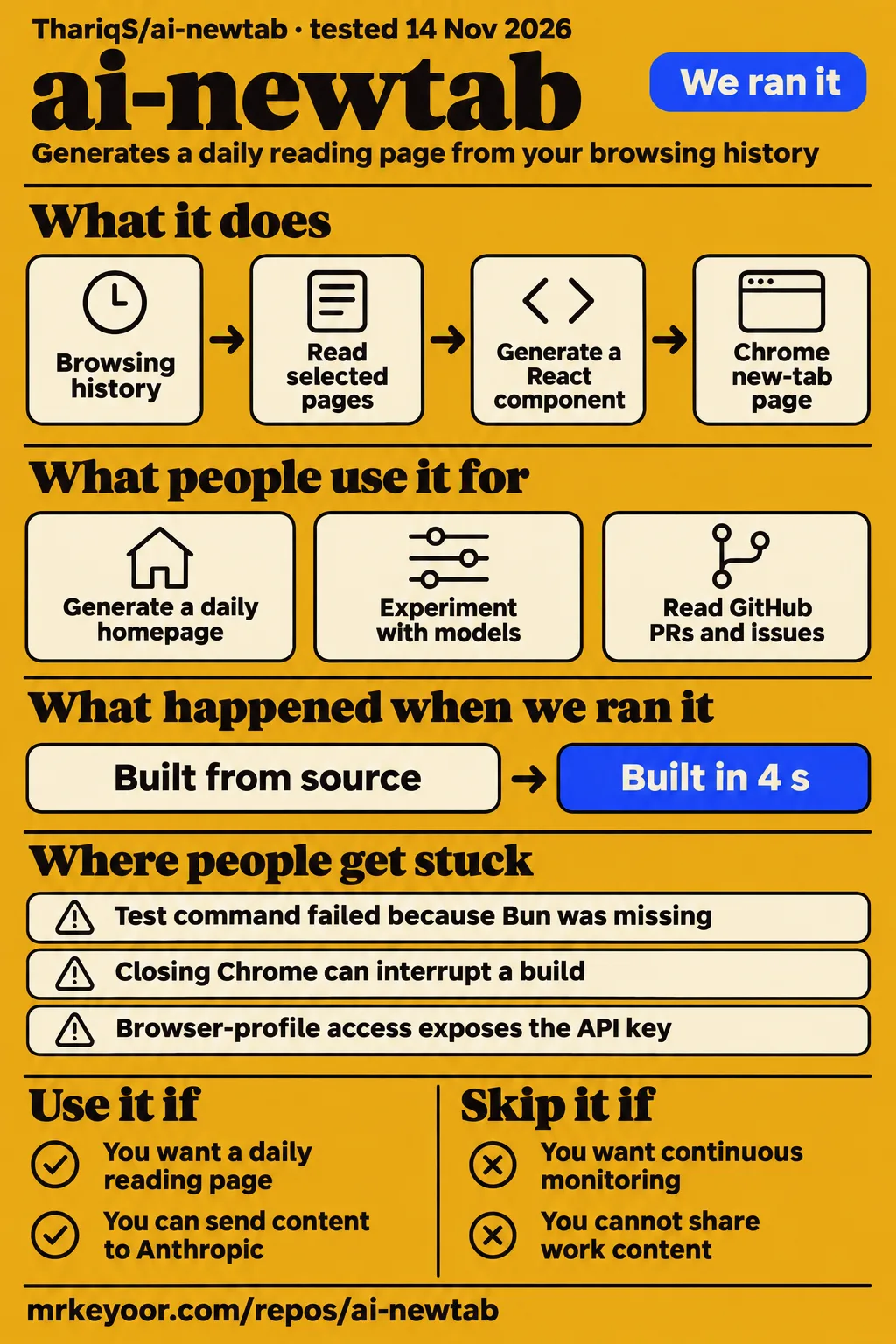
Our sandbox built ai-newtab in 4 seconds, but its test command stopped because Bun was missing. Run it if you want to experiment with a Claude-written Chrome homepage and can decide which browsing data may leave your machine. Skip it for a work profile containing material you cannot send to Anthropic, or for a store release with the current API-key storage.
ThariqS/ai-newtab, called AI Homepage in its README, replaces Chrome's new-tab page with a React component generated from browsing history and selected pages. Its attraction is specific: the agent can read pages in your signed-in browser, then turn what it finds into a page shaped by your instructions. That same access is the reason to read the privacy details before entering a key.
What people use ai-newtab for
The supplied user reports describe a personal daily homepage and an experiment with different model providers.
- Project author Thariq, posting as trq212, says he made a homepage generated each day from sites he reads, replacing his Chrome new-tab page. This is the creator's account of personal use, rather than an independent customer result. Author's post, preserved in the research record.
- X user Tao100086 reports modifying the extension to accept an OpenAI-compatible base URL, API key and model name. In that user's Chinese-language account, GPT6-Astra and Gemini3.8 flash through a proxy produced homepages they liked less than the original Claude version. That is one person's subjective comparison using a modified integration. Model experiment.
The upstream instructions offer a useful way to decide what to ask for. A quiet reading list puts a short explanation beside each link. A dense dashboard can put GitHub PRs and issues ahead of Hacker News. These are documented instruction examples, not separate user case studies. They show how content priorities and appearance share the same settings box. Write the reading task you actually have before spending time describing fonts.
What happened when we ran it
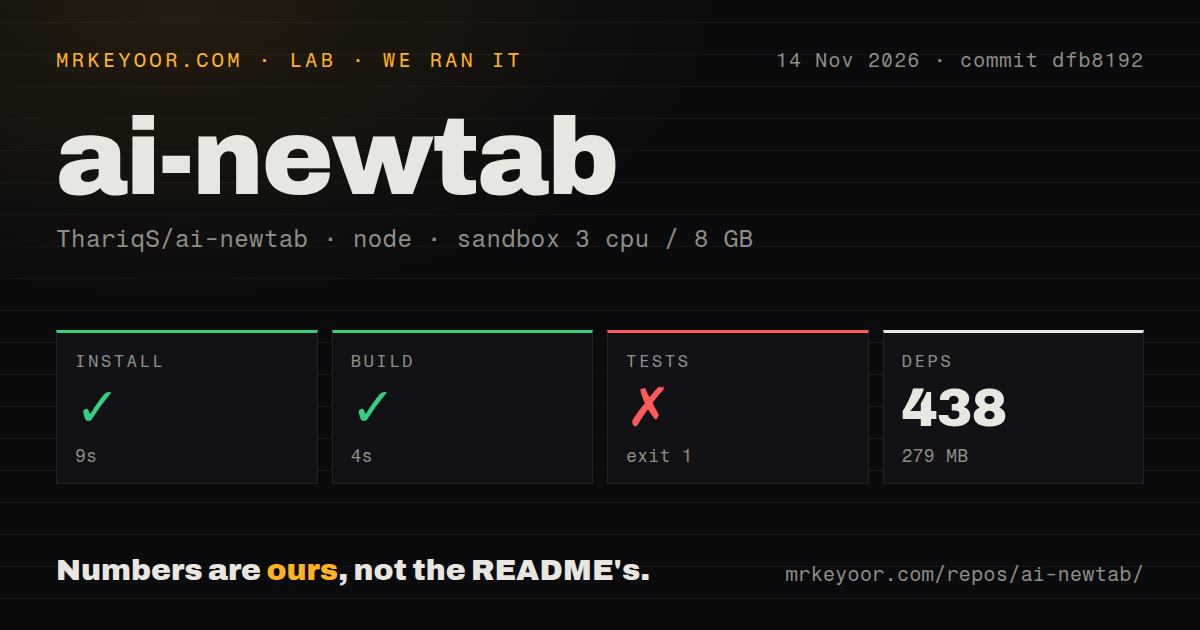
Our November 14, 2026 sandbox run at commit dfb8192 installed dependencies in 9 seconds, built in 4 seconds and failed the test step after 1 second.
| Repository step | Our recorded result | What it means |
|---|---|---|
| pnpm install | Succeeded in 9 seconds | 438 dependencies recorded, 279 MB on disk |
| Build | Succeeded in 4 seconds | The recorded source-build step completed |
| Tests | Failed, exit 1, in 1 second | The command tried to run Bun, which the shell could not find |
The configured sandbox had 3 CPUs, 8 GB RAM and image label lab-node:22. The checkout contained 61 files, approximately 3,987 source lines and 0.5 MB. The scan found monorepo workspaces, zero CI workflow files, no Dockerfile and no tests directory. The project keeps its Bun scripts under harness/, so the directory scan should not be read as a claim that it has no test code.
The failure is unusually clear. The package command was bun test harness/, followed by sh: 1: bun: not found and an ELIFECYCLE failure. The shell could not launch the requested runner. There is no failing assertion in that tail, and no basis for calling the homepage generator broken. The README separately documents that the unit-test command needs Bun. A developer changing the history filter needs that runner as well as the tools used to build the extension.
A separate hands-on attempt stopped at its safety check because no Compose file existed. The detailed step lists compose.yaml, compose.yml, docker-compose.yaml and docker-compose.yml as absent. Its generic run summary says it deployed with Docker Compose, which conflicts with the failed step. We treat that attempt as blocked, not as a working deployment. The teardown record says cleanup completed. A Compose prerequisite is a mismatch for this extension's documented installation path, not a product defect.
Where people get stuck: runner, browser lifetime and tool replies
Bun is required for the documented unit-test command, while closing Chrome has a separate recovery path through Resume interrupted build.
| Symptom or risk | Evidence | Useful response |
|---|---|---|
| Test command exits before assertions | Our log says bun: not found |
Provide Bun before running that command again |
| Chrome closes during generation | README documents interrupted builds | Use Resume interrupted build on the next new tab |
| A modified agent appears stuck | Architecture says an unanswered tool call idles forever | Return a tool result on every handler path, including errors |
| A private hostname passes a name filter | Closed issue #11 reports a resolution bypass | Read the address-check qualifications and explicitly exclude sensitive hosts |
Issue #11 describes a concrete failure: a router name could resolve to a private address while passing a hostname-only check. The reporter showed that fritz.box passed where the equivalent private IP did not. That example concerns AVM routers common in Germany, but the underlying distinction applies to intranet names elsewhere too. The issue is closed, and the architecture now describes checking the address Chrome actually connected to before uploading the page.
For developers adapting the agent loop, the architecture's tool-response rule matters as much as the user-facing resume button. An error must become a response to the pending custom tool call. Otherwise the remote session keeps waiting. Treat the documented recovery machinery as code to understand before replacing browser tools with your own bridge.
The privacy boundary includes domains, page bodies and browser requests
The architecture says history digests can still list a domain whose page body is stopped by the private-address check.
The privacy documentation separates several actions that short reviews tend to merge. The editable blocked-sites list applies to history digests and page requests. A redirect's final URL gets another check before upload. Address observation adds protection for names that resolve to private IPs. Behind a private-address proxy, or when Chrome reports no address, the implementation falls back to the name check. Subresource loads are not intercepted.
That makes an explicit host exclusion useful even when a network guard exists. A personal intranet domain appearing in a history digest is a different disclosure from the HTML of its signed-in page. Review both. The README says subdomains are included in the exclusion list and supports wildcard entries. Add your own sensitive hosts before the first homepage build rather than assuming the editable defaults describe your workplace.
Server-side cleanup also has two parts. The architecture says session event logs retain domains, titles and scraped page bodies until deletion, while uploaded files persist independently. It describes deleting both in a cleanup block. The local API key is a third concern: anyone with access to the browser profile can read it. The project explicitly warns against Web Store distribution without putting that key behind a proxy.
Shell access is disabled in the hosted sandbox, and the generated component renders in a sandboxed iframe. Those are documented containment measures. Developers Digest also identifies a remaining content problem: untrusted scraped pages can steer what the generated homepage says. Review the links and summaries as generated editorial output, especially when a page asks the agent to change its instructions.
Daily editions put freshness and spending on the same switch
Automatic generation runs at most once per morning, and each homepage build is an agent session billed to your API key.
The current README describes a morning window between 5am and noon. Scheduling starts after the first manual build. If Chrome is closed throughout that window, the day is skipped, and the scheduler tries at most once that morning. A new tab is a view of the saved result and the shared background build. Opening another tab is not a promise of another fetch of every source.
For a digest of reading material, that rhythm is sensible. For a dashboard you expect to reflect every new issue or message immediately, a daily generated edition is the wrong expectation. The manual rebuild button provides an explicit refresh. Turning off automatic rebuilding makes generation a deliberate action, which also gives you a simpler way to observe what an individual session costs.
Developers Digest repeats about $0.75 per daily build, explicitly attributed to the author's estimate via AlphaSignal. That figure is not our measurement or a guaranteed price. The README ties spending to the model and how much it reads, and describes Haiku as the cheapest choice. Treat the model selector and automatic-generation switch as budget controls, rather than building a monthly forecast from a quoted daily estimate. Cost attribution.
ai-newtab vs bookmarks, Tabliss and Bonjourr
Choose a conventional start page when you want known links and widgets; choose ai-newtab when generated reading material is the feature you want to evaluate.
| Choice | Why consider it | Evidence behind the comparison |
|---|---|---|
| A simple bookmarks page | Go directly to chosen sites without asking an agent to summarize them | Developers Digest argues that bookmarks can replace the homepage feature without the browsing-summary trade-off |
| ai-newtab with Claude | Generate a page from history and selected signed-in sources | The upstream README describes that workflow |
| A modified OpenAI-compatible version | Experiment with other providers | Tao100086 reports preferring the original Claude output to the two models tried through a proxy |
| Tabliss | Arrange quick links, a clock, weather and other widgets | Its official site lists those widgets and customization options |
| Bonjourr | Use a configurable start page with quick links, notes and a search bar | Its official site lists those features and explicitly says no generative AI |
Tabliss is a sensible candidate if most of your proposed homepage instructions describe widgets. Bonjourr is another if you want a start page you arrange yourself. Their official pages supply the feature descriptions here. We assign neither a measured speed nor a reliability advantage over ai-newtab.
The model experiment answers a narrower question. An OpenAI-compatible endpoint can be part of someone's fork without being a supported setting in upstream ai-newtab. Tao100086's result is a reason to judge the generated page after changing models, rather than assuming protocol compatibility preserves the result you liked.
What the other reviews get wrong
The Developers Digest teardown's interval advice conflicts with the current README's once-per-morning schedule.
Its October 11 teardown lists 6-, 12-, 24- and 48-hour rebuild intervals and recommends 48 hours. The current README copy in the pack instead specifies the morning window and skipped days. Use the current documented switch, rather than hunting for an interval setting described by an older review.
The blanket statement that local-network addresses are always blocked also needs qualification. Issue #11 documents the hostname bypass, while the architecture describes both the added address check and its exceptions. Saying the issue is closed without those exceptions would give readers the wrong privacy boundary.
Finally, GitHub Locker repeats README wording that background rebuilding makes each new tab up to date. The detailed schedule is more useful: one morning attempt, only when Chrome is open in the window. That is a saved daily edition, not continuous monitoring. The distinction matters if you intend to make the page your first view of work each morning. Repeated freshness wording.
Stars show attention; the tracker shows a specific repair
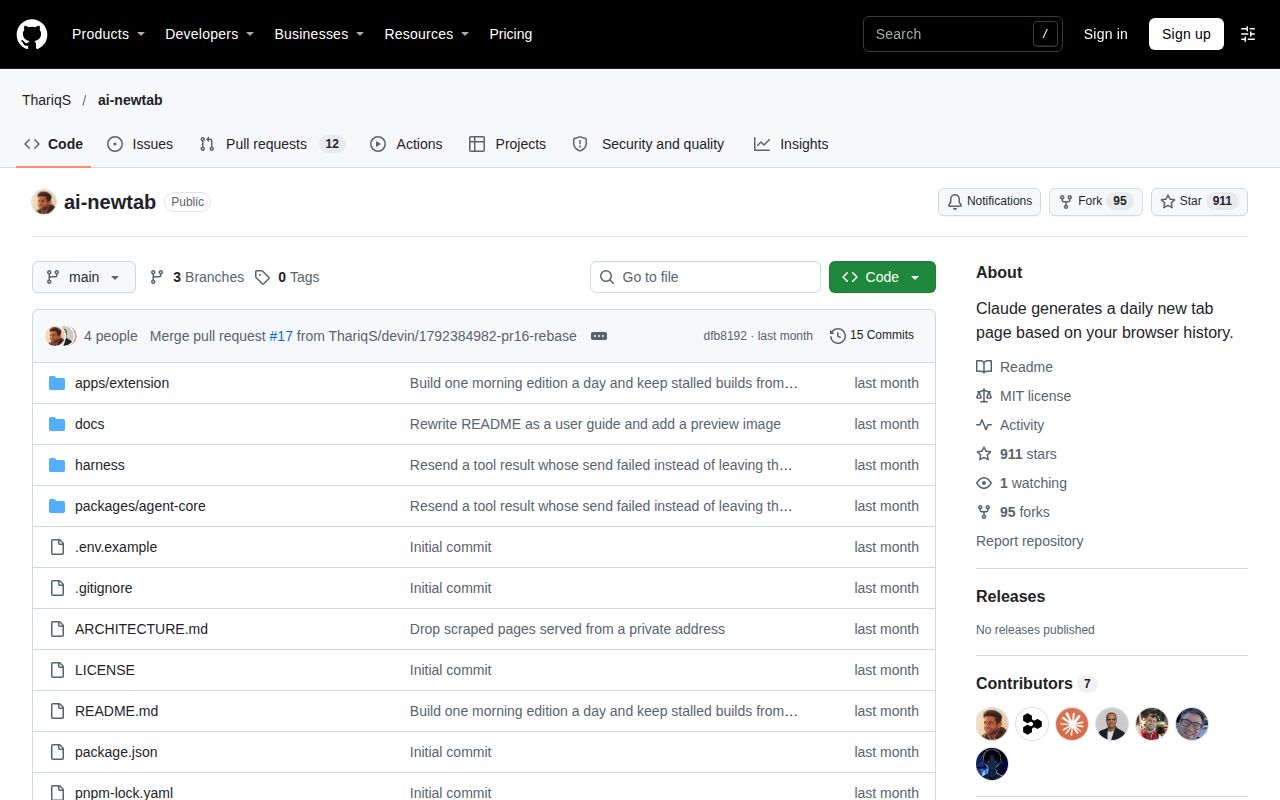
GitHub reported 911 stars and a last push on October 19, 2026, when we checked on November 14.
The repository API reported 12 open issues and PRs combined. That is not a count of unresolved bugs. The closed private-network report supplies a more useful maintenance signal than stars alone: a concrete problem was reported and the current architecture documents an additional check. Neither the stars nor that one repair measures sustained daily use.
The latest-release API returned 404. That response means the endpoint supplied no latest release, not that development has stopped. The README itself calls the project early and experimental. Its installation and architecture documentation are in English. The two personal-use reports are more relevant to adoption than similarly named extension listings, which should not be treated as listings for ThariqS/ai-newtab.
Questions people ask
The upstream instructions require a manually loaded Chromium extension and your own Anthropic API key.
How do I install ai-newtab in Chrome?
Use Node.js 20 or later, clone ThariqS/ai-newtab and run the README's pnpm install and build commands. In chrome://extensions, enable Developer mode and load apps/extension/.output/chrome-mv3 unpacked. Open a new tab, enter your key and start the first homepage. Installation instructions.
What browsing data does ai-newtab send to Anthropic?
It sends top domains, visit counts, selected page titles and cleaned HTML from up to eight pages. Those pages open in your signed-in browser and can contain private content. The distinction between a local extension and remote processing is explicit in the README.
How much does ai-newtab cost to run?
Each build incurs API charges for an agent session; the README gives no fixed per-build price. Developers Digest attributes the repeated $0.75 figure to the author's estimate, rather than an independent benchmark. Cost evidence.
Is ai-newtab free, and what license does it use?
The code is MIT licensed, but the generated homepages use a paid API. Downloading the source does not include unlimited generation. License and cost documentation.
Which Claude models can ai-newtab use?
The current README lists Claude Sonnet 5.5 as the default, with Haiku 5.5 and Opus 5.5 as alternatives. These are the project's documented choices, not a separate model-availability check. Model settings.
Is ai-newtab safe to publish to the Chrome Web Store?
The project says not to publish it as-is because browser-profile access exposes the stored API key. The architecture calls for moving the key behind a proxy before distribution. Distribution warning.
How does ai-newtab use Claude Managed Agents?
Its background worker drives the remote session and executes history and page-reading tools locally. The hosted sandbox reads uploaded files and writes the React component displayed on the new tab. Architecture.
Is ai-newtab still maintained?
The dated evidence shows an October 19, 2026 push and a closed network-filter issue, alongside the README's experimental status. Those are activity signals, not a support commitment. Repository facts, issue #11.
Can I use ai-newtab commercially?
MIT permits commercial use subject to its license conditions. That permission concerns the code; it does not remove API charges or the project's warning about distributing its current key-storage design. MIT license, status warning.
What can I use ai-newtab for?
Use it to generate a personal new-tab reading page with content and layout instructions. Thariq reports using it for his own daily homepage; Tao100086 reports experimenting with model replacements. Personal-use reports.
Does ai-newtab understand my current task rather than just my browsing frequency?
Its documented input begins with ranked browsing history, and your instructions can specify priorities. That mechanism alone supplies no proof of task understanding. The supplied analysis asks readers to distinguish relevance from visit frequency. Relevance discussion.
Can names that resolve to private IP addresses bypass ai-newtab's local-network guard?
Issue #11 demonstrated that bypass in the hostname-only filter. The architecture now documents connected-address checking, with proxy and missing-address exceptions and possible domain exposure in history digests. Issue report, current qualifications.
What we have not tested yet
Our successful source build is not an observed Chrome installation or a generated homepage: the separate hands-on attempt stopped before deployment.
We did not measure recommendation quality, homepage-generation latency, API spending across models or page counts, sustained productivity, or browser memory. The sandbox image label does not establish the actual runtime or operating-system version. The missing Bun executable prevented the recorded unit-test command from running its assertions; there is no passing-test count to report.
We have not inspected network traffic, reproduced the closed issue's address checks, tested the proxy fallback, audited generated code, or checked remote deletion and retention. The architecture's cleanup description is a documented implementation claim, not our deletion result. Its advice to check current retention and ZDR eligibility matters before distribution. The fixture-based API harness also cannot stand in for a test of signed-in browsing.
Setup ease, community support and production maturity remain unassessed in our score cards. Documentation receives 4/5 on an explicit editorial scale: 1 means essential instructions are absent, 3 means basic setup and operating guidance are present, and 5 means detailed guidance corroborated by our full workflow. The README and architecture earn 4 for concrete installation, scheduling, filtering, recovery and key-storage explanations; our blocked browser run prevents the highest rating.
For the next evaluation, use a separate browser profile containing only material you can send to the API. Set the sensitive-host exclusions first, generate one page, and inspect its content alongside the corresponding API bill. That is the decision this source build leaves you with.