mrkeyoor.com_
Tue 01 Sept 17:45 UTC
Self-Hostedevaluationupdated 26 Aug 2026

AdGuardHome review

AdGuard Home is a DNS server you run on your own network to block requests to advertising, tracking, malware, and adult-content domains. It gives phones, televisions, consoles, and other devices one filtering policy without requiring an app on each device, with query logs and per-client controls in a web interface.

+243stars / 7d
Verdict

Our sandbox installed 250 packages in 101 seconds, built AdGuard Home in 76 seconds, and passed all 31 Go tests, making it a credible first choice for a technical household that wants one DNS policy across many devices. Use it if you can own port 53, router configuration, upgrades, and a fallback resolver. Keep a browser blocker for same-domain ads, and DNSCrypt operators should wait for issue #8569 to be resolved before taking v0.107.79.

We ran it

Lab card: what happened when we ran AdGuardHomeScreenshot of AdGuardHome (adguard.com/adguard-home/overview.html)
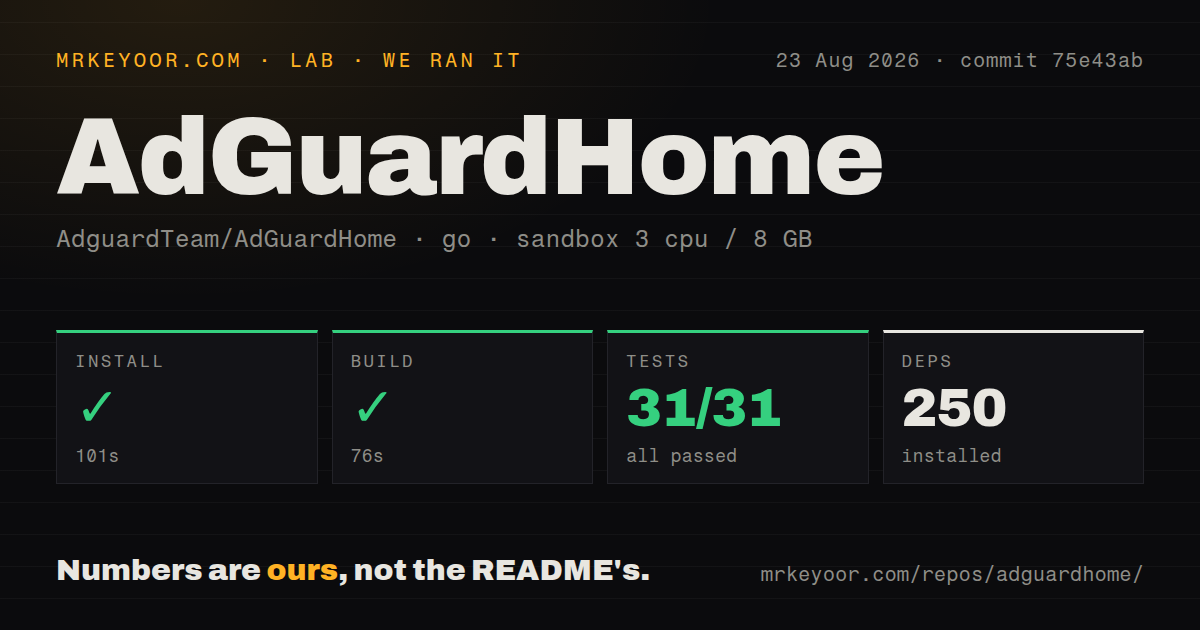
Install✓ · 101s250 packages
Build✓ · 76s
Tests✓ · 62s31 passed · 0 failed of 31 (go test)
Repo1745 files~177,374 lines of source · 14.3 MB · 3 CI workflows

Answers from our run

Does AdGuardHome build from source?

Dependencies installed in 101 seconds (250 packages), and the build succeeded in 76 seconds. We cloned commit 75e43ab into a clean Debian container with 3 CPUs and no project-specific setup.

Do AdGuardHome's tests pass?

Yes: 31 of 31 passed when we ran the project's own test command (go test). Some failures need services or credentials a bare container does not have.

Who should not use AdGuardHome?

Anyone mainly trying to remove YouTube or Twitch video ads, or sponsored posts inside social feeds: the README says DNS filtering cannot block ads served from the same domain as wanted content.

What are the alternatives to AdGuardHome?

Pi-hole, Technitium DNS Server, CoreDNS. Our sandbox installed 250 packages in 101 seconds, built AdGuard Home in 76 seconds, and passed all 31 Go tests, making it a credible first choice for a technical household that wants one DNS policy across many devices.

Setup4/5Build passed cleanly; router and port 53 work remain
Docs5/5Clear guides for clients, containers, encryption, and APIs
Community5/5Current pushes, frequent releases, and active issue triage
Maturity5/5Established DNS service with stable releases and upgrade guidance

Discussed on

  1. hnAdGuard Home: Network-wide ad- and tracker-blocking DNS server310 points
  2. hnAdGuard Home: Network-wide ads and trackers blocking DNS server171 points

Who it’s for

Households that want one filtering policy for phones, computers, televisions, and smart devices.
Self-hosters who want control over blocklists, upstream DNS, query data, and local rewrites.
Network administrators who need per-client rules, safe-search enforcement, encrypted DNS, or an optional DHCP server.
Home Assistant users and router owners who can give a DNS service a stable local address and monitor it.

Who it’s NOT for

Anyone mainly trying to remove YouTube or Twitch video ads, or sponsored posts inside social feeds: the README says DNS filtering cannot block ads served from the same domain as wanted content.
Users who cannot change router or device DNS settings: the getting-started guide says clients must be pointed at AdGuard Home, and some routers do not accept a custom DNS server.
DNSCrypt server operators who need v0.107.79 immediately: issue #8569 reports that this release starts plain DNS but does not create the configured DNSCrypt server.
Owners of small routers who plan to load million-rule lists without watching memory: issue #8491 reports a 1 GB OpenWrt device becoming unavailable after a filter update of about 2.1 million rules.
Contributors whose build system assumes parallel Make jobs: the README warns that make -j 4 and a parallel MAKEFLAGS are likely to break the build.

Setup reality

Our sandbox installed 250 packages in 101 seconds, built commit 75e43ab in 76 seconds, and completed the Go test run in 62 seconds. All 31 tests passed. The run used 3 CPUs, 8 GB of RAM, and the golang:1.24-bookworm image without secrets or elevated privileges.

Running the finished server is mostly a network job. It needs a stable address, access to TCP and UDP port 53, persistent configuration and work directories, and router or per-device DNS changes. Encrypted inbound DNS adds certificates and extra listeners; the optional DHCP server needs control of the network's DHCP role.

The source snapshot was 14.3 MB with 1,745 files and about 177,374 source lines. Our inventory found 3 CI workflow files, no Dockerfile, and no top-level tests directory, although the project publishes an official container and Go tests still ran through its packages. Docker DHCP needs Linux host networking, and systemd-resolved may already own port 53.

One DNS server covers the network, but same-domain ads get through

AdGuard Home blocks known advertising and tracking domains for every client that uses it as DNS. That reaches televisions, consoles, speakers, and appliances where a browser extension is impossible. The web interface adds query logs, custom allow and block rules, per-client policy, safe-search enforcement, local DNS rewrites, encrypted upstreams, and an optional DHCP server. A household can manage one policy instead of installing a separate blocker on every screen.

The scope is broad for a 14.3 MB checkout. Our lab counted 1,745 files and about 177,374 lines of source at commit 75e43ab, yet the product still presents the common controls through one dashboard. Per-client settings are especially useful: a child's tablet can receive stricter filtering while a work machine uses fewer lists. The REST API and Home Assistant integration give operators ways to inspect or automate the same service.

What happened when we ran it

Our run installed 250 packages in 101 seconds, then built AdGuard Home successfully in 76 seconds. We used a fresh Debian container based on golang:1.24-bookworm, with 3 CPUs, 8 GB of RAM, no secrets, and no elevated container privileges. That is a clean source-build result, not a test of the official prebuilt binary, Snap package, or published container image.

The Go test command finished in 62 seconds: 31 tests passed and 0 failed. Our harness found 3 CI workflow files, no Dockerfile, and no top-level tests directory in the measured snapshot. The absence of a tests directory does not mean there were no tests, since Go discovers tests beside package code. Likewise, the project can publish a container without keeping a conventional Dockerfile at the repository root.

Port 53 and client routing are the real setup costs

The successful 76-second build only gets you a binary. A working deployment needs a stable local address and TCP plus UDP port 53, then the router's DHCP settings or each client must point DNS traffic at that address. The official guide notes that some routers do not allow a custom DNS server; using AdGuard Home's DHCP service is one workaround. If clients keep another resolver, filtering coverage becomes inconsistent.

Container users have two extra choices that did not appear in our 101-second install measurement. Configuration and work directories need persistent mounts. The official Docker guide requires Linux host networking for the built-in DHCP server, and it warns that host networking is unavailable on Docker Desktop for macOS and Windows. On Linux, systemd-resolved may already listen on port 53, so its stub listener can conflict with the DNS service.

Source contributors face a different setup than appliance users. The current README asks for Go 1.25 or later, Node.js 24.10.0 or later, and npm 10.8 or later, then uses make init and make. It also warns that parallel Make jobs are unsupported. Our commit-pinned build used the golang:1.24-bookworm image, so that successful result should not be read as a promise that the current branch accepts older prerequisites.

DNS filtering cannot remove YouTube or Twitch ads

AdGuard Home cannot block an advertisement when the ad and wanted content use the same domain. The README names YouTube and Twitch ads, plus sponsored posts on major social networks, as examples. DNS also cannot remove empty page elements or apply cosmetic rules. A browser content blocker remains the right companion for web pages, while AdGuard Home handles devices and applications that cannot run one.

Large lists can create a more physical limit than DNS semantics. Issue #8491 describes a 1 GB OpenWrt router running v0.107.78 whose resident memory rose after a list of roughly 2.1 million rules updated, followed by loss of DNS and the web interface. The reporter explicitly says the update correlates with the increase and does not prove the root cause. Small-router owners should start with restrained lists and watch memory during updates.

v0.107.79 is actively maintained, with a DNSCrypt regression open

The repository was pushed on 2026-08-25, and release v0.107.79 arrived on 2026-08-18. That release updated Go for security fixes and added protection against DNS-over-QUIC resource exhaustion. GitHub reported 1,280 issues and pull requests combined, so the number is a work queue rather than a count of confirmed defects. Fresh issues were receiving maintainer labels and updates on 2026-08-25, which supports an active-maintenance judgment.

One current report matters to a narrow but serious group. Issue #8569 says v0.107.79 starts plain DNS but fails to create a configured DNSCrypt server; the issue remains open and marked in progress. Our 31 passing Go tests do not disprove that deployment report because our sandbox did not configure a live DNSCrypt listener. Operators using that protocol should hold their known-good version until the issue is resolved and verify the listener after upgrading.

AdGuard Home is the strongest fit for a self-hoster who wants readable controls, encrypted DNS options, and filtering across devices. The 250-package install and 31-test pass show that its source path worked cleanly in our sandbox. The operational price is ownership of a network dependency: keep configuration backups, preserve a fallback resolver, avoid indiscriminate mega-lists, and pair it with browser-level filtering where DNS cannot see enough to act.

Alternatives

ProjectWhat it isPick it when
Pi-holeA familiar network-wide DNS blocker with a large home-server community.pick this instead when community familiarity and the Pi-hole ecosystem matter more than built-in encrypted DNS features.
Technitium DNS ServerA full authoritative and recursive DNS server with blocking, encrypted protocols, apps, and a web console.pick this instead when advanced DNS hosting matters as much as household filtering.
CoreDNS gh↗A plugin-driven DNS server commonly used for infrastructure and service discovery.pick this instead when you want DNS behavior composed as code and do not need a household filtering dashboard.

What people are saying

  1. [github-trending] AdguardTeam/AdGuardHome

Sources

  1. AdGuard Home README
  2. AdGuard Home getting started guide
  3. AdGuard Home Docker guide
  4. AdGuard Home v0.107.79 release
  5. Issue 8569: v0.107.79 broke DNSCrypt server
  6. Issue 8491: OpenWrt memory increase after filter update

More self-hosted reviews

v2 · OpenShell · wigolo · Mindwtr · club-3090 · reclip · the whole board →