z-schema review
z-schema 12.4.3 validates JSON values against draft-04, draft-06, draft-07, draft-2019-09, or draft-2020-12 schemas in Node.js and browsers. `ZSchema.create()` selects synchronous or asynchronous validation and either thrown errors or result objects; compiled references, custom formats, schema readers, and structured error details cover larger schema sets. Version 12 defaults schemas without `$schema` to draft-2020-12 and requires Node 22. Our install found an ESM package with an exports map, but no TypeScript declarations despite TypeScript examples in the README.
Our z-schema 12.4.3 install took 1.2 seconds, occupied 4 MB across 8 packages, bundled to 30.7 KB gzipped, and had 0 audit findings, but it shipped no TypeScript declarations on our box. Use it for multi-draft validation modes on Node 22; choose Ajv when generated speed, plugins, or stronger TS tooling matter more.
We installed it
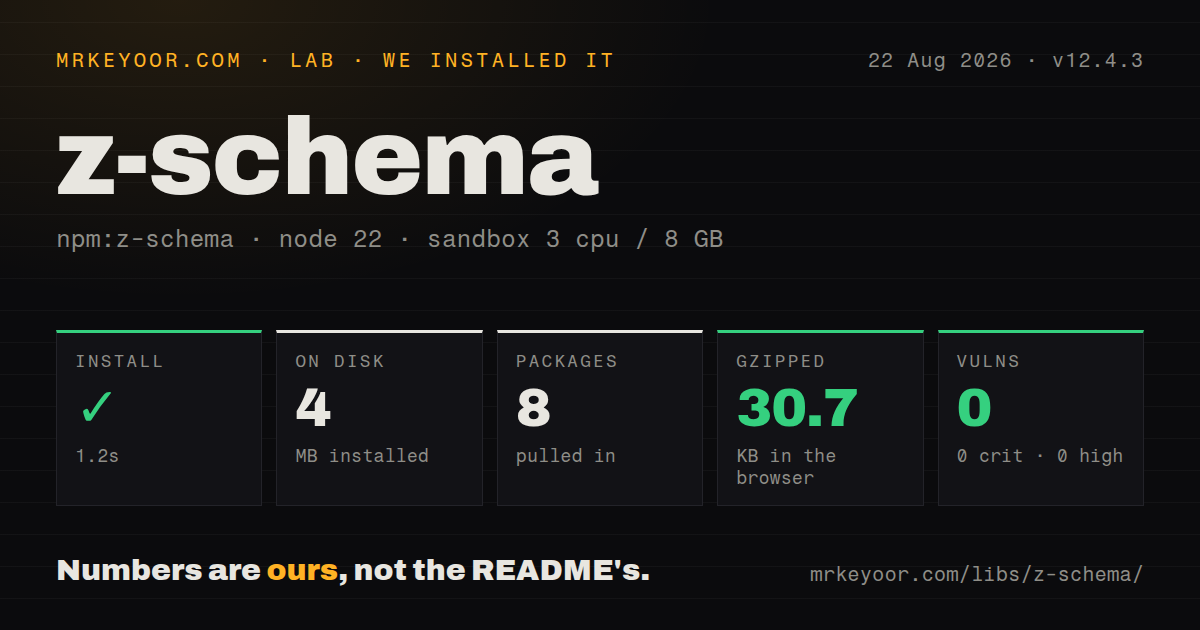
| Install | ✓ · 1.2s | 8 packages on disk · 4 MB |
| Import | ✓ | ESM import works · require() works · ESM package with exports map |
| Browser | 30.7 KB | gzipped (117.9 KB minified), bundled with esbuild |
| Types | — | no TypeScript types found |
| Known vulns | 0 | 0 critical · 0 high · 0 moderate · 0 low (npm audit) |
Answers from our run
Does z-schema install cleanly?
Yes. In a fresh container with an empty cache, npm install z-schema finished in 1 seconds, leaving 8 packages and 4 MB on disk. npm audit reported no known vulnerabilities.
How much does z-schema add to a browser bundle?
30.7 KB gzipped (117.9 KB minified) when the whole package is bundled for the browser with esbuild. Importing only part of it is usually smaller.
Does z-schema work with both ESM and CommonJS?
Yes. Both import 'z-schema' and require('z-schema') worked in Node 22 in our run. The package is published as ESM with an exports map.
Does z-schema include TypeScript types?
No type declarations were found in our install, so TypeScript users need their own declarations.
z-schema or ajv: which should you use?
ajv: Use it for generated validators, high throughput, and a large formats and keywords ecosystem. Our z-schema 12.4.3 install took 1.2 seconds, occupied 4 MB across 8 packages, bundled to 30.7 KB gzipped, and had 0 audit findings, but it shipped no TypeScript declarations on our box.
When should you not use z-schema?
Node 20 or older is still supported by the application; 12.4.3 declares Node 22 minimum.
Use it if
- One validator must handle draft-04 through draft-2020-12 with an explicit version choice.
- Callers need either thrown structured errors or safe `{ valid, err }` results, synchronously or asynchronously.
- Linked schemas will be compiled at startup and remote references are registered under application policy.
- Custom synchronous or asynchronous format checks are part of the schema contract.
- Node 20 or older is still supported by the application; 12.4.3 declares Node 22 minimum.
- Major-version migration work is unacceptable: versions 9 through 12 changed factory use or the default draft.
- `strictMode` is assumed to mean only JSON Schema compliance; it also enforces package-specific schema style rules.
- Remote `$ref` values should be fetched automatically without a security policy; readers are application callbacks and global state can cross instances.
- Maximum validation throughput, standalone generated code, or the broadest plugin ecosystem is the priority; Ajv is the usual choice.
Setup reality
Our z-schema 12.4.3 install completed in 1.2 seconds and left 8 packages using 4 MB on disk. The package is 1,460 KB unpacked, has 3 direct dependencies and 0 peers, and returned 0 known vulnerabilities from npm audit. Its engine requirement is Node 22 or newer, with no native compilation or credentials.
Version 12.4.3 is an ESM package with an exports map. Both require() and ESM import worked on Node 22. We found no TypeScript declaration files in the installed package, so the README's TypeScript examples do not provide first-party compile-time types on our box. Check that gap before adopting it in a strict TS project.
Create validators with ZSchema.create(). Default validation returns true or throws ValidateError; safe: true returns a result object, async: true returns a promise, and both options combine. Schemas lacking $schema use draft-2020-12 in v12, so pin the draft in long-lived schemas instead of inheriting a future major's default.
Precompile linked schemas with validateSchema at startup. Register remote references yourself or install a restricted schema reader; never turn schema URIs into unrestricted filesystem or network access. Global readers, references, and custom formats can affect separate instances. Async tasks default to a 2,000 ms timeout and cap at 60,000 ms. Our browser bundle measured 117.9 KB minified and 30.7 KB gzipped, which is expensive for a client form if a smaller validator covers its draft.
Patterns
Validate without exceptions validate-with-safe-result
import ZSchema from 'z-schema';

const validator = ZSchema.create({ safe: true });
const result = validator.validate(data, schema);
if (!result.valid) {
  console.error(result.err?.details);
}
safe is a factory option that changes validate's return type. A default validator instead returns true or throws ValidateError.
Handle structured errors in throw mode catch-validation-error
const validator = ZSchema.create();
try {
  validator.validate(data, schema);
} catch (error) {
  if (error.name === 'ValidateError') {
    for (const detail of error.details) {
      console.error(detail.path, detail.keyword, detail.message);
    }
  } else {
    throw error;
  }
}
Do not parse the summary message. details provides stable codes, keyword names, data paths, schema paths, and nested errors.
Pin draft-07 behavior during migration pin-schema-draft
const validator = ZSchema.create({ version: 'draft-07' });

validator.validate(data, {
  $schema: 'http://json-schema.org/draft-07/schema#',
  type: 'object',
});
Version 12 defaults schemas without an explicit declaration to draft-2020-12. Pinning both configuration and $schema makes intent reviewable.
Run an asynchronous format check safely validate-async-format
const validator = ZSchema.create({
  async: true,
  safe: true,
  asyncTimeout: 1500,
});
validator.registerFormat('user-exists', async (id) => {
  return typeof id === 'number' && await users.exists(id);
});

const result = await validator.validate(data, schema);
Async format functions require async: true. The timeout applies to async work and is silently capped at 60,000 ms.
Compile schemas with cross-references at startup compile-linked-schemas
const schemas = [
  { $id: 'person', type: 'object', properties: { name: { type: 'string' } }, required: ['name'] },
  { $id: 'team', type: 'object', properties: { lead: { $ref: 'person' } } },
];

const validator = ZSchema.create();
validator.validateSchema(schemas);
validator.validate({ lead: { name: 'Ada' } }, schemas[1]);
Compile before serving requests so invalid schemas and unresolved links fail during startup rather than on the first matching payload.
Register a remote reference on one validator register-instance-reference
const validator = ZSchema.create();
validator.setRemoteReference(
  'https://schemas.example/address.json',
  addressSchema
);
validator.validate(data, rootSchema);
Instance references take precedence and avoid the process-wide last-write-wins cache used by ZSchema.setRemoteReference.
Load references through an allowlisted reader restrict-schema-reader
ZSchema.setSchemaReader((uri) => {
  const schema = approvedSchemas.get(uri);
  if (!schema) throw new Error(`Schema URI not allowed: ${uri}`);
  return schema;
});
The package does not safely download arbitrary remote schemas for you. Do not map untrusted URIs directly to filesystem paths or unrestricted HTTP requests.
Add an instance-scoped format register-custom-format
const validator = ZSchema.create();
validator.registerFormat('order-id', (value) => {
  return typeof value === 'string' && /^ORD-[0-9]{8}$/.test(value);
});

validator.validate('ORD-00123456', { type: 'string', format: 'order-id' });
Prefer instance registration when tests or tenants use different rules. Global ZSchema.registerFormat affects every instance in the process.
Short-circuit invalid production payloads stop-at-first-error
const validator = ZSchema.create({
  safe: true,
  breakOnFirstError: true,
});
const { valid, err } = validator.validate(request.body, schema);
The default collects all errors. Short-circuit only when the caller does not need a complete list for a form or diagnostics.
Return machine-friendly path segments report-array-paths
const validator = ZSchema.create({
  safe: true,
  reportPathAsArray: true,
});
const result = validator.validate(data, schema);
const path = result.err?.details[0]?.path;
// for example: ['users', 0, 'email']
Without reportPathAsArray, paths use JSON Pointer-like strings such as #/users/0/email. Choose one representation at your API boundary.
Validate against one schema branch validate-subschema
validator.validate(address, rootSchema, {
  schemaPath: '#/properties/address',
});
schemaPath targets a schema location, not a path into the data. Validate the corresponding data value yourself.
Check a schema and payload from the CLI validate-from-cli
npx z-schema schema.json data.json
npx z-schema --strictMode schema.json data.json
strictMode enables a bundle of opinionated schema checks, including required maxLength, properties, items, and additional-property declarations. It is not merely stricter value validation.
Alternatives
| Package | Registry | Pick it when |
|---|---|---|
| ajv | npm | Use it for generated validators, high throughput, and a large formats and keywords ecosystem. |
| @exodus/schemasafe | npm | Use it for security-focused JSON Schema compilation with a smaller option surface. |
| jsonschema | npm | Use it for a simpler validator API when modern-draft breadth and code generation are not priorities. |
More data guides
numpy · pandas · fsspec · lxml · pyarrow · sqlalchemy · the whole shelf →
How this guide is made: grounded in the library's documentation, release notes, changelog, and issue history, on a fixed rubric — not a hands-on install of every release. The 50 most-downloaded entries are additionally install-verified in clean containers. Corrections: contact the desk.