xmlbuilder2 review
Our Node 22 sandbox installed xmlbuilder2 4.0.3 cleanly, while its browser-targeted esbuild case did not compile. The package puts a chainable wrapper around DOM nodes: create() parses or starts a document, ele(), att(), txt(), and up() shape it, and end() emits XML, JSON, or JavaScript objects. It also handles namespaces, fragments, doctypes, CDATA, tree traversal, and forward-only callback output. Version 4.0.3 fixes pretty-print newlines around text-only elements in callback mode; the v4 line requires Node 20.
Our xmlbuilder2 4.0.3 install took 1.9 seconds and 5 MB with 0 audit findings, but the browser bundle failed, so this is a Node-first XML builder. Choose it for exact document construction or DOM edits; choose a parser-first package when ingestion is most of the job.
We installed it
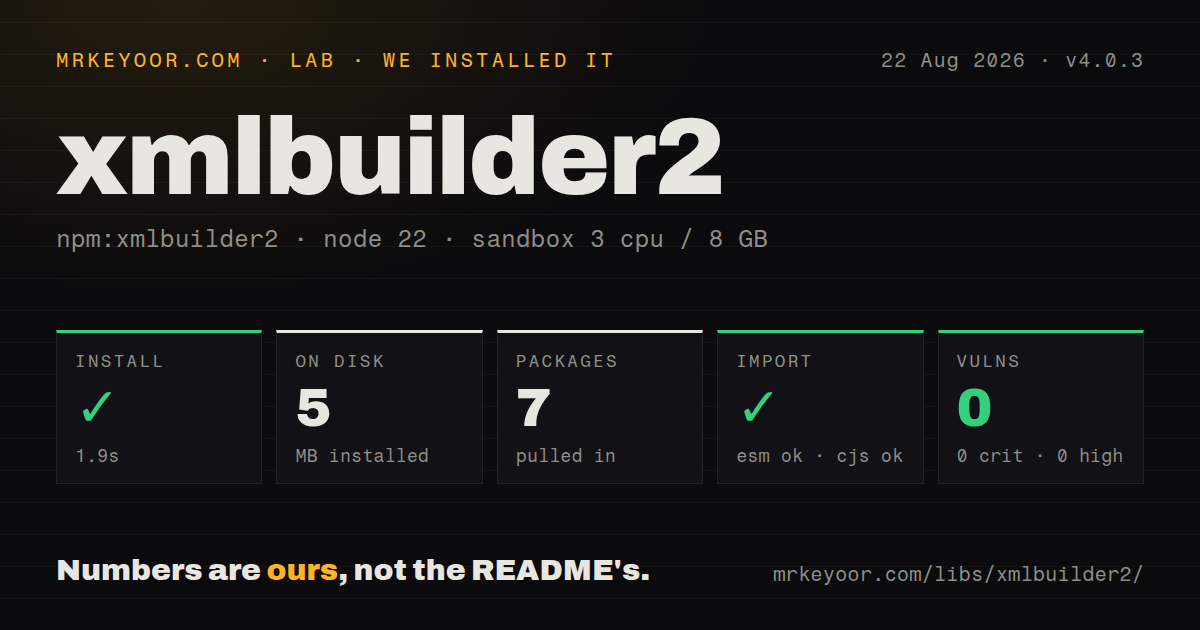
| Install | ✓ · 1.9s | 7 packages on disk · 5 MB |
| Import | ✓ | ESM import works · require() works · CommonJS package |
| Browser | n/a | could not be bundled for the browser (Node-only code, most likely) |
| Types | ✓ | TypeScript types bundled |
| Known vulns | 0 | 0 critical · 0 high · 0 moderate · 0 low (npm audit) |
Answers from our run
Does xmlbuilder2 install cleanly?
Yes. In a fresh container with an empty cache, npm install xmlbuilder2 finished in 2 seconds, leaving 7 packages and 5 MB on disk. npm audit reported no known vulnerabilities.
Can xmlbuilder2 run in a browser?
Not directly: esbuild could not bundle it for the browser in our run, which normally means it depends on Node built-ins. Use it on the server, or find a browser-targeted alternative.
Does xmlbuilder2 work with both ESM and CommonJS?
Yes. Both import 'xmlbuilder2' and require('xmlbuilder2') worked in Node 22 in our run. The package is published as CommonJS.
Does xmlbuilder2 include TypeScript types?
Yes, type declarations ship inside the package, so no @types install is needed.
xmlbuilder2 or fast-xml-parser: which should you use?
fast-xml-parser: Use it when parsing, validation, and object conversion matter more than editing a DOM. Our xmlbuilder2 4.0.3 install took 1.9 seconds and 5 MB with 0 audit findings, but the browser bundle failed, so this is a Node-first XML builder.
When should you not use xmlbuilder2?
Your main task is fast XML-to-object parsing or validation; xmlbuilder2 includes a DOM and builder surface that a parser-first package avoids
Use it if
- A Node service must generate namespace-aware XML for SOAP, feeds, sitemaps, invoices, or packaged document formats
- You need to parse existing XML into a DOM, change selected nodes, and serialize the same document model
- Escaped text and attributes should come from builder calls instead of handwritten XML templates
- A very large document can be written in one direction through callbacks without retaining the full output tree
- Your main task is fast XML-to-object parsing or validation; xmlbuilder2 includes a DOM and builder surface that a parser-first package avoids
- The target is a browser bundle imported through ordinary package syntax; our esbuild browser build failed even though npm ships a standalone minified browser file
- Production still runs Node 18 or earlier; xmlbuilder2 4 changed the engine floor to Node 20
- Queries depend on XPath or CSS selectors; this API traverses wrapper nodes with callbacks and direct DOM inspection
- You need predictable object shapes without a conversion policy; repeated siblings can change values into arrays, and null handling depends on parser options
Setup reality
We installed xmlbuilder2 4.0.3 in a clean Node 22 container in 1.9 seconds. It produced 7 packages using 5 MB on disk. npm audit returned 0 known vulnerabilities at all severities. The package declares 4 direct dependencies and 0 peers, with 1,148 KB unpacked. It is CommonJS without an exports map; require() and ESM import both succeeded. TypeScript declarations ship in the package.
No credentials or config file are involved, but Node 20 is mandatory for version 4. The chain's current position matters more than installation. ele() moves into a new child, and up() returns to its parent. Missing one up() can yield well-formed XML with an incorrect hierarchy. Use the wellFormed serializer option during tests, then validate business-critical output against the receiving system's schema because XML syntax alone cannot catch a misplaced invoice line.
Object conversion reserves @ for attributes and # for text. A single child can be a scalar while repeated siblings become an array; the verbose serializer trades shorter output for a stable representation. Parser options decide whether null and undefined nodes disappear. For namespaces, provide the namespace URI and qualified name through ele() rather than assembling xmlns attributes in strings. That keeps prefix declarations attached to the DOM model.
The regular builder retains a DOM, so document size turns into process memory. createCB sends chunks through callbacks and closes nodes permanently as it advances. Its data callback does not pause automatically for a slow writable stream, leaving backpressure to the application. Version 4.0.3 corrects pretty callback formatting for text-only elements. Our browser bundle attempt failed; browser projects should test the shipped standalone file in their exact asset pipeline instead of assuming the Node entry can be bundled.
Patterns
Build nested XML with chain calls build-chained-document
const { create } = require('xmlbuilder2')

const doc = create({ version: '1.0', encoding: 'UTF-8' })
  .ele('catalog')
    .ele('item').att('sku', 'A-17')
      .ele('name').txt('Gasket & seal').up()
      .ele('qty').txt('4').up()
    .up()
  .up()

console.log(doc.end({ prettyPrint: true }))
Every ele() changes the current node. Each up() in this example closes one level of the intended hierarchy.
Convert an object into XML nodes build-from-js-object
const { create } = require('xmlbuilder2')

const doc = create({
  order: {
    '@id': 'PO-42',
    customer: { '#': 'Acme & Sons' },
    line: [
      { '@sku': 'A1', '#': 'washer' },
      { '@sku': 'B2', '#': 'bolt' },
    ],
  },
})

console.log(doc.end({ prettyPrint: true }))
The object parser treats @ keys as attributes and # as text. Arrays create repeated sibling elements.
Edit an existing XML document parse-and-modify
const { create } = require('xmlbuilder2')

const doc = create('<order status="new"><line sku="A1"/></order>')
const root = doc.root()
root.att('status', 'packed')
root.ele('line').att('sku', 'B2').up()

console.log(doc.end({ prettyPrint: true }))
create() parses strings into a DOM-backed document. Add children through root() so the result still has one document element.
Convert between XML, objects, and JSON convert-xml-and-object
const { convert } = require('xmlbuilder2')

const xml = '<r a="1"><i>one</i><i>two</i></r>'
const objectValue = convert(xml, { format: 'object' })
const jsonText = convert(xml, { format: 'json', prettyPrint: true })
const xmlAgain = convert({ r: { '@a': '1' } }, { format: 'xml' })
Repeated i elements become an array in object output. Request verbose output when consumers require one stable shape.
Create qualified elements with namespace URIs write-namespaced-xml
const { create } = require('xmlbuilder2')

const soap = 'http://schemas.xmlsoap.org/soap/envelope/'
const stock = 'https://example.com/stock'

const doc = create()
  .ele(soap, 'soap:Envelope')
    .ele('soap:Body')
      .ele(stock, 'm:GetPrice')
        .ele('m:Sku').txt('A-17').up()
      .up()
    .up()
  .up()

console.log(doc.end({ prettyPrint: true }))
Supplying the namespace URI lets the DOM model manage declarations. A prefix by itself does not define a namespace.
Control XML serialization select-serialization-options
doc.end({ prettyPrint: true, indent: '  ' })
doc.end({ headless: true })
doc.end({ wellFormed: true })
doc.end({ format: 'object', verbose: true })
doc.end({ format: 'json', prettyPrint: true })
wellFormed throws on invalid XML syntax. It does not validate the document against XSD or another business schema.
Traverse a tree with predicates find-and-remove-nodes
const { create } = require('xmlbuilder2')

const root = create('<r><item id="1"/><item id="2"/><debug/></r>').root()

const item = root.find(node =>
  node.node.nodeName === 'item' && node.node.getAttribute('id') === '2'
)
item.att('state', 'kept')
root.filter(node => node.node.nodeName === 'debug')
  .forEach(node => node.remove())
Traversal callbacks receive builder wrappers with the underlying DOM node at node. The package does not add XPath or CSS selectors.
Emit a large document through callbacks stream-callback-output
const { createCB } = require('xmlbuilder2')
const fs = require('node:fs')

const output = fs.createWriteStream('rows.xml')
const xml = createCB({
  data: chunk => output.write(chunk),
  end: () => output.end(),
})

xml.ele('rows')
for (const row of rows) {
  xml.ele('row').att('id', row.id).txt(row.label).up()
}
xml.up().end()
createCB is forward-only, and output.write() backpressure is the caller's responsibility. Closed nodes cannot be edited later.
Reuse a multi-node fragment import-fragment
const { create, fragment } = require('xmlbuilder2')

const lines = fragment()
  .ele('line').txt('first').up()
  .ele('line').txt('second').up()

const doc = create().ele('invoice')
doc.import(lines)
console.log(doc.end({ prettyPrint: true }))
A fragment may contain several top-level nodes. import() copies them beneath the current destination node.
Add a doctype, comment, CDATA, and instruction add-special-node-types
const { create } = require('xmlbuilder2')

const doc = create()
  .dtd({ name: 'report', sysID: 'report.dtd' })
  .ele('report')
    .com('generated by batch 42')
    .dat('<raw value & markup>')
    .ins('xml-stylesheet', 'type="text/xsl" href="report.xsl"')
  .up()

console.log(doc.end({ prettyPrint: true }))
CDATA content cannot contain the closing ]]> token. Special nodes still need testing in the parser that will receive them.
Use verbose conversion for predictable output preserve-stable-object-shape
const { convert } = require('xmlbuilder2')

const one = convert('<r><item>A</item></r>', {
  format: 'object',
  verbose: true,
})
const two = convert('<r><item>A</item><item>B</item></r>', {
  format: 'object',
  verbose: true,
})
Compact conversion can switch item from a scalar to an array when a second sibling appears. verbose keeps explicit node records.
Reject malformed names before publishing XML catch-invalid-output
const { create } = require('xmlbuilder2')

try {
  const doc = create().ele('1invalid').txt('value').up()
  doc.end({ wellFormed: true })
} catch (error) {
  console.error('XML rejected:', error.message)
}
An invalid XML name can throw during node creation before end() runs. Catch errors around the full build and serialization path.
Alternatives
| Package | Registry | Pick it when |
|---|---|---|
| fast-xml-parser | npm | Use it when parsing, validation, and object conversion matter more than editing a DOM. |
| xmlbuilder | npm | Use it when an older codebase already relies on the original build-only chain API. |
| xml-js | npm | Use it for direct XML and JavaScript-object conversion with compact or non-compact output. |
| xml2js | npm | Use it when an existing Node service is built around xml2js callbacks or promises. |
More utils guides
lru-cache · type-fest · ajv · zod · p-limit · find-up · the whole shelf →
How this guide is made: grounded in the library's documentation, release notes, changelog, and issue history, on a fixed rubric — not a hands-on install of every release. The 50 most-downloaded entries are additionally install-verified in clean containers. Corrections: contact the desk.