xml2js review
xml2js 0.6.2 converts an XML document into nested JavaScript objects and can build XML from the same object convention. Attributes live under `$`, character content can live under `_`, and child elements are arrays by default, even when the input contains one child. The parser wraps sax-js, while output generation uses xmlbuilder-js. The 0.6.2 release commit changed only the version strings in `package.json` and `package-lock.json`, so there is no new parser feature or bug fix to explain for this version.
xml2js 0.6.2 installed in 0.5 seconds and used 4 MB in our sandbox, but its browser bundle failed and the package supplied no TypeScript declarations. Keep it for Node code already built around the `$`, `_`, and array-heavy object shape; new typed or streaming work has better-fitting parsers.
We installed it
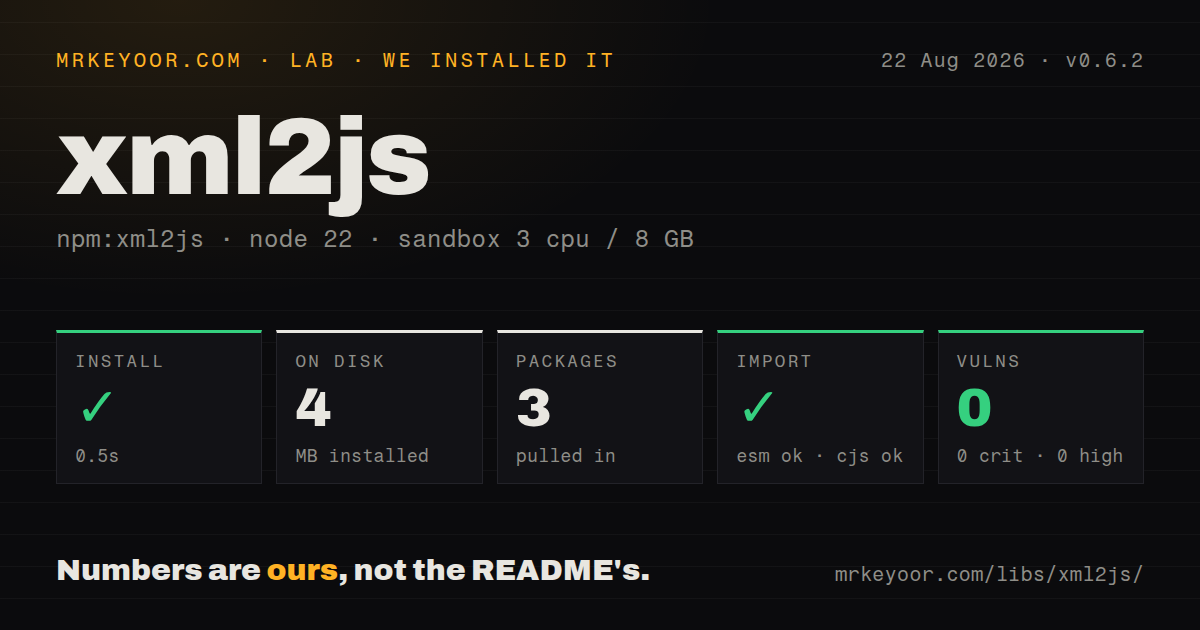
| Install | ✓ · 0.5s | 3 packages on disk · 4 MB |
| Import | ✓ | ESM import works · require() works · CommonJS package |
| Browser | n/a | could not be bundled for the browser (Node-only code, most likely) |
| Types | — | no TypeScript types found |
| Known vulns | 0 | 0 critical · 0 high · 0 moderate · 0 low (npm audit) |
Answers from our run
Does xml2js install cleanly?
Yes. In a fresh container with an empty cache, npm install xml2js finished in 0.5s, leaving 3 packages and 4 MB on disk. npm audit reported no known vulnerabilities.
Can xml2js run in a browser?
Not directly: esbuild could not bundle it for the browser in our run, which normally means it depends on Node built-ins. Use it on the server, or find a browser-targeted alternative.
Does xml2js work with both ESM and CommonJS?
Yes. Both import 'xml2js' and require('xml2js') worked in Node 22 in our run. The package is published as CommonJS.
Does xml2js include TypeScript types?
No type declarations were found in our install, so TypeScript users need their own declarations.
xml2js or fast-xml-parser: which should you use?
fast-xml-parser: Use it when current TypeScript support and configurable XML parsing or building matter more than xml2js-compatible output. xml2js 0.6.2 installed in 0.5 seconds and used 4 MB in our sandbox, but its browser bundle failed and the package supplied no TypeScript declarations.
When should you not use xml2js?
Choose fast-xml-parser when TypeScript declarations, current syntax targets, or a browser-oriented build are requirements; xml2js ships no types.
Use it if
- A Node script receives modest XML documents and needs a plain object through either a callback or a Promise.
- Existing code already expects xml2js's `$`, `_`, and always-array shape, making a parser swap more disruptive than useful.
- You need to emit ordinary XML from JavaScript objects and can stay within the Builder's documented object convention.
- Tag, attribute, and value processors are enough to normalize a known partner format before application validation.
- Choose `fast-xml-parser` when TypeScript declarations, current syntax targets, or a browser-oriented build are requirements; xml2js ships no types.
- Choose `saxes` for a streaming event parser when a document is too large to hold as one nested object.
- Use a DOM implementation when code needs XPath-style traversal, node identity, or in-place document edits. The README directs DOM users elsewhere.
- Avoid xml2js for mixed-content documents where exact child and text order must round-trip. Ordered children require special options, and the README limits one-to-one conversion guarantees.
- Do not choose it for frontend bundling. Our esbuild browser build failed, the package is CommonJS without an exports map, and no TypeScript declarations were found.
Setup reality
Our Node 22 sandbox installed xml2js 0.6.2 in 0.5 seconds. npm left 3 packages occupying 4 MB and found 0 known vulnerabilities at critical, high, moderate, or low severity. The package declares 2 direct dependencies and 0 peers, with 3392 KB unpacked, and accepts Node 4 or newer. It is CommonJS with no exports map. require() and ESM import both worked in our checks. The package contains no TypeScript declarations.
The default result shape deserves a fixture before application code is written. explicitRoot and explicitArray both default to true, attributes go under $, and text may appear under _. Whitespace trimming and normalization default to false. Changing explicitArray makes a field switch between a scalar object and an array as document cardinality changes, so stable consumers usually keep arrays and unwrap deliberately. Processor functions can also change names or values before validation; treat those settings as part of the data contract.
parseString() uses callbacks, and its async option defaults to false, so code must not rely on the callback crossing an event-loop turn. parseStringPromise() gives normal Promise control flow. The README recommends creating one Parser per file; parser reuse without reset() is not guaranteed. xml2js builds a complete object rather than yielding records, which makes it a poor fit for very large feeds or backpressure-sensitive ingestion. Its validator callback examines the converted structure and does not implement XSD validation.
Our browser bundle attempt failed in esbuild, so keep this package in Node code. Building XML has another boundary: one-to-one conversion is promised only with default settings apart from attrkey, charkey, and explicitArray. Options such as namespace metadata, ordered children, merged attributes, and value coercion can discard or duplicate distinctions needed for an exact round trip. Version 0.6.2 was published in 2023 with metadata-only changes; pin fixtures around every partner XML shape before upgrading or changing options.
Patterns
Parse one XML document parse-with-promise
const { parseStringPromise } = require('xml2js')

const result = await parseStringPromise(xml)
console.log(result.catalog.book[0].title[0])
Child elements are arrays by default. Keep that shape in types and tests even when a fixture contains only one child.
Handle parser errors with a callback parse-with-callback
const { parseString } = require('xml2js')

parseString(xml, { strict: true }, (error, result) => {
  if (error) return done(error)
  consume(result)
  done()
})
The `async` option defaults to false. Do not assume this callback always runs on a later event-loop turn.
Read an attribute and character data read-attributes-and-text
const xml = '<price currency="INR">499</price>'
const result = await parseStringPromise(xml)

console.log(result.price.$.currency)
console.log(result.price._)
Attributes use `$` and character content uses `_` when the element also has attributes. Both keys can be renamed through parser options.
Return single children as properties disable-explicit-arrays
const result = await parseStringPromise(xml, {
  explicitArray: false,
})

console.log(result.catalog.book.title)
With `explicitArray: false`, the same property becomes an array when multiple matching children arrive. This creates a data-dependent result type.
Keep element order for mixed children preserve-child-order
const result = await parseStringPromise(xml, {
  explicitChildren: true,
  preserveChildrenOrder: true,
  charsAsChildren: true,
})

for (const child of result.root.$$) {
  console.log(child['#name'], child._)
}
Ordered children appear under `$$` and carry `#name`. Named properties are retained too, so the result contains duplicate views of the same children.
Expose namespace metadata capture-namespaces
const result = await parseStringPromise(xml, { xmlns: true })

console.log(result['atom:feed'].$ns.local)
console.log(result['atom:feed'].$ns.uri)
Namespace metadata uses `$ns` when the attribute key is `$`. The original prefixed element name remains the object key unless a processor changes it.
Remove prefixes from element names strip-namespace-prefix
const { parseStringPromise, processors } = require('xml2js')

const result = await parseStringPromise(xml, {
  tagNameProcessors: [processors.stripPrefix],
})
`stripPrefix` removes the prefix from element names but leaves the `xmlns` prefix alone. Different namespaces can then collapse onto the same local key.
Convert number and boolean text coerce-values
const { parseStringPromise, processors } = require('xml2js')

const result = await parseStringPromise(xml, {
  valueProcessors: [processors.parseNumbers, processors.parseBooleans],
})
Processors run during parsing and change the stored values. Identifiers such as `0012` may lose formatting when treated as numbers, so use coercion only for known fields.
Build XML with attributes and text build-xml
const { Builder } = require('xml2js')

const builder = new Builder({ headless: true })
const xml = builder.buildObject({
  price: {
    $: { currency: 'INR' },
    _: '499',
  },
})
Builder interprets `$` as attributes and `_` as character content. Other parser option combinations are not all guaranteed to round-trip exactly.
Use CDATA where escaping is needed write-cdata
const { Builder } = require('xml2js')

const xml = new Builder({ cdata: true }).buildObject({
  script: 'if (a < b) return c;',
})
With `cdata: true`, Builder uses CDATA only when the text requires it. It does not wrap every text node unconditionally.
Reject an invalid converted value validate-converted-node
const result = await parseStringPromise(xml, {
  validator(path, previous, value) {
    if (path.endsWith('/quantity') && Number(value[0]) < 0) {
      throw new Error('quantity must be non-negative')
    }
    return value
  },
})
The validator receives xml2js's converted value for each path. It is an application hook and does not validate an XML document against XSD.
Use a fresh parser for each document parse-many-files
const { Parser } = require('xml2js')

const results = await Promise.all(
  documents.map((xml) => new Parser().parseStringPromise(xml)),
)
The README recommends one Parser per file. Reusing a parser without `reset()` is explicitly outside the guaranteed behavior.
Alternatives
| Package | Registry | Pick it when |
|---|---|---|
| fast-xml-parser | npm | Use it when current TypeScript support and configurable XML parsing or building matter more than xml2js-compatible output. |
| xml-js | npm | Use it when compact and non-compact object representations provide a better fit for conversion work. |
| saxes | npm | Use it for event-driven parsing when records should be handled without constructing one full object tree. |
More utils guides
lru-cache · type-fest · ajv · zod · p-limit · find-up · the whole shelf →
How this guide is made: grounded in the library's documentation, release notes, changelog, and issue history, on a fixed rubric — not a hands-on install of every release. The 50 most-downloaded entries are additionally install-verified in clean containers. Corrections: contact the desk.