wrangler review
Wrangler 4.126.0 is Cloudflare's command-line tool for developing and operating Workers. It bundles code, runs a local workerd environment, deploys scripts, derives binding types, stores secrets, tails logs, and manages products such as D1, KV, R2, Queues, Workflows, and Durable Objects. A checked-in JSONC or TOML file connects source code, a compatibility date, and resource bindings. The current release adds per-Workflow default retention, ordered events in local email-test results, an experimental PlanetScale billing signature command, FUSE support for local containers, and richer preview metadata.
Wrangler 4.125.0 took 12.3 seconds and 247 MB in our sandbox, so upgrading a Cloudflare Workers project to 4.126.0 should be treated as a runtime-toolchain change rather than a trivial CLI bump. Pin it, test the compatibility date and local resources, and keep deployment tokens narrowly scoped.
We installed it
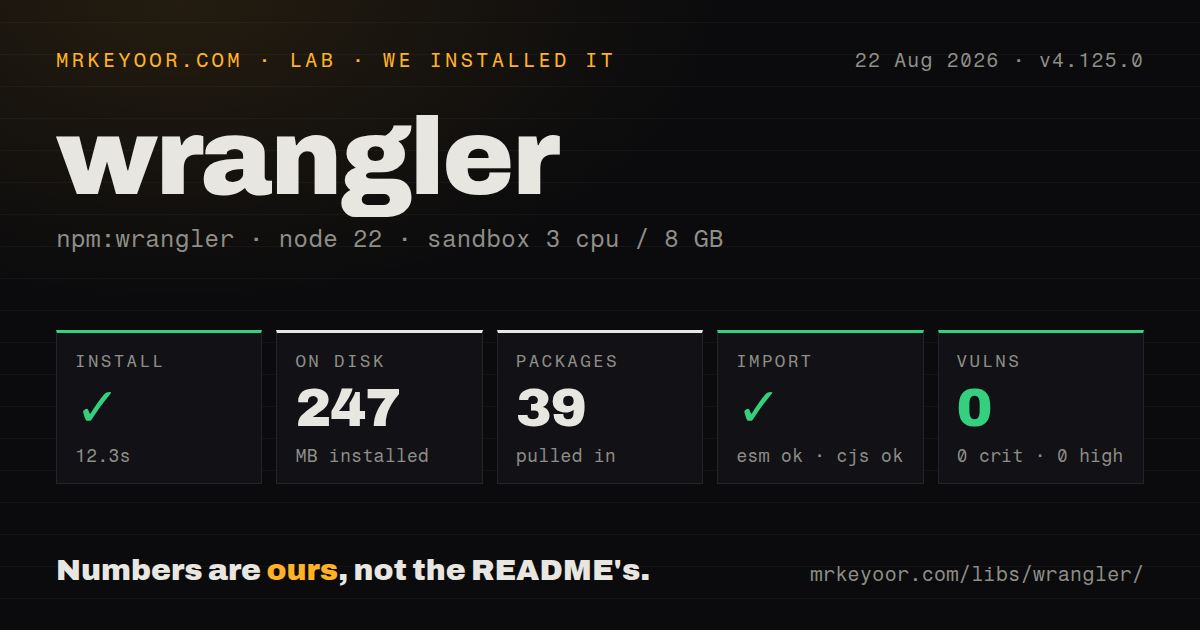
| Install | ✓ · 12.3s | 39 packages on disk · 247 MB |
| Import | ✓ | ESM import works · require() works · CommonJS package with exports map |
| Browser | n/a | could not be bundled for the browser (Node-only code, most likely) |
| Types | ✓ | TypeScript types bundled |
| Known vulns | 0 | 0 critical · 0 high · 0 moderate · 0 low (npm audit) |
Answers from our run
Does wrangler install cleanly?
Yes. In a fresh container with an empty cache, npm install wrangler finished in 12 seconds, leaving 39 packages and 247 MB on disk. npm audit reported no known vulnerabilities.
Can wrangler run in a browser?
Not directly: esbuild could not bundle it for the browser in our run, which normally means it depends on Node built-ins. Use it on the server, or find a browser-targeted alternative.
Does wrangler work with both ESM and CommonJS?
Yes. Both import 'wrangler' and require('wrangler') worked in Node 22 in our run. The package is published as CommonJS with an exports map.
Does wrangler include TypeScript types?
Yes, type declarations ship inside the package, so no @types install is needed.
wrangler or @cloudflare/vite-plugin: which should you use?
@cloudflare/vite-plugin: Use it when a Vite application should run Workers development inside the same dev server. Wrangler 4.125.0 took 12.3 seconds and 247 MB in our sandbox, so upgrading a Cloudflare Workers project to 4.126.0 should be treated as a runtime-toolchain change rather than a trivial CLI bump.
When should you not use wrangler?
The tool has little value outside Cloudflare because its bindings, account operations, and deployment model are vendor-specific.
Use it if
- A project deploys directly to Cloudflare Workers and needs the supported local runtime, authentication, bundling, and release path.
- Development should use workerd with the same compatibility date and resource bindings declared for deployment.
- CI needs dry-run bundles, token authentication, uploads, percentage rollouts, log tails, or rollback commands.
- TypeScript environment declarations should be regenerated from the checked-in Wrangler configuration.
- The tool has little value outside Cloudflare because its bindings, account operations, and deployment model are vendor-specific.
- Wrangler 4.126.0 requires Node 22+, excluding older build agents and developer machines.
- Use a stateful infrastructure tool when the team needs plans, diffs, imports, and full destroy semantics across account resources; Wrangler config does not supply that entire lifecycle.
- Avoid automatic upgrades when local runtime behavior must remain fixed. Wrangler frequently changes exact workerd and Miniflare versions.
- This is not a browser library. Our 4.125.0 browser bundle failed, consistent with a CLI that uses Node, native runtimes, and local processes.
Setup reality
We installed Wrangler 4.125.0, the release immediately before today's 4.126.0, in a fresh Node 22 Bookworm container. It took 12.3 seconds, left 39 packages, and used 247 MB. npm audit found 0 vulnerabilities at all severities. That measured package declared 8 direct dependencies and 1 peer, was 24,104 KB unpacked, required Node 22+, bundled types, and used the MIT OR Apache-2.0 expression.
The measured package is CommonJS with an exports map; both require() and ESM import worked. Its browser bundle failed, which matches a CLI that starts platform runtime code. Install Wrangler in devDependencies and run the local version through npm scripts or npx. A global copy can use a different workerd build than CI. Version 4.126.0 also changes workerd and Miniflare revisions, so pinning still matters across adjacent releases.
Interactive developers can use wrangler login. CI should provide a narrowly scoped CLOUDFLARE_API_TOKEN and the account identifier required by its commands. Put credentials in wrangler secret, not ordinary committed variables. Local values come from .dev.vars or .env according to Wrangler's rules; keep those files out of Git. The new experimental PlanetScale signature is itself a short-lived authorization artifact and should be piped rather than exposed in process arguments or logs.
The compatibility_date changes runtime semantics and deserves a tested update. Name --local or --remote on data-changing D1, KV, and R2 commands because emulator state differs from account state. Version 4.126.0 adds Workflow retention defaults, ordered email-test events, and FUSE-capable container development under supported Docker setups. Preview annotations are best-effort, and local container privileges vary across Linux, macOS, and WSL. Features introduced in 4.125.0, including TCP connect triggers and preview containers, remain experimental or configuration-sensitive.
Patterns
Run the pinned Worker locally start-local-worker
npm install --save-dev wrangler@4.126.0
npx wrangler dev

# choose a port and persistent local state
npx wrangler dev --port 3000 --persist-to .cache/wrangler
A project dependency keeps developer machines and CI on the same Wrangler and workerd versions.
Declare runtime compatibility in config configure-worker
// wrangler.jsonc
{
  "name": "orders-api",
  "main": "src/index.ts",
  "compatibility_date": "2026-08-25",
  "compatibility_flags": ["nodejs_compat"],
  "observability": { "enabled": true }
}
Change `compatibility_date` in a tested commit because it can alter Worker behavior even when application source stays unchanged.
Regenerate the environment interface generate-binding-types
npx wrangler types
npx wrangler types --env-interface CloudflareEnv
npx wrangler types --include-runtime=false
Run `wrangler types` after every binding edit. Stale declarations can claim a resource exists when deployment config does not.
Store a deployed secret store-secret
printf '%s' "$API_TOKEN" | npx wrangler secret put API_TOKEN

# .dev.vars, kept out of git
# API_TOKEN=local-test-token
Committed plain variables are visible configuration. Keep credentials in secret storage and ignore local variable files.
Create D1 and run remote migrations create-d1-database
npx wrangler d1 create app-db
npx wrangler d1 migrations apply app-db --remote
npx wrangler d1 execute app-db --remote --command 'select 1'
Resource creation returns identifiers for config. Every state-changing command should explicitly name local or remote state.
Write binary records to local KV write-kv-batch
npx wrangler kv bulk put values.json --binding CACHE --local
npx wrangler kv key get image-header --binding CACHE --local
Wrangler 4.125.0 fixed corruption of base64 values in local bulk writes; the remote KV path was not affected.
Produce a deployment bundle without upload dry-run-deploy
npx wrangler deploy --dry-run --outdir dist
find dist -maxdepth 1 -type f -print
Dry-run checks bundling and configuration without credentials or a production mutation.
Deploy with a CI token deploy-from-ci
CLOUDFLARE_API_TOKEN=... \
CLOUDFLARE_ACCOUNT_ID=... \
npx wrangler deploy
Limit the token to the target account and products. Worker deploy permission may not cover D1, KV, routes, or other resources.
Stream deployed Worker errors tail-production
npx wrangler tail --status error --format pretty
npx wrangler tail --method POST --search checkout
`tail` is a sampled live stream rather than durable history. Configure observability storage when later investigation is required.
Move a percentage of traffic roll-out-version
npx wrangler versions upload
npx wrangler versions list
npx wrangler versions deploy NEW_ID@10% OLD_ID@90%
Percentage rollout uses version upload and version deployment. Plain `wrangler deploy` sends the new version directly.
Return traffic to an older version rollback-deployment
npx wrangler deployments list
npx wrangler rollback --message 'checkout errors'
Rollback changes Worker code serving traffic. It does not undo D1 migrations, KV writes, R2 objects, or secret changes.
Open an experimental local TCP trigger test-tcp-connect
// wrangler.jsonc
{
  "name": "tcp-proxy",
  "main": "src/index.ts",
  "compatibility_date": "2026-08-20",
  "compatibility_flags": ["experimental"],
  "connect": [{ "protocol": "tcp", "port": 5432 }]
}
The connect trigger requires the experimental compatibility flag, binds to loopback by default, and currently supports TCP only.
Alternatives
| Package | Registry | Pick it when |
|---|---|---|
| @cloudflare/vite-plugin | npm | Use it when a Vite application should run Workers development inside the same dev server. |
| miniflare | npm | Use it when code needs to embed the local Workers simulator without account and deployment commands. |
| @cloudflare/vitest-pool-workers | npm | Use it to execute tests in isolated Workers runtimes instead of operating deployments. |
More infra guides
semver · boto3 · opentelemetry-api · @opentelemetry/api · psutil · distro · the whole shelf →
How this guide is made: grounded in the library's documentation, release notes, changelog, and issue history, on a fixed rubric — not a hands-on install of every release. The 50 most-downloaded entries are additionally install-verified in clean containers. Corrections: contact the desk.