@vueuse/core review
@vueuse/core is a typed collection of Vue 3 composables for browser APIs and recurring reactive behavior. Its functions wrap storage, events, media queries, element observers, pointer input, clipboard, network state, timing, async state, WebSockets, history, and shared-state patterns in refs that follow Vue effect scopes. Named imports let a bundler remove unused functions, and separate VueUse packages cover integrations and Nuxt wiring. Version 14.4 adds useElementOverflow, exposes flush and isPending on debounced functions, extends onStartTyping and virtual-list scrolling options, reports speech-recognition confidence, and fixes stale fetch aborts, pointer cancellation, element sizing, WebSocket close status, and several observer cases.
@vueuse/core pays off in a Vue 3.5 app that uses several browser APIs and values scope-aware cleanup. Keep imports narrow, treat SSR defaults as part of the component design, and choose Vue Query or Pinia when the problem is remote or application state.
We installed it
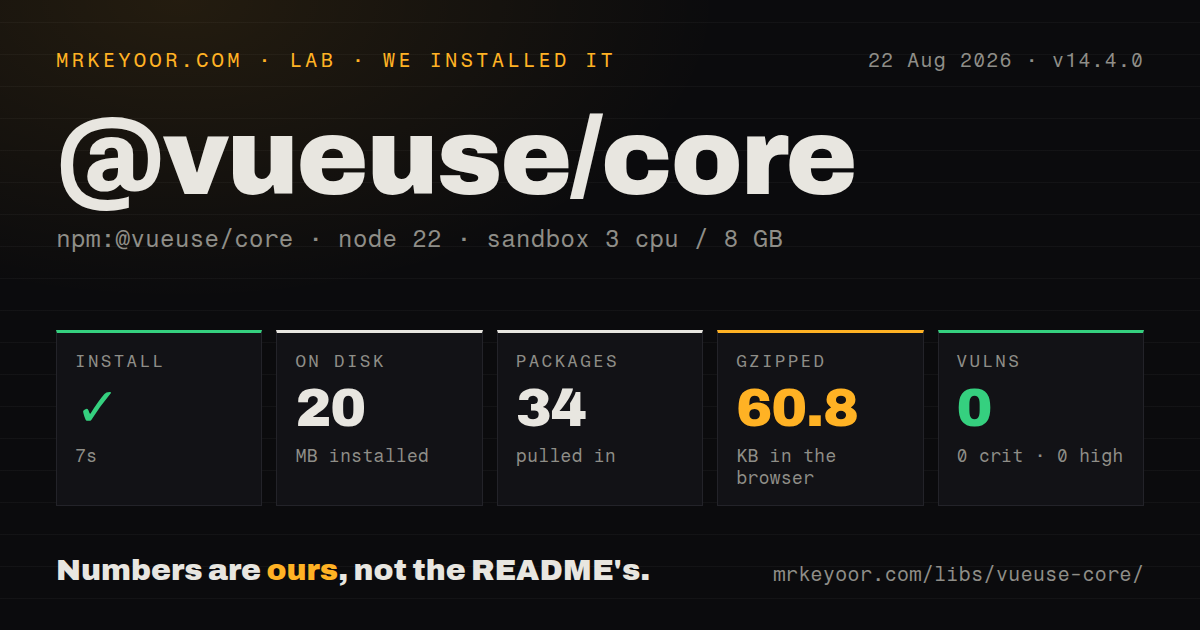

| Install | ✓ · 7s | 34 packages on disk · 20 MB |
| Import | ✓ | ESM import works · require() works · ESM package with exports map |
| Browser | 60.8 KB | gzipped (166.3 KB minified), bundled with esbuild |
| Types | ✓ | TypeScript types bundled |
| Known vulns | 0 | 0 critical · 0 high · 0 moderate · 0 low (npm audit) |
Answers from our run
Does @vueuse/core install cleanly?
Yes. In a fresh container with an empty cache, npm install @vueuse/core finished in 7 seconds, leaving 34 packages and 20 MB on disk. npm audit reported no known vulnerabilities.
How much does @vueuse/core add to a browser bundle?
60.8 KB gzipped (166.3 KB minified) when the whole package is bundled for the browser with esbuild. Importing only part of it is usually smaller.
Does @vueuse/core work with both ESM and CommonJS?
Yes. Both import '@vueuse/core' and require('@vueuse/core') worked in Node 22 in our run. The package is published as ESM with an exports map.
Does @vueuse/core include TypeScript types?
Yes, type declarations ship inside the package, so no @types install is needed.
@vueuse/core or @vueuse/integrations: which should you use?
@vueuse/integrations: Use it alongside core when the needed composable wraps an optional third-party library such as Fuse, Axios, or focus-trap. @vueuse/core pays off in a Vue 3.5 app that uses several browser APIs and values scope-aware cleanup.
When should you not use @vueuse/core?
The app needs only one or two short wrappers. Owning a small local composable may be simpler than tracking VueUse peer requirements and major migrations.
Use it if
- A Vue 3.5 application repeatedly wraps event listeners, storage, media queries, observers, clipboard, drag, pointer, or window APIs
- Listeners and observers should follow component or effect-scope cleanup without bespoke onUnmounted code in every composable
- The team wants typed reactive primitives with live documentation and source links rather than a private collection of partly tested helpers
- Nuxt or auto-import tooling can expose selected composables while keeping VueUse's SSR fallbacks and package conventions consistent
- The app needs only one or two short wrappers. Owning a small local composable may be simpler than tracking VueUse peer requirements and major migrations.
- Your project is on Vue 2 or Vue below 3.5. Version 14 declares Vue ^3.5.0 as its single peer dependency.
- Server data caching, request deduplication, retries, invalidation, and background refetch are the requirement. useFetch is a reactive fetch wrapper, not a server-state cache.
- Markup cannot change between server output and client hydration. Composables backed by window, storage, matchMedia, or layout start with server fallbacks and need an explicit rendering strategy.
- A broad namespace import will be passed around at runtime. Our import-all browser measurement was 166.3 KB minified and 60.8 KB gzipped; named imports are the intended tree-shaking path.
Setup reality
Our clean Node 22 install of @vueuse/core 14.4.0 succeeded in 7 seconds. It left 34 packages using 20 MB, with 3 direct dependencies and 1 peer dependency; the package itself was 920 KB unpacked. npm audit found 0 known vulnerabilities. It is an ESM package with an exports map, and both require() and ESM import worked in the probe. TypeScript declarations are bundled. Importing the whole package into esbuild produced 166.3 KB minified and 60.8 KB gzipped.
Vue ^3.5.0 is required. The direct dependencies include @vueuse/shared, @vueuse/metadata, and Web Bluetooth types. Add-on integrations are separate packages and may bring their own peers. The package declares sideEffects false, so modern bundlers can remove unused named exports. Deep imports are more fragile than the public entry point because build output paths can change between majors.
Browser-backed composables run against defaults during SSR. localStorage, matchMedia, window size, and element layout are unavailable until the client owns the page, which can change rendered text or structure during hydration. Use client-only rendering, stable SSR defaults, or CSS for presentation-only breakpoints. In Nuxt, prefer the VueUse module when auto-import and server behavior should be configured together.
Cleanup depends on an active Vue effect scope. Calls made during component setup or inside a managed scope dispose listeners and observers automatically. Calls made later from a detached callback need the returned stop function. Reactive targets can also be null before mount and rebind after template refs resolve. For useFetch, WebSockets, debounced work, and async state, handle cancellation and stale responses explicitly instead of assuming component unmount is the only race.
Patterns
Persist a reactive preference persist-local-state
<script setup lang="ts">
import { useLocalStorage } from '@vueuse/core'

const preferences = useLocalStorage('app:preferences', {
  theme: 'light',
  density: 'comfortable',
})

preferences.value.density = 'compact'
</script>
Storage is unavailable during SSR, so the default object drives server output. Avoid rendering different markup solely from the stored client value during hydration.
Attach an event listener to a template ref attach-scoped-listener
<script setup lang="ts">
import { useTemplateRef } from 'vue'
import { useEventListener } from '@vueuse/core'

const panel = useTemplateRef<HTMLElement>('panel')
const stop = useEventListener(panel, 'pointerdown', (event) => {
  console.log(event.pointerType)
})
</script>

<template><section ref="panel" /></template>
The listener rebinds when the ref changes and stops with the active component scope. Keep the returned stop function for early manual cleanup.
Close a popover on outside input close-on-outside-click
<script setup lang="ts">
import { ref, useTemplateRef } from 'vue'
import { onClickOutside } from '@vueuse/core'

const open = ref(false)
const popover = useTemplateRef<HTMLElement>('popover')
const trigger = useTemplateRef<HTMLElement>('trigger')

onClickOutside(popover, () => { open.value = false }, {
  ignore: [trigger],
})
</script>
Ignore the trigger or the same pointer action can open and then close the popover. Teleported content may also need to be listed because it is outside the target subtree.
Track an element's dimensions observe-element-size
<script setup lang="ts">
import { useTemplateRef } from 'vue'
import { useElementSize } from '@vueuse/core'

const card = useTemplateRef<HTMLElement>('card')
const { width, height } = useElementSize(card, undefined, {
  box: 'border-box',
})
</script>
Values use defaults before the element mounts. Version 14.4 pre-fills size according to the selected box option, but SSR still has no layout measurement.
Detect clipped content observe-element-overflow
<script setup lang="ts">
import { computed, useTemplateRef } from 'vue'
import { useElementOverflow } from '@vueuse/core'

const content = useTemplateRef<HTMLElement>('content')
const { isXOverflowed, isYOverflowed } = useElementOverflow(content)
const overflowing = computed(() => isXOverflowed.value || isYOverflowed.value)
</script>
useElementOverflow is new in 14.4 and reports each axis separately. Its answer depends on client layout, so do not change server markup from it before mount.
Debounce a save with manual flush debounce-save
import { useDebounceFn } from '@vueuse/core'

const saveDraft = useDebounceFn(
  () => api.save(form.value),
  500,
  { maxWait: 2000 },
)

saveDraft()
saveDraft.flush()
console.log(saveDraft.isPending.value)
flush and isPending were added to the filter system in 14.4. Handle the promise returned by saveDraft() when the underlying function can reject.
Load when a sentinel enters view observe-visibility
<script setup lang="ts">
import { useTemplateRef } from 'vue'
import { useIntersectionObserver } from '@vueuse/core'

const sentinel = useTemplateRef<HTMLElement>('sentinel')
const { stop } = useIntersectionObserver(
  sentinel,
  ([entry]) => {
    if (!entry?.isIntersecting) return
    loadNextPage()
    stop()
  },
  { rootMargin: '200px' },
)
</script>
The observer can first report a non-intersecting entry. Check isIntersecting and stop when only one activation is wanted.
Create reactive breakpoints react-to-breakpoint
<script setup lang="ts">
import { useBreakpoints } from '@vueuse/core'

const breakpoints = useBreakpoints({
  mobile: 0,
  tablet: 768,
  desktop: 1200,
})

const desktop = breakpoints.greaterOrEqual('desktop')
</script>
matchMedia is not available during SSR. Prefer CSS for purely visual layout or provide client-stable rendering until hydration finishes.
Copy text with status copy-clipboard
<script setup lang="ts">
import { useClipboard } from '@vueuse/core'

const { copy, copied, isSupported } = useClipboard({
  copiedDuring: 1200,
})
</script>

<template>
  <button :disabled="!isSupported" @click="copy('npm i @vueuse/core')">
    {{ copied ? 'Copied' : 'Copy' }}
  </button>
</template>
The modern Clipboard API needs a secure context and may require user activation. Render a fallback when isSupported is false.
Expose loading and error refs load-async-state
<script setup lang="ts">
import { useAsyncState } from '@vueuse/core'

const { state: user, isLoading, error, execute } = useAsyncState(
  () => fetch('/api/me').then((response) => {
    if (!response.ok) throw new Error(`HTTP ${response.status}`)
    return response.json()
  }),
  null,
  { immediate: true, resetOnExecute: false },
)
</script>
Render or log the error ref. useAsyncState can capture a rejection instead of throwing it into the component setup path.
Manage a reconnecting WebSocket open-websocket
<script setup lang="ts">
import { useWebSocket } from '@vueuse/core'

const { data, status, send, close } = useWebSocket(
  'wss://example.com/events',
  {
    autoReconnect: { retries: 5, delay: 1000 },
    heartbeat: { message: 'ping', interval: 15000 },
  },
)
</script>
data contains the latest message rather than a history. Version 14.4 fixes status so an explicit close() moves it to CLOSED.
Create request-scoped injected state share-injected-state
import { ref } from 'vue'
import { createInjectionState } from '@vueuse/core'

export const [provideCounter, useCounter] = createInjectionState(
  (initial = 0) => {
    const count = ref(initial)
    const increment = () => count.value++
    return { count, increment }
  },
)
Injection follows the component tree and is safer for per-request SSR state than a module-level global singleton. Consumers must run under the provider.
Alternatives
| Package | Registry | Pick it when |
|---|---|---|
| @vueuse/integrations | npm | Use it alongside core when the needed composable wraps an optional third-party library such as Fuse, Axios, or focus-trap. |
| @tanstack/vue-query | npm | Use it when remote data needs caching, deduplication, retry, invalidation, stale-time policy, and background refresh. |
| pinia | npm | Use it when the main problem is structured application state, actions, devtools, and store ownership rather than browser utilities. |
More web frontend guides
postcss · react · react-dom · tailwindcss · clsx · htmlparser2 · the whole shelf →
How this guide is made: grounded in the library's documentation, release notes, changelog, and issue history, on a fixed rubric — not a hands-on install of every release. The 50 most-downloaded entries are additionally install-verified in clean containers. Corrections: contact the desk.