pinia review
Pinia 4.0.3 is Vue's official shared-state library. A named store holds reactive state, computed getters, and callable actions, with Vue Devtools integration and TypeScript inference. Stores can use an Options-style object or a setup function, and separate stores replace Vuex's nested module tree. Version 4.0.3 fixes server hydration of reactive Set and Map values by replacing the server snapshot instead of unioning it, guards a production Devtools constant, and declares Nuxt 5 compatibility. Our whole-package browser build measured 102.7 KB minified and 35.3 KB gzipped.
Pinia 4.0.3 installed in 6.9 seconds with 38 packages and 0 audit findings, and its SSR Set/Map hydration fix makes it the sensible shared-state default for current Vue 3.5 apps. Skip it for component-local state, and plan persistence plus per-request SSR isolation yourself.
We installed it
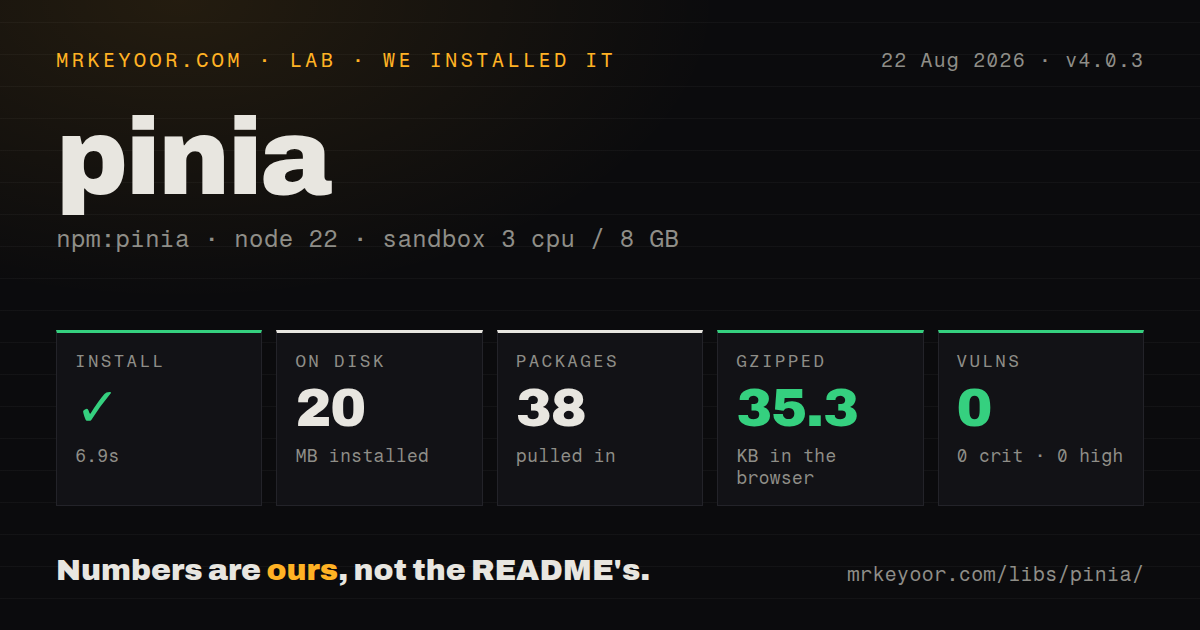

| Install | ✓ · 6.9s | 38 packages on disk · 20 MB |
| Import | ✓ | ESM import works · require() works · ESM package with exports map |
| Browser | 35.3 KB | gzipped (102.7 KB minified), bundled with esbuild |
| Types | ✓ | TypeScript types bundled |
| Known vulns | 0 | 0 critical · 0 high · 0 moderate · 0 low (npm audit) |
Answers from our run
Does pinia install cleanly?
Yes. In a fresh container with an empty cache, npm install pinia finished in 7 seconds, leaving 38 packages and 20 MB on disk. npm audit reported no known vulnerabilities.
How much does pinia add to a browser bundle?
35.3 KB gzipped (102.7 KB minified) when the whole package is bundled for the browser with esbuild. Importing only part of it is usually smaller.
Does pinia work with both ESM and CommonJS?
Yes. Both import 'pinia' and require('pinia') worked in Node 22 in our run. The package is published as ESM with an exports map.
Does pinia include TypeScript types?
Yes, type declarations ship inside the package, so no @types install is needed.
pinia or vuex: which should you use?
vuex: Keep it where an established Vuex store works and migration would bring little product value. Pinia 4.0.3 installed in 6.9 seconds with 38 packages and 0 audit findings, and its SSR Set/Map hydration fix makes it the sensible shared-state default for current Vue 3.5 apps.
When should you not use pinia?
The data belongs to one component branch. Props, emits, provide/inject, or a local composable keeps its lifetime easier to see.
Use it if
- State is shared by unrelated Vue components and ownership through props, emits, or one composable is no longer clear.
- The team wants typed stores whose actions and mutations appear in Vue Devtools without Vuex mutation boilerplate.
- A Vue 3.5 application needs separate domain stores that can call each other without a nested module hierarchy.
- Server-rendered Vue or Nuxt needs a documented per-request store and hydration path.
- The data belongs to one component branch. Props, emits, provide/inject, or a local composable keeps its lifetime easier to see.
- You support Vue 2 or Vue below 3.5.11. Pinia 4 declares Vue ^3.5.11, and Vue 2 users must stay on the older Pinia line.
- Your toolchain still needs a CommonJS Pinia entry. Version 4 is ESM-only even though our Node require() interop check happened to load it.
- Persistence, cross-tab sync, undo, or server-request caching must be built in. Pinia core supplies none of those behaviors.
- The workflow needs guarded transitions and impossible-state modeling. Pinia actions are ordinary functions, not a statechart.
- Adding 38 installed packages and 20 MB for a small isolated widget is unjustified. A Vue ref or a narrow composable may cover the same state.
Setup reality
We installed Pinia 4.0.3 in a fresh Node 22 Bookworm sandbox. npm completed in 6.9 seconds and left 38 packages using 20 MB. The package is 208 KB unpacked, declares 1 direct dependency and 3 peers, and produced 0 npm audit findings. It is an ESM package with an exports map and bundled declarations; ESM import and require() both worked in our check. A namespace browser build measured 102.7 KB minified and 35.3 KB gzipped.
Install Vue ^3.5.11 and @vue/devtools-api ^8.1.5 beside Pinia; TypeScript consumers need 5.6 or newer. Create one Pinia root for a browser app and call app.use(pinia) before any component uses a store. Code outside setup, such as a router guard, must run after installation or receive the root explicitly. Directly destructuring state drops Vue reactivity, so use storeToRefs(); bound actions can be destructured as methods.
Setup stores must return every state ref used by the store. Hidden state interferes with hydration, Devtools, and plugins, and setup stores do not receive the Option-store $reset() implementation. Pinia also does not persist data. A $subscribe handler or plugin must choose which fields to serialize, version the saved shape, and reject bad data rather than copying localStorage blindly into live state.
SSR requires a new Pinia instance per request and an XSS-safe serializer for pinia.state.value. Version 4.0.3 specifically changes hydration of reactive Set and Map values from union to replacement, so regression-test those types when upgrading. Nuxt users should use @pinia/nuxt instead of wiring request activation by hand. In tests, setActivePinia(createPinia()) isolates unit state; @pinia/testing stubs actions unless stubActions: false is set, which can otherwise skip the business logic a test claims to cover.
Patterns
Register one Pinia root before mounting install-root-store
import { createApp } from 'vue';
import { createPinia } from 'pinia';
import App from './App.vue';

const app = createApp(App);
app.use(createPinia());
app.mount('#app');
Pinia 4 also requires @vue/devtools-api. Components can call stores only after app.use() installs the root.
Group cart state, a getter, and an action define-option-store
export const useCartStore = defineStore('cart', {
  state: () => ({ items: [] as { id: string; price: number }[] }),
  getters: {
    total: (state) => state.items.reduce((sum, item) => sum + item.price, 0),
  },
  actions: {
    add(item: { id: string; price: number }) { this.items.push(item); },
  },
});
The cart id must be unique across the app because registration, Devtools, and hydration use it.
Build a store with Vue refs define-setup-store
export const useCounterStore = defineStore('counter', () => {
  const count = ref(0);
  const doubled = computed(() => count.value * 2);
  function increment() { count.value += 1; }
  function reset() { count.value = 0; }
  return { count, doubled, increment, reset };
});
Return each state ref used by the store. Setup stores also need an explicit reset action.
Extract state without breaking updates destructure-reactive-state
const cart = useCartStore();
const { items, total } = storeToRefs(cart);
const { add } = cart;
storeToRefs() preserves state and getter reactivity. Actions are bound to the store and can be taken directly.
Record several mutations as one patch patch-related-state
cart.$patch((state) => {
  state.items.push({ id: 'book', price: 20 });
  state.coupon = 'READ20';
});
The function form handles collection mutations and groups the changes into 1 Devtools and subscription event.
Restore an Option store's initial state reset-option-state
const cart = useCartStore();
cart.$reset();
$reset() recreates Option-store state. It is absent from setup stores unless you implement it.
Track an API request inside an action run-async-action
async load(id: string) {
  this.loading = true;
  try {
    this.profile = await api.getUser(id);
  } finally {
    this.loading = false;
  }
}
Pinia allows async actions but does not deduplicate requests, cache server results, or cancel stale work.
Subscribe to cart changes persist-selected-state
const stop = cart.$subscribe((_mutation, state) => {
  localStorage.setItem('cart', JSON.stringify({ items: state.items }));
}, { detached: true });
detached keeps the callback after its component unmounts. Validate and version the stored JSON before hydration.
Measure successful and failed actions observe-action-result
const stop = user.$onAction(({ name, after, onError }) => {
  const start = performance.now();
  after(() => console.log(name, performance.now() - start));
  onError((error) => console.error(name, error));
}, true);
The true argument detaches the hook from component teardown. Do not record secrets from action arguments.
Pass Pinia to a router guard use-store-in-router
router.beforeEach((to) => {
  const auth = useAuthStore(pinia);
  if (to.meta.requiresAuth && !auth.user) return '/login';
});
Passing the instance avoids activation-order ambiguity. SSR must create that instance per request.
Attach a router through a plugin extend-stores-with-plugin
const pinia = createPinia();
pinia.use(({ store }) => {
  store.router = markRaw(router);
});
app.use(pinia);
The plugin affects stores created after registration. markRaw() keeps the router out of Vue's proxy conversion.
Create a fresh root for each test isolate-unit-test-state
beforeEach(() => setActivePinia(createPinia()));

it('increments', () => {
  const counter = useCounterStore();
  counter.increment();
  expect(counter.count).toBe(1);
});
A new root prevents state leaking across tests. @pinia/testing stubs actions unless stubActions is set to false.
Alternatives
| Package | Registry | Pick it when |
|---|---|---|
| vuex | npm | Keep it where an established Vuex store works and migration would bring little product value. |
| nanostores | npm | Use it for small framework-neutral atoms shared among Vue, React, Svelte, or vanilla islands. |
| zustand | npm | Use it primarily in React applications that prefer a hook-based store with no Vue dependency. |
| @reduxjs/toolkit | npm | Use it when Redux conventions, middleware, normalized data, and Redux DevTools are already part of the stack. |
More web frontend guides
postcss · react · react-dom · tailwindcss · clsx · htmlparser2 · the whole shelf →
How this guide is made: grounded in the library's documentation, release notes, changelog, and issue history, on a fixed rubric — not a hands-on install of every release. The 50 most-downloaded entries are additionally install-verified in clean containers. Corrections: contact the desk.