@visx/vendor review
@visx/vendor 4.0.0 is a packaging shim used by visx, not a chart library. It exposes selected D3 modules and InternMap through named subpaths such as `@visx/vendor/d3-scale`, sending ESM imports to re-exports and CommonJS requires to transpiled vendored copies. There is deliberately no package-root export. Version 4 updates the exact D3 pins used by the visx 4 line, including d3-shape 3 and d3-path 3. Our root `import` and `require()` checks both failed on Node 22, and the root browser bundle failed too. That result is consistent with a package whose supported API begins at subpaths rather than `@visx/vendor` itself.
Our @visx/vendor 4.0.0 install pulled in 27 packages and 6 MB, then bare `require()`, ESM `import`, and browser bundling all failed on Node 22. Install it only for its documented D3 subpaths when visx-compatible dual-module publishing is the requirement; application code should depend on D3 directly.
We installed it
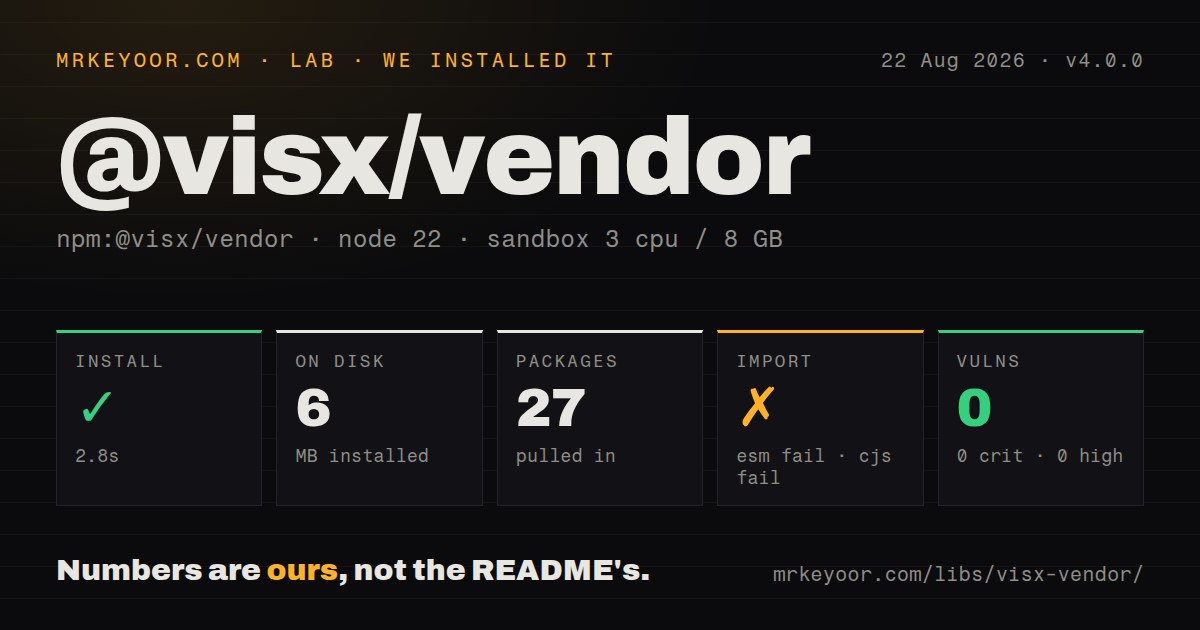
| Install | ✓ · 2.8s | 27 packages on disk · 6 MB |
| Import | ✗ | ESM import fails · require() fails · CommonJS package with exports map |
| Browser | n/a | could not be bundled for the browser (Node-only code, most likely) |
| Types | — | no TypeScript types found |
| Known vulns | 0 | 0 critical · 0 high · 0 moderate · 0 low (npm audit) |
Answers from our run
Does @visx/vendor install cleanly?
Yes. In a fresh container with an empty cache, npm install @visx/vendor finished in 3 seconds, leaving 27 packages and 6 MB on disk. npm audit reported no known vulnerabilities.
Can @visx/vendor run in a browser?
Not directly: esbuild could not bundle it for the browser in our run, which normally means it depends on Node built-ins. Use it on the server, or find a browser-targeted alternative.
Does @visx/vendor work with both ESM and CommonJS?
Neither plain import nor require succeeded in our sandbox, so it needs a bundler or extra setup.
Does @visx/vendor include TypeScript types?
No type declarations were found in our install, so TypeScript users need their own declarations.
@visx/vendor or d3-scale: which should you use?
d3-scale: Install d3-scale directly when an application only needs continuous, ordinal, threshold, or time scales. Our @visx/vendor 4.0.0 install pulled in 27 packages and 6 MB, then bare require(), ESM import, and browser bundling all failed on Node 22.
When should you not use @visx/vendor?
You are building an application and can install D3 directly: this package declares 23 direct dependencies to support visx's publishing needs, while one d3-scale or d3-array dependency states intent more clearly
Use it if
- You maintain a visx package and must use the same exact D3 versions and dual-module routing as the visx 4 monorepo
- A published library already exposes @visx/vendor subpaths to both ESM and CommonJS consumers
- You are diagnosing an existing visx dependency tree and need to know why a D3 function resolves through this compatibility layer
- Your code needs one of the documented `d3-*` or `internmap` subpaths and you have tested that exact path in every supported module system
- You are building an application and can install D3 directly: this package declares 23 direct dependencies to support visx's publishing needs, while one `d3-scale` or `d3-array` dependency states intent more clearly
- You plan to import `@visx/vendor` at the root: our `require()` and ESM `import` checks both failed on Node.js 22.23.2 because the package only exposes named subpaths
- You need D3 modules outside the export pattern's published files: d3-axis, d3-selection, d3-zoom, and d3-transition are not among the generated vendor entries
- You rely on package-level TypeScript discovery: our install found no TypeScript types, so verify the exact subpath and compiler setup instead of assuming declarations resolve
- You want to choose your own D3 upgrade schedule: version 4 pins every dependency exactly, and its d3-shape and d3-path updates arrived with the visx 4 release
Setup reality
We installed @visx/vendor 4.0.0 in 2.8 seconds. It left 27 packages using 6 MB on disk; the package was 1,644 KB unpacked, with 23 direct dependencies, 0 peer dependencies, and no npm audit findings. Its combined licence is MIT and ISC. Our package-level type probe found no TypeScript types.
The first-run surprise is the missing root entry. Both require('@visx/vendor') and import '@visx/vendor' failed under Node.js 22.23.2 in our sandbox. The browser bundle failed as well. Use a published subpath such as @visx/vendor/d3-scale, never the bare package name, and test the exact import in the build tool that will ship it.
No credentials, native compilation, or config file are involved. The exports map routes import to an ESM file and require to a transpiled CommonJS file. Those CommonJS copies rewrite internal references to other vendored modules. Root compatibility files with a .js suffix exist for older tools, but the README presents extensionless conditional subpaths as the normal interface.
Version 4.0.0 pins 12 runtime libraries and 11 @types packages at exact versions. The package marks itself side-effect-free, yet that does not make a bare import valid or prove every consumer will prune all 23 dependencies. For normal application code, install the needed D3 module directly. Keep @visx/vendor when you are matching visx internals or publishing the same ESM and CommonJS bridge.
Patterns
Map a numeric domain to pixels create-linear-scale
import {scaleLinear} from '@visx/vendor/d3-scale';

const x = scaleLinear()
  .domain([0, 100])
  .range([0, 640])
  .clamp(true);

const pixel = x(42);
Import from the `d3-scale` subpath. Our bare package import failed, and a scale only maps values; it does not render an axis or mark.
Require one vendored module from CommonJS load-commonjs-subpath
const {scaleBand} = require('@visx/vendor/d3-scale');

const x = scaleBand()
  .domain(['A', 'B'])
  .range([0, 320])
  .padding(0.1);
The exports map sends `require` to a transpiled CommonJS copy. Test this exact subpath because the root require failed on Node.js 22.23.2.
Find the minimum and maximum value compute-array-extent
import {extent} from '@visx/vendor/d3-array';

const [minimum, maximum] = extent(rows, (row) => row.value);
`extent()` can return undefined bounds for empty or non-numeric input. Check both values before creating a scale domain.
Group records with d3-array group-records
import {group} from '@visx/vendor/d3-array';

const byTeam = group(rows, (row) => row.team);
const platformRows = byTeam.get('platform') ?? [];
The returned InternMap interns keys by value. Object keys still need careful identity semantics, just as they do with the upstream D3 function.
Create a compact number formatter format-axis-number
import {format} from '@visx/vendor/d3-format';

const compact = format('.2s');
const label = compact(1250000);
D3 format specifiers use the default locale until you configure another one. Keep locale choice explicit for user-facing separators and currency.
Parse a local calendar date parse-fixed-date
import {timeParse} from '@visx/vendor/d3-time-format';

const parseDate = timeParse('%Y-%m-%d');
const date = parseDate('2026-08-25');
`timeParse()` returns null on a mismatch and creates a local-time Date. Use `utcParse()` when the input contract is UTC.
Generate a range of UTC days generate-day-boundaries
import {utcDay} from '@visx/vendor/d3-time';

const days = utcDay.range(
  new Date('2026-08-01T00:00:00Z'),
  new Date('2026-08-08T00:00:00Z'),
);
The range excludes the stop value. `utcDay` also avoids local daylight-saving changes that affect `timeDay`.
Build an SVG line path generate-line-path
import {line, curveMonotoneX} from '@visx/vendor/d3-shape';

const makeLine = line()
  .x((point) => point.x)
  .y((point) => point.y)
  .curve(curveMonotoneX);

const pathData = makeLine(points);
Version 4 pins d3-shape 3.2.0. Sort points by x for `curveMonotoneX`, and handle the generator's nullable result.
Construct path commands without a DOM build-svg-path
import {path} from '@visx/vendor/d3-path';

const shape = path();
shape.moveTo(10, 10);
shape.lineTo(90, 10);
shape.lineTo(50, 70);
shape.closePath();

const d = shape.toString();
Version 4 pins d3-path 3.1.0. The path object returns command text and does not create or update an SVG element.
Interpolate between two colors interpolate-colors
import {interpolateRgb} from '@visx/vendor/d3-interpolate';

const colorAt = interpolateRgb('#2563eb', '#dc2626');
const midpoint = colorAt(0.5);
RGB interpolation is not perceptually uniform. Pick a color-space-specific upstream interpolator when equal-looking steps are part of the design.
Query the nearest plotted point find-nearest-point
import {Delaunay} from '@visx/vendor/d3-delaunay';

const delaunay = Delaunay.from(
  points,
  (point) => point.x,
  (point) => point.y,
);
const nearest = points[delaunay.find(pointerX, pointerY)];
Build the triangulation in the same coordinate system as the pointer. Raw data coordinates will give the wrong result after scaling to pixels.
Look up equal Date values as one key intern-date-keys
import {InternMap} from '@visx/vendor/internmap';

const labels = new InternMap();
labels.set(new Date('2026-08-25T00:00:00Z'), 'release');

const label = labels.get(new Date('2026-08-25T00:00:00Z'));
InternMap uses primitive values for interning by default, so separate Date objects for the same instant match unlike keys in a native Map.
Alternatives
| Package | Registry | Pick it when |
|---|---|---|
| d3-scale | npm | Install d3-scale directly when an application only needs continuous, ordinal, threshold, or time scales. |
| d3-array | npm | Install d3-array directly for grouping, bins, statistics, ticks, and array transforms without the rest of the vendor set. |
| d3 | npm | Use the aggregate D3 package when an ESM application intentionally needs a broad selection of D3 modules. |
| victory-vendor | npm | Use victory-vendor only inside Victory's corresponding dependency model; it solves a similar publisher problem for a different component family. |
More web frontend guides
postcss · react · react-dom · tailwindcss · clsx · htmlparser2 · the whole shelf →
How this guide is made: grounded in the library's documentation, release notes, changelog, and issue history, on a fixed rubric — not a hands-on install of every release. The 50 most-downloaded entries are additionally install-verified in clean containers. Corrections: contact the desk.