@visx/event review
@visx/event 4.0.0 converts a mouse, pointer, touch, or focus event into an `{x, y}` point for an SVG chart. `localPoint(event)` derives a reference from the target, while `localPoint(element, event)` pins the coordinate calculation to a supplied node. SVG screen transforms are inverted when available, and the result is an `@visx/point` value or `null`. The package does not manage tooltips, gestures, drag state, scales, or nearest-data lookup. Version 4 moves visx to React 18 or 19, package-root exports, modern browser targets, and corrected ESM output. Our full import measured 0.7 KB gzipped with bundled types.
@visx/event 4.0.0 installed in 1.6 seconds and added a 0.7 KB gzipped full import in our sandbox, with 0 audit findings and bundled types. Use it for SVG-local event coordinates inside a visx 4 chart; skip it for HTML offsets, nested-group coordinates, portals, or gesture state.
We installed it
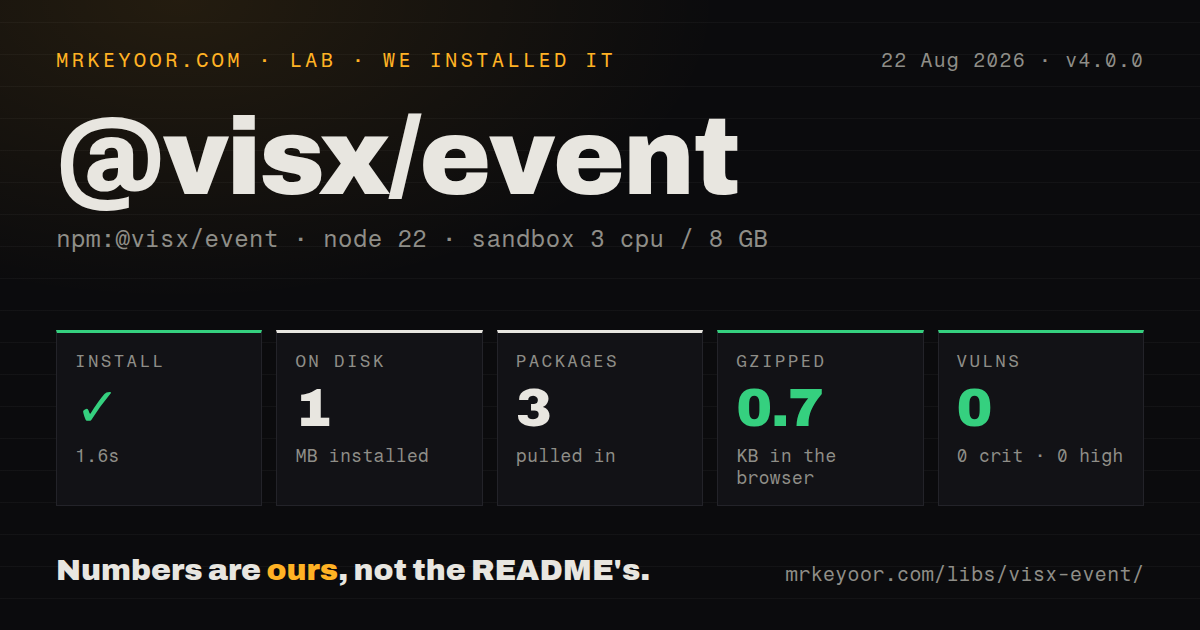
| Install | ✓ · 1.6s | 3 packages on disk · 1 MB |
| Import | ✓ | ESM import works · require() works · CommonJS package with exports map |
| Browser | 0.7 KB | gzipped (1.4 KB minified), bundled with esbuild |
| Types | ✓ | TypeScript types bundled |
| Known vulns | 0 | 0 critical · 0 high · 0 moderate · 0 low (npm audit) |
Answers from our run
Does @visx/event install cleanly?
Yes. In a fresh container with an empty cache, npm install @visx/event finished in 2 seconds, leaving 3 packages and 1 MB on disk. npm audit reported no known vulnerabilities.
How much does @visx/event add to a browser bundle?
0.7 KB gzipped (1.4 KB minified) when the whole package is bundled for the browser with esbuild. Importing only part of it is usually smaller.
Does @visx/event work with both ESM and CommonJS?
Yes. Both import '@visx/event' and require('@visx/event') worked in Node 22 in our run. The package is published as CommonJS with an exports map.
Does @visx/event include TypeScript types?
Yes, type declarations ship inside the package, so no @types install is needed.
@visx/event or d3-selection: which should you use?
d3-selection: Choose its pointer helpers when D3 is already present or several touch points are needed. @visx/event 4.0.0 installed in 1.6 seconds and added a 0.7 KB gzipped full import in our sandbox, with 0 audit findings and bundled types.
When should you not use @visx/event?
The target is an ordinary HTML element; subtracting its bounding rectangle from clientX and clientY avoids React and visx peers
Use it if
- A custom visx SVG chart needs pointer positions expressed in its outer SVG coordinate system
- Native DOM and React synthetic mouse or touch events should pass through one typed helper
- A scaled SVG `viewBox` requires screen-coordinate inversion before scale lookup
- The application already uses synchronized visx 4 packages and `@visx/point` is an expected dependency
- The target is an ordinary HTML element; subtracting its bounding rectangle from `clientX` and `clientY` avoids React and visx peers
- The application is still on React 16 or 17; visx 4 declares React 18 or 19 peers
- Interaction needs drag, pinch, velocity, pointer capture, or several touches; this helper returns 1 point and holds no gesture state
- Coordinates must be local to a transformed nested `<g>`; `localPoint` targets the owner SVG rather than that group
- A body-level tooltip portal expects page coordinates; SVG-local values cannot be used there without another conversion
Setup reality
Our @visx/event 4.0.0 install finished in 1.6 seconds in a clean Node 22 container. It left 3 packages using 1 MB, and npm audit found 0 known vulnerabilities. The package itself was 140 KB unpacked, with 1 direct dependency and 2 peer dependencies. It is CommonJS with an exports map; require() and ESM import both worked. TypeScript declarations are bundled. A full esbuild browser import measured 1.4 KB minified and 0.7 KB gzipped.
Install React 18 or 19 alongside visx 4; TypeScript projects should match the optional @types/react peer to that major. @visx/point 4.0.0 is the 1 runtime dependency. The migration guide tells applications to upgrade all @visx/* packages together because peers, internal versions, and entry points changed as one release. Import from @visx/event; the v4 exports map makes old deep paths unsupported. No provider, CSS file, credential, or native build is involved.
Coordinate space is the actual setup work. When an SVG child fires the event, localPoint finds its owner SVG and inverts the screen transform, which accounts for a viewBox and CSS scaling. A bounding-rectangle fallback works in CSS pixels and may differ from SVG user units. Pass an explicit element when event delegation or overlays make event.target unstable, and always handle a null result instead of moving a marker to zero.
Touch conversion reads the first changed touch, so 2-finger gestures need another library. A drawing surface may also require touch-action: none to stop browser panning. Focus events contain no pointer location; the helper uses the focused element's rectangle center. For a transformed nested group, invert that group's getScreenCTM() yourself. For a tooltip rendered outside the chart container, convert the SVG point to the portal's page or container coordinates.
Patterns
Read coordinates from an SVG mark track-mouse
import {localPoint} from '@visx/event';
function move(event) {
  const point = localPoint(event);
  if (point) setCursor(point);
}
The 1-argument form derives its reference from the event target and can return `null`.
Anchor calculation to the chart root use-svg-reference
const svgRef = useRef<SVGSVGElement>(null);
function move(event) {
  if (!svgRef.current) return;
  const point = localPoint(svgRef.current, event);
  if (point) setCursor(point);
}
An explicit root prevents delegated child targets from changing the reference element.
Share one handler across input devices handle-pointer-event
<circle onPointerMove={event => {
  const point = localPoint(event);
  if (point) updateCursor(point);
}} />
Pointer capture, velocity, and drag state remain outside this 1-point conversion.
Draw from a touch event handle-touch
<svg style={{touchAction: 'none'}} onTouchMove={event => {
  const point = localPoint(event);
  if (point) drawAt(point.x, point.y);
}} />
The helper reads changed touch number 1 only; it does not track a second finger.
Open a tooltip on keyboard focus position-focus-tooltip
<circle tabIndex={0} cx={x} cy={y} onFocus={event => {
  const point = localPoint(event);
  if (point) showTooltip(point);
}} />
A focus event has no pointer location, so version 4.0.0 uses the target rectangle's center.
Invert a continuous chart scale find-nearest-datum
const point = localPoint(event);
if (point) {
  const domainX = xScale.invert(point.x);
  setHovered(findNearestDatum(data, domainX));
}
Continuous scales expose `invert`; a band scale needs position and bandwidth comparison.
Work in scaled SVG user units respect-viewbox
<svg viewBox="0 0 1000 500" width={500} height={250}>
  <rect width={1000} height={500} onMouseMove={event => {
    const point = localPoint(event);
    if (point) setCrosshair(point);
  }} />
</svg>
An SVG child lets the helper invert the owner screen transform from 500 CSS pixels into 1,000 viewBox units.
Invert a nested group's transform convert-group-space
function pointInGroup(group, event) {
  const ctm = group.getScreenCTM();
  if (!ctm) return null;
  const point = group.ownerSVGElement.createSVGPoint();
  point.x = event.clientX; point.y = event.clientY;
  return point.matrixTransform(ctm.inverse());
}
Use the group's own matrix when zoom, rotation, or translation makes owner-SVG coordinates insufficient.
Hide output when conversion fails guard-null
const point = localPoint(event);
if (!point) { hideTooltip(); return; }
showTooltip({left: point.x, top: point.y});
Replacing `null` with `{x: 0, y: 0}` causes a false jump to the chart origin.
Offset a same-container tooltip position-container-tooltip
const point = localPoint(event);
if (point) setTooltip({datum, left: point.x + margin.left, top: point.y + margin.top});
This only fits an overlay sharing the chart container; a body portal uses another coordinate system.
Limit state writes to animation frames coalesce-pointer-updates
let frame = 0;
function move(event) {
  const point = localPoint(event);
  if (!point) return;
  cancelAnimationFrame(frame);
  frame = requestAnimationFrame(() => setCursor(point));
}
Cancel the 1 pending frame on unmount; scale searches and React state usually cost more than `localPoint`.
Skip visx for plain HTML coordinates convert-html-offset
const rect = element.getBoundingClientRect();
const point = {x: event.clientX - rect.left, y: event.clientY - rect.top};
This 2-subtraction path is enough for an untransformed HTML element and avoids the React peers.
Alternatives
| Package | Registry | Pick it when |
|---|---|---|
| d3-selection | npm | Choose its pointer helpers when D3 is already present or several touch points are needed. |
| @use-gesture/react | npm | Choose it for stateful drag, pinch, wheel, hover, and move gestures. |
| @visx/drag | npm | Choose it for visx drag start, movement, end, delta, and reset state. |
| @visx/tooltip | npm | Choose it when the real job is tooltip state and portal-aware rendering. |
More web frontend guides
postcss · react · react-dom · tailwindcss · clsx · htmlparser2 · the whole shelf →
How this guide is made: grounded in the library's documentation, release notes, changelog, and issue history, on a fixed rubric — not a hands-on install of every release. The 50 most-downloaded entries are additionally install-verified in clean containers. Corrections: contact the desk.