@upstash/redis review
@upstash/redis 1.38.2 is a typed client for Upstash's HTTP Redis API. We measured a 71.7 KB minified, 16.3 KB gzipped full browser import. Commands return promises and run through fetch, so the client works where a Redis TCP socket does not, including edge functions and workers. It exposes strings, hashes, lists, sets, sorted sets, streams, scripts, JSON, search, pipelines and transactions. The current patch deduplicates repeated telemetry values; version 1.38 also changed automatic batching so reads and writes can travel in separate requests.
@upstash/redis 1.38.2 installed in 1.2 seconds and produced a 16.3 KB gzipped browser bundle in our sandbox, a fair cost when Upstash REST is what makes Redis reachable from an edge runtime. Use a TCP client for ordinary Redis servers, and separate dependent reads from writes now that automatic pipelines route them independently.
We installed it
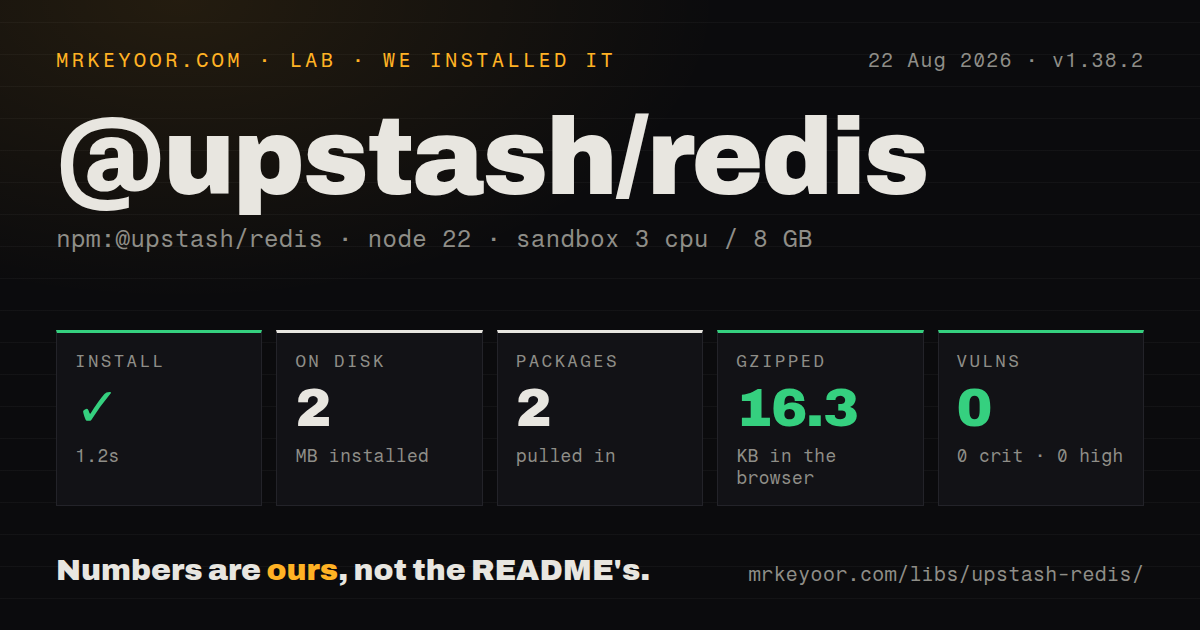
| Install | ✓ · 1.2s | 2 packages on disk · 2 MB |
| Import | ✓ | ESM import works · require() works · CommonJS package with exports map |
| Browser | 16.3 KB | gzipped (71.7 KB minified), bundled with esbuild |
| Types | ✓ | TypeScript types bundled |
| Known vulns | 0 | 0 critical · 0 high · 0 moderate · 0 low (npm audit) |
Answers from our run
Does @upstash/redis install cleanly?
Yes. In a fresh container with an empty cache, npm install @upstash/redis finished in 1 seconds, leaving 2 packages and 2 MB on disk. npm audit reported no known vulnerabilities.
How much does @upstash/redis add to a browser bundle?
16.3 KB gzipped (71.7 KB minified) when the whole package is bundled for the browser with esbuild. Importing only part of it is usually smaller.
Does @upstash/redis work with both ESM and CommonJS?
Yes. Both import '@upstash/redis' and require('@upstash/redis') worked in Node 22 in our run. The package is published as CommonJS with an exports map.
Does @upstash/redis include TypeScript types?
Yes, type declarations ship inside the package, so no @types install is needed.
@upstash/redis or redis: which should you use?
redis: Choose the official Node client for standard RESP servers, pooled connections and Redis deployments outside Upstash REST. @upstash/redis 1.38.2 installed in 1.2 seconds and produced a 16.3 KB gzipped browser bundle in our sandbox, a fair cost when Upstash REST is what makes Redis reachable from an edge runtime.
When should you not use @upstash/redis?
Your database is self-hosted Redis, ElastiCache or any RESP endpoint; this package accepts an Upstash REST URL and token instead of redis://
Use it if
- Your serverless or edge runtime needs Upstash Redis through fetch because TCP connections are unavailable
- You want TypeScript command options and dedicated Node, Cloudflare and Fastly package exports
- Your workload can combine concurrent commands into HTTP pipelines and tolerate the documented ordering rules
- You need Redis data structures plus Upstash JSON or search commands behind the same REST credentials
- Your database is self-hosted Redis, ElastiCache or any RESP endpoint; this package accepts an Upstash REST URL and token instead of redis://
- Your long-running Node process sits near Redis and sends many small commands; redis or ioredis avoids an HTTP request per unbatched operation
- You need read-after-write order inside one mixed Promise.all; automatic pipelining now separates reads from writes and can run those requests in parallel
- You cannot keep the REST token away from untrusted browser users; bundling a database credential gives every recipient the access carried by that token
- Your writes cannot safely repeat after an ambiguous network failure; the HTTP requester retries network errors 5 times by default
Setup reality
In our install, @upstash/redis 1.38.2 completed in 1.2 seconds and left 2 packages using 2 MB. npm audit reported 0 known vulnerabilities. The package has 1 direct dependency, no peers, an MIT license and 1,088 KB unpacked. It is CommonJS with an exports map; require() and ESM import both worked, and types are bundled. Our full browser import measured 71.7 KB minified and 16.3 KB gzipped.
Version 1.38.2 needs an Upstash database REST URL and token. Redis.fromEnv() reads UPSTASH_REDIS_REST_URL and UPSTASH_REDIS_REST_TOKEN, with KV_REST_API_URL and KV_REST_API_TOKEN fallbacks. Cloudflare code should use the cloudflare export and pass bindings rather than call fromEnv(). Missing credentials produce warnings and fail when a command runs. Keep write-capable tokens out of public bundles.
Each ordinary command uses HTTP transport, while automatic pipelining is enabled by default. Concurrent calls in Promise.all can share requests. Since 1.38.0, reads and writes go into separate automatic pipelines, so a read in the same mixed Promise.all may race its write. Use separate awaited phases when order matters. An explicit pipeline keeps command order without atomicity; multi() gives isolated transaction execution.
The requester defaults to 5 network retries with exponential backoff. A mutation can execute twice if the server applied it before the response disappeared, so use idempotency where duplicates hurt. Base64 response encoding and automatic JSON deserialization are enabled by default; get() supplies a compile-time shape without validating stored data. Requests default to no-store caching, read-your-writes is enabled, and anonymous runtime telemetry stays on unless enableTelemetry is false or UPSTASH_DISABLE_TELEMETRY is truthy.
Patterns
Load Node credentials from environment variables connect-from-environment
import { Redis } from '@upstash/redis'

export const redis = Redis.fromEnv({
  enableTelemetry: false,
  readYourWrites: true,
})

await redis.ping()
fromEnv reads UPSTASH_REDIS_REST_URL and UPSTASH_REDIS_REST_TOKEN, then checks the KV_REST_API fallbacks. Missing values fail when a command executes.
Set credentials, retries and per-request deadlines configure-request-policy
const redis = new Redis({
  url: process.env.UPSTASH_REDIS_REST_URL,
  token: process.env.UPSTASH_REDIS_REST_TOKEN,
  retry: { retries: 2, backoff: (attempt) => 50 * 2 ** attempt },
  signal: () => AbortSignal.timeout(1500),
  enableTelemetry: false,
})
A signal factory creates a new AbortSignal for every request. Retried mutations need an idempotency plan because an absent response does not prove the first attempt failed.
Write and read an object with expiry store-json-with-ttl
type Session = { userId: string; roles: string[] }

await redis.set(
  'session:abc',
  { userId: 'u1', roles: ['editor'] },
  { ex: 900 },
)

const session = await redis.get<Session>('session:abc')
Automatic deserialization restores JSON-compatible values. The Session generic does not validate data written by older code or another client.
Set a key only when it is absent claim-expiring-key
const token = crypto.randomUUID()
const result = await redis.set('job:42:lock', token, { nx: true, ex: 30 })

if (result !== 'OK') {
  throw new Error('Job is already claimed')
}
NX with a TTL can claim work, but deleting the lock safely requires checking the token in Lua. A worker that outlives 30 seconds can lose ownership.
Store a hash and read all fields write-and-read-hash
await redis.hset('user:42', {
  name: 'Ada',
  plan: 'pro',
  logins: 7,
})

const user = await redis.hgetall<{
  name: string
  plan: string
  logins: number
}>('user:42')
The return generic changes TypeScript's view only. Redis does not enforce that every writer supplies the same fields or value types.
Send an explicit HTTP pipeline batch-independent-commands
const [profile, count] = await redis
  .pipeline()
  .get<{ name: string }>('profile:u1')
  .incr('page:views')
  .exec()
An explicit pipeline sends one HTTP request and preserves command order. Other clients may interleave operations because pipeline execution is not atomic.
Keep a write ahead of its dependent read separate-dependent-batches
await Promise.all([
  redis.set('profile:u1', { name: 'Ada' }),
  redis.incr('profile:writes'),
])

const profile = await redis.get<{ name: string }>('profile:u1')
Since 1.38.0, automatic pipelining separates reads and writes. Two awaited phases preserve this dependency; one mixed Promise.all does not.
Group commands in a Redis transaction run-atomic-transaction
const [remaining, queued] = await redis
  .multi()
  .decrby('inventory:sku-7', 1)
  .lpush('orders:pending', 'order-99')
  .exec()
multi() executes the commands atomically, yet this example can still make inventory negative. Use Lua when a value must be checked before the write.
Keep errors beside pipeline results inspect-pipeline-errors
const results = await redis
  .pipeline()
  .get('known-string')
  .incr('possibly-wrong-type')
  .exec({ keepErrors: true })

for (const item of results) {
  if (item.error) console.error(item.error)
}
keepErrors returns one result or error object per command. Without it, one command error rejects the pipeline even though earlier commands may have run.
Walk a key prefix with SCAN scan-matching-keys
let cursor = '0'
do {
  const [next, keys] = await redis.scan(cursor, {
    match: 'session:*',
    count: 200,
  })
  cursor = next
  for (const key of keys) await processKey(key)
} while (cursor !== '0')
SCAN may return an empty page before the cursor reaches 0 and can repeat keys while data changes. Make processKey safe to run more than once.
Append an item to a Redis JSON document update-redis-json
await redis.json.set('cart:u1', '$', { items: [], total: 0 })
await redis.json.arrappend('cart:u1', '$.items', { sku: 'A1', qty: 2 })

const cart = await redis.json.get<{
  items: Array<{ sku: string; qty: number }>
  total: number
}>('cart:u1')
JSON methods depend on the Upstash-supported Redis JSON surface. JSONPath selection can change the result shape, so test the exact path used by the application.
Check and decrement inventory in Lua apply-lua-invariant
const changed = await redis.eval<[], number>(
  `local n = tonumber(redis.call('GET', KEYS[1]) or '0')
   if n <= 0 then return 0 end
   redis.call('DECR', KEYS[1])
   return 1`,
  ['inventory:sku-7'],
  [],
)
KEYS and ARGV stay separate from the script body. The number generic describes the expected result but performs no runtime validation.
Alternatives
| Package | Registry | Pick it when |
|---|---|---|
| redis | npm | Choose the official Node client for standard RESP servers, pooled connections and Redis deployments outside Upstash REST |
| ioredis | npm | Choose it for a connection-oriented Node service that needs Cluster, Sentinel or mature offline-queue behavior |
| keyv | npm | Choose it when the application only needs a portable key-value cache and may swap storage adapters |
More data guides
numpy · pandas · fsspec · lxml · pyarrow · sqlalchemy · the whole shelf →
How this guide is made: grounded in the library's documentation, release notes, changelog, and issue history, on a fixed rubric — not a hands-on install of every release. The 50 most-downloaded entries are additionally install-verified in clean containers. Corrections: contact the desk.