testcontainers review
testcontainers 12.1.0 controls disposable Docker-compatible containers from Node tests. `GenericContainer` pulls or builds an image, publishes random host ports, waits for readiness, and returns connection details. The package also manages networks, Compose projects, file copies, commands, and cleanup through Ryuk; service-specific `@testcontainers/*` packages add database or broker helpers. Version 12.1 adds MongoDB Atlas Local and Mosquitto modules. Our base-package check loaded through both CommonJS and ESM, but it is a Node-only tool and brought a sizeable dependency tree.
testcontainers 12.1.0 took 27.4 seconds, installed 142 packages using 47 MB, and produced 0 audit findings in our sandbox; both Node module paths loaded, while the browser build failed. Add it for real-service integration tests only when every developer and CI runner has proven daemon, image, readiness, and cleanup wiring.
We installed it
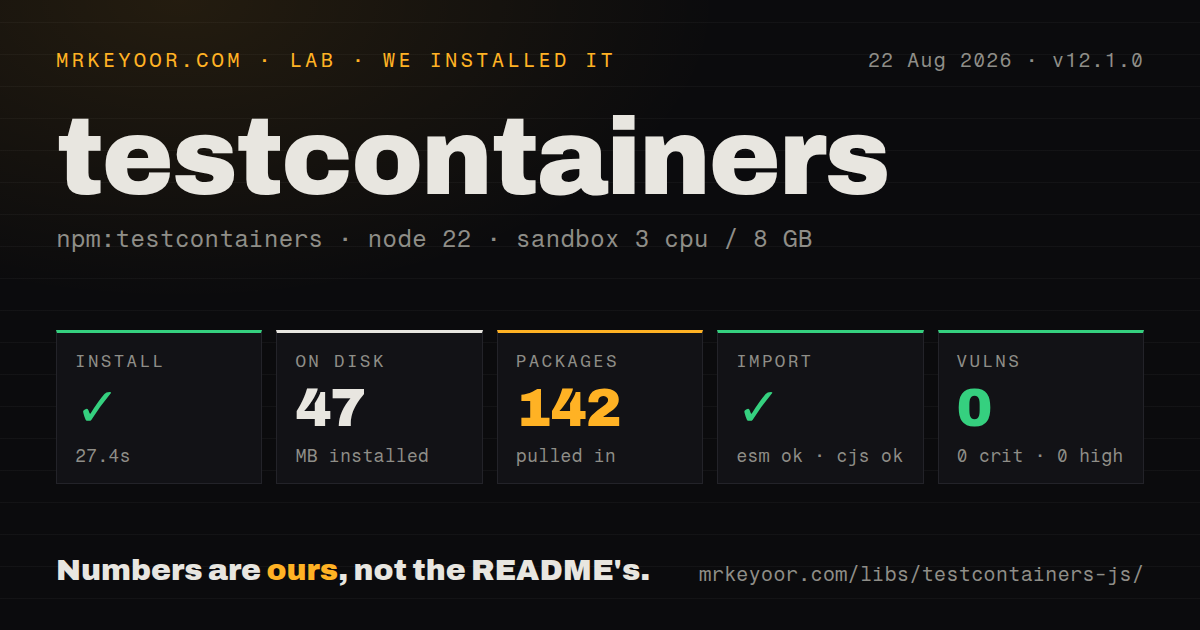
| Install | ✓ · 27.4s | 142 packages on disk · 47 MB · 1 deprecation warning |
| Import | ✓ | ESM import works · require() works · CommonJS package |
| Browser | n/a | could not be bundled for the browser (Node-only code, most likely) |
| Types | — | no TypeScript types found |
| Known vulns | 0 | 0 critical · 0 high · 0 moderate · 0 low (npm audit) |
Answers from our run
Does testcontainers install cleanly?
Yes. In a fresh container with an empty cache, npm install testcontainers finished in 27 seconds, leaving 142 packages and 47 MB on disk. npm audit reported no known vulnerabilities. The install printed 1 deprecation warning.
Can testcontainers run in a browser?
Not directly: esbuild could not bundle it for the browser in our run, which normally means it depends on Node built-ins. Use it on the server, or find a browser-targeted alternative.
Does testcontainers work with both ESM and CommonJS?
Yes. Both import 'testcontainers' and require('testcontainers') worked in Node 22 in our run. The package is published as CommonJS.
Does testcontainers include TypeScript types?
No type declarations were found in our install, so TypeScript users need their own declarations.
testcontainers or dockerode: which should you use?
dockerode: Use it when direct Docker API access is needed and the team will implement waits, port lookup, and cleanup itself. testcontainers 12.1.0 took 27.4 seconds, installed 142 packages using 47 MB, and produced 0 audit findings in our sandbox; both Node module paths loaded, while the browser build failed.
When should you not use testcontainers?
The runner cannot reach a Docker, Podman, or compatible daemon. testcontainers is a client and has no in-process container engine.
Use it if
- An integration test must run against the same database, broker, search engine, or emulator family used in production.
- Developers and CI runners can expose a Docker-compatible daemon and pull pinned images from the required registry.
- Random host ports and isolated containers are needed so several test workers can run without fixed-port collisions.
- A custom OCI image needs lifecycle, readiness, networking, logs, and cleanup from the test process.
- The runner cannot reach a Docker, Podman, or compatible daemon. testcontainers is a client and has no in-process container engine.
- The suite must stay fast and offline. Missing images require a registry pull, then every run pays container startup and readiness time.
- The project still runs Node 20 or an early Node 22 release. Version 12 requires Node 22.22 or newer.
- Rootless Podman on macOS is mandatory and automatic leak cleanup is required. The runtime guide says Ryuk does not work there and must be disabled.
- Tests depend on fixed container names, bind mounts, or hard-coded localhost ports. The docs warn these choices break parallel runs, remote daemons, or Docker-in-Docker.
Setup reality
We installed testcontainers 12.1.0 in a fresh Node 22 Bookworm sandbox. npm took 27.4 seconds, printed 1 deprecation warning, and left 142 packages using 47 MB. The package declared 15 direct dependencies, 0 peers, and 908 KB unpacked. npm audit found 0 vulnerabilities at all severities. It requires Node 22.22 or newer, and our package scan found no TypeScript declarations.
Both CommonJS require() and ESM import worked under Node 22.23.2 even though the package has no exports map. Our esbuild browser build failed, which fits a library that talks to a container daemon and local sockets. A successful import does not prove tests can start: Docker must be reachable through the local socket or a configured DOCKER_HOST, with registry credentials supplied through Docker configuration when images are private.
Readiness changed in major version 12. An image health check is now the default when present; otherwise Testcontainers waits for mapped ports for up to 60 seconds. Many services accept a socket before recovery or migrations finish, so add a log, HTTP, command, or composite wait tied to an application-level signal. Always read getHost() and getMappedPort() after startup instead of assuming localhost and the container port.
Ryuk removes leaked resources when the process exits unexpectedly, but runtime wiring varies. Rootless Podman on macOS requires TESTCONTAINERS_RYUK_DISABLED=true; Colima and Rancher Desktop document IPv6 resolution and delayed port-forwarding problems. Stop containers and networks in teardown anyway. Container reuse is enabled by default when TESTCONTAINERS_REUSE_ENABLE is unset, so disable it for state-isolation tests and pin every image tag to keep CI runs repeatable.
Patterns
Start Redis on a random host port start-generic-container
import { GenericContainer } from 'testcontainers'

const redis = await new GenericContainer('redis:8.2-alpine')
  .withExposedPorts(6379)
  .start()

try {
  const url = `redis://${redis.getHost()}:${redis.getMappedPort(6379)}`
  await runTests(url)
} finally {
  await redis.stop()
}
Read both values after startup; the 1 internal port is rarely the host port assigned by the runtime.
Pass disposable database settings configure-service
const postgres = await new GenericContainer('postgres:18-alpine')
  .withEnvironment({
    POSTGRES_USER: 'test',
    POSTGRES_PASSWORD: 'test',
    POSTGRES_DB: 'app_test',
  })
  .withExposedPorts(5432)
  .start()
These 3 credentials belong only to the disposable test instance; use the PostgreSQL module when its URI helper is useful.
Wait for a readiness log wait-for-log
import { GenericContainer, Wait } from 'testcontainers'

const app = await new GenericContainer('example/api:1.4.2')
  .withExposedPorts(8080)
  .withWaitStrategy(Wait.forLogMessage(/ready on port 8080/i))
  .withStartupTimeout(120_000)
  .start()
Match 1 stable readiness message; incidental startup logs can let a test run before recovery finishes.
Probe an application health route wait-for-http
const api = await new GenericContainer('example/api:1.4.2')
  .withExposedPorts(8080)
  .withWaitStrategy(
    Wait.forHttp('/health/ready', 8080)
      .forStatusCode(200)
      .forResponsePredicate((body) => body === 'ready')
  )
  .start()
The probe targets container port 8080 and waits for both the status and body conditions.
Wait for a port and log together combine-waits
const wait = Wait.forAll([
  Wait.forListeningPorts(),
  Wait.forLogMessage('Ready to accept connections'),
]).withDeadline(90_000)

const redis = await new GenericContainer('redis:8.2-alpine')
  .withExposedPorts(6379)
  .withWaitStrategy(wait)
  .start()
The 90-second deadline caps the composite; without it, inner wait timeouts can lengthen the total.
Check a file inside the container execute-command
const result = await container.exec([
  'sh', '-c', 'test -f /opt/app/config.json && echo ready',
])

if (result.exitCode !== 0) {
  throw new Error(result.stderr)
}
`exec()` returns the 1 exit code; it does not automatically fail the JavaScript test for a nonzero result.
Copy configuration before startup copy-config
const nginx = await new GenericContainer('nginx:1.29-alpine')
  .withCopyContentToContainer([{
    content: 'server { listen 8080; location / { return 200 "ok"; } }',
    target: '/etc/nginx/conf.d/default.conf',
    mode: parseInt('0644', 8),
  }])
  .withExposedPorts(8080)
  .start()
A copied file works with remote daemons and Docker-in-Docker; 1 host bind mount may not.
Connect services with an alias connect-network
const network = await new Network().start()
const redis = await new GenericContainer('redis:8.2-alpine')
  .withNetwork(network)
  .withNetworkAliases('cache')
  .start()

const worker = await new GenericContainer('example/worker:2.0.0')
  .withNetwork(network)
  .withEnvironment({ REDIS_URL: 'redis://cache:6379' })
  .start()
The alias works between containers on 1 network; host-side test code still uses mapped ports.
Call a host server from a container expose-host-service
import { TestContainers } from 'testcontainers'

await TestContainers.exposeHostPorts(8000)
const client = await new GenericContainer('curlimages/curl:8.16.0')
  .withCommand([
    'curl', '-f', 'http://host.testcontainers.internal:8000'
  ])
  .start()
Start the host listener before exposing its 1 port; Testcontainers creates an SSH helper for this route.
Get a PostgreSQL connection URI use-postgresql-module
import { PostgreSqlContainer } from '@testcontainers/postgresql'

const postgres = await new PostgreSqlContainer('postgres:18-alpine')
  .withDatabase('app_test')
  .withUsername('test')
  .withPassword('test')
  .start()

const uri = postgres.getConnectionUri()
Install the companion module separately; the base package does not export this 1 service wrapper.
Attach logs during a failing test stream-container-logs
const stream = await container.logs()
stream
  .on('data', (line) => process.stdout.write(`[service] ${line}`))
  .on('err', (line) => process.stderr.write(`[service] ${line}`))
Container output can expose test credentials and payloads, so do not retain the full stream from every CI run.
Wait for a migration to exit run-one-shot-job
const migration = await new GenericContainer('example/migrations:3.1.0')
  .withEnvironment({ DATABASE_URL: internalDatabaseUrl })
  .withWaitStrategy(Wait.forOneShotStartup())
  .start()
The 1-shot strategy treats exit code 0 as readiness; it is wrong for a service that should keep running.
Alternatives
| Package | Registry | Pick it when |
|---|---|---|
| dockerode | npm | Use it when direct Docker API access is needed and the team will implement waits, port lookup, and cleanup itself. |
| docker-compose | npm | Use it when the complete test stack already lives in Compose and JavaScript only needs project up and down controls. |
| mongodb-memory-server | npm | Use it for MongoDB-only tests where a specialized ephemeral server is enough and a general container API adds little. |
| @testcontainers/postgresql | npm | Use this companion instead of raw `GenericContainer` when PostgreSQL credentials and connection-URI helpers save setup code. |
More testing guides
pytest · chai · vitest · playwright · jsdom · axe-core · the whole shelf →
How this guide is made: grounded in the library's documentation, release notes, changelog, and issue history, on a fixed rubric — not a hands-on install of every release. The 50 most-downloaded entries are additionally install-verified in clean containers. Corrections: contact the desk.