@tanstack/react-virtual review
@tanstack/react-virtual 3.14.10 is the React adapter for TanStack's headless list and grid virtualizer. useVirtualizer computes which items overlap a scroll viewport and returns keys, dimensions, offsets, and total scroll size. Your component still owns the scroll box, spacer, absolute positioning, row markup, accessibility, measurement refs, and loading behavior. Its single direct dependency is virtual-core 3.17.8, whose current fixes reset stuck scrolling state during cleanup and ignore connected measurement nodes outside the item count. Our full-package browser build measured 11.5 KB gzipped.
@tanstack/react-virtual 3.14.10 installed in 2.2 seconds and measured 11.5 KB gzipped in our browser build, with 0 audit findings. Choose it when a large React list truly needs virtualization and your team wants headless control; a finished list component is cheaper when you do not want to own CSS, accessibility, and measurement behavior.
We installed it
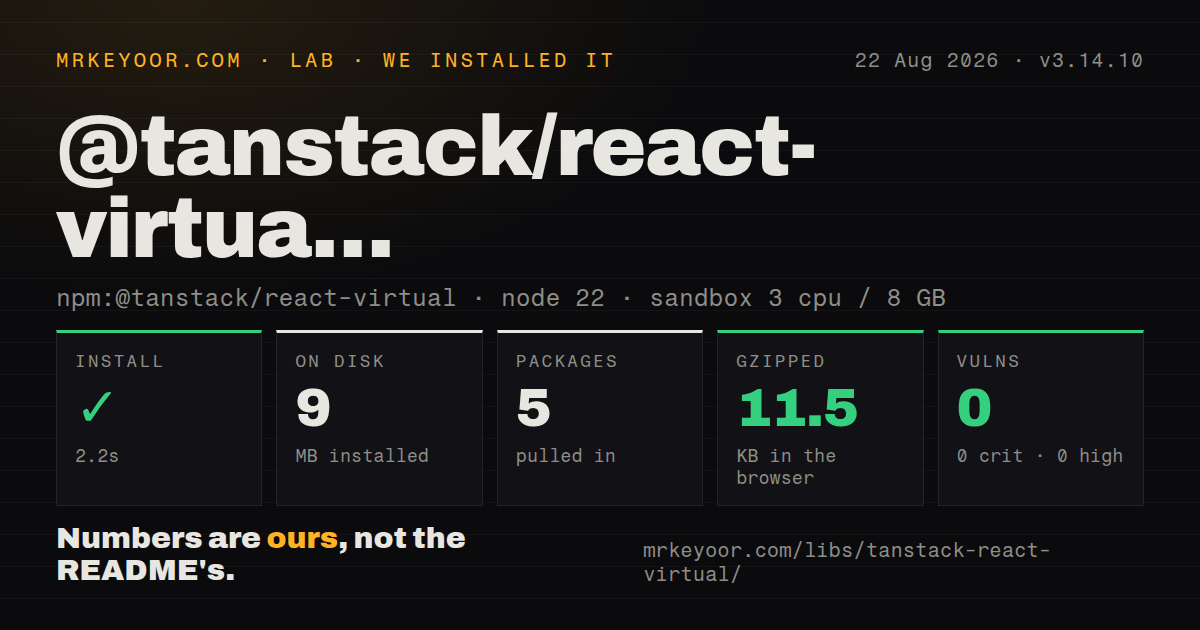
| Install | ✓ · 2.2s | 5 packages on disk · 9 MB |
| Import | ✓ | ESM import works · require() works · ESM package with exports map |
| Browser | 11.5 KB | gzipped (36.4 KB minified), bundled with esbuild |
| Types | ✓ | TypeScript types bundled |
| Known vulns | 0 | 0 critical · 0 high · 0 moderate · 0 low (npm audit) |
Answers from our run
Does @tanstack/react-virtual install cleanly?
Yes. In a fresh container with an empty cache, npm install @tanstack/react-virtual finished in 2 seconds, leaving 5 packages and 9 MB on disk. npm audit reported no known vulnerabilities.
How much does @tanstack/react-virtual add to a browser bundle?
11.5 KB gzipped (36.4 KB minified) when the whole package is bundled for the browser with esbuild. Importing only part of it is usually smaller.
Does @tanstack/react-virtual work with both ESM and CommonJS?
Yes. Both import '@tanstack/react-virtual' and require('@tanstack/react-virtual') worked in Node 22 in our run. The package is published as ESM with an exports map.
Does @tanstack/react-virtual include TypeScript types?
Yes, type declarations ship inside the package, so no @types install is needed.
@tanstack/react-virtual or react-virtuoso: which should you use?
react-virtuoso: Use it when React 19 screens need a component-level list with grouped and chat behavior. @tanstack/react-virtual 3.14.10 installed in 2.2 seconds and measured 11.5 KB gzipped in our browser build, with 0 audit findings.
When should you not use @tanstack/react-virtual?
The list has a few hundred cheap rows; virtualization adds measurement and scroll-restoration bugs before it saves useful work
Use it if
- A React 16.8 through 19 screen renders enough rows or cells that DOM and layout work visibly slows scrolling
- Variable-height content can carry stable item keys, data-index attributes, and measurement refs
- The design system must control every role, element, class, and interaction instead of adopting a finished list component
- Window scrolling, horizontal layouts, grids, sticky ranges, or bottom anchoring should share 1 headless engine
- The list has a few hundred cheap rows; virtualization adds measurement and scroll-restoration bugs before it saves useful work
- A ready list with grouped rows, sticky headers, or chat behavior is wanted; react-virtuoso supplies more of that behavior
- Browser find, print, select-all, or no-JavaScript output must include every record; offscreen rows do not exist in the DOM
- The team cannot implement row counts, keyboard focus, semantic tables, and focus return around absolutely positioned children
- An 11.5 KB gzipped measured import is too much for a fixed-height list; compare react-window or a small local window
Setup reality
We installed @tanstack/react-virtual 3.14.10 in 2.2 seconds on a clean Node 22 sandbox. The result was 5 packages and 9 MB on disk, with 0 known vulnerabilities from npm audit. The package declared 1 direct dependency plus 2 peers, React and React DOM, and its own unpacked files measured 96 KB. Bundled TypeScript declarations were present. ESM import and require() both loaded through its exports map under the How we test method.
We built the full package with esbuild at 36.4 KB minified and 11.5 KB gzipped. No credentials or config files are needed. The common blank-screen failure is CSS: the scroll element needs a bounded height and overflow, while the inner spacer needs position: relative and getTotalSize(). Each visible child then needs absolute positioning from its virtual start. Server rendering needs an initialRect or a planned short first render when layout shift is unacceptable.
For variable heights, place data-index and ref={virtualizer.measureElement} on the same node and do not force that node to estimateSize's height. Use a stable getItemKey when data can prepend, sort, or delete, or cached measurements follow the old array indexes. A low estimate makes the scrollbar resize as real rows arrive. Overscan reduces blank edges during fast movement at the cost of more mounted DOM.
Only rendered items participate in native search, printing, selection, and focus. Infinite loading needs a placeholder count and an in-flight guard so the last visible row does not trigger duplicate requests. Smooth scrolling and dynamic measurement interact badly because corrected sizes move the target during animation. React 19 users can disable the adapter's flushSync behavior when warnings appear, but that choice needs scrolling tests rather than a blanket flag change.
Patterns
Virtualize fixed-height rows render-fixed-rows
const parentRef = useRef<HTMLDivElement>(null)
const v = useVirtualizer({
  count: items.length,
  getScrollElement: () => parentRef.current,
  estimateSize: () => 35,
  overscan: 5,
})

return <div ref={parentRef} style={{height: 400, overflow: 'auto'}}>
  <div style={{height: v.getTotalSize(), position: 'relative'}}>
    {v.getVirtualItems().map(row => <div key={row.key} style={{position: 'absolute', width: '100%', height: row.size, transform: `translateY(${row.start}px)`}}>{items[row.index]}</div>)}
  </div>
</div>
All 3 layers matter: bounded scroll parent, relative total-size spacer, and absolutely positioned visible items.
Measure rows after layout measure-dynamic-rows
const v = useVirtualizer({
  count: messages.length,
  getScrollElement: () => parentRef.current,
  estimateSize: () => 60,
})

{v.getVirtualItems().map(item => <div
  key={item.key}
  data-index={item.index}
  ref={v.measureElement}
  style={{position: 'absolute', width: '100%', transform: `translateY(${item.start}px)`}}
>{messages[item.index].body}</div>)}
Put data-index and measureElement on the same node. Do not set its height to the 60 px estimate.
Tie virtualization to the document window use-window-scroll
const listRef = useRef<HTMLDivElement>(null)
const v = useWindowVirtualizer({
  count: posts.length,
  estimateSize: () => 240,
  overscan: 3,
  scrollMargin: listRef.current?.offsetTop ?? 0,
})
Subtract scrollMargin from each translated item start. It accounts for content above the virtual list.
Keep cached sizes attached to row IDs set-stable-keys
const getItemKey = useCallback((index: number) => rows[index].id, [rows])
const v = useVirtualizer({
  count: rows.length,
  getScrollElement: () => parentRef.current,
  estimateSize: () => 48,
  getItemKey,
})
Index keys assign old measurements to new content after a prepend or sort. Memoize a stable ID function.
Move to a virtual index scroll-to-row
v.scrollToIndex(500, {align: 'center'})
v.scrollToOffset(1200, {align: 'start'})
v.scrollToEnd({behavior: 'smooth'})
Long jumps use estimates until rows are measured. Smooth behavior is unreliable when dynamic sizes keep correcting the target.
Fetch when the final row becomes visible load-next-page
const visible = v.getVirtualItems()
useEffect(() => {
  const last = visible.at(-1)
  if (last && last.index >= rows.length - 1 && hasNextPage && !isFetchingNextPage) {
    fetchNextPage()
  }
}, [visible, rows.length, hasNextPage, isFetchingNextPage, fetchNextPage])
Guard both hasNextPage and the in-flight state. Add 1 placeholder to count when an unloaded row should occupy space.
Combine row and column virtualizers virtualize-two-axes
const rowsV = useVirtualizer({count: 10000, getScrollElement: () => parentRef.current, estimateSize: () => 32, overscan: 5})
const colsV = useVirtualizer({horizontal: true, count: 200, getScrollElement: () => parentRef.current, estimateSize: () => 100, overscan: 3})
Both instances can share 1 scroll element. Fixed widths and heights are easier than measuring both axes.
Force a section header into range keep-sticky-index
const rangeExtractor = useCallback((range: Range) => {
  const sticky = [...stickyIndexes].reverse().find(i => range.startIndex >= i) ?? 0
  return [...new Set([sticky, ...defaultRangeExtractor(range)])].sort((a, b) => a - b)
}, [])

const v = useVirtualizer({count: rows.length, getScrollElement: () => parentRef.current, estimateSize: () => 36, rangeExtractor})
rangeExtractor keeps the header mounted. Your CSS still owns sticky positioning and z-index.
Return to a measured scroll position restore-virtual-state
const saved = JSON.parse(sessionStorage.getItem('inbox') ?? 'null')
const v = useVirtualizer({
  count: rows.length,
  getScrollElement: () => parentRef.current,
  estimateSize: () => 48,
  initialMeasurementsCache: saved?.snapshot,
  initialOffset: saved?.offset,
})
Save takeSnapshot() and scrollOffset before leaving. Rows absent from the snapshot still use the 48 px estimate.
Alternatives
| Package | Registry | Pick it when |
|---|---|---|
| react-virtuoso | npm | Use it when React 19 screens need a component-level list with grouped and chat behavior |
| react-window | npm | Use it for fixed-size lists and grids with a smaller surface |
| react-virtualized | npm | Use it when an established application already relies on its broad component suite |
| virtua | npm | Use it when automatic measurement is worth giving up some low-level layout control |
More web frontend guides
postcss · react · react-dom · tailwindcss · clsx · htmlparser2 · the whole shelf →
How this guide is made: grounded in the library's documentation, release notes, changelog, and issue history, on a fixed rubric — not a hands-on install of every release. The 50 most-downloaded entries are additionally install-verified in clean containers. Corrections: contact the desk.