react-virtuoso review
react-virtuoso 4.18.12 renders the visible window of a large React collection and measures row sizes from the DOM. `Virtuoso` handles variable-height lists, `GroupedVirtuoso` adds sticky groups, `VirtuosoGrid` lays out equal-size cards, and `TableVirtuoso` keeps table semantics. It supports loading at either edge, bottom-following feeds, scroll restoration, window scrolling, SSR seeds, and imperative navigation. Version 4.18.12 measures window-scrolling lists before they enter the viewport so their estimated height already participates in document layout. Our full-import browser build measured 72.6 KB minified and 23.9 KB gzipped, so use it when avoided row rendering repays that cost.
react-virtuoso 4.18.12 installed in 1.4 seconds with 0 direct dependencies and no audit findings, but our full browser import was 23.9 KB gzipped. That trade fits large variable-height lists, tables, and reverse-loading feeds; render small lists normally and choose a headless virtualizer when owning layout is the point.
We installed it
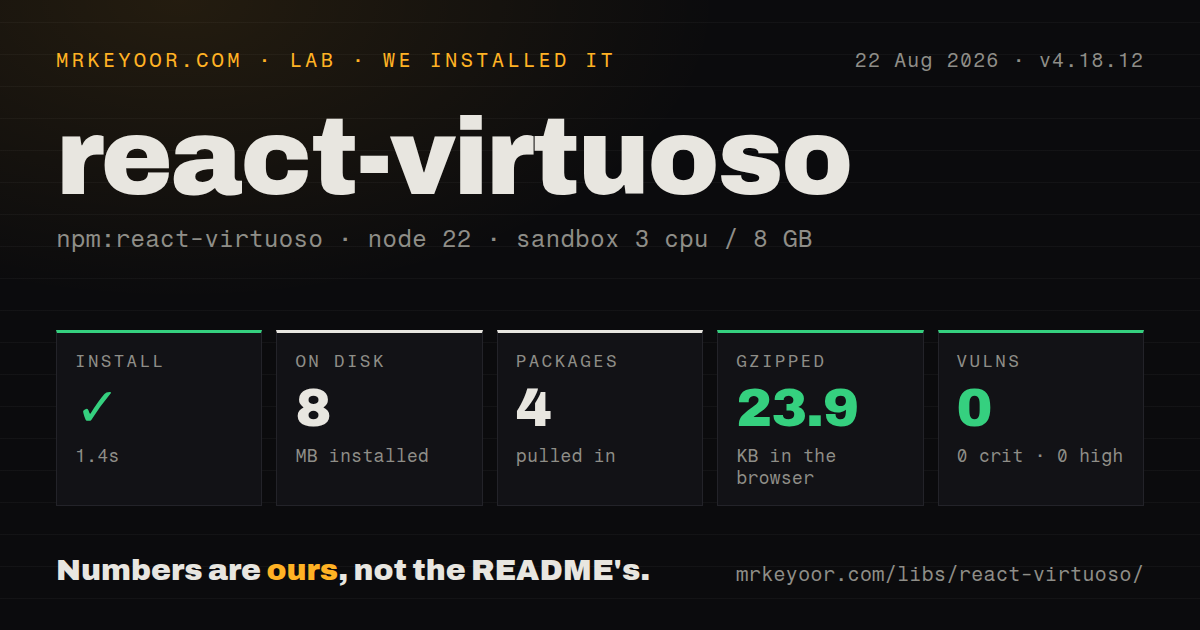
| Install | ✓ · 1.4s | 4 packages on disk · 8 MB |
| Import | ✓ | ESM import works · require() works · CommonJS package with exports map |
| Browser | 23.9 KB | gzipped (72.6 KB minified), bundled with esbuild |
| Types | ✓ | TypeScript types bundled |
| Known vulns | 0 | 0 critical · 0 high · 0 moderate · 0 low (npm audit) |
Answers from our run
Does react-virtuoso install cleanly?
Yes. In a fresh container with an empty cache, npm install react-virtuoso finished in 1 seconds, leaving 4 packages and 8 MB on disk. npm audit reported no known vulnerabilities.
How much does react-virtuoso add to a browser bundle?
23.9 KB gzipped (72.6 KB minified) when the whole package is bundled for the browser with esbuild. Importing only part of it is usually smaller.
Does react-virtuoso work with both ESM and CommonJS?
Yes. Both import 'react-virtuoso' and require('react-virtuoso') worked in Node 22 in our run. The package is published as CommonJS with an exports map.
Does react-virtuoso include TypeScript types?
Yes, type declarations ship inside the package, so no @types install is needed.
react-virtuoso or @tanstack/react-virtual: which should you use?
@tanstack/react-virtual: Choose it for a headless virtualizer when your code should own markup, scroll containers, and layout behavior. react-virtuoso 4.18.12 installed in 1.4 seconds with 0 direct dependencies and no audit findings, but our full browser import was 23.9 KB gzipped.
When should you not use react-virtuoso?
The collection is a few dozen cheap rows. Normal rendering is easier to test and search, while our full import added 23.9 KB gzipped.
Use it if
- Hundreds or thousands of React rows have changing heights and maintaining a measurement cache yourself is unwanted work.
- One package should cover virtual flat lists, sticky grouped lists, equal-size grids, and semantic tables.
- A feed or log viewer must load at both ends, preserve position on prepend, or follow output only while the reader remains at the bottom.
- React 16 through 19 support, bundled TypeScript declarations, and both module formats are useful across a mixed frontend estate.
- The collection is a few dozen cheap rows. Normal rendering is easier to test and search, while our full import added 23.9 KB gzipped.
- The target is React Native or another non-DOM renderer. Virtuoso depends on browser layout and `ResizeObserver` rather than native list primitives.
- Grid cards have different heights and must pack like masonry. The core `VirtuosoGrid` requires equal-size items; masonry is a separate package.
- The advertised turnkey chat data API must be MIT. Virtuoso Message List is sold separately under a commercial developer license.
- Item layout cannot avoid vertical margins, zero-height records, or late size changes from unbounded media. The troubleshooting guide identifies all three as sources of bad measurement or scroll jumps.
Setup reality
We installed react-virtuoso 4.18.12 in 1.4 seconds in a fresh Node 22 Bookworm sandbox. It left 4 packages and 8 MB on disk. The package itself was 256 KB unpacked with no direct dependencies and 2 peer dependencies, React and React DOM. npm audit found 0 known vulnerabilities. The CommonJS package has an exports map, includes TypeScript declarations, and worked through both require() and ESM import. Our full namespace browser bundle measured 72.6 KB minified and 23.9 KB gzipped.
Setup needs no stylesheet or provider, and it has no native compilation, secret, or config file. A list does need a real viewport height from inline style, CSS, a flex layout, window scrolling, or a custom scroll parent. Percentage heights only work when ancestors define their own height. The first rendered row seeds the size estimate. Set defaultItemHeight when that row is an outlier; use fixedItemHeight only when every row truly has one fixed height.
DOM geometry is the recurring trap. ResizeObserver catches later changes, but measured rectangles exclude vertical margins, so use padding and reset margins on paragraphs, headings, lists, blockquotes, and code blocks inside rows. Filter zero-height items instead of hiding them in the virtual data. Give data records stable keys through computeItemKey. Version 4.18.12 improves offscreen window-list document sizing, but images and iframes that load late can still disturb reverse-scroll position.
endReached and startReached do not fetch, cancel, deduplicate, or serialize requests; guard them in application state. Prepending requires decreasing a positive firstItemIndex by exactly the inserted data count. SSR's initialItemCount only emits an initial unmeasured slice. JSDOM supplies no useful layout, so tests need VirtuosoMockContext or the grid equivalent. Define custom component types outside render and forward refs. The MIT core has feed primitives, while the packaged Message List and masonry products have separate install and license decisions.
Patterns
Render typed rows with stable identity render-variable-list
import {Virtuoso} from 'react-virtuoso';

type User = {id: string; name: string; bio: string};

export function UserList({users}: {users: User[]}) {
  return (
    <Virtuoso
      style={{height: 480}}
      data={users}
      computeItemKey={(_index, user) => user.id}
      itemContent={(_index, user) => (
        <article style={{padding: 12}}>
          <strong>{user.name}</strong>
          <p style={{margin: 0}}>{user.bio}</p>
        </article>
      )}
    />
  );
}
`data` supplies the count and item type. Stable domain keys preserve row identity, while padding avoids the vertical-margin measurement problem.
Virtualize a large index-only collection render-index-range
<Virtuoso
  style={{height: 400}}
  totalCount={100_000}
  defaultItemHeight={36}
  itemContent={(index) => (
    <div style={{padding: 8}}>Row {index}</div>
  )}
/>
`defaultItemHeight` replaces the first row as the initial estimate. `fixedItemHeight` should be used only when every rendered row is exactly that height.
Guard an end-reached fetch against overlap load-next-page
const [loading, setLoading] = useState(false);

const loadMore = useCallback(async () => {
  if (loading || !hasNextPage) return;
  setLoading(true);
  try {
    const next = await fetchNextPage();
    setItems((current) => [...current, ...next]);
  } finally {
    setLoading(false);
  }
}, [loading, hasNextPage]);

return <Virtuoso style={{height: 500}} data={items} endReached={loadMore} itemContent={renderItem} />;
`endReached` may fire again after data or viewport changes. The application must serialize requests and deduplicate returned records.
Navigate through the imperative list handle scroll-to-index
import {useRef} from 'react';
import {Virtuoso, type VirtuosoHandle} from 'react-virtuoso';

const listRef = useRef<VirtuosoHandle>(null);

<button onClick={() => listRef.current?.scrollToIndex({
  index: 500,
  align: 'center',
  behavior: 'smooth',
})}>Go to row 500</button>

<Virtuoso ref={listRef} style={{height: 500}} totalCount={1000} itemContent={(index) => <div>{index}</div>} />
Out-of-range indexes are clamped in current releases. Smooth motion across many unmeasured variable rows can still look expensive.
Mount with the final message in view start-at-item
<Virtuoso
  style={{height: 500}}
  data={messages}
  initialTopMostItemIndex={{
    index: messages.length - 1,
    align: 'end',
  }}
  itemContent={renderMessage}
/>
`initialTopMostItemIndex` controls mount placement. Use the handle's `scrollToIndex` for later navigation instead of changing this initial prop.
Follow appended rows only at the bottom follow-live-output
<Virtuoso
  style={{height: 500}}
  data={messages}
  alignToBottom
  followOutput={(isAtBottom) =>
    isAtBottom ? 'smooth' : false
  }
  itemContent={(_index, message) => (
    <MessageRow message={message} />
  )}
/>
This bottom-follow primitive is part of the MIT package. The higher-level Message List data API is a separately licensed product.
Insert older records without moving the viewport prepend-history
const INITIAL_INDEX = 100_000;
const [firstItemIndex, setFirstItemIndex] = useState(INITIAL_INDEX);

async function loadOlder() {
  const older = await fetchOlder();
  setFirstItemIndex((value) => value - older.length);
  setMessages((current) => [...older, ...current]);
}

return <Virtuoso
  style={{height: 500}}
  firstItemIndex={firstItemIndex}
  data={messages}
  startReached={loadOlder}
  itemContent={renderMessage}
/>;
Keep `firstItemIndex` positive and subtract exactly the inserted data count. Guard `startReached` so two history requests cannot overlap.
Add sticky headers to flattened groups render-groups
import {GroupedVirtuoso} from 'react-virtuoso';

<GroupedVirtuoso
  style={{height: 500}}
  groupCounts={[3, 2, 4]}
  groupContent={(groupIndex) => (
    <div style={{background: 'white', padding: 8}}>
      {groupNames[groupIndex]}
    </div>
  )}
  itemContent={(itemIndex) => (
    <ContactRow contact={contacts[itemIndex]} />
  )}
/>
`groupCounts` stores the number of data rows per group. `itemContent` receives the flattened item index, not an index local to its group.
Virtualize equal-size cards with CSS columns render-equal-grid
import {VirtuosoGrid} from 'react-virtuoso';

<VirtuosoGrid
  style={{height: 600}}
  data={products}
  computeItemKey={(_index, product) => product.id}
  listClassName="product-grid"
  itemClassName="product-grid-item"
  itemContent={(_index, product) => (
    <ProductCard product={product} />
  )}
/>
CSS owns columns and item dimensions. `VirtuosoGrid` assumes equal-size items, so uneven cards need the separate masonry package.
Keep table markup with a sticky heading row render-table
import {TableVirtuoso} from 'react-virtuoso';

<TableVirtuoso
  style={{height: 520}}
  data={users}
  fixedHeaderContent={() => (
    <tr><th>Name</th><th>Email</th></tr>
  )}
  itemContent={(_index, user) => (
    <>
      <td>{user.name}</td>
      <td>{user.email}</td>
    </>
  )}
/>
Retain normal table display rules. `border-collapse: collapse` can make sticky borders scroll away; the docs recommend separate borders.
Emit twelve rows before browser measurement seed-server-render
<Virtuoso
  style={{height: 500}}
  data={articles}
  initialItemCount={12}
  itemContent={(_index, article) => (
    <ArticleRow article={article} />
  )}
/>
`initialItemCount` creates an unmeasured server slice, not a permanent page size. Reserve stable row space to limit layout shift after hydration.
Give JSDOM deterministic list measurements mock-dom-sizes
import {render} from '@testing-library/react';
import {Virtuoso, VirtuosoMockContext} from 'react-virtuoso';

const result = render(
  <Virtuoso data={users} itemContent={renderUser} />,
  {
    wrapper: ({children}) => (
      <VirtuosoMockContext.Provider
        value={{viewportHeight: 300, itemHeight: 50}}
      >
        {children}
      </VirtuosoMockContext.Provider>
    ),
  }
);

expect(result.getByText(users[0].name)).toBeVisible();
JSDOM does not calculate layout, so an unmocked virtual list can render no rows. Grid tests use `VirtuosoGridMockContext` with width measurements.
Alternatives
| Package | Registry | Pick it when |
|---|---|---|
| @tanstack/react-virtual | npm | Choose it for a headless virtualizer when your code should own markup, scroll containers, and layout behavior. |
| react-window | npm | Choose it for a smaller fixed-size list or grid whose item dimensions are already known. |
| react-virtualized | npm | Choose it when maintaining a legacy app already built around its broad list, grid, table, and measurement APIs. |
| @virtuoso.dev/masonry | npm | Choose it when variable-height cards must pack into masonry columns rather than an equal-size grid. |
More web frontend guides
postcss · react · react-dom · tailwindcss · clsx · htmlparser2 · the whole shelf →
How this guide is made: grounded in the library's documentation, release notes, changelog, and issue history, on a fixed rubric — not a hands-on install of every release. The 50 most-downloaded entries are additionally install-verified in clean containers. Corrections: contact the desk.