sympy review
SymPy 1.14.0 is a computer algebra system implemented in Python. It builds expression trees for symbols, exact rationals, equations, matrices, transforms, sums, integrals, and other mathematical objects, then manipulates or evaluates those objects. You can differentiate a formula, solve equations, factor a polynomial, print LaTeX, or compile an expression into a NumPy function. Version 1.14 adds DomainMatrix QR work, fraction-free LU improvements, factor caching, `qs_factor`, more core type hints, and control-system additions alongside many correctness fixes. Exactness lasts only if Python has not already converted an input such as `1/3` to float.
SymPy 1.14.0 installed in 0.4 seconds and used 32 MB across 2 packages, with a 0.02-second isympy import and 0 audit findings in our sandbox. Use it to derive and verify symbolic formulas, then move hot numeric evaluation to lambdify with NumPy or a specialized arithmetic library.
We installed it
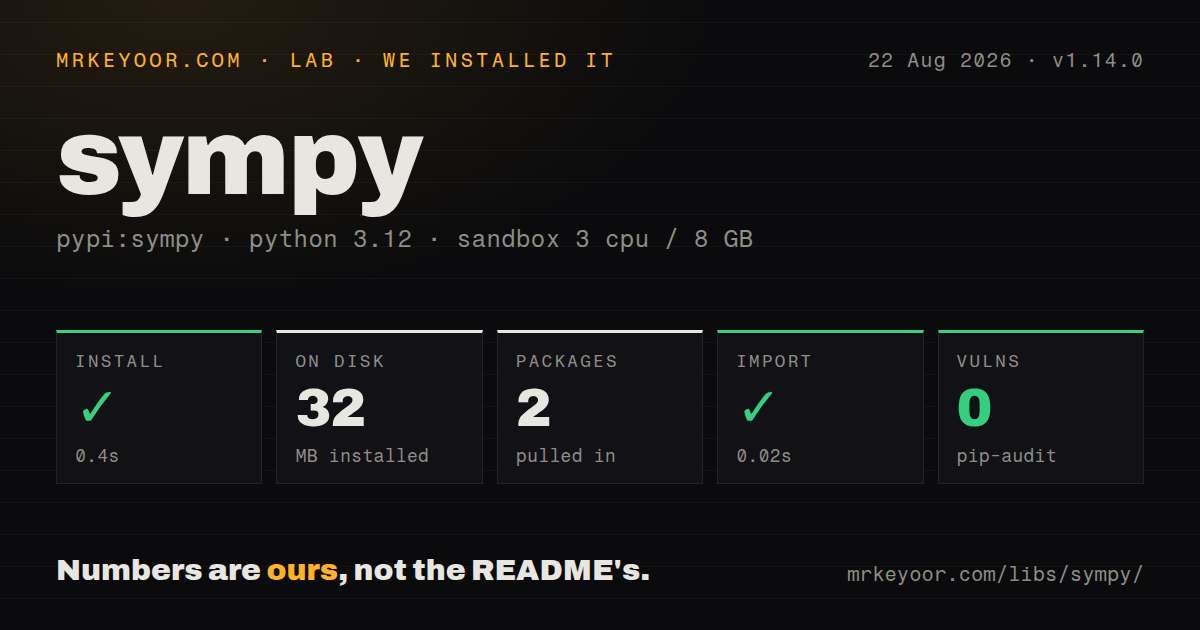
| Install | ✓ · 0.4s | 2 packages on disk · 32 MB |
| Import | ✓ | import isympy in 0.02s · pure Python · requires Python >=3.9 |
| Known vulns | 0 | (pip-audit) |
Answers from our run
Does sympy install cleanly?
Yes. In a fresh container with an empty cache, pip install sympy finished in 0.4s, leaving 2 packages and 32 MB on disk. pip-audit reported no known vulnerabilities.
What does sympy need to run?
Python >=3.9, and nothing compiled: it is pure Python. In our run import isympy succeeded in 0.02s.
sympy or python-flint: which should you use?
python-flint: Choose it for compiled exact polynomials, matrices, number theory, and ball arithmetic when breadth matters less than speed. SymPy 1.14.0 installed in 0.4 seconds and used 32 MB across 2 packages, with a 0.02-second isympy import and 0 audit findings in our sandbox.
When should you not use sympy?
The workload is repeated numeric array computation. NumPy and SciPy avoid the Python expression-tree cost.
Discussed on
- hnHackerRank (YC S11) DMCA'ed the SymPy Docs [fixed]921 points
- hnSymPy makes math fun again323 points
- hnSymPy makes math fun again267 points
- hnSymPy: Symbolic Mathematics in Python264 points
- hnThe SymPy/HackerRank DMCA Incident235 points
Use it if
- Python code must derive, transform, solve, or print an equation symbolically rather than evaluate only numeric arrays.
- Rationals, radicals, algebraic numbers, and matrices should stay exact until an explicit numerical evaluation.
- A derived formula will later be converted to NumPy, mpmath, C, Fortran, or LaTeX output.
- Assumptions about positivity, reality, integrality, or domains need to guide legal simplifications.
- The workload is repeated numeric array computation. NumPy and SciPy avoid the Python expression-tree cost.
- A web request needs a predictable deadline for arbitrary solve, integrate, limit, or simplify input. Symbolic algorithms can grow or remain unevaluated.
- Expressions come from untrusted users. sympify, parse_expr, and lambdify are not safe expression sandboxes.
- Your typing policy requires py.typed in every dependency. Our 1.14.0 package inspection found no py.typed marker.
- The task is specialized high-speed exact arithmetic rather than broad symbolic manipulation. python-flint may fit that narrower workload better.
Setup reality
We installed SymPy 1.14.0 in a fresh Python 3.12 Bookworm container in 0.4 seconds. The environment ended with 2 packages using 32 MB, and import isympy completed in 0.02 seconds. pip-audit found 0 known vulnerabilities. The pure-Python distribution reports 3 direct dependencies, requires Python >=3.9, has no py.typed marker, and uses the BSD license. No compiler, credentials, daemon, or config file was needed.
Python evaluates numeric literals before a SymPy call sees them. Use Rational(1, 3) or S(1)/3 for exact thirds. Build mathematical equations with Eq; == asks whether two expression trees are structurally equal and returns a Python boolean. Testing equivalence with simplify(left - right) == 0 is useful but can still be inconclusive for a hard expression.
Assumptions control which rewrites are valid. sqrt(x**2) cannot become x for a symbol that may be negative, while a positive symbol permits that result. solve() supports many problem types but returns several shapes; solveset() has consistent set results and different coverage. Integral, Sum, Limit, ConditionSet, or RootOf can remain in the answer when no closed form is found. Code must accept that outcome.
Do symbolic work once, then call lambdify() with an explicit backend for repeated numerical arrays. It generates executable code, so only feed it trusted expressions. simplify and solvers have no built-in wall-clock limit. If a service accepts user-selected formulas, run the symbolic job in a separate process with a timeout plus CPU and memory ceilings, and bound expression size before evaluation.
Patterns
Declare a positive symbol declare-symbol
from sympy import symbols, sqrt

x = symbols('x')
p = symbols('p', positive=True)
print(sqrt(x**2))
print(sqrt(p**2))
The positive assumption allows the second square root to reduce to p. The generic x may be negative.
Create exact fractions before division keep-rational-exact
from sympy import Rational, S

a = Rational(1, 3)
b = S(1) / 3
print(a + b)
Plain Python `1/3` has already become a float before SymPy receives it.
Request a specific algebraic form factor-expand
from sympy import expand, factor, symbols

x = symbols('x')
print(expand((x + 1)**3))
print(factor(x**3 - 1))
Targeted transforms are easier to predict than simplify(), which uses heuristics to choose a form.
Take first and second derivatives differentiate
from sympy import diff, exp, sin, symbols

x = symbols('x')
expr = sin(x) * exp(x)
first = diff(expr, x)
second = diff(expr, x, 2)
An undefined symbolic Function may leave a Derivative object until enough information exists to evaluate it.
Compute a definite integral integrate
from sympy import exp, integrate, oo, symbols

x = symbols('x')
result = integrate(exp(-x**2), (x, -oo, oo))
When SymPy cannot find a closed form, an unevaluated Integral is a valid return value.
Solve an equation over real numbers solve-over-reals
from sympy import Eq, S, solveset, symbols

x = symbols('x')
roots = solveset(Eq(x**2, 4), x, domain=S.Reals)
solveset returns a set-like result. solve covers other cases but can return lists, tuples, or dictionaries.
Find one nearby numeric root numeric-root
from sympy import cos, nsolve, symbols

x = symbols('x')
root = nsolve(cos(x) - x, x, 1)
nsolve is local. The starting guess affects convergence and which root is returned.
Compute exact matrix properties exact-matrix
from sympy import Matrix

a = Matrix([[1, 2], [3, 4]])
print(a.det())
print(a.inv())
print(a.eigenvals())
Symbolic matrix expressions can grow much faster than numeric linear algebra on large inputs.
Build a truncated local series series-expansion
from sympy import cos, symbols

x = symbols('x')
series = cos(x).series(x, 0, 8)
polynomial = series.removeO()
The Order term records the discarded degree. removeO() drops that information for evaluation or code generation.
Replace symbols in a new expression substitute-values
from sympy import pi, sin, symbols

x, y = symbols('x y')
expr = x**2 + sin(y)
value = expr.subs({x: 3, y: pi / 2})
subs returns another expression. Ordered replacements can interact unless simultaneous=True is requested.
Evaluate a formula over NumPy arrays lambdify-numpy
import numpy as np
from sympy import lambdify, sin, symbols

x = symbols('x')
fn = lambdify(x, x**2 + sin(x), 'numpy')
values = fn(np.array([0.0, 1.0, 2.0]))
lambdify generates executable code. Use trusted expressions and name the backend explicitly.
Print a symbolic integral as LaTeX render-latex
from sympy import Integral, cos, latex, pi, symbols

x = symbols('x')
formula = Integral(cos(x)**2, (x, 0, pi))
source = latex(formula)
answer = formula.doit()
Capitalized Integral constructs the unevaluated object; doit() requests its value.
Alternatives
| Package | Registry | Pick it when |
|---|---|---|
| python-flint | PyPI | Choose it for compiled exact polynomials, matrices, number theory, and ball arithmetic when breadth matters less than speed. |
| mpmath | PyPI | Choose it when arbitrary-precision numerical values and special functions are enough without symbolic expressions. |
| numpy | PyPI | Choose it for numeric arrays and linear algebra when every input already has a concrete value. |
| scipy | PyPI | Choose it for numerical optimization, integration, signal processing, and scientific algorithms over floating-point data. |
More data guides
numpy · pandas · fsspec · pyarrow · lxml · sqlalchemy · the whole shelf →
How this guide is made: grounded in the library's documentation, release notes, changelog, and issue history, on a fixed rubric — not a hands-on install of every release. The 50 most-downloaded entries are additionally install-verified in clean containers. Corrections: contact the desk.