stripe review
`stripe`, also called stripe-node, is Stripe's official JavaScript server SDK. Its resource methods cover payments, customers, subscriptions, invoices, Checkout, Connect, and the rest of Stripe's API. The client also verifies webhook signatures, retries selected network failures with idempotency handling, paginates list endpoints, and exposes request metadata. Version 22.5.0 adds helpers for parsing events that were verified earlier, including EventBridge and Event Grid payloads, plus a `major_api_version` constant. Those parsing helpers deliberately skip authenticity checks and belong only after a trusted verification boundary. Our test found working CommonJS and ESM entry paths with no installed runtime dependencies.
Use stripe-node on a server that has already chosen Stripe; its signature checks, pagination, request metadata, and retry controls remove risky glue code. Keep it out of browsers, preserve raw webhook bodies, and never use 22.5.0's unverified parsers before a trusted verification step.
We installed it
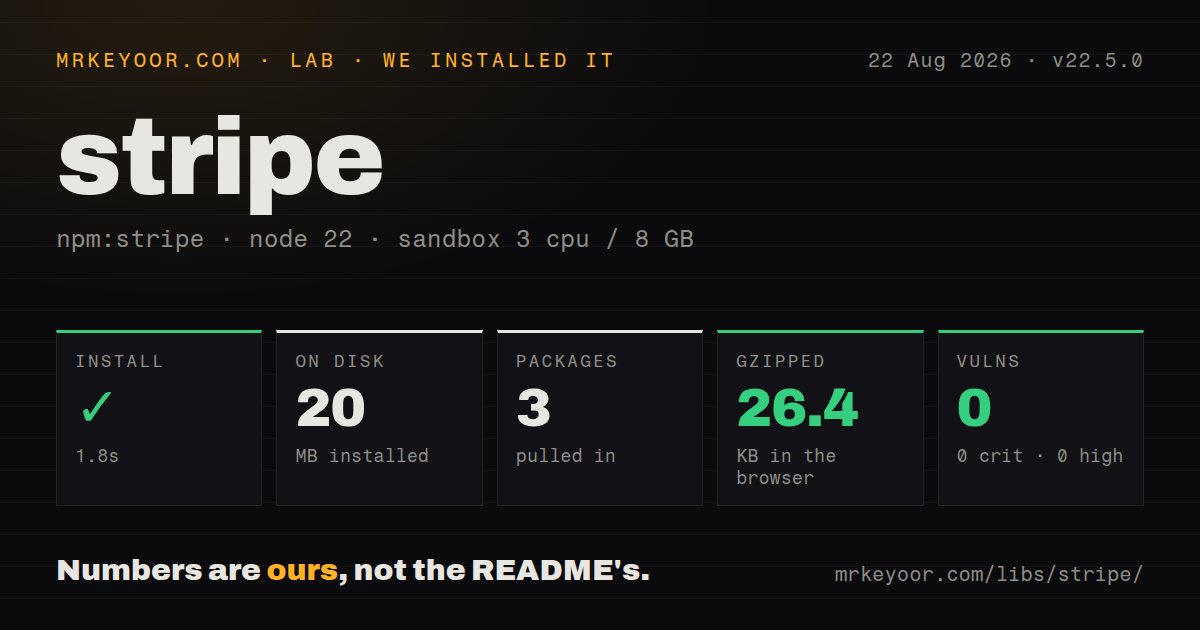
| Install | ✓ · 1.8s | 3 packages on disk · 20 MB |
| Import | ✓ | ESM import works · require() works · CommonJS package with exports map |
| Browser | 26.4 KB | gzipped (205.9 KB minified), bundled with esbuild |
| Types | — | no TypeScript types found |
| Known vulns | 0 | 0 critical · 0 high · 0 moderate · 0 low (npm audit) |
Answers from our run
Does stripe install cleanly?
Yes. In a fresh container with an empty cache, npm install stripe finished in 2 seconds, leaving 3 packages and 20 MB on disk. npm audit reported no known vulnerabilities.
How much does stripe add to a browser bundle?
26.4 KB gzipped (205.9 KB minified) when the whole package is bundled for the browser with esbuild. Importing only part of it is usually smaller.
Does stripe work with both ESM and CommonJS?
Yes. Both import 'stripe' and require('stripe') worked in Node 22 in our run. The package is published as CommonJS with an exports map.
Does stripe include TypeScript types?
No type declarations were found in our install, so TypeScript users need their own declarations.
stripe or braintree: which should you use?
braintree: Use it when Braintree is the chosen processor and its gateway, vault, and transaction model already fit the product. Use stripe-node on a server that has already chosen Stripe; its signature checks, pagination, request metadata, and retry controls remove risky glue code.
When should you not use stripe?
Your processor is PayPal, Square, Braintree, or another provider. Every resource in this package is tied to Stripe's API.
Use it if
- A Node, Deno, worker, or serverless backend talks directly to Stripe's API with a secret account key.
- Webhook handlers need Stripe's signature verification against the exact raw request body.
- List endpoints should stream through async iteration instead of hand-maintained starting_after cursors.
- Payment creation needs built-in idempotency options, network retry controls, Connect account headers, and request IDs.
- Your processor is PayPal, Square, Braintree, or another provider. Every resource in this package is tied to Stripe's API.
- Card details must be collected in a web page or React Native app. Use Stripe.js or the platform SDK; putting a secret key in client code is an account compromise.
- The application must keep compile-time types matched to an old Stripe API version. The SDK documents its types against the latest supported API shape.
- You expect minor upgrades never to add TypeScript work. Stripe's policy allows new response enum members in minors when runtime compatibility is preserved.
- A browser bundle must stay small. Our all-package esbuild test produced 205.9 KB minified and 26.4 KB gzipped, and server credentials still make browser use inappropriate.
Setup reality
We installed stripe 22.5.0 in a fresh Node 22 Bookworm container. npm finished in 1.8 seconds, left 3 packages, and used 20 MB. The package declares 0 direct dependencies, 1 peer dependency, and 20068 KB unpacked; it requires Node 18 or newer and uses the MIT license. npm audit found 0 known vulnerabilities. The CommonJS package has an exports map, and both require('stripe') and ESM import worked. Our inspection found no TypeScript types. An all-package browser build measured 205.9 KB minified and 26.4 KB gzipped.
The client needs a Stripe secret key at construction. Keep live and test keys in a secret store, create the instance lazily when build steps lack runtime credentials, and never send it to the browser. Stripe.js handles browser-side payment details with publishable keys. The server SDK enables telemetry by default; set telemetry: false if policy requires it. Automatic retry behavior and request timeouts are configurable globally or per call. Supply stable idempotency keys derived from your order or operation so a retry cannot create a second payment.
Webhook verification requires the exact raw bytes received and the endpoint's signing secret. JSON middleware must not consume or reserialize that route first. Return quickly after durable receipt, then process asynchronously with your own duplicate-event protection. Version 22.5.0 can parse a payload without verification for events already authenticated before entering a queue, including supported EventBridge and Event Grid flows. Calling those helpers on an internet request removes the authenticity check. For local delivery, the Stripe CLI can forward events and provides a signing secret distinct from dashboard endpoint secrets.
Patterns
Create the client lazily init-client
import Stripe from 'stripe';

let _stripe: Stripe | null = null;
export const getStripe = (): Stripe => {
  if (!_stripe) {
    _stripe = new Stripe(process.env.STRIPE_SECRET_KEY as string);
  }
  return _stripe;
};
Some build steps import modules before runtime secrets exist. Delay construction until a server request or job actually needs the client, and reject a missing key explicitly.
Start a card payment create-payment-intent
const intent = await stripe.paymentIntents.create({
  amount: 2000, // smallest currency unit: 2000 = $20.00
  currency: 'usd',
  automatic_payment_methods: { enabled: true },
});
// send intent.client_secret to the browser for Stripe.js to confirm
Stripe expects an integer in the currency's smallest unit. Return only the client secret to trusted browser code and keep the secret account key on the server.
Verify an Express webhook verify-webhook
app.post('/webhook', express.raw({ type: 'application/json' }), (req, res) => {
  let event;
  try {
    event = stripe.webhooks.constructEvent(
      req.body, // raw Buffer, not parsed JSON
      req.headers['stripe-signature'],
      process.env.STRIPE_WEBHOOK_SECRET
    );
  } catch (err) {
    return res.status(400).send(`Webhook Error: ${err.message}`);
  }
  if (event.type === 'payment_intent.succeeded') { /* fulfill */ }
  res.json({ received: true });
});
Mount raw-body middleware on this route before JSON parsing. Verification fails if any middleware changes the bytes that Stripe signed.
Open hosted subscription Checkout create-checkout-session
const session = await stripe.checkout.sessions.create({
  mode: 'subscription',
  line_items: [{ price: 'price_123', quantity: 1 }],
  success_url: 'https://example.com/success?session_id={CHECKOUT_SESSION_ID}',
  cancel_url: 'https://example.com/cancel',
});
// redirect the user to session.url
Stripe replaces the literal checkout-session placeholder on redirect. Fulfillment should follow a verified webhook rather than trusting the success page alone.
Stream paginated customers auto-paginate-list
for await (const customer of stripe.customers.list({ limit: 100 })) {
  await handle(customer);
  if (shouldStop()) break;
}

// or collect a bounded batch:
const charges = await stripe.charges.list().autoPagingToArray({ limit: 1000 });
Async iteration fetches additional pages as needed and can stop early. Array collection requires an explicit upper limit to bound memory and API calls.
Bind retries to an order ID idempotency-key
const charge = await stripe.paymentIntents.create(
  { amount: 2000, currency: 'usd', automatic_payment_methods: { enabled: true } },
  { idempotencyKey: `order-${orderId}` }
);
Reuse the same application-derived key for retries of one logical operation. Generating a fresh key for each attempt defeats duplicate protection.
Set retry and timeout policy configure-retries
const stripe = new Stripe(key, {
  maxNetworkRetries: 2, // exponential backoff
  timeout: 20000,       // default is 80000 ms
});

// per-request override:
await stripe.customers.create({ email }, { maxNetworkRetries: 3 });
The client already retries selected network failures once by default. Tune retries and timeouts to the calling job's deadline, then handle final uncertainty with idempotent state reconciliation.
Expand related API objects expand-nested-objects
const intent = await stripe.paymentIntents.retrieve('pi_123', {
  expand: ['customer', 'latest_charge'],
});
const email = (intent.customer as Stripe.Customer).email;
An expandable field may remain an ID or arrive as an object. Check its runtime shape before accessing object fields, especially when expansion is conditional.
Scope a call to a connected account connect-account-call
const transactions = await stripe.balanceTransactions.list(
  { limit: 10 },
  { stripeAccount: 'acct_1ABC...' }
);
Place stripeAccount in the request-options argument. Log both the platform request ID and connected account when diagnosing Connect failures.
Separate decline and rate-limit errors handle-card-errors
try {
  await stripe.paymentIntents.confirm('pi_123');
} catch (err) {
  if (err instanceof Stripe.errors.StripeCardError) {
    console.log(err.code, err.decline_code); // e.g. 'card_declined', 'insufficient_funds'
  } else if (err instanceof Stripe.errors.StripeRateLimitError) {
    // back off and retry
  } else {
    throw err;
  }
}
Handle expected card declines without hiding transport or programming errors. Preserve the Stripe request ID in internal logs for support investigations.
Generate a signed test payload test-webhook-locally
const payload = JSON.stringify({ id: 'evt_test', object: 'event' });
const header = stripe.webhooks.generateTestHeaderString({
  payload,
  secret: 'whsec_test_secret',
});
const event = stripe.webhooks.constructEvent(payload, header, 'whsec_test_secret');
This exercises local signature verification without network delivery. Use Stripe CLI forwarding when the test also needs routing, middleware, and endpoint behavior.
Parse an event after queue verification parse-verified-event
// The ingress service already verified the signature, then stored the payload.
const event = stripe.webhooks.constructEventWithoutVerification(payload)

if (event.type === 'payment_intent.succeeded') {
  await fulfillOnce(event.id, event.data.object)
}
Added in 22.5.0, this helper skips authenticity verification. Use it only when a trusted ingress already verified the event and the queue preserves that trust boundary.
Alternatives
| Package | Registry | Pick it when |
|---|---|---|
| braintree | npm | Use it when Braintree is the chosen processor and its gateway, vault, and transaction model already fit the product. |
| square | npm | Use it for Square's online and in-person payment APIs when the business already runs on that platform. |
| @paypal/paypal-server-sdk | npm | Use it for PayPal Orders and related server calls when PayPal is the required checkout rail. |
More infra guides
semver · boto3 · opentelemetry-api · @opentelemetry/api · psutil · distro · the whole shelf →
How this guide is made: grounded in the library's documentation, release notes, changelog, and issue history, on a fixed rubric — not a hands-on install of every release. The 50 most-downloaded entries are additionally install-verified in clean containers. Corrections: contact the desk.