string-template review
string-template 1.0.0 is a small CommonJS function that substitutes flat placeholders such as {name}, {0}, and {first_name}. Data may be one object or array, or a series of positional arguments. Missing, null, and undefined values turn into empty text; doubled braces preserve a literal placeholder. The compile subpath can pre-parse a reused string or generate a function with new Function. Version 1.0.0 added `_` keys to the direct formatter, but its compiled parser still accepts letters and digits only.
string-template 1.0.0 added one package in 0.6 seconds and bundled to 0.5 KB gzipped in our sandbox, yet its last npm release was January 2016 and it ships no types or ESM exports. Keep it where legacy behavior is already tested; new code should prefer template literals or a formatter that escapes the actual output context.
We installed it
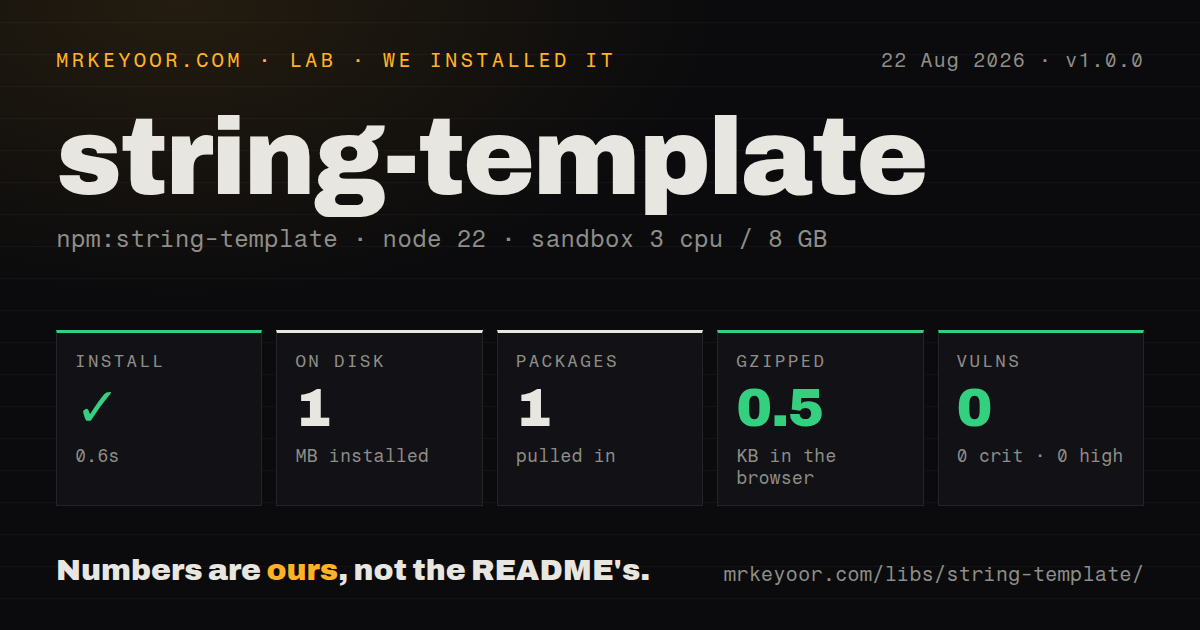
| Install | ✓ · 0.6s | 1 package on disk · 1 MB |
| Import | ✓ | ESM import works · require() works · CommonJS package |
| Browser | 0.5 KB | gzipped (0.9 KB minified), bundled with esbuild |
| Types | — | no TypeScript types found |
| Known vulns | 0 | 0 critical · 0 high · 0 moderate · 0 low (npm audit) |
Answers from our run
Does string-template install cleanly?
Yes. In a fresh container with an empty cache, npm install string-template finished in 0.6s, leaving 1 package and 1 MB on disk. npm audit reported no known vulnerabilities.
How much does string-template add to a browser bundle?
0.5 KB gzipped (0.9 KB minified) when the whole package is bundled for the browser with esbuild. Importing only part of it is usually smaller.
Does string-template work with both ESM and CommonJS?
Yes. Both import 'string-template' and require('string-template') worked in Node 22 in our run. The package is published as CommonJS.
Does string-template include TypeScript types?
No type declarations were found in our install, so TypeScript users need their own declarations.
string-template or sprintf-js: which should you use?
sprintf-js: Use it when width, precision, numeric bases, or explicit positional format specifiers are part of the output contract. string-template 1.0.0 added one package in 0.6 seconds and bundled to 0.5 KB gzipped in our sandbox, yet its last npm release was January 2016 and it ships no types or ESM exports.
When should you not use string-template?
New JavaScript already has the values in lexical scope; a native template literal removes the dependency and makes each expression visible
Use it if
- A legacy module already depends on this exact placeholder grammar and its empty-string treatment of missing values
- The code must run in an old ES5 browser where native template literals are unavailable
- Templates contain trusted, context-neutral text with flat keys and no formatting rules
- A frequently reused template benefits from the ordinary pre-parsed compile path without generated code
- New JavaScript already has the values in lexical scope; a native template literal removes the dependency and makes each expression visible
- The output enters HTML, SQL, a shell, a URL, or a regular expression; substitution performs raw string coercion and provides no contextual escaping
- Nested values, default expressions, plural rules, loops, conditionals, or locale-aware formatting are required; the grammar has flat keys only
- ESM exports or TypeScript declarations are required; version 1.0.0 ships neither and has no exports map
- Input maps may use a null prototype or own the name hasOwnProperty; source inspection shows the first case loses every value and the second can throw
Setup reality
Our fresh install of string-template 1.0.0 finished in 0.6 seconds. It left one package and 1 MB on disk, with zero direct dependencies, zero peers, 136 KB unpacked, and an MIT license. npm audit found 0 known vulnerabilities. An import-all esbuild browser target produced 0.9 KB minified and 0.5 KB gzipped, so download weight is not the reason to reject it.
No account, config file, engine constraint, native build, or postinstall step is involved. The package is CommonJS without an exports map. require() and ESM import both worked in our sandbox, while no TypeScript declarations were present. The undocumented-by-exports path require('string-template/compile') remains reachable because old Node resolution can load compile.js directly. A strict future exports map would have to declare that subpath explicitly.
Exactly one object-typed value argument becomes the lookup table; otherwise the remaining arguments become numeric positions. Arrays therefore work in the single-value form. The code calls args.hasOwnProperty itself. Object.create(null) data is replaced with an empty object, and an own non-function hasOwnProperty value causes a TypeError. Absent keys plus null and undefined become empty strings, while 0 and false survive. That silent behavior can hide a misspelled required field.
Doubled braces escape placeholder syntax only. They do not encode substituted text for HTML or any other sink. Direct formatting recognizes _, but the 1.0.0 compiler regex does not, so {first_name} stays literal after compilation. compile(template) tokenizes without dynamic code. compile(template, true) uses new Function, which needs unsafe-eval under Content Security Policy and should receive trusted template text only.
Patterns
Substitute flat object keys replace-named-values
const format = require('string-template');

const text = format('Hello {name}, {count} jobs remain', {
  name: 'Ada',
  count: 4
});
Only own properties match. Values are converted to text without HTML, SQL, shell, URL, or regular-expression escaping.
Read numeric placeholders from an array replace-array-values
const text = format(
  'Hello {0}, {1} jobs remain',
  ['Ada', 4]
);
One array argument is the lookup object, and {0} or {1} reads its indexed own properties.
Pass numeric values separately replace-positional-values
const text = format(
  'Hello {0}, {1} jobs remain',
  'Ada',
  4
);
Two or more value arguments become an internal array-like list, with placeholders resolved by position.
Preserve placeholder-shaped text escape-braces
const sample = format('Write {{name}} and {{0}} literally');
console.log(sample);
// Write {name} and {0} literally
Double braces escape the package's placeholder parser. They do not escape a substituted value for an output context.
See how absent values disappear detect-missing-values
const text = format('{first} {middle} {last}', {
  first: 'Ada',
  last: 'Lovelace'
});

console.log(text); // Ada  Lovelace
An absent key, null, or undefined inserts an empty string without throwing. Validate mandatory fields before formatting.
Keep zero and false values preserve-falsy-values
const text = format('attempts={attempts}; active={active}', {
  attempts: 0,
  active: false
});

console.log(text); // attempts=0; active=false
Only null and undefined are removed. Other values use JavaScript's normal string conversion.
Use `_` keys without compile use-snake-case-directly
const text = format('Hello {first_name}', {
  first_name: 'Ada'
});

console.log(text); // Hello Ada
Version 1.0.0 recognizes `_` in index.js. compile.js omits that character from its regex, so compiling the same string leaves {first_name} untouched.
Pre-parse a reused template compile-template
const compile = require('string-template/compile');
const render = compile('Hello {0}, {1} jobs remain');

console.log(render('Ada', 4));
console.log(render(['Grace', 2]));
The default compiler tokenizes the string and returns a closure. It does not call new Function.
Opt into generated source generate-inline-function
const compile = require('string-template/compile');
const render = compile('Hello {0}', true);
console.log(render('Ada'));
A truthy second argument invokes new Function. Strict CSP blocks it without unsafe-eval, and template text must be trusted.
Copy a null-prototype map before formatting normalize-map
const raw = Object.assign(Object.create(null), {name: 'Ada'});
const values = Object.fromEntries(
  Object.entries(raw).filter(([key]) => key !== 'hasOwnProperty')
);

console.log(format('Hello {name}', values));
The formatter discards a null-prototype lookup and directly calls hasOwnProperty. Copy the map and reject that reserved key first.
Encode text before HTML interpolation escape-html
function escapeHtml(value) {
return String(value)
.replaceAll('&', '&')
.replaceAll('<', '<')
.replaceAll('>', '>')
.replaceAll('"', '"')
.replaceAll("'", ''');
}
const html = format('<p>{name}</p>', {name: escapeHtml(userName)});This encoder covers HTML text and quoted attributes only. DOM textContent is safer where a DOM API is available; other sinks need different encoders.
Reject missing placeholders before formatting require-all-keys
function formatStrict(template, values) {
  const keys = [...template.matchAll(/\{([0-9A-Za-z_]+)\}/g)]
    .map((match) => match[1]);

  for (const key of keys) {
    if (!Object.prototype.hasOwnProperty.call(values, key)) {
      throw new Error(`Missing template value: ${key}`);
    }
  }
  return format(template, values);
}
The package silently removes absent placeholders. A wrapper can turn omissions into errors for notifications, config output, and audit messages.
Alternatives
| Package | Registry | Pick it when |
|---|---|---|
| sprintf-js | npm | Use it when width, precision, numeric bases, or explicit positional format specifiers are part of the output contract |
| mustache | npm | Use it for HTML-escaped interpolation, nested lookup, sections, and inverted sections in a logic-less format |
| handlebars | npm | Use it when presentation templates need helpers, partials, loops, conditions, and HTML escaping |
| lodash | npm | Use its template function only when Lodash is already installed and generated-code behavior is acceptable |
More utils guides
lru-cache · type-fest · ajv · zod · p-limit · find-up · the whole shelf →
How this guide is made: grounded in the library's documentation, release notes, changelog, and issue history, on a fixed rubric — not a hands-on install of every release. The 50 most-downloaded entries are additionally install-verified in clean containers. Corrections: contact the desk.