lodash review
Lodash 4.18.1 is a CommonJS collection of helpers for arrays, objects, functions, collections, and value conversion. Its remaining strong cases are operations JavaScript does not express as clearly: debounce and throttle controls, deep path access, iteratee shorthands, stable grouping, deep cloning or equality, and the data-last lodash/fp build. Version 4.18.1 repairs ReferenceErrors in modular template and fromPairs builds caused by stale internal build mappings. The project is entering OpenJS Feature-Complete status, which points toward maintenance and compatibility instead of a version 5 redesign.
Lodash 4.18.1 installed in 0.6 seconds with 0 dependencies, but our root browser import cost 25.8 KB gzipped and shipped no TypeScript declarations. Keep it for deep-value, timing, equality, or FP helpers that remove real code; skip the root package for ordinary modern array operations.
We installed it
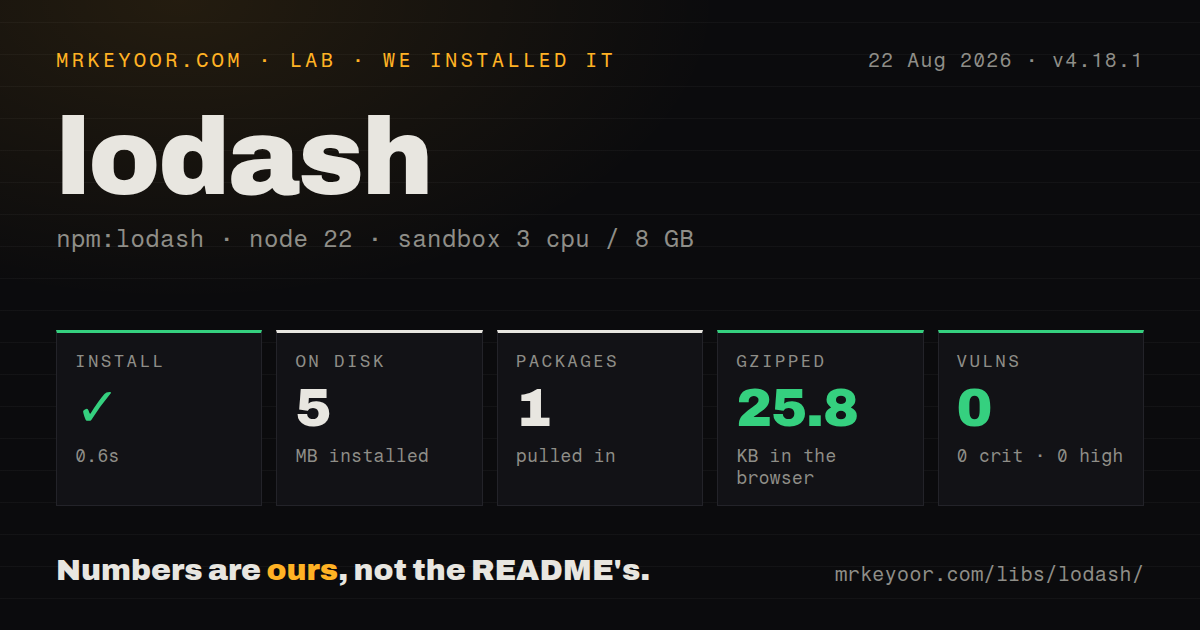
| Install | ✓ · 0.6s | 1 package on disk · 5 MB |
| Import | ✓ | ESM import works · require() works · CommonJS package |
| Browser | 25.8 KB | gzipped (72 KB minified), bundled with esbuild |
| Types | — | no TypeScript types found |
| Known vulns | 0 | 0 critical · 0 high · 0 moderate · 0 low (npm audit) |
Answers from our run
Does lodash install cleanly?
Yes. In a fresh container with an empty cache, npm install lodash finished in 0.6s, leaving 1 package and 5 MB on disk. npm audit reported no known vulnerabilities.
How much does lodash add to a browser bundle?
25.8 KB gzipped (72 KB minified) when the whole package is bundled for the browser with esbuild. Importing only part of it is usually smaller.
Does lodash work with both ESM and CommonJS?
Yes. Both import 'lodash' and require('lodash') worked in Node 22 in our run. The package is published as CommonJS.
Does lodash include TypeScript types?
No type declarations were found in our install, so TypeScript users need their own declarations.
lodash or radash: which should you use?
radash: Use it for a modern TypeScript utility set that also includes async helpers. Lodash 4.18.1 installed in 0.6 seconds with 0 dependencies, but our root browser import cost 25.8 KB gzipped and shipped no TypeScript declarations.
When should you not use lodash?
The feature only needs map, filter, find, Object.entries, optional chaining, or structuredClone; current JavaScript already supplies them
Discussed on
- hnLodash 4.0.0 is out303 points
- hnGoogle Took Down My Chrome Extension for Using Lodash286 points
- hnLodash v3.0.0245 points
- hnLodash just declared issue bankruptcy and closed every issue and open PR240 points
- hnUnderscore and Lodash Merge Thread208 points
Use it if
- An established codebase uses Lodash shorthands heavily and removal would add churn without shrinking shipped output
- You need documented debounce, throttle, memoize, cloneDeep, isEqual, or nested-path behavior
- A Node service wants one dependency-free compatibility layer across several runtime generations
- The project deliberately uses lodash/fp for curried, immutable, data-last composition
- The feature only needs map, filter, find, Object.entries, optional chaining, or structuredClone; current JavaScript already supplies them
- A browser entry would import the package root; our measured full bundle was 25.8 KB gzipped and CommonJS limits automatic tree shaking
- First-party TypeScript declarations are mandatory; our package inspection found none, so typed users normally install @types/lodash
- The dependency must be ESM-native with an exports map; Lodash 4.18.1 is CommonJS without one
- New utility APIs are expected regularly; Feature-Complete status favors fixes and continuity over expansion
Setup reality
We installed Lodash 4.18.1 in a fresh Node 22 sandbox in 0.6 seconds. It produced 1 package and 5 MB on disk, and npm audit found 0 known vulnerabilities. Lodash declares 0 direct dependencies and 0 peer dependencies. The package itself is 5,008 KB unpacked. It is CommonJS without an exports map; require() and ESM import both worked. No TypeScript declarations were present.
Our full esbuild browser import measured 72 KB minified and 25.8 KB gzipped. Lodash needs no credentials or config file, so import shape is the main setup choice. The root path loads the full build. Paths such as lodash/debounce can narrow an entry, and lodash-es is a separate ESM package. lodash/fp also changes argument order, curries methods, and avoids mutation. Mixing FP and ordinary examples produces convincing but incorrect calls.
memoize keeps entries until code deletes or clears them, and its default cache key is only the first argument. debounce and throttle retain timers and the latest arguments until invocation or cancel(). Long-lived workers and disposed UI components should call cancel. flush forces pending work immediately, which is useful only when the caller genuinely wants delivery during cleanup.
Deep paths accept strings such as a[0].b or arrays of keys. A caller-supplied path is still untrusted input and should not become permission to traverse arbitrary fields. cloneDeep handles many data values, yet sockets, DOM nodes, class instances, and application resources may need an explicit copier. Version 4.18.1 fixes generated modular artifacts for template and fromPairs; it does not alter their public signatures.
Patterns
Group records by one derived value group-records
import groupBy from 'lodash/groupBy.js';
const byStatus = groupBy(orders, order => order.status);
groupBy returns an object and stringifies keys; choose Map when object identity must survive.
Read a deep field with a fallback read-nested-value
import get from 'lodash/get.js';
const city = get(profile, ['address','city'], 'unknown');
The fallback applies to undefined, while an explicit null value is returned unchanged.
Write through a checked key path set-nested-value
import set from 'lodash/set.js';
set(settings, ['editor','tabSize'], 2);
set mutates its first argument, and untrusted paths should be rejected before this call.
Keep the first record for each key dedupe-by-key
import uniqBy from 'lodash/uniqBy.js';
const unique = uniqBy(users, user => user.id);
uniqBy preserves input order and discards later records whose derived key has appeared.
Delay repeated search calls debounce-search
import debounce from 'lodash/debounce.js';
const searchLater = debounce(runSearch, 250, { maxWait: 1000 });
searchLater(query);
The returned function retains a timer and arguments; call cancel when its owner is disposed.
Cap progress update frequency throttle-progress
import throttle from 'lodash/throttle.js';
const report = throttle(sendProgress, 200, { leading: true, trailing: true });
A trailing invocation holds the newest arguments until it runs or report.cancel removes it.
Cache using both arguments memoize-compound-key
import memoize from 'lodash/memoize.js';
const loadUser = memoize(fetchUser, (tenantId, userId) => tenantId + ':' + userId);
Without a resolver, memoize keys only on the first argument and also retains rejected promises.
Compose data-last FP helpers compose-fp-pipeline
import flow from 'lodash/fp/flow.js';
import map from 'lodash/fp/map.js';
import filter from 'lodash/fp/filter.js';
const names = flow(filter(u => u.active), map(u => u.name));
lodash/fp uses iteratee-first, data-last arguments and caps iteratee arity, unlike ordinary Lodash.
Alternatives
| Package | Registry | Pick it when |
|---|---|---|
| radash | npm | Use it for a modern TypeScript utility set that also includes async helpers |
| remeda | npm | Use it for strong inference across data-first and data-last pipelines |
| underscore | npm | Use it only when an older application already depends on Underscore semantics |
More utils guides
lru-cache · type-fest · ajv · zod · p-limit · find-up · the whole shelf →
How this guide is made: grounded in the library's documentation, release notes, changelog, and issue history, on a fixed rubric — not a hands-on install of every release. The 50 most-downloaded entries are additionally install-verified in clean containers. Corrections: contact the desk.