@sqltools/formatter review
@sqltools/formatter is the SQLTools extension's standalone lexical formatter. It breaks SQL text into tokens, rewrites indentation and whitespace, optionally changes recognized keyword case, separates semicolon-delimited statements, and can expose the token list. Its four modes are generic SQL, DB2, Couchbase N1QL, and Oracle PL/SQL. Version 1.2.5 remains current, while the package changelog's latest described formatter work is 1.2.4 support for PostgreSQL C-style escape strings and the `@@` operator. It does not parse or validate a database grammar.
@sqltools/formatter 1.2.5 installed in 0.3 seconds, used 1 MB, and bundled to 9.7 KB gzipped in our sandbox with no audit findings. It is a good compatibility choice for SQLTools output and four documented modes; new multi-dialect formatters should compare `sql-formatter`, and no application should treat `params` as safe SQL binding.
We installed it
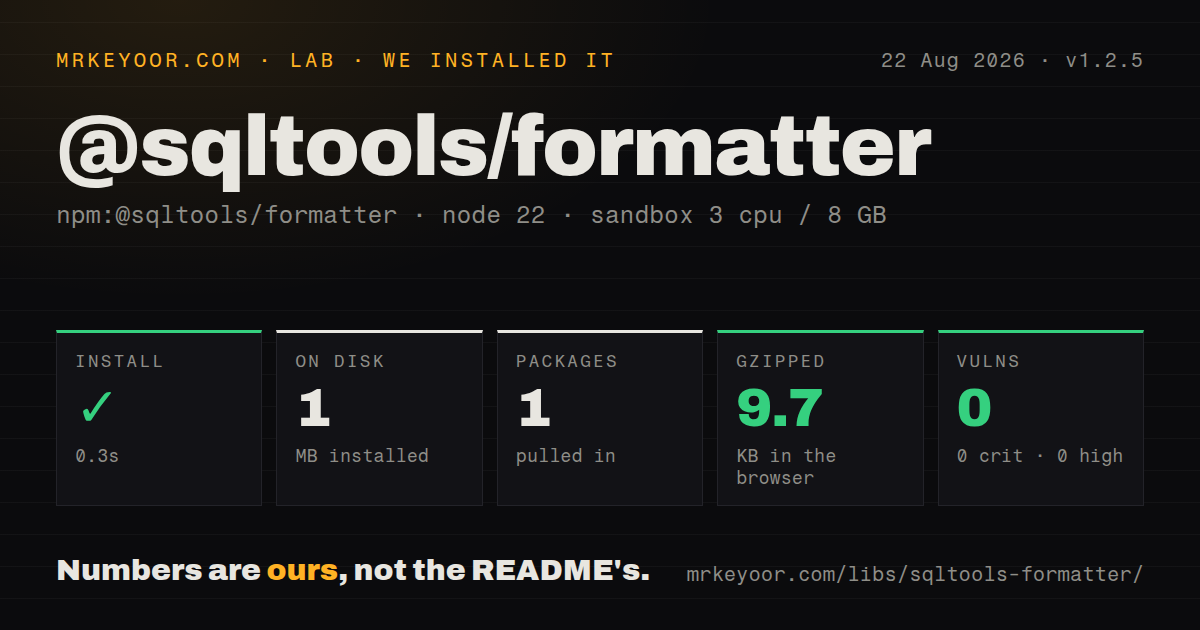
| Install | ✓ · 0.3s | 1 package on disk · 1 MB |
| Import | ✓ | ESM import works · require() works · CommonJS package |
| Browser | 9.7 KB | gzipped (36 KB minified), bundled with esbuild |
| Types | ✓ | TypeScript types bundled |
| Known vulns | 0 | 0 critical · 0 high · 0 moderate · 0 low (npm audit) |
Answers from our run
Does @sqltools/formatter install cleanly?
Yes. In a fresh container with an empty cache, npm install @sqltools/formatter finished in 0.3s, leaving 1 package and 1 MB on disk. npm audit reported no known vulnerabilities.
How much does @sqltools/formatter add to a browser bundle?
9.7 KB gzipped (36 KB minified) when the whole package is bundled for the browser with esbuild. Importing only part of it is usually smaller.
Does @sqltools/formatter work with both ESM and CommonJS?
Yes. Both import '@sqltools/formatter' and require('@sqltools/formatter') worked in Node 22 in our run. The package is published as CommonJS.
Does @sqltools/formatter include TypeScript types?
Yes, type declarations ship inside the package, so no @types install is needed.
@sqltools/formatter or sql-formatter: which should you use?
sql-formatter: Use it for a maintained formatter with explicit coverage for many current database dialects. @sqltools/formatter 1.2.5 installed in 0.3 seconds, used 1 MB, and bundled to 9.7 KB gzipped in our sandbox with no audit findings.
When should you not use @sqltools/formatter?
You need explicit PostgreSQL, MySQL, SQLite, BigQuery, Snowflake, T-SQL, Redshift, Spark, or Trino modes. The public Config type lists only four language strings.
Use it if
- Another tool must reproduce the formatting behavior used by the SQLTools VS Code extension.
- Queries fit the package's `sql`, `db2`, `n1ql`, or `pl/sql` keyword and placeholder tables.
- A small dependency-free browser or Node formatter with bundled declarations is preferable to an AST pipeline.
- Editor code needs generic SQL tokens as well as formatted output.
- You need explicit PostgreSQL, MySQL, SQLite, BigQuery, Snowflake, T-SQL, Redshift, Spark, or Trino modes. The public Config type lists only four language strings.
- Formatting must preserve every vendor extension. The implementation uses token patterns and fixed keyword tables rather than a database parser, so unrecognized syntax needs fixture tests.
- You plan to use `params` as query binding. Values are inserted into the string without driver escaping or quoting and must never replace real prepared statements.
- A current standalone release matters. Version 1.2.5 was published in October 2022 even though the containing SQLTools monorepo is still active.
- Your ESM policy forbids CommonJS interop. The package has one CommonJS main file and no exports map.
Setup reality
Our fresh Node 22 Bookworm install of @sqltools/formatter 1.2.5 completed in 0.3 seconds. It left 1 package and 1 MB on disk; the package is 184 KB unpacked and declares 0 direct dependencies plus 0 peer dependencies. npm audit reported 0 known vulnerabilities at every severity. There are no native builds, database drivers, credentials, environment variables, or config files.
The package is CommonJS without an exports map, and both require() and ESM import worked in our sandbox. TypeScript declarations are bundled under lib. The README's default import depends on compiler or bundler interop, while named format and tokenize imports match the declaration surface directly. Our full browser import produced 36 KB minified and 9.7 KB gzipped with esbuild.
Defaults are generic sql, two-space indentation, unchanged keyword case, and 1 newline between semicolon-separated queries. Language choices are exactly sql, db2, n1ql, and pl/sql. This is a tokenizer with keyword lists, so test stored procedures, dollar quotes, JSON operators, quoted identifiers, comments, and warehouse-specific syntax before applying it to saved files. tokenize() follows generic SQL rules rather than switching to every formatter dialect.
The params option performs text replacement for positional or named placeholders. It does not quote or escape values, so a string literal must already include its SQL quotes. Keep the feature limited to trusted previews and fixtures; database execution belongs behind a driver's parameter API. linesBetweenQueries only controls whitespace after semicolons, and 'preserve' retains existing line breaks there while other layout is still rewritten.
Patterns
Reflow a generic SQL statement format-basic-query
import { format } from '@sqltools/formatter'

const output = format('SELECT id,name FROM users WHERE active=true')
console.log(output)
The default is generic SQL tokenization. Formatting changes layout and does not prove that the statement is valid for any database.
Call the CommonJS default object use-default-import
import sqlFormatter from '@sqltools/formatter'

const output = sqlFormatter.format('SELECT * FROM products')
This README form needs CommonJS default-import interop. Named imports are a clearer fit when the TypeScript configuration does not synthesize defaults.
Indent nested SQL with tabs set-indentation
const output = format(
  'SELECT id, name FROM users WHERE id IN (SELECT user_id FROM admins)',
  { indent: '\t' },
)
`indent` accepts a string rather than a numeric width; version 1.2.5 defaults to two spaces.
Uppercase recognized keywords uppercase-keywords
const output = format('select id from users where active = true', {
  reservedWordCase: 'upper',
})
Only words present in the chosen mode's keyword tables change case. Identifiers and string contents remain as written.
Lowercase recognized keywords lowercase-keywords
const output = format('SELECT id FROM users ORDER BY id', {
  reservedWordCase: 'lower',
})
Leave `reservedWordCase` unset when a mixed-case source must retain its keyword spelling.
Select the DB2 token tables format-db2
const output = format(
  'SELECT EMPNO, LASTNAME FROM EMPLOYEE FETCH FIRST 10 ROWS ONLY',
  { language: 'db2', reservedWordCase: 'upper' },
)
DB2 mode changes reserved words and placeholder recognition; test database-specific statements before bulk rewriting.
Format a Couchbase N1QL query format-n1ql
const output = format(
  'SELECT META(bucket).id FROM bucket WHERE type = $type',
  { language: 'n1ql' },
)
N1QL mode recognizes its collection delimiters and `$name` placeholders, unlike the other three modes.
Apply Oracle PL/SQL rules format-plsql
const output = format(
  'BEGIN SELECT name INTO result FROM users WHERE id = :id; END;',
  { language: 'pl/sql', reservedWordCase: 'upper' },
)
PL/SQL support comes from fixed token and keyword lists. Put packages, procedures, and q-quoted strings in regression fixtures.
Insert a blank line between statements space-multiple-queries
const output = format(
  'SELECT 1; SELECT 2; SELECT 3;',
  { linesBetweenQueries: 2 },
)
A value of 2 inserts two newline characters after each separator, which renders one empty line between statements.
Retain line breaks after semicolons preserve-query-spacing
const source = 'SELECT 1;\n\n\nSELECT 2;'
const output = format(source, { linesBetweenQueries: 'preserve' })
Preservation applies to the run of newlines immediately after a semicolon. The formatter still changes other whitespace.
Substitute trusted display values preview-parameter-values
const output = format(
  'SELECT * FROM users WHERE id = :id AND role = :role',
  { params: { id: 42, role: "'admin'" } },
)
Version 1.2.5 inserts these values without escaping. Never pass user input or execute the resulting string against a database.
Inspect generic SQL tokens tokenize-sql
import { tokenize } from '@sqltools/formatter'

const tokens = tokenize('SELECT * FROM users WHERE id = :id')
const placeholders = tokens.filter(token => token.type === 'placeholder')
`tokenize()` uses generic SQL rules. Choosing `language` for `format()` does not turn this helper into a DB2, N1QL, or PL/SQL parser.
Alternatives
| Package | Registry | Pick it when |
|---|---|---|
| sql-formatter | npm | Use it for a maintained formatter with explicit coverage for many current database dialects. |
| prettier-plugin-sql | npm | Use it when SQL blocks should follow the repository's existing Prettier workflow. |
| eslint-plugin-sql | npm | Use it when linting SQL inside JavaScript templates matters more than producing standalone formatted files. |
More data guides
numpy · pandas · fsspec · lxml · pyarrow · sqlalchemy · the whole shelf →
How this guide is made: grounded in the library's documentation, release notes, changelog, and issue history, on a fixed rubric — not a hands-on install of every release. The 50 most-downloaded entries are additionally install-verified in clean containers. Corrections: contact the desk.