selenium review
Selenium 4.47.0 is the official Python binding for W3C WebDriver. It drives installed browsers locally or sends commands to a remote Grid, which makes it useful for end-to-end tests that must cover Chrome, Edge, Firefox, or Safari through the vendors' own drivers. The binding can locate elements, perform user input, switch browsing contexts, execute scripts, and expose newer BiDi features. It does not include a browser. Version 4.47.0 adds CDP mappings for Chrome 149 through 151, accepts `By` in locator type hints, blocks CDP access on Firefox, fixes `no_proxy` substring bypasses, honors Grid-advertised remote URLs, and cleans up driver-service subprocess resources more reliably.
Selenium 4.47.0 installed in 0.6 seconds and used 28 MB across 15 packages in our sandbox, with typed code and 0 known vulnerabilities, but a working test still depends on a compatible browser, driver, and wait strategy. Choose it for Safari, Grid, vendor clouds, or an established WebDriver estate; compare Playwright for a new suite limited to its browser set.
We installed it
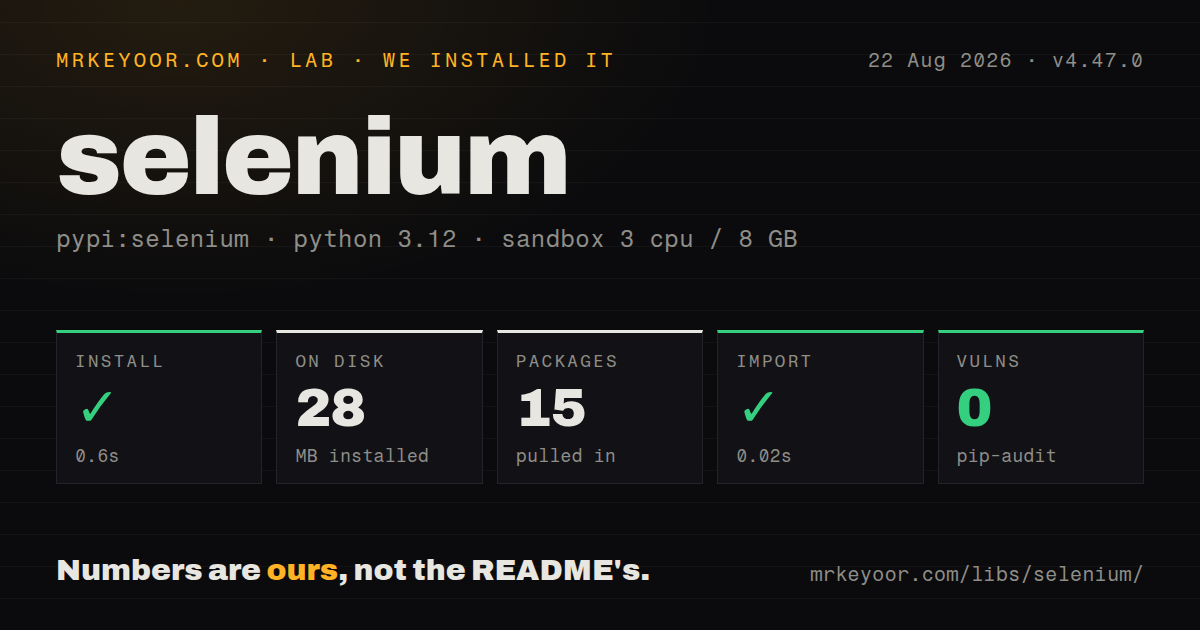
| Install | ✓ · 0.6s | 15 packages on disk · 28 MB |
| Import | ✓ | import selenium in 0.02s · pure Python · py.typed · requires Python >=3.10 |
| Known vulns | 0 | (pip-audit) |
Answers from our run
Does selenium install cleanly?
Yes. In a fresh container with an empty cache, pip install selenium finished in 0.6s, leaving 15 packages and 28 MB on disk. pip-audit reported no known vulnerabilities.
What does selenium need to run?
Python >=3.10, and nothing compiled: it is pure Python. In our run import selenium succeeded in 0.02s, and the package ships py.typed for type checkers.
selenium or playwright: which should you use?
playwright: Use it for a new supported-browser suite that benefits from locator auto-waits, traces, and isolated browser contexts. Selenium 4.47.0 installed in 0.6 seconds and used 28 MB across 15 packages in our sandbox, with typed code and 0 known vulnerabilities, but a working test still depends on a compatible browser, driver, and wait strategy.
When should you not use selenium?
You are starting a Chrome, Firefox, or WebKit-only suite and want built-in tracing, request interception, and locator auto-waiting; compare Playwright before accepting Selenium's explicit synchronization work
Use it if
- You must test Safari or an existing WebDriver Grid alongside Chrome and Firefox
- Your organization already has Selenium page objects, fixtures, cloud-browser capabilities, or Grid operations
- You need the browser vendor's WebDriver behavior instead of a simulated DOM
- Your test suite spans languages and should use the same W3C WebDriver protocol across them
- You are starting a Chrome, Firefox, or WebKit-only suite and want built-in tracing, request interception, and locator auto-waiting; compare Playwright before accepting Selenium's explicit synchronization work
- You only need to parse HTML already returned by an HTTP request; Beautiful Soup avoids launching a browser and driver process
- The environment cannot provide a browser binary or let Selenium Manager resolve a compatible driver; installing the Python package alone creates no runnable session
- Your automation depends on Chrome DevTools commands outside the supported window; Selenium 4.47.0 ships mappings for CDP 149, 150, and 151, and CDP is blocked on Firefox
- You expect locators to survive DOM replacement; Selenium element references become stale and must be found again after the page swaps the underlying node
Setup reality
Our fresh Python 3.12 sandbox installed selenium 4.47.0 in 0.6 seconds. It left 15 packages using 28 MB on disk. The pure-Python wheel declares 6 direct dependencies and includes py.typed; import selenium completed in 0.02 seconds. pip-audit found 0 known vulnerabilities. These numbers describe our install only, and How we test documents the unprivileged container. No browser session was started by that import check.
The first webdriver.Chrome() or webdriver.Firefox() call is the real setup test. Selenium Manager can discover, download, and cache a matching driver when you do not provide a Service path, but the machine still needs a supported browser and network or a seeded cache. Proxies, locked-down home directories, architecture mismatches, and browser auto-updates can break that step. Pin the browser image in CI and record its version beside Selenium 4.47.0 when failures depend on the driver pair.
WebDriver commands are synchronous, while modern pages replace nodes between calls. Use WebDriverWait for a condition tied to the next action, then find the element again after navigation or DOM replacement. Mixing implicit waits with 10-second explicit waits makes elapsed time harder to reason about. Frames, alerts, and windows each change the active context; a locator valid in the top document cannot see an iframe until switch_to.frame() succeeds. Always call quit() from teardown.
Remote Grid adds queueing, capabilities, and server-side cleanup to the 28 MB client install. Version 4.47.0 now honors the Grid's se:remoteUrl for reachable BiDi, CDP, and VNC addresses, but your runner still needs a route to those advertised URLs. Save the 1 session ID plus screenshot, page source, browser logs, and current URL before teardown on failure. A killed runner can leave a remote session alive until the Grid's timeout policy removes it.
Patterns
Start Chrome and guarantee teardown start-browser
from selenium import webdriver

driver = webdriver.Chrome()
try:
    driver.get('https://example.com')
    print(driver.title)
finally:
    driver.quit()
`quit()` ends the WebDriver session and closes its browser windows; closing 1 tab with `close()` may leave the session running.
Set a fixed headless viewport configure-headless
from selenium import webdriver

options = webdriver.ChromeOptions()
options.add_argument('--headless=new')
options.add_argument('--window-size=1440,1000')
options.add_argument('--lang=en-US')
driver = webdriver.Chrome(options=options)
A 1440 by 1000 viewport makes responsive breakpoints explicit; headless defaults can differ from a developer's visible window.
Locate one element or collect many find-elements
from selenium.webdriver.common.by import By

submit = driver.find_element(By.CSS_SELECTOR, 'button[type="submit"]')
links = driver.find_elements(By.TAG_NAME, 'a')
print(len(links))
`find_element()` raises `NoSuchElementException` for 0 matches; `find_elements()` returns an empty list.
Wait for the next actionable control wait-until-clickable
from selenium.webdriver.common.by import By
from selenium.webdriver.support import expected_conditions as EC
from selenium.webdriver.support.ui import WebDriverWait

button = WebDriverWait(driver, 10).until(
    EC.element_to_be_clickable((By.ID, 'save'))
)
button.click()
This wait stops as soon as the control is visible and enabled, with a 10-second ceiling if the condition never becomes true.
Wait for a URL change after submission wait-for-navigation
from selenium.webdriver.common.by import By
from selenium.webdriver.support import expected_conditions as EC
from selenium.webdriver.support.ui import WebDriverWait

old_url = driver.current_url
driver.find_element(By.CSS_SELECTOR, 'form button').click()
WebDriverWait(driver, 10).until(EC.url_changes(old_url))
`url_changes()` observes navigation without keeping an element reference that may become stale during the page swap.
Re-locate a node after DOM replacement refind-stale-element
from selenium.webdriver.common.by import By
from selenium.webdriver.support import expected_conditions as EC
from selenium.webdriver.support.ui import WebDriverWait

old_row = driver.find_element(By.CSS_SELECTOR, '[data-row="42"]')
driver.find_element(By.ID, 'refresh').click()
WebDriverWait(driver, 10).until(EC.staleness_of(old_row))
new_row = driver.find_element(By.CSS_SELECTOR, '[data-row="42"]')
A stale reference still points to the removed node; waiting for staleness and locating again returns the replacement.
Enter an iframe and return to the page switch-frame
from selenium.webdriver.common.by import By
from selenium.webdriver.support import expected_conditions as EC
from selenium.webdriver.support.ui import WebDriverWait

WebDriverWait(driver, 10).until(
    EC.frame_to_be_available_and_switch_to_it((By.ID, 'payment'))
)
driver.find_element(By.NAME, 'card').send_keys(card_number)
driver.switch_to.default_content()
Top-level locators see 0 elements inside an iframe until WebDriver switches to that frame's browsing context.
Detect and enter a newly opened tab switch-window
from selenium.webdriver.common.by import By
from selenium.webdriver.support.ui import WebDriverWait

known = set(driver.window_handles)
driver.find_element(By.LINK_TEXT, 'Open report').click()
WebDriverWait(driver, 10).until(
    lambda d: len(d.window_handles) > len(known)
)
new_handle = (set(driver.window_handles) - known).pop()
driver.switch_to.window(new_handle)
Window-handle order has no contract, so set subtraction identifies the 1 new handle without assuming it is last.
Wait for and accept a browser alert handle-alert
from selenium.webdriver.support import expected_conditions as EC
from selenium.webdriver.support.ui import WebDriverWait

alert = WebDriverWait(driver, 5).until(EC.alert_is_present())
message = alert.text
alert.accept()
print(message)
An open modal alert blocks ordinary page commands; the 5-second wait returns the alert object when it appears.
Find a control inside an open shadow root use-shadow-dom
from selenium.webdriver.common.by import By

host = driver.find_element(By.CSS_SELECTOR, 'settings-panel')
shadow = host.shadow_root
toggle = shadow.find_element(By.CSS_SELECTOR, 'button[role="switch"]')
toggle.click()
WebDriver can traverse an open shadow root through `shadow_root`; a closed root is not exposed to page automation.
Save browser evidence before teardown capture-failure
from pathlib import Path

def save_failure(driver, test_name):
    out = Path('artifacts')
    out.mkdir(exist_ok=True)
    driver.save_screenshot(out / f'{test_name}.png')
    (out / f'{test_name}.html').write_text(
        driver.page_source, encoding='utf-8'
    )
    (out / f'{test_name}.url').write_text(driver.current_url)
After `quit()` there is 0 active session, so screenshots, source, and the current URL must be collected first.
Create a named remote Grid session run-on-grid
from selenium import webdriver

options = webdriver.FirefoxOptions()
options.set_capability('se:name', 'checkout flow')
driver = webdriver.Remote(
    command_executor='http://selenium-grid:4444',
    options=options,
)
print(driver.session_id)
Selenium 4.47.0 honors Grid-advertised `se:remoteUrl` values, but the runner must be able to reach the returned BiDi, CDP, or VNC address.
Alternatives
| Package | Registry | Pick it when |
|---|---|---|
| playwright | PyPI | Use it for a new supported-browser suite that benefits from locator auto-waits, traces, and isolated browser contexts |
| splinter | PyPI | Use it when a smaller acceptance-test API is worth adding an abstraction over browser drivers |
| beautifulsoup4 | PyPI | Use it with an HTTP client when the response already contains the HTML and no user interaction is needed |
More testing guides
pytest · chai · vitest · playwright · jsdom · axe-core · the whole shelf →
Related reading
How this guide is made: grounded in the library's documentation, release notes, changelog, and issue history, on a fixed rubric — not a hands-on install of every release. The 50 most-downloaded entries are additionally install-verified in clean containers. Corrections: contact the desk.