beautifulsoup4 review
Beautiful Soup 4.15.0 turns HTML or XML into a Python tree you can search with tag filters, attribute tests, regular expressions, callables, or CSS selectors. It is built for tolerant extraction and document cleanup, especially when the source markup is inconsistent. The package does not download a URL or execute browser JavaScript; pair it with an HTTP client, or use a browser tool when the DOM only appears after scripts run. Version 4.15.0 adds `new_tag()` and `new_string()` on nodes that are already attached to a tree, revises `find*` overloads for type checkers, and fixes two `html.parser` edge cases. It is also the final release supporting Python 3.7 and the final release that still runs APIs deprecated in 4.13.0.
Beautiful Soup 4.15.0 installed in 0.2 seconds and occupied 1 MB across 3 packages in our sandbox, with typed code and 0 known vulnerabilities, so it is an inexpensive choice for tolerant HTML extraction. Install it when you can pin a parser and the page already contains the data; move to a browser for script-built DOMs and migrate off 4.13-deprecated names now.
We installed it
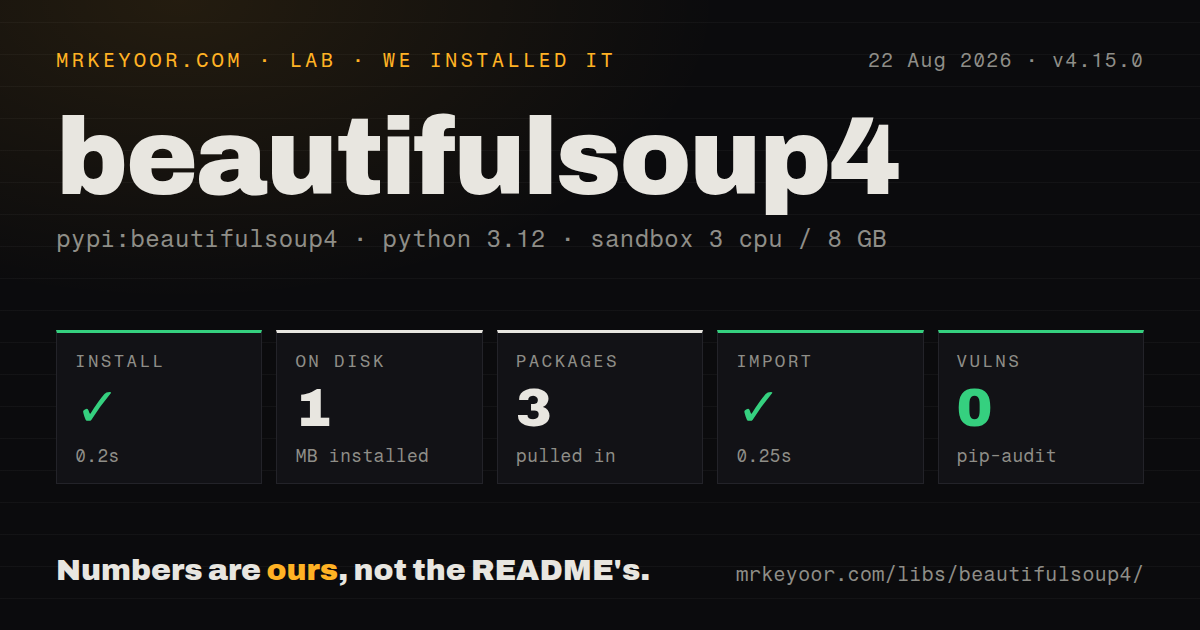
| Install | ✓ · 0.2s | 3 packages on disk · 1 MB |
| Import | ✓ | import bs4 in 0.25s · pure Python · py.typed · requires Python >=3.7.0 |
| Known vulns | 0 | (pip-audit) |
Answers from our run
Does beautifulsoup4 install cleanly?
Yes. In a fresh container with an empty cache, pip install beautifulsoup4 finished in 0.2s, leaving 3 packages and 1 MB on disk. pip-audit reported no known vulnerabilities.
What does beautifulsoup4 need to run?
Python >=3.7.0, and nothing compiled: it is pure Python. In our run import bs4 succeeded in 0.25s, and the package ships py.typed for type checkers.
beautifulsoup4 or lxml: which should you use?
lxml: Use it for direct XPath, strict XML work, or lower parser overhead on large documents. Beautiful Soup 4.15.0 installed in 0.2 seconds and occupied 1 MB across 3 packages in our sandbox, with typed code and 0 known vulnerabilities, so it is an inexpensive choice for tolerant HTML extraction.
When should you not use beautifulsoup4?
The data appears only after JavaScript runs; Beautiful Soup does not start a browser or execute page scripts
Use it if
- You need to extract links, tables, metadata, or text from HTML that may be malformed
- You want one traversal API while choosing `html.parser`, lxml, or html5lib per workload
- You need to edit a parsed tree, remove unwanted nodes, or serialize the changed markup
- You receive unknown byte encodings and want UnicodeDammit to inspect and decode them
- The data appears only after JavaScript runs; Beautiful Soup does not start a browser or execute page scripts
- You need a fast XPath-first parser for large, regular documents; lxml exposes XPath directly and avoids Beautiful Soup's wrapper layer
- Every worker must build the same tree from broken HTML but you cannot pin a parser; the official docs show that `html.parser`, lxml, and html5lib repair invalid markup differently
- You need streaming extraction with bounded memory; Beautiful Soup normally builds a mutable tree for the parsed document
- Your code still calls names deprecated in 4.13.0; 4.15.0 is their last working release and a later point release will first raise `NotImplementedError` before removal
Setup reality
Our fresh Python 3.12 sandbox installed beautifulsoup4 4.15.0 in 0.2 seconds. The environment held 3 packages and used 1 MB on disk afterward. import bs4 completed in 0.25 seconds, pip-audit found 0 known vulnerabilities, and the pure-Python distribution included py.typed. Those figures come from our own install; the setup is described under How we test.
The default install can use Python's html.parser, while the 4.15.0 metadata lists lxml and html5lib as optional extras. Name the parser in every BeautifulSoup(markup, parser) call. If lxml is installed on one machine and absent on another, leaving the choice implicit can change the selected backend. XML parsing requires lxml. html5lib follows browser-style HTML repair, but the official documentation says it does not support parse_only.
Pass response bytes when the declared character set may be wrong. Beautiful Soup's UnicodeDammit layer records its guess in original_encoding, and from_encoding lets you override that guess. get_text() can join text from separate nodes, so supply a separator when word boundaries matter. Keep the response object and HTTP error handling outside this package; Beautiful Soup sees markup, not status codes, redirects, cookies, or retry policy.
A full parse keeps a navigable, mutable tree in memory. SoupStrainer can limit construction with supported parsers, and decompose() removes a subtree when you no longer need it. For 10,000,000-byte text nodes, Beautiful Soup 4.14.3 added lxml's huge_tree=True; without that option, lxml may stop at the oversized node. Parser choice belongs in tests because malformed input can produce different trees even when all 3 backends accept it.
Patterns
Parse HTML with a named backend parse-html
from bs4 import BeautifulSoup

html = '<main><h1>Report</h1></main>'
soup = BeautifulSoup(html, 'html.parser')
print(soup.h1.get_text(strip=True))
Beautiful Soup 4.15.0 supports several backends, and malformed HTML can produce a different tree under each one.
Select elements with CSS select-css
from bs4 import BeautifulSoup

soup = BeautifulSoup(html, 'html.parser')
for card in soup.select('article.card[data-state="ready"]'):
    title = card.select_one('h2')
    if title is not None:
        print(title.get_text(' ', strip=True))
`select_one()` returns `None` when 0 elements match, while `select()` returns a list.
Filter tags by name and attributes find-attributes
import re
from bs4 import BeautifulSoup

soup = BeautifulSoup(html, 'html.parser')
links = soup.find_all(
    'a',
    href=re.compile(r'^/products/'),
    class_='result',
)
print([link.get('href') for link in links])
Use `class_` because `class` is a Python keyword; `.get()` avoids a missing-attribute exception.
Preserve boundaries while extracting text extract-text
from bs4 import BeautifulSoup

soup = BeautifulSoup('<p>Hello <strong>from</strong> Pune</p>', 'html.parser')
text = soup.get_text(' ', strip=True)
print(text)
The separator prevents text from adjacent nodes being joined into a single word.
Find the next sibling with a matching tag navigate-siblings
from bs4 import BeautifulSoup

soup = BeautifulSoup(html, 'html.parser')
heading = soup.find('h2', string='Pricing')
if heading is not None:
    table = heading.find_next_sibling('table')
    if table is not None:
        print(table.get_text(' ', strip=True))
`next_sibling` may be a whitespace string; `find_next_sibling('table')` skips unrelated siblings.
Parse XML with lxml parse-xml
from bs4 import BeautifulSoup

xml = b'<?xml version="1.0"?><feed><item id="7"/></feed>'
soup = BeautifulSoup(xml, 'xml')
item = soup.find('item')
print(item['id'] if item else None)
The `xml` parser feature requires lxml; the default installation alone only guarantees `html.parser`.
Build only matching link branches parse-selected-branches
from bs4 import BeautifulSoup, SoupStrainer

only_links = SoupStrainer('a', href=True)
soup = BeautifulSoup(html, 'html.parser', parse_only=only_links)
print([link['href'] for link in soup.find_all('a')])
The official documentation says html5lib ignores `parse_only`, so use `html.parser` or lxml for this pattern.
Remove scripts and styles before reading text remove-unwanted-tags
from bs4 import BeautifulSoup

soup = BeautifulSoup(html, 'html.parser')
for node in soup.select('script, style, noscript'):
    node.decompose()
print(soup.get_text(' ', strip=True))
`decompose()` destroys the removed subtree; use `extract()` if later code still needs that node.
Create and attach a new tag edit-tree
from bs4 import BeautifulSoup

soup = BeautifulSoup('<main><p>Old</p></main>', 'html.parser')
badge = soup.main.new_tag('span', attrs={'class': 'badge'})
badge.string = 'Reviewed'
soup.main.append(badge)
print(soup.main)
Version 4.15.0 allows `new_tag()` on an attached tag; detached nodes still cannot create new nodes this way.
Inspect or override byte decoding handle-encoding
from bs4 import BeautifulSoup

soup = BeautifulSoup(response.content, 'html.parser')
print(soup.original_encoding)

forced = BeautifulSoup(
    response.content,
    'html.parser',
    from_encoding='windows-1252',
)
Pass bytes when Beautiful Soup should detect the encoding; a decoded Python string has already lost the original byte evidence.
Stop after the first matching rows limit-results
from bs4 import BeautifulSoup

soup = BeautifulSoup(html, 'html.parser')
rows = soup.find_all('tr', class_='result', limit=20)
for row in rows:
    print(row.get_text(' ', strip=True))
`limit=20` limits returned matches; it does not turn a full-document parse into a streaming parser.
Compare installed parsers on bad markup diagnose-parser
from bs4.diagnose import diagnose

markup = '<a><b /></a>'
diagnose(markup)
The diagnostic prints how the installed parser backends interpret the same input, which helps reproduce machine-specific tree differences.
Alternatives
| Package | Registry | Pick it when |
|---|---|---|
| lxml | PyPI | Use it for direct XPath, strict XML work, or lower parser overhead on large documents |
| selectolax | PyPI | Use it when fast HTML5 parsing and CSS selection matter more than Beautiful Soup's editing API |
| parsel | PyPI | Use it when an extraction pipeline needs both XPath and CSS selectors with Scrapy-style selectors |
More utils guides
lru-cache · type-fest · ajv · zod · p-limit · find-up · the whole shelf →
How this guide is made: grounded in the library's documentation, release notes, changelog, and issue history, on a fixed rubric — not a hands-on install of every release. The 50 most-downloaded entries are additionally install-verified in clean containers. Corrections: contact the desk.