playwright review
Playwright 1.62.0 imported in 0.02 seconds in our Python 3.12 sandbox, although the wheel alone contains no runnable browser. Its sync and asyncio interfaces control release-pinned Chromium, Firefox, and WebKit builds. Locators wait for actionability, contexts separate cookies and storage, and tracing captures a run for later replay. Version 1.62 adds WebP screenshots, a switch that prevents automatic scrolling, locator.wait_for_function(), response timing data, and isolated headless clipboards. Debian 11 is no longer supported.
Playwright 1.62.0 installed in 0.9 seconds and used 137 MB across 4 packages in our sandbox before any browser download, with 0 pip-audit findings. Choose it for new cross-browser UI tests when CI can manage pinned browser artifacts; API tests and simple HTML fetches should stay lighter.
We installed it
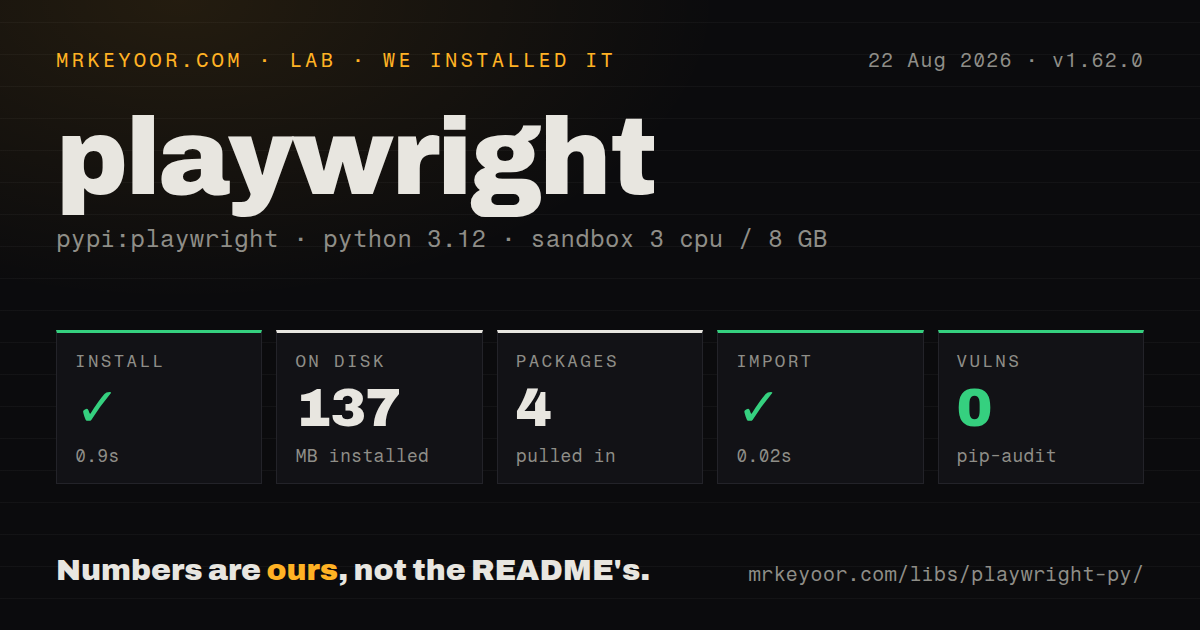
| Install | ✓ · 0.9s | 4 packages on disk · 137 MB |
| Import | ✓ | import playwright in 0.02s · pure Python · py.typed · requires Python >=3.10 |
| Known vulns | 0 | (pip-audit) |
Answers from our run
Does playwright install cleanly?
Yes. In a fresh container with an empty cache, pip install playwright finished in 0.9s, leaving 4 packages and 137 MB on disk. pip-audit reported no known vulnerabilities.
What does playwright need to run?
Python >=3.10, and nothing compiled: it is pure Python. In our run import playwright succeeded in 0.02s, and the package ships py.typed for type checkers.
playwright or selenium: which should you use?
selenium: Use it for WebDriver compatibility, Selenium Grid, or an existing cloud-browser contract. Playwright 1.62.0 installed in 0.9 seconds and used 137 MB across 4 packages in our sandbox before any browser download, with 0 pip-audit findings.
When should you not use playwright?
Skip it for JSON APIs or static markup checks. An HTTP client avoids a browser process and its downloaded artifacts.
Use it if
- Use it when one Python suite must exercise Chromium, Firefox, and WebKit at the browser level.
- Choose it for UI tests that need actionability waits, retrying assertions, trace archives, and isolated sessions.
- Adopt it when JavaScript rendering, browser storage, or user interaction makes an HTTP client an incomplete test.
- Use the sync interface for linear scripts or the asyncio interface for an existing asynchronous test stack.
- Skip it for JSON APIs or static markup checks. An HTTP client avoids a browser process and its downloaded artifacts.
- Walk away if CI cannot store separately installed browser revisions and their Linux libraries.
- Prefer Selenium when the organization depends on Grid, vendor WebDriver services, real Safari, or legacy browsers.
- Do not call the sync API from Jupyter or any running event loop; those environments need the asyncio API.
- Stay below 1.62 or change the base image when Debian 11 is still a deployment requirement.
Setup reality
We installed Playwright 1.62.0 in 0.9 seconds in a clean Python 3.12 container. The wheel and dependencies left 4 packages using 137 MB. It is pure Python, declares 2 direct dependencies, requires Python 3.10 or later, and includes py.typed. The measured metadata did not state a license. import playwright took 0.02 seconds, and pip-audit reported 0 known vulnerabilities.
A pip install provides bindings without any browser executable. Install only the required revision with playwright install chromium, firefox, or webkit. On a supported fresh Linux runner, --with-deps also asks the system package manager for libraries and may need elevated permissions. The required revision changes with the Python package, so an upgrade must rerun browser installation or the first launch can report a missing executable.
Pick playwright.sync_api or playwright.async_api at the application boundary. Sync calls cannot run inside an active asyncio event loop. pytest's page and context fixtures come from pytest-playwright, which is a separate distribution. Each BrowserContext begins with isolated cookies and storage; sharing a context across tests deliberately shares that state and can make ordering matter.
Actionability waits cannot disambiguate a locator that matches 2 elements, so prefer roles, labels, and stable test IDs. Add route interception before navigation, and save a download before its context closes. storage_state files may contain usable cookies and belong in secret handling, not Git. Recreate expired state rather than embedding credentials in setup code.
Patterns
Download the matching Chromium revision install-browser
python -m pip install playwright
playwright install chromium
pip supplies only Python bindings. Run the Chromium install again whenever the Playwright package version changes.
Add Chromium and Linux libraries together install-linux-deps
playwright install --with-deps chromium--with-deps invokes the system package manager and may need root. Bake those libraries into the image when CI cannot elevate.
Open a page through the blocking API open-page-sync
from playwright.sync_api import sync_playwright

with sync_playwright() as p:
    browser = p.chromium.launch()
    page = browser.new_page()
    page.goto('https://example.com')
    print(page.title())
    browser.close()
Chromium launches headless unless configured otherwise. This interface raises when used under an already running asyncio loop.
Launch Firefox from an asyncio program open-page-async
import asyncio
from playwright.async_api import async_playwright

async def main():
    async with async_playwright() as p:
        browser = await p.firefox.launch()
        page = await browser.new_page()
        await page.goto('https://example.com')
        await browser.close()

asyncio.run(main())
Browser methods from async_api must be awaited. Objects imported from sync_api cannot be mixed into this lifecycle.
Fill a login form by label and role use-accessible-locators
page.get_by_label('Email').fill('dev@example.com')
page.get_by_label('Password').fill(secret)
page.get_by_role('button', name='Sign in').click()
Strict matching turns 2 controls named Sign in into an error instead of selecting the first element.
Retry visibility and URL expectations assert-eventually
from playwright.sync_api import expect

expect(page.get_by_role('heading', name='Dashboard')).to_be_visible()
expect(page).to_have_url('https://app.example.com/home')
expect polls until its timeout or success. A Python assert samples the page once and can race rendering.
Start a context with empty storage isolate-session
context = browser.new_context()
page = context.new_page()
page.goto(base_url)
context.close()
A new context separates cookies and local storage while reusing the existing browser process.
Create a context from saved authentication reuse-auth-state
context = browser.new_context(storage_state='auth.json')
page = context.new_page()
auth.json may contain active session cookies. Exclude it from Git and regenerate it when the server expires those credentials.
Intercept a profile request before navigation mock-api-response
page.route('**/api/profile', lambda route: route.fulfill(
    status=200,
    json={'name': 'Test User'},
))
page.goto(app_url)
The route must exist before page.goto starts. Otherwise the initial profile request can reach the network.
Persist an export before closing its context save-download
with page.expect_download() as pending:
    page.get_by_role('button', name='Export').click()
download = pending.value
download.save_as('artifacts/report.csv')
The temporary download belongs to its browser context and is removed at context close unless save_as copies it.
Save a lossy WebP screenshot capture-webp
page.screenshot(path='artifacts/home.webp', quality=60)Version 1.62 adds WebP output. A quality of 100 is lossless, while this 60 setting applies lossy encoding.
Capture screenshots, DOM snapshots, and sources record-trace
context.tracing.start(screenshots=True, snapshots=True, sources=True)
page.goto(app_url)
context.tracing.stop(path='artifacts/trace.zip')
trace.zip opens in Playwright Trace Viewer and preserves the recorded test steps for failure analysis.
Alternatives
| Package | Registry | Pick it when |
|---|---|---|
| selenium | PyPI | Use it for WebDriver compatibility, Selenium Grid, or an existing cloud-browser contract. |
| pytest-playwright | PyPI | Add it when pytest fixtures and command-line browser selection should own test setup. |
| pyppeteer | PyPI | Keep it only for an older codebase already written against its Puppeteer-shaped Python interface. |
More testing guides
pytest · chai · vitest · playwright · jsdom · axe-core · the whole shelf →
How this guide is made: grounded in the library's documentation, release notes, changelog, and issue history, on a fixed rubric — not a hands-on install of every release. The 50 most-downloaded entries are additionally install-verified in clean containers. Corrections: contact the desk.