axe-core review
axe-core 4.13.0 examines a live HTML document and returns four separate result sets: violations, passes, checks that need a person to decide, and rules that did not apply. It is the engine used inside browser tests, not a claim of WCAG certification. This release understands ARIA values exposed through ElementInternals, accepts the sectionheader and sectionfooter roles, adds Swedish output, and revises several ARIA and contrast decisions. Our complete browser import reached 589.7 KB minified and 160.6 KB gzipped, which makes test-only loading the sensible default.
axe-core 4.13.0 installed in 0.6 seconds with zero audit findings, but our full browser import was 160.6 KB gzipped, so it belongs in browser tests rather than shipped application code. Install it when the team will review incomplete cases and keep manual accessibility testing in the release process.
We installed it
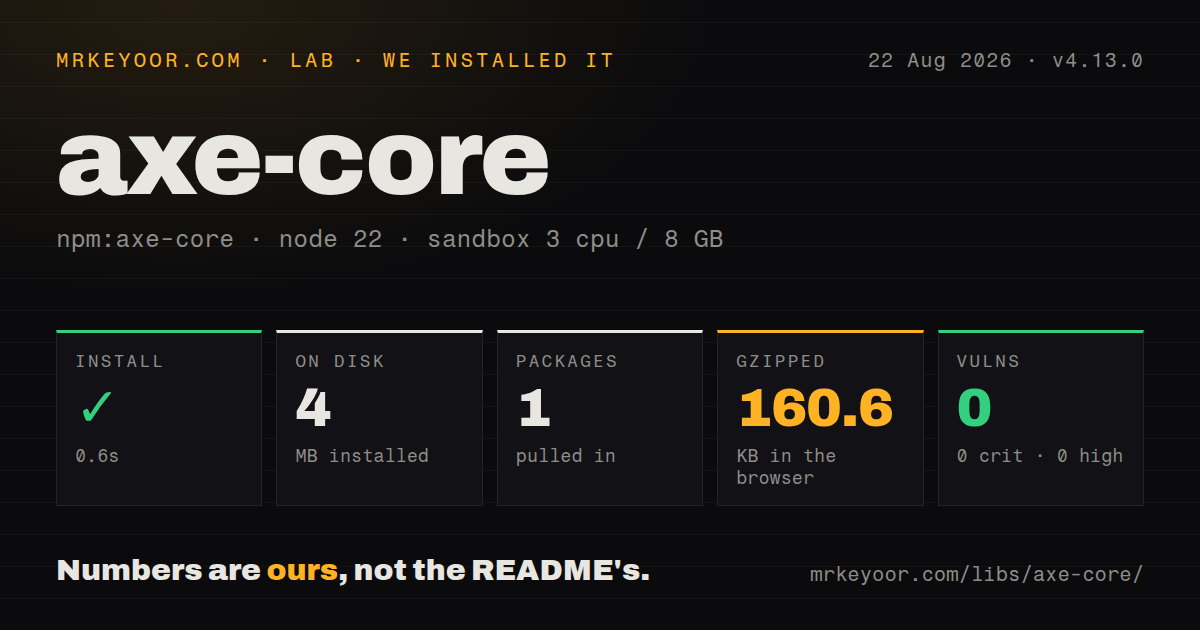
| Install | ✓ · 0.6s | 1 package on disk · 4 MB |
| Import | ✓ | ESM import works · require() works · CommonJS package |
| Browser | 160.6 KB | gzipped (589.7 KB minified), bundled with esbuild |
| Types | ✓ | TypeScript types bundled |
| Known vulns | 0 | 0 critical · 0 high · 0 moderate · 0 low (npm audit) |
Answers from our run
Does axe-core install cleanly?
Yes. In a fresh container with an empty cache, npm install axe-core finished in 0.6s, leaving 1 package and 4 MB on disk. npm audit reported no known vulnerabilities.
How much does axe-core add to a browser bundle?
160.6 KB gzipped (589.7 KB minified) when the whole package is bundled for the browser with esbuild. Importing only part of it is usually smaller.
Does axe-core work with both ESM and CommonJS?
Yes. Both import 'axe-core' and require('axe-core') worked in Node 22 in our run. The package is published as CommonJS.
Does axe-core include TypeScript types?
Yes, type declarations ship inside the package, so no @types install is needed.
axe-core or @axe-core/playwright: which should you use?
@axe-core/playwright: Choose the official adapter when Playwright is already your runner and you want injection plus a chainable scan builder. axe-core 4.13.0 installed in 0.6 seconds with zero audit findings, but our full browser import was 160.6 KB gzipped, so it belongs in browser tests rather than shipped application code.
When should you not use axe-core?
You need automation to prove conformance. Deque says the engine finds 57% of WCAG issues on average, and its incomplete results explicitly require manual review.
Use it if
- You run Playwright, Cypress, Webdriver, or another browser test runner and want accessibility failures beside functional test failures.
- Your design system needs repeatable checks for names, labels, ARIA state, landmarks, contrast, frames, and open shadow roots.
- Reports must include the affected HTML, nested selectors, impact, a failure summary, and a rule-specific help URL.
- Someone on the team will triage the incomplete results and still test keyboard and screen-reader behavior by hand.
- You need automation to prove conformance. Deque says the engine finds 57% of WCAG issues on average, and its incomplete results explicitly require manual review.
- Your entire test environment is JSDOM. The README calls that support limited and names color-contrast as a rule that does not work there.
- The scanner must ride in your normal application JavaScript. Our full import was 160.6 KB gzipped, a large user-facing cost for code normally used during testing.
- Your CI assumes a minor update cannot alter the result count. The compatibility policy permits standards and rule changes, and the 4.13.0 notes warn that issue numbers can move.
- You cannot load and configure the engine inside participating cross-origin frames. allowedOrigins must be set in every frame before axe can exchange those results.
Setup reality
We installed axe-core 4.13.0 in a clean, unprivileged Node 22 Bookworm container. npm finished in 0.6 seconds, put one package on disk, and used 4 MB. The package has zero direct and peer dependencies, occupies 3,100 KB unpacked, bundles TypeScript declarations, and produced zero npm audit findings. It is CommonJS without an exports map; both require() and ESM import worked in our sandbox. A full esbuild import measured 589.7 KB minified and 160.6 KB gzipped.
No account or configuration file is needed, but axe requires a rendered DOM. A plain Node import gives it no page to inspect. Browser adapters such as @axe-core/playwright inject the script after navigation. Each iframe needs its own copy. For cross-origin frames, configure allowedOrigins inside every participating document; a parent page cannot inspect another origin by itself. JSDOM lacks enough layout information for the color-contrast rule.
Run the scan after the exact UI state is visible and stable. The result has violations, incomplete, passes, and inapplicable arrays. Incomplete is work, not noise: it includes cases where layout, imagery, or another technical limit prevented a decision. WCAG tags do not inherit lower levels, so a wcag2aa selection must also name wcag2a if both are part of the policy.
Version 4.13.0 turns on ElementInternals handling, so custom elements can gain or lose findings after this upgrade. Large pages also spend time calculating unique selectors, especially around contrast. resultTypes: ['violations'] keeps full node detail for violations and limits detail in the other groups. Nested frame and shadow-root targets are arrays; flattening them into one CSS selector breaks the path.
Patterns
Inspect the visible document scan-current-document
const result = await axe.run();
console.log(result.violations);
console.log(result.incomplete);
axe.run reads the browser's current DOM. Call it only after the state under test is visible, and send incomplete items to manual review.
Run named WCAG levels select-wcag-tags
const result = await axe.run({
  runOnly: {
    type: 'tag',
    values: ['wcag2a', 'wcag2aa', 'wcag21a', 'wcag21aa', 'wcag22aa'],
  },
});
A 2.0 AA tag does not pull in 2.0 A. Name every standards level that your gate is meant to cover.
Check one application region limit-scan-context
const result = await axe.run({
  include: ['main'],
  exclude: ['[data-owned-by-vendor]'],
});
The excluded subtree produces no findings. Keep the exception narrow and record who owns the omitted UI.
Turn violations into a test failure fail-ci-on-violations
const { violations } = await axe.run();

if (violations.length > 0) {
  const message = violations.flatMap((rule) =>
    rule.nodes.map((node) => `${rule.id}: ${JSON.stringify(node.target)}\n${rule.helpUrl}`)
  ).join('\n\n');
  throw new Error(message);
}
Nested frames and shadow roots produce structured target arrays. JSON output preserves that path when one flat CSS selector cannot.
Omit one rule from one scan disable-rule-locally
const result = await axe.run({
  rules: {
    'color-contrast': { enabled: false },
  },
});
A per-run rule option stays local. axe.configure changes later scans in the same frame until configuration is reset.
Add an accessibility assertion to Playwright test-with-playwright
import AxeBuilder from '@axe-core/playwright';
import { expect, test } from '@playwright/test';

test('checkout has no automatic violations', async ({ page }) => {
  await page.goto('/checkout');
  const result = await new AxeBuilder({ page })
    .withTags(['wcag2a', 'wcag2aa'])
    .analyze();
  expect(result.violations).toEqual([]);
});
@axe-core/playwright handles script injection for this runner. The assertion covers automatic violations, while incomplete cases need a separate review path.
Keep detailed nodes only for violations reduce-selector-work
const result = await axe.run({
  resultTypes: ['violations'],
});
This option returns full violation nodes and at most one node per rule in the other result types, reducing selector calculation on large documents.
Inspect rules assigned to a tag list-rule-metadata
const rules = axe.getRules(['wcag22aa']);
console.table(rules.map(({ ruleId, description }) => ({
  ruleId,
  description,
})));
axe.getRules exposes the installed 4.13.0 catalog. Use that list during upgrades instead of assuming a tag maps to a fixed set forever.
Run an explicit starter set pin-rule-baseline
const result = await axe.run({
  runOnly: {
    type: 'rule',
    values: ['button-name', 'image-alt', 'label', 'link-name', 'color-contrast'],
  },
});
An explicit list avoids surprise additions in CI, but every unnamed rule is skipped. Reconcile the list with the catalog at each upgrade.
Select a form within an iframe target-inside-frame
const result = await axe.run({
  fromFrames: ['iframe#payment', 'form'],
});
Cross-origin documents also need axe and compatible allowedOrigins configuration inside each frame before their results can reach the parent.
Permit one cross-origin frame configure-frame-origins
axe.configure({
  allowedOrigins: ['<same_origin>', 'https://payments.example.com'],
});
Apply the same origin policy in every participating frame. The API warns against <unsafe_all_origins>, and an empty array blocks all frame communication.
Apply runtime locale messages change-result-language
import de from 'axe-core/locales/de.json' with { type: 'json' };

axe.configure({ locale: de });
const result = await axe.run();
The locale object must match the package's locale schema. axe.resetLocale() restores the earlier language without clearing unrelated rule configuration.
Alternatives
| Package | Registry | Pick it when |
|---|---|---|
| @axe-core/playwright | npm | Choose the official adapter when Playwright is already your runner and you want injection plus a chainable scan builder. |
| pa11y | npm | Choose it for command-line URL checks and standard reports without building a browser-test wrapper. |
| lighthouse | npm | Choose it when accessibility is one part of a wider page audit that also covers performance and SEO. |
More testing guides
pytest · chai · vitest · playwright · jsdom · @testing-library/react · the whole shelf →
How this guide is made: grounded in the library's documentation, release notes, changelog, and issue history, on a fixed rubric — not a hands-on install of every release. The 50 most-downloaded entries are additionally install-verified in clean containers. Corrections: contact the desk.