react-side-effect review
react-side-effect 2.1.2 builds a higher-order React component that gathers props from every mounted copy and reduces them to one piece of global state. A client callback can apply that state to document.title, body styles, analytics, or another browser singleton. On the server, peek() reads the aggregate and rewind() reads then clears it. Version 2.1.2 only extended the peer range to React 18; the implementation still registers instances in UNSAFE_componentWillMount and stores them in a closure shared by every copy of the generated component.
react-side-effect 2.1.2 installed four packages and 1 MB in 0.9 seconds in our sandbox, but it stops at React 18 and registers shared state through UNSAFE_componentWillMount. Keep it only behind an existing component API with sequential SSR; use request-scoped head tools or ordinary effects in new React code.
We installed it
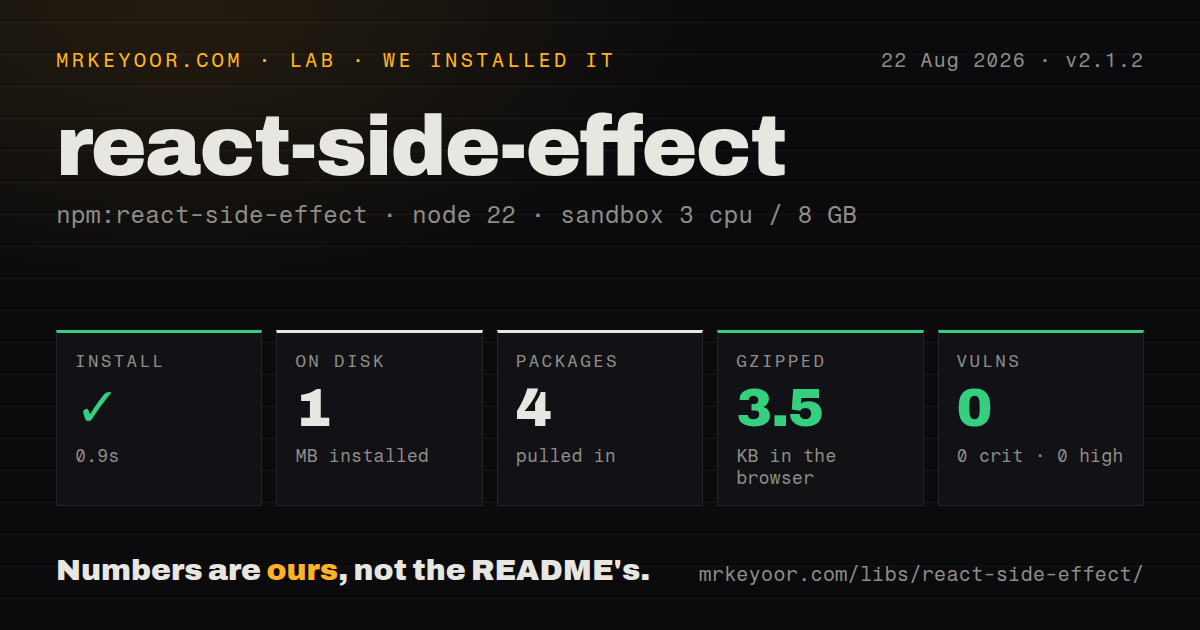
| Install | ✓ · 0.9s | 4 packages on disk · 1 MB |
| Import | ✓ | ESM import works · require() works · CommonJS package |
| Browser | 3.5 KB | gzipped (8.8 KB minified), bundled with esbuild |
| Types | — | no TypeScript types found |
| Known vulns | 0 | 0 critical · 0 high · 0 moderate · 0 low (npm audit) |
Answers from our run
Does react-side-effect install cleanly?
Yes. In a fresh container with an empty cache, npm install react-side-effect finished in 0.9s, leaving 4 packages and 1 MB on disk. npm audit reported no known vulnerabilities.
How much does react-side-effect add to a browser bundle?
3.5 KB gzipped (8.8 KB minified) when the whole package is bundled for the browser with esbuild. Importing only part of it is usually smaller.
Does react-side-effect work with both ESM and CommonJS?
Yes. Both import 'react-side-effect' and require('react-side-effect') worked in Node 22 in our run. The package is published as CommonJS.
Does react-side-effect include TypeScript types?
No type declarations were found in our install, so TypeScript users need their own declarations.
react-side-effect or react-helmet-async: which should you use?
react-helmet-async: Choose it for titles, meta, links, and scripts with request-scoped server rendering. react-side-effect 2.1.2 installed four packages and 1 MB in 0.9 seconds in our sandbox, but it stops at React 18 and registers shared state through UNSAFE_componentWillMount.
When should you not use react-side-effect?
You are on React 19: version 2.1.2's peer range stops at React 18
Use it if
- An established React 16 through 18 library already exposes a component created by withSideEffect
- Several mounted markers must contribute to one global value, with precedence defined by your reducer
- A sequential renderToString pipeline already calls rewind() after every request
- Replacing this HOC would break a public component contract you still support
- You are on React 19: version 2.1.2's peer range stops at React 18
- Concurrent rendering matters: instances are registered in UNSAFE_componentWillMount before commit and kept in shared closure state
- Server requests render concurrently: rewind() clears one shared instance list rather than request-scoped storage
- You only manage titles and meta tags: react-helmet-async already provides a request-scoped head API
- You require bundled TypeScript declarations, native ESM, or hooks: the package supplies none of those
Setup reality
Our install of react-side-effect 2.1.2 completed in 0.9 seconds and left four packages using 1 MB on disk. npm audit found 0 known vulnerabilities. The package is 40 KB unpacked, has no direct dependencies, and declares one React peer. There is no native build step.
No credentials or configuration files are needed. It is CommonJS without an exports map; require() and ESM import both worked in our Node 22 sandbox. We found no bundled TypeScript declarations. The declared peer range is React ^16.3, ^17, or ^18, so React 19 installations can raise a peer conflict. Version 2.1.2 added React 18 to that range and changed no runtime behavior.
Each generated component owns a closure containing mountedInstances and state. Mount, update, and unmount recalculate the aggregate. The registration happens in UNSAFE_componentWillMount, a render-phase lifecycle that is a poor fit for concurrent rendering. Your reducer must define ordering, empty-state cleanup, and merge rules; otherwise an unmounted marker can leave a stale title, class, or body style.
Our browser build measured 8.8 KB minified and 3.5 KB gzipped. On the server, the client callback is skipped. Call rewind() after every renderToString to retrieve and clear state; the README warns that missing it leaks memory and contaminates later results. peek() does not clear state and is intended for tests. Even disciplined cleanup cannot make one closure request-scoped when renders overlap.
Patterns
Reduce mounted markers to one title create-document-title
import withSideEffect from 'react-side-effect';

function TitleMarker() { return null; }

export const DocumentTitle = withSideEffect(
  (items) => items.at(-1)?.title ?? '',
  (title) => { document.title = title; }
)(TitleMarker);
The last registered instance wins; registration order can resemble nesting but is not a direct traversal of the React tree.
Set a screen title declaratively render-title-marker
function AccountScreen() {
  return <>
    <DocumentTitle title="Account settings" />
    <main>...</main>
  </>;
}
The wrapped marker can return null because the HOC tracks its props independently of visible output.
Combine body style markers merge-body-styles
const BodyStyle = withSideEffect(
  (items) => Object.assign({}, ...items.map((item) => item.style)),
  (style) => {
    document.body.style.backgroundColor = style.backgroundColor ?? '';
    document.body.style.overflow = style.overflow ?? '';
  }
)(() => null);
Reset missing properties to an empty string or styles from the last unmounted marker will remain on document.body.
Toggle one body class from all markers toggle-body-class
const BodyClass = withSideEffect(
  (items) => items.some((item) => item.modalOpen),
  (modalOpen) => {
    document.body.classList.toggle('has-modal', modalOpen);
  }
)(() => null);
classList.toggle(name, boolean) removes the class when the final modal marker unmounts.
Select the marker with the highest priority choose-highest-priority
const reduceByPriority = (items) => items.reduce(
  (best, item) => !best || item.priority > best.priority ? item : best,
  null
)?.value ?? null;
An explicit numeric priority avoids relying on mounted-instance order when precedence affects correctness.
Aggregate unique flags collect-unique-values
const FeatureFlags = withSideEffect(
  (items) => [...new Set(items.flatMap((item) => item.flags ?? []))],
  (flags) => window.analytics?.setEnabledFlags(flags)
)(() => null);
The reducer runs after every mount, update, and unmount, so expensive aggregation will repeat during ordinary rendering.
Read and clear state after renderToString extract-server-state
function renderRequest(app) {
  let title;
  try {
    const html = renderToString(app);
    title = DocumentTitle.rewind();
    return renderPage({html, title});
  } finally {
    if (!DocumentTitle.canUseDOM) DocumentTitle.rewind();
  }
}
rewind() is server-only and clears the shared stack; the finally branch covers render errors but does not isolate concurrent requests.
Map the server result before rewind map-server-state
const ServerTitle = withSideEffect(
  (items) => items.at(-1)?.title ?? '',
  (title) => { document.title = title; },
  (title) => ({title, escaped: escapeHtml(title)})
)(() => null);

const titleState = ServerTitle.rewind();
The optional third function runs when canUseDOM is false, and rewind() returns its mapped state.
Peek at state without clearing it inspect-state-in-test
const view = mount(<>
  <DocumentTitle title="Outer" />
  <DocumentTitle title="Inner" />
</>);

expect(DocumentTitle.peek()).to.equal('Inner');
view.unmount();
peek() leaves the instance list intact and is documented for tests, so the rendered tree still needs to be unmounted.
Clear server state after each test reset-server-test-state
afterEach(() => {
  if (!DocumentTitle.canUseDOM) {
    DocumentTitle.rewind();
  }
});
rewind() throws when canUseDOM is true; browser-like tests should unmount their trees instead.
Load the published CommonJS entry use-commonjs
const withSideEffect = require('react-side-effect');

const Visibility = withSideEffect(
  (items) => items.some((item) => item.hidden),
  (hidden) => { document.body.hidden = hidden; }
)(() => null);
Version 2.1.2 publishes a CommonJS main file and no module field or exports map.
Install the separate declaration package add-typescript-types
npm install react-side-effect
npm install --save-dev @types/react-side-effect
react-side-effect 2.1.2 bundles no declarations; the separate @types package is versioned independently.
Alternatives
| Package | Registry | Pick it when |
|---|---|---|
| react-helmet-async | npm | Choose it for titles, meta, links, and scripts with request-scoped server rendering. |
| react | npm | Choose React's useEffect when one mounted owner can apply and clean up the browser effect. |
| next | npm | Choose Next.js metadata APIs when head state belongs to a Next application and should participate in its server rendering. |
More web frontend guides
postcss · react · react-dom · tailwindcss · clsx · htmlparser2 · the whole shelf →
How this guide is made: grounded in the library's documentation, release notes, changelog, and issue history, on a fixed rubric — not a hands-on install of every release. The 50 most-downloaded entries are additionally install-verified in clean containers. Corrections: contact the desk.